Cli-microsoft365: Failing tests on spo list view field
As per the instructions in 'Minimal Path to Awesome'
After forking, I ran npm test
4 tests fail
As below
1) spo list view field add
uses correct API url when list id option is passed:
Error: Timeout of 2000ms exceeded. For async tests and hooks, ensure "done()" is called; if returning a Promise, ensure it resolves. (/Users/garrytrinder/Documents/GitHub/office365-cli/dist/o365/spo/commands/list/list-view-field-add.spec.js)
2) spo list view field add
uses correct API url when list title option is passed:
Error: Timeout of 2000ms exceeded. For async tests and hooks, ensure "done()" is called; if returning a Promise, ensure it resolves. (/Users/garrytrinder/Documents/GitHub/office365-cli/dist/o365/spo/commands/list/list-view-field-add.spec.js)
3) spo list view field remove
uses correct API url when list id option is passed:
Error: Timeout of 2000ms exceeded. For async tests and hooks, ensure "done()" is called; if returning a Promise, ensure it resolves. (/Users/garrytrinder/Documents/GitHub/office365-cli/dist/o365/spo/commands/list/list-view-field-remove.spec.js)
4) spo list view field remove
uses correct API url when list title option is passed:
Error: Timeout of 2000ms exceeded. For async tests and hooks, ensure "done()" is called; if returning a Promise, ensure it resolves. (/Users/garrytrinder/Documents/GitHub/office365-cli/dist/o365/spo/commands/list/list-view-field-remove.spec.js)
 garrytrinder
All 32 comments
Hi @garrytrinder ,
Having the Error: Timeout of 2000ms exceeded means something is very slow on your machine or promise is really not resolved on time.
Could you please see if node 8.x or 10.x is installed and try npm run clean, npm run build and npm t?
These tests are suppose to be ok since we run pipeline and continuous deployment before and after every pull request and they pass there. They also pass on my both machines.
What OS and version of nodejs are you using?
 VelinGeorgiev
on 1 Aug 2019
VelinGeorgiev
on 1 Aug 2019
Thanks for picking this up @VelinGeorgiev
I'm running Node v8.11.4 on MacOS Mojave 10.14.6.
I've completed the steps as suggested but still the same.
garrytrinder
on 1 Aug 2019
Thanks Garry! I will try to reproduce with clean clone on my side.
VelinGeorgiev
on 1 Aug 2019
I did some testing following the steps in the mpa.md file with clean clone of the pnp/office365-cli, but the tests passed for me. I will try few more things tomorrow.
VelinGeorgiev
on 1 Aug 2019
I've just tried this on different versions of Node v8.16.0 and v10.16.1 which result in the same test failures for me. Before each test I removed node_modules and repeated the MPA steps. 🤔
garrytrinder
on 1 Aug 2019
Not sure if this is relevant but I'm also running TypeScript v3.5.3
garrytrinder
on 1 Aug 2019
@garrytrinder , what you can do is to increase the timeout limit for a mocha test. You can open the packages.json and add --timeout 10000 to the npm test task.
It should look like this
  "scripts": {
    "build": "tsc -p . && node scripts/copy-files.js",
    "watch": "tsc -w -p .",
    "clean": "rimraf ./dist",
    "test": "nyc -r=lcov -r=text mocha \"dist/**/*.spec.js\" --timeout 10000"
  },
Could you please run the tests with it and let me know if they pass?
I am using node v10.16.0, and tried typescript 3.5.3. It was ok for me.
VelinGeorgiev
on 2 Aug 2019
Adding the timeout doesn't appear to be making any difference, still getting same four fails 🤔
garrytrinder
on 2 Aug 2019
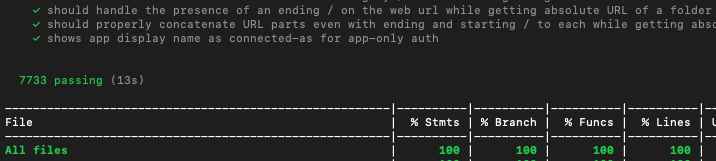
I've increased the timeout all the way up to 999999 and I have now seen the tests complete, see below. I have no idea why these specific tests would run so slow though 🤷🏻♂️

I've been able to debug one of the tests and can see that done() is being called quickly but then seems to get stuck in a loop somewhere.
garrytrinder
on 2 Aug 2019
This is very interesting. I have not seen that before, we can monitor that behavior and see it someone else will experience the same.
@garrytrinder, this should not be a show stopper for you to build command since you better run only the tests you are adding for the new command.
What I usually do is to change the package.json to
"test": "nyc -r=lcov -r=text mocha \"dist/**/<NAME_OF_FILE_OF_MY_NEW_COMMAND>.spec.js\"" to speedup the tests execution when I develop commands. I do not commit that to the upstream branch.
VelinGeorgiev
on 2 Aug 2019
@VelinGeorgiev thanks for that tip 😀
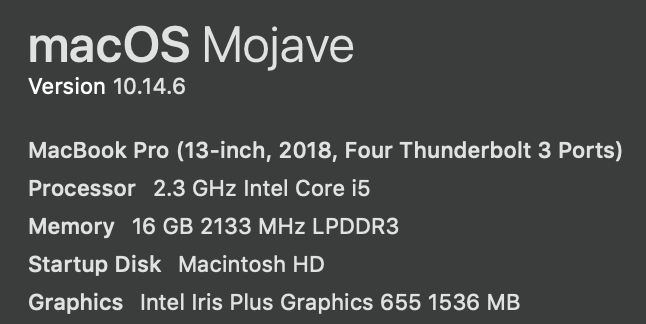
For reference, here is my machine spec.
garrytrinder
on 2 Aug 2019
That is a top notch hardware + software combination, I doubt this is the reason. I assume it is a combination of nodejs version + npm + mocha + typescript + some other package that makes nodejs to respond slowly.
Or it is just flaky test that we have to fix.
VelinGeorgiev
on 2 Aug 2019
Agreed, as I have the issue on my machine, I'm happy to look into it further and if I resolve the issue, I will raise a PR.
garrytrinder
on 2 Aug 2019
@VelinGeorgiev Ok, so I think I've found a fix for this, but i'm not 100% on why.
I noticed that some tests call stubAllGetRequests(); so I added that to the first line of one of the failing tests and it resolved quickly as you would expect. So I've added that line to the other three failing tests and I can now run a complete suite of tests with success.
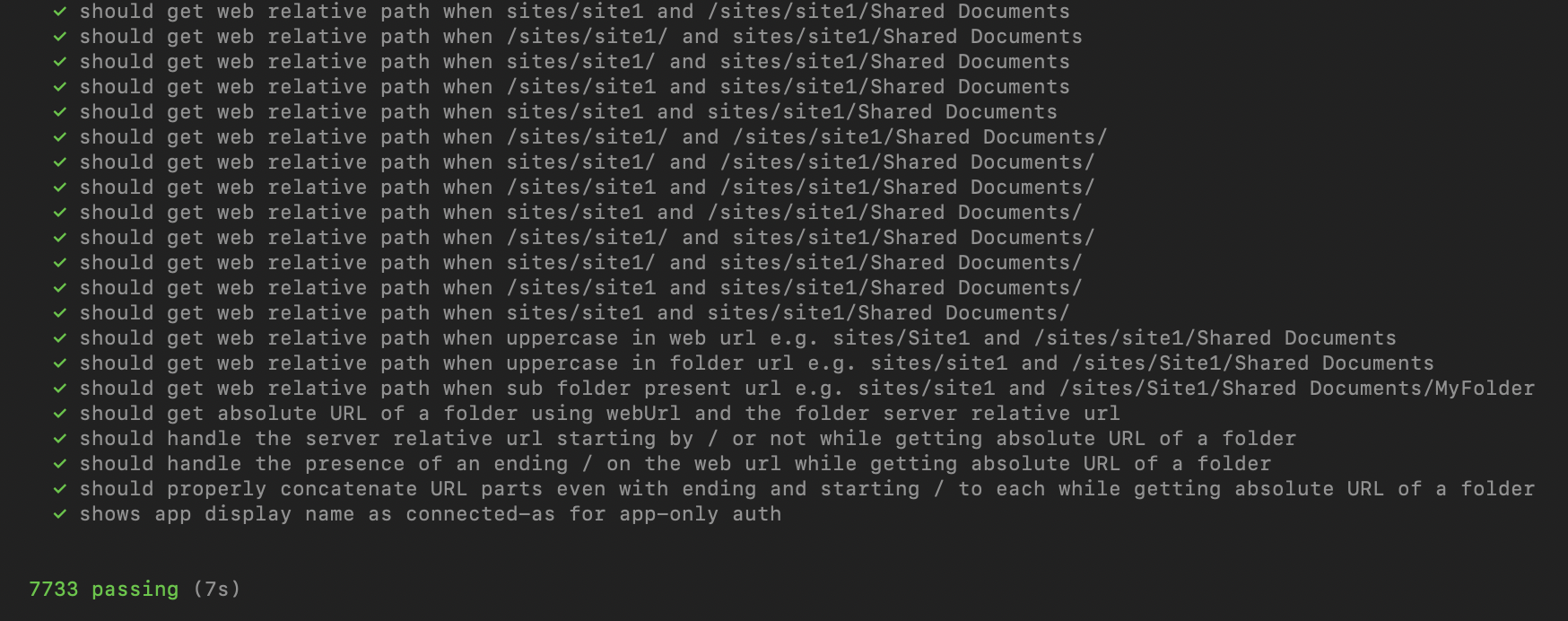
I'm new to writing tests, so just following what I see in the codebase. What is stubAllGetRequests(); method doing and why would it resolve this issue?
garrytrinder
on 6 Aug 2019
Code changes can be seen here... let me know if you want me to create a PR...
https://github.com/pnp/office365-cli/compare/master...garrytrinder:TestTimeouts
garrytrinder
on 6 Aug 2019
@garrytrinder, that is a great first contribution. I think you nailed it down and this looks like a flaky tests that you've managed to fix. Thank you!
Let me explain what actually happens:
stubAllGetRequests();is a custom function that aims to fake all GET http requests for that particular command so the unit test would not send a GET request, but would be intercepted by the sinonjs and sinonjs will send back fake response. Sinon is a library that we use for faking stuff.- In the tests that were failing for you seems that only the POST requests were stubbed/faked directly in the test, but the command probably kept trying to send real GET requests to the server for some reason. I can see the list view commands perform GET and POST requests.
- In addition: Why they do not fail on the build machine is perhaps something we can investigate, that could be a weak point in the command itself.
@garrytrinder , lets bring the changes you've made, but this should be a pull request against the dev branch. That means that you have to create a branch out of dev add your changes there and create a PR against dev so we can merge them at the end of the week.
Again thanks for your support!
VelinGeorgiev
on 7 Aug 2019
Makes sense now, thanks for the explanation @VelinGeorgiev
I'll get a PR raised against dev later today 😀
garrytrinder
on 7 Aug 2019
@VelinGeorgiev I've just noticed that the changes I have made locally against master, already exist in the dev branch, so these updates will get merged in when the next release happens.
To confirm this is the case, when I checkout dev and run a test I don't get any errors.
I suspect that this is why you also didn't see any issues (making the assumption you just default to dev branch) and also no issues have been reported in the builds as they take from the dev branch also.
garrytrinder
on 7 Aug 2019
Thanks for your input @garrytrinder !
It is interesting how the master worked without that so far. I am pretty sure tested the master and the dev on my Mac and the tests passed. I will try to investigate the root cause further when I have more time.
I'd suggest, we can close that issue once we merge master with dev since you would not experience these issues. We can always open new one if the issue is there again.
VelinGeorgiev
on 8 Aug 2019
Happy to help :)
I agree, I'm happy to just leave this open and check after next release 👍🏻
garrytrinder
on 8 Aug 2019
@VelinGeorgiev and @garrytrinder I had the same issue today where most of the tests were failing and the timeout resolved it for me :) phew
 rabwill
on 17 Aug 2019
rabwill
on 17 Aug 2019
We should not increase the timeout for tests. With proper mocking we should not need more time per test. An issue like the one you noticed is often a sign of something else, so whenever we hit something similar we should have a closer look at the failing test.
 waldekmastykarz
on 19 Aug 2019
waldekmastykarz
on 19 Aug 2019
I have re-cloned the repo tonight, followed the "awesome" steps and confirmed that 1.23.0 (master) still has the four failed tests, but 2.0.0 (dev) does not.
garrytrinder
on 19 Aug 2019
I agree. Increasing the timeouts was just for troubleshot purposes to see it is ever going to pass :)
VelinGeorgiev
on 20 Aug 2019
Thanks for double checking @garrytrinder. I'll have a look at it if I can repro it and find the reason why it's happening. Appreciate your help 👏
waldekmastykarz
on 22 Aug 2019
I've just tried it and I can't repro it :( All tests pass as expected.
I'm on:
- Node v10.15.3
- npm 6.8.0
pulled the latest source from the dev branch, installed deps and rannpm t. Also running on macOS 10.14.6
I can try a different machine next week to see if it helps.
waldekmastykarz
on 24 Aug 2019
@waldekmastykarz I don’t have an issue with running tests against the dev branch, it’s when I run them against master the failed tests occur.
garrytrinder
on 24 Aug 2019
Ah sorry, my bad. I'll have another look.
waldekmastykarz
on 25 Aug 2019
There is one test that takes a bit longer to execute, but overall all tests pass.
waldekmastykarz
on 25 Aug 2019
Thanks for checking @waldekmastykarz this does seem to be a really odd issue, not sure what it is... 🤔
Sent with GitHawk
garrytrinder
on 25 Aug 2019
It's interesting indeed. Let's keep an eye out on it to see if we can repro it. For now, let's close this issue, ok?
waldekmastykarz
on 28 Aug 2019
Sure, no problem 👍🏻
garrytrinder
on 28 Aug 2019
Related issues
 vineet2907
·
3Comments
vineet2907
·
3Comments
 StfBauer
·
3Comments
StfBauer
·
3Comments
 plamber
·
3Comments
garrytrinder
·
3Comments
rabwill
·
3Comments
plamber
·
3Comments
garrytrinder
·
3Comments
rabwill
·
3Comments
Most helpful comment
We should not increase the timeout for tests. With proper mocking we should not need more time per test. An issue like the one you noticed is often a sign of something else, so whenever we hit something similar we should have a closer look at the failing test.