Cli-microsoft365: New command: Move a file to a different location
Move a file to another location
command: spo file move -u|--webUrl <webUrl> -s|--sourceUrl <sourceUrl> -t|--targetUrl <targetUrl> --deleteIfAlreadyExists
- webUrl: The URL of the site where the file is located
- sourceUrl: Site-relative URL of the file to move
- targetUrl: Server-relative URL where to move the file
- deleteIfAlreadyExists: If a file already exists at the targetUrl, it will be moved to the recycle bin. If omitted, the move operation will be canceled if the file already exists at the targetUrl location
 phawrylak
All 17 comments
@phawrylak, I would recommend looking at the copy file command. That one can look similar as the copy command with switching few params for the CreateCopyJobs API.
 VelinGeorgiev
on 12 Nov 2018
VelinGeorgiev
on 12 Nov 2018
@VelinGeorgiev, yes, this is the plan. I have read your blog article and have seen spo file copy command. 👍
phawrylak
on 13 Nov 2018
You want to take it @phawrylak?
 waldekmastykarz
on 13 Nov 2018
waldekmastykarz
on 13 Nov 2018
I will leave it for others. 😃
phawrylak
on 13 Nov 2018
Is it ok if I'll have a look at it guys? :)
 simonagren
on 14 Nov 2018
simonagren
on 14 Nov 2018
spo file move -u|--webUrl <webUrl> -s|--sourceUrl <sourceUrl> -t|--targetUrl <targetUrl> --deleteIfAlreadyExists
So then in the code we assume IsMoveMode to be true?
body: {
            exportObjectUris: [sourceAbsoluteUrl],
            destinationUri: this.urlCombine(tenantUrl, args.options.targetUrl),
            options: { "IgnoreVersionHistory": true, "IsMoveMode": true }
          },
Ideally, that should be it. You can have a look at my blog notes if there is anything more to be done https://blog.velingeorgiev.com/createcopyjobs-api-copy-move-SharePoint-files-folders
I would suggest to have --ignoreVersionHistory param in the command so let the admin decide if they want to move the history. Defaults to true
VelinGeorgiev
on 14 Nov 2018
@VelinGeorgiev then I'll change it so it's the same in the spo file copy aswell? Ok to do this in the same PR in that case or should I make separate PRs?
simonagren
on 14 Nov 2018
I think copy is never meant to keep your history, since it is a copy. That is why I have not included it in the command, however when you move you might want to keep the history.
@phawrylak and @waldekmastykarz, what do you think?
VelinGeorgiev
on 14 Nov 2018
Ok, let's go with it :) Could you change the label for this? I'm also gonna do the move folder, gonna comment there now
simonagren
on 14 Nov 2018
@waldekmastykarz, could you please change the label?
VelinGeorgiev
on 14 Nov 2018
What is the default behavior for persisting history when moving files using the UI? That is what we should follow.
waldekmastykarz
on 15 Nov 2018
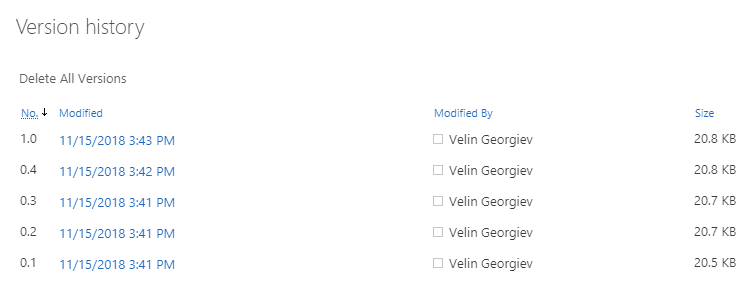
It is true when it sends the request, but seems that it does not take effect when does MOVE and moves the file with all the history included. Maybe this is used only when COPY.
I can see all my versions for moved file with options

VelinGeorgiev
on 15 Nov 2018
Then we should use that as the default too.
waldekmastykarz
on 15 Nov 2018
@simonagren could you please test if --ignoreVersionHistory has any effect at all. Seems it might be used when the api is used to copy files just.
VelinGeorgiev
on 15 Nov 2018
@VelinGeorgiev I will test the different behaviours, and I just asked Waldek if sunday is ok as a deadline? :)
simonagren
on 15 Nov 2018
No deadlines! You're ready when you're ready 😄
waldekmastykarz
on 15 Nov 2018
Related issues
 thomyg
·
3Comments
thomyg
·
3Comments
 StfBauer
·
3Comments
StfBauer
·
3Comments
 rabwill
·
3Comments
rabwill
·
3Comments
 plamber
·
3Comments
plamber
·
3Comments
 arjunumenon
·
3Comments
arjunumenon
·
3Comments
Most helpful comment
No deadlines! You're ready when you're ready 😄