Cli-microsoft365: spo customaction set with --clientSideComponentProperties param results in invalid JSON object
Running the command:
o365 spo customaction set -u https://<tenant>.sharepoint.com/sites/<site> -i<id> -s Web -p '{"testMessage":"Test message"}'
Results in the following when running the corresponding get command:
o365 spo customaction get -u https://<tenant>.sharepoint.com/sites/<site>-i <id> -s Web -o JSON
ClientSideComponentId        : <id>
ClientSideComponentProperties: '{testMessage:Test message}'
CommandUIExtension           : null
Description                  : null
Group                        : null
Id                           : <customActionId>
ImageUrl                     : null
Location                     : ClientSideExtension.ApplicationCustomizer
Name                         : {<customActionId>}
RegistrationId               : null
RegistrationType             : 0
Rights                       : {"High":"0","Low":"0"}
Scope                        : Web
ScriptBlock                  : null
ScriptSrc                    : null
Sequence                     : 65536
Title                        : <customActionTitle>
Url                          : null
VersionOfUserCustomAction    : 0.9.22.9201
Expected behaviour:
- The value of the
ClientSideComponentPropertiesproperty should be a valid JSON object - When the value is parsed by SPFx app customizer code that inherits from the
BaseApplicationCustomizerobject - thepropertiesobject should be hydrated with the "testMessage" value.
Observed behaviour:
- The value of the
ClientSideComponentPropertiesproperty is not a valid JSON object - The value parsed by the SPFx app customizer code inheriting
BaseApplicationCustomizer- thepropertiesobject has no properties
I suspect the above behaviour might be due to the way a POST to the _api/<scope>/UserCustomActions end point processes the ClientSideComponentProperties payload, and not the way the parameter is parsed by spo customaction set - but wanted to raise it here first to see if there's anything that can be done in office365-cli
 mpowney
All 14 comments
Adding --debug to the o365 spo customaction set command call shows the body payload of the _api/<scope>/UserCustomActions call is as follows:
Executing web request...
body   : {"ClientSideComponentProperties":"'{testMessage:Test message}'"}
Tried escaping the -p parameter in different ways, e.g.
{'testMessage':"Test message"}- '{\"testMessage\":\"Test message\"}'
But none of these seem to work either.
If I re-run the same API call in Postman, with the following payload:
{"ClientSideComponentProperties":"{\"testMessage\":\"Test message\""}
It works fine. It looks like somewhere along the way my input parameter is being stripped of the \" quotes.
mpowney
on 1 Oct 2018
@mpowney have a look at the REMARKS here, https://pnp.github.io/office365-cli/cmd/spo/customaction/customaction-add/#remarks.
That might help you.
The reason in most of the cases is that different shells interred quotes and escape differently
 VelinGeorgiev
on 1 Oct 2018
VelinGeorgiev
on 1 Oct 2018
@mpowney which OS and shell are you running into this? We could see if we can clarify this in the command's help. As @VelinGeorgiev noted, different shells handle it differently so not sure if there is one way across all shells, but if we know the differences, then we can document them.
 waldekmastykarz
on 1 Oct 2018
waldekmastykarz
on 1 Oct 2018
The shell was node js command prompt on Windows 10. I think I tried escaping the double quotes with no luck. I’ll confirm which escape sequences I’ve tried later today.
Was there a discussion about handling JSON in parameters somewhere @waldekmastykarz? I vaguely recall one and searched around gitter and here but couldn’t find it. If there was one perhaps I can use it as reference also.
mpowney
on 1 Oct 2018
@mpowney have you tried with what we have in the remarks. I am with Windows 8.1 and it worked for me using the Windows shell.
o365 spo customaction add -u https://contoso.sharepoint.com/sites/test -t "YourAppCustomizer" -n "YourName" -l "ClientSideExtension.ApplicationCustomizer" -c b41916e7-e69d-467f-b37f-ff8ecf8f99f2 -p '{\"testMessage\":\"Test message\"}'
@VelinGeorgiev I tried:
- '{"testMessage":"Test message"}'
- '{testMessage:"Test message"}'
- '\{"testMessage":"Test message"\}'
- '{\"testMessage\":\"Test message\"}'
- `{\"testMessage\":\"Test message\"}`
- `{"testMessage":"Test message"}`
- `{'testMessage':'Test message'}`
- `{\"testMessage\":\"Test message\"}`
mpowney
on 1 Oct 2018
I will have a look asap and try to reproduce it
VelinGeorgiev
on 1 Oct 2018
One we have it sorted out, we should have a dedicated page in the docs for this 🧐
waldekmastykarz
on 2 Oct 2018
FWIW, when using the CLI in zsh on macOS, I can pass a JSON string like:
$ o365 ... --customProperties '`{"Property 1": "Value 1", "Property 2": "Value 2"}`'
Here are my findings for tonight:
Windows 8.1
o365 spo customaction set --url https://xxx.sharepoint.com/sites/xx --id 815860e5-c83a-43aa-a69c-28a936e2d812 -p '{\"instrumentationKey\":\"58b2b73e-82b5-4808-a969-a18cbbd36999\",\"logLevel\":\"1\",\"testMessage\":\"\"}'
Works for:
- cmder (ConEmu [64] (version 171025))
- Windows command prompt
Does not work for:
- Windows PowerShell.exe - Error: 500. The body in the request is
{"ClientSideComponentProperties":"{"}
I managed to make it work with the Windows PowerShell using:
o365 spo customaction set --url https://xxx.sharepoint.com/sites/xxx --id  81
5860e5-c83a-43aa-a69c-28a936e2d812 -p "{'instrumentationKey':'58b2b73e-82b5-4808-a969-a18cbbd36999','logLevel':'1','test
Message':''}"
Body request is
{"ClientSideComponentProperties":"{'instrumentationKey':'58b2b73e-82b5-4808-a969-a18cbbd36999','logLevel':'1','
testMessage':''}"}
Seems the web service is able to convert single quote successfully, but this is pure luck.
Will keep you posted if I find the secret formula for PowerShell.exe
UPDATE:
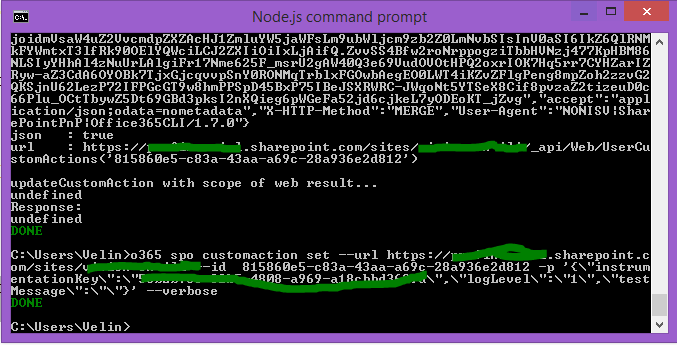
The node command prompt worked with both (Nodejs v8.9.1):
o365 spo customaction set --url https://xxx.sharepoint.com/sites/xxx --id 815860e5-c83a-43aa-a69c-28a936e2d812 -p '{\"instrumentationKey\":\"58b2b73e-82b5-4808-a969-a18cbbd36999\",\"logLevel\":\"1\",\"testMessage\":\"\"}'
o365 spo customaction set --url https://xxx.sharepoint.com/sites/xxx --id 815860e5-c83a-43aa-a69c-28a936e2d812 -p "{'instrumentationKey':'58b2b73e-82b5-4808-a969-a18cbbd36999','logLevel':'1','testMessage':''}"
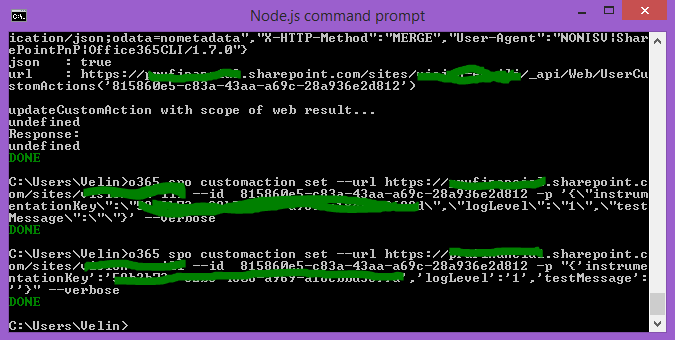
VelinGeorgiev
on 3 Oct 2018
Thanks for the detailed findings @VelinGeorgiev! @mpowney, does that help or are there some cases that we haven't covered yet?
waldekmastykarz
on 4 Oct 2018
I am thinking if there isn't a way to create a smart guessing functionality in case JSON parse fails before the post request then try fix the quotes from a function in the CLI. However, this may still not cover all the cases and could be more complex that I initially think would be.
VelinGeorgiev
on 4 Oct 2018
From what I've seen, the first part of processing quotes happens already in the shell so if incorrectly quoted JSON string is passed into the CLI, it might be tough to make something out of it.
waldekmastykarz
on 4 Oct 2018
Closing for the lack of further discussion
waldekmastykarz
on 30 Oct 2018
Related issues
 arjunumenon
·
3Comments
arjunumenon
·
3Comments
 thomyg
·
3Comments
thomyg
·
3Comments
 rabwill
·
3Comments
waldekmastykarz
·
3Comments
arjunumenon
·
3Comments
rabwill
·
3Comments
waldekmastykarz
·
3Comments
arjunumenon
·
3Comments