Clay: When navigating on DatePicker via TABS and selecting dates with SPACE, we can multi select days
- [✅ ] I have searched the issues of this repository and believe that this is not a duplicate.
Is there an example you can provide via codesandbox.com?
Just use the master's storybook: https://storybook-clayui.netlify.app/?path=/story/components-claydatepicker--default
What are the steps to reproduce?
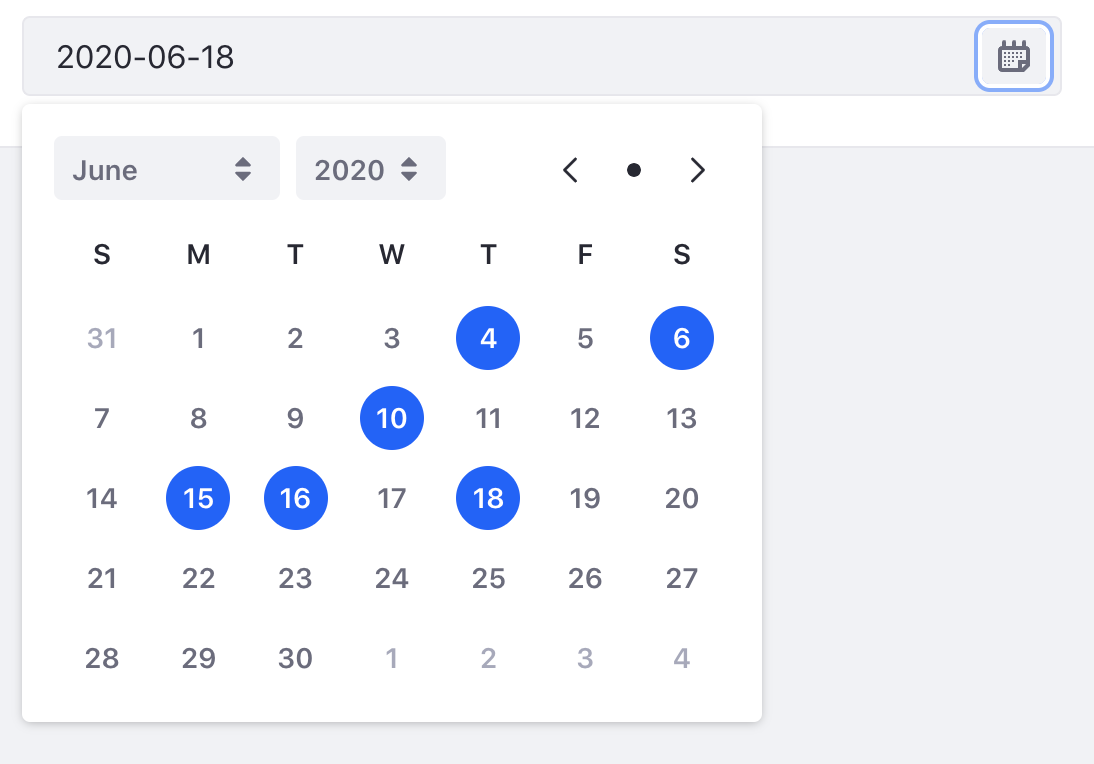
Open ClayDatePicker using space, then navigate thru dates using TABS and select using SPACE.
You'll notice is possible select multiple dates(at least the UI tells it 😂 )
What is the expected result?
Since We don't have a design specification for multi select dates, don't let user select multiple dates
Environment
| Tech | Version |
| ----- | ------- |
| Clay | v3.4.0 |
| React | undefined |
 diegonvs
All 7 comments
Hey @pat270 @marcoscv-work @eduardoallegrini, I noticed this issue can't be reproduced when using Enter key. Do you guys have any markup/a11y guidance about this issue? Is there a difference between selecting elements using enter and space key?
diegonvs
on 30 Jun 2020
@diegonvs I'm assuming the dates are using <button>. ~The browser triggers a click event when you press space on a button. The enter key does nothing for a button.~
Edit: Browser triggers click event on key up for space. For enter, click is triggered on key down. Don't know if this helps you.
Edit 2: I just looked at the storybook. I can only replicate that bug when it tab + space really quickly through the calendar. Maybe preventDefault() on space key up might fix it? :shrug:
 pat270
on 30 Jun 2020
pat270
on 30 Jun 2020
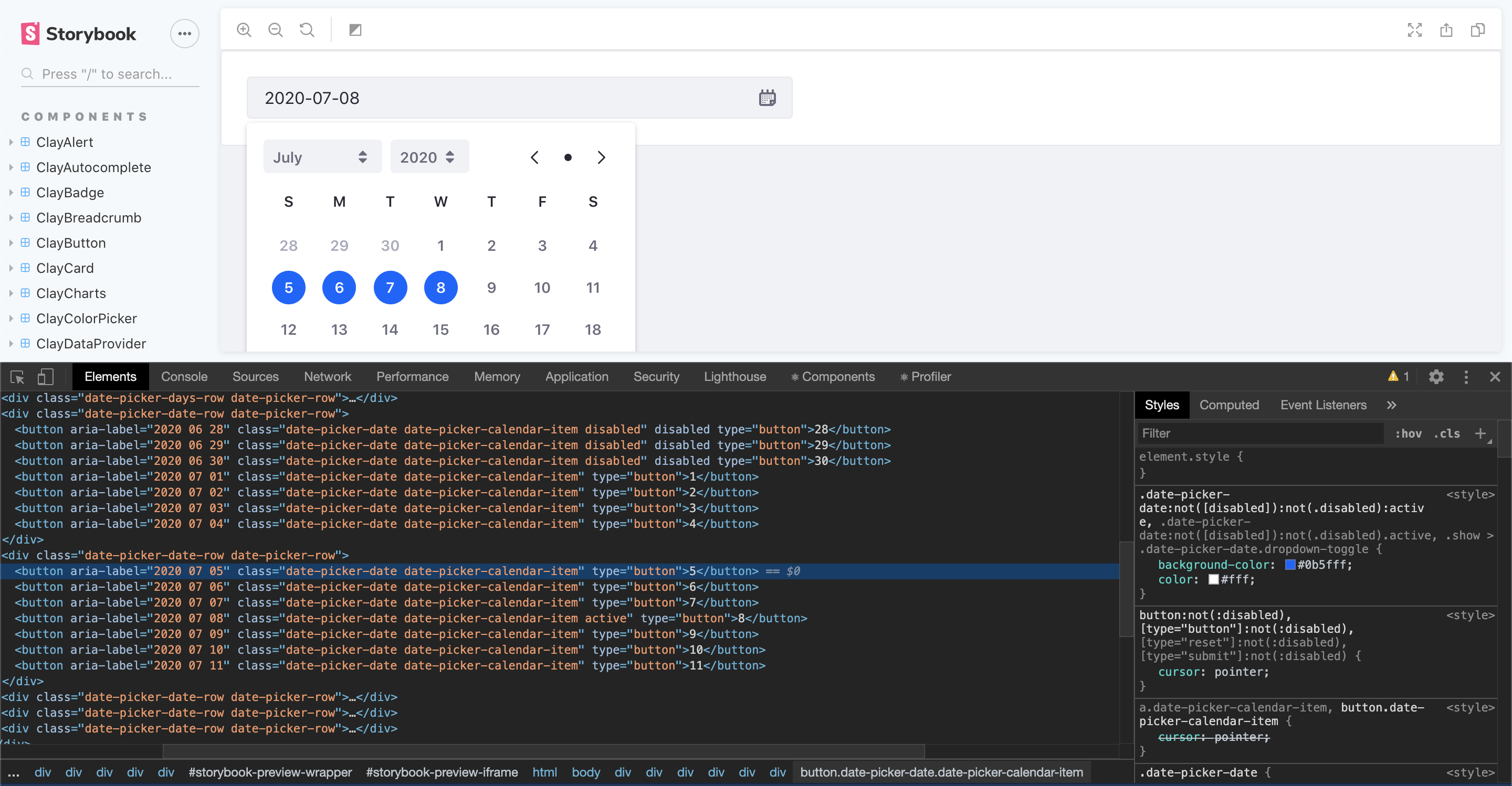
Looking at the demo I can see there's not a real JS error, the .active class is being assigned correctly, the problem is the :active status of the button. Removing .date-picker-date:not([disabled]):not(.disabled):active, fix it.
 edalgrin
on 1 Jul 2020
edalgrin
on 1 Jul 2020
Looked into it further based on @eduardoallegrini comment. I can replicate on Clay CSS. It's a webkit browser bug (happens on Chrome and Safari) when tabbing + space quickly across a list of buttons fails to remove the :active state.
We should probably fix this via JS. When space is pressed we should event.preventDefault(); or also call blur()when removing .active class .
pat270
on 1 Jul 2020
Hey @pat270, I tried add a keyUp listener for detecting when pressing SPACE key and then preventDefault() for avoiding this behaviour but with this code I can select multiple dates without tabbing+spacing quickly. Also, I tried to blur the element when changing the active state(using a useEffect with a ref for the button) but It still being reproduced. Also, I tried to retrieve the event.target on the click event and then preventDefault() but again, no success :/
diegonvs
on 1 Jul 2020
@diegonvs I think you need to event.preventDefault() on keydown then on keyup you need to fire the click event or run the active method.
Here is a simple snippet I used in the console on the storybook site:
document.addEventListener('keydown', function(event) {
    var key = event.keyCode || event.which;

    if (key === 32) {
        event.preventDefault();
    }
});

var evt = document.createEvent('Event');

evt.initEvent('click', true, true);

document.addEventListener('keyup', function(event) {
    var key = event.keyCode || event.which;

    if (key === 32) {
        event.target.dispatchEvent(evt);
    }
});
It worked @pat270! Thanks! I'll send a PR
diegonvs
on 1 Jul 2020
Related issues
 bryceosterhaus
·
5Comments
bryceosterhaus
·
5Comments
 hold-shift
·
3Comments
hold-shift
·
3Comments
 kresimir-coko
·
3Comments
kresimir-coko
·
3Comments
 drakonux
·
5Comments
drakonux
·
4Comments
drakonux
·
5Comments
drakonux
·
4Comments