Clay: What is the expected behavior when the user clicks on the "Select current date" icon on date picker fields?
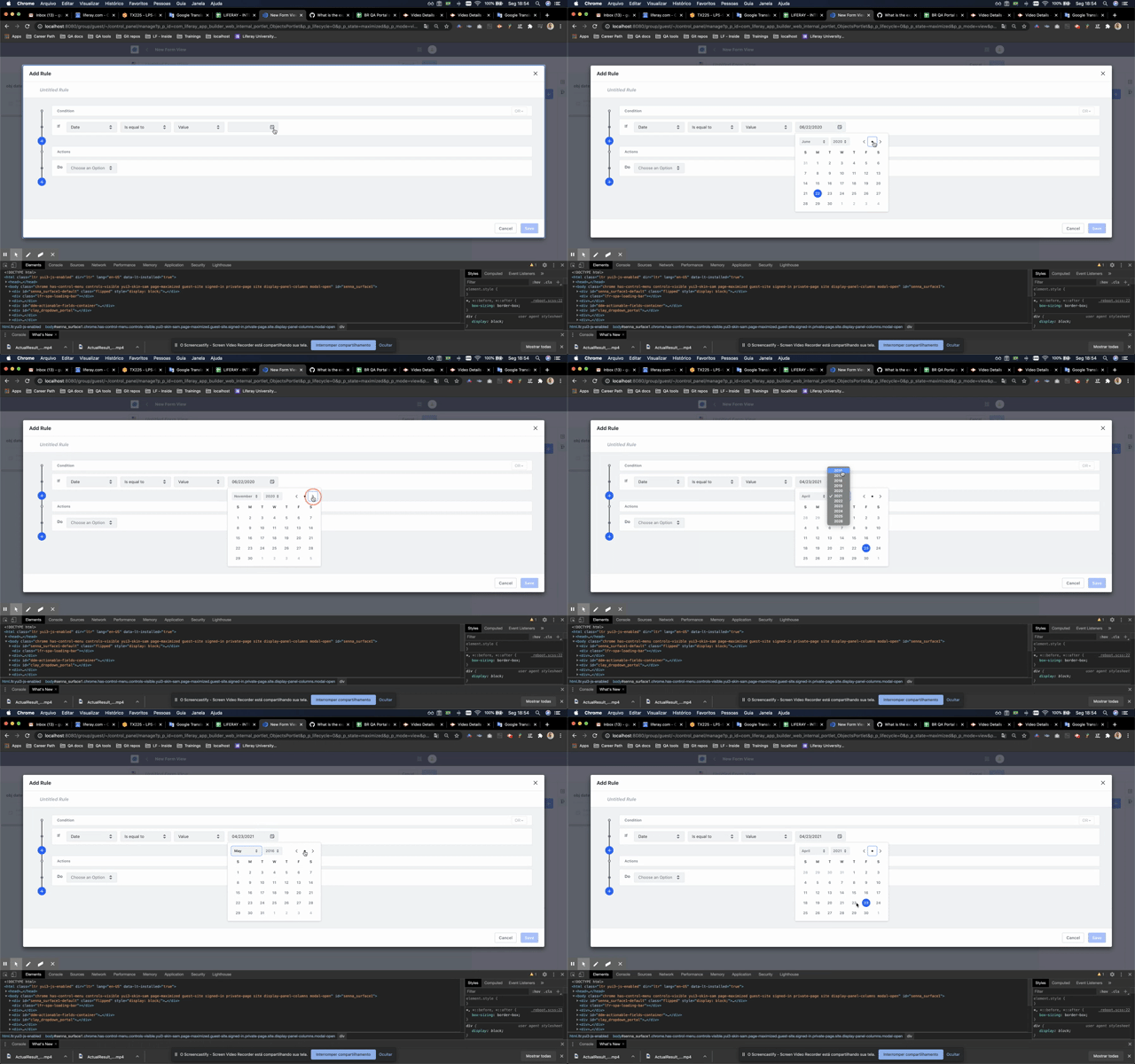
What is the expected behavior when the user clicks on the "Select current date" icon on date picker fields?
Actual Result 1: When the input is empty the current date is selected and the page about the current date is shown.
Actual Result 2: When there is value in the input the page about the current date is shown.
 guipfreire
All 11 comments
Hey @drakonux can you check this out for us? I'm in doubt with the description in the document, I remember that we had already talked about it but I don't remember the final result. 😅
cc @bryceosterhaus in case you remember something.
 matuzalemsteles
on 22 Jun 2020
matuzalemsteles
on 22 Jun 2020
I don't fully remember either.
I think as far as my expectation, I would think that clicking that dot would always take you to the currently selected date. And if no date is selected, I would expect it to be the current date.
 bryceosterhaus
on 23 Jun 2020
bryceosterhaus
on 23 Jun 2020
https://issues.liferay.com/browse/LEXI-430 for more details
 pat270
on 23 Jun 2020
pat270
on 23 Jun 2020
Hello there!
Reading the date picker definition document...
If a user clicks the dot button:
When the input is empty or there is a value the current day is selected (thus the input is updated) and the page about the current date is shown.
It's like a user selecting a day, with the difference the dot button always selects the current day.
However, reviewing the behavior of the HTML5 input date component, the selection mode is quite different. If a day is selected (clicking a day or the current day button) the input is updated and the flyout hides.
In addition, keyboard interaction uses cursors to move the selection through the days of the month which is a quicker interaction for users that want to reach the footer instead of our current behavior using TAB, the users have to move the focus day by day.
 drakonux
on 23 Jun 2020
drakonux
on 23 Jun 2020
From an accessibility point of view (quick review from my POV):
When an action is not totally clear or it has a different behavior than expected it should be explained in order to avoid mistakes (3.3.2 Labels or Instructions - A, 3.3.3 Input Assistance - AA). For example by using titles, in this case, something like "select the current day".
I recommend using closer behavior of native components, in order to make it easier to use, for example by using the keyboard (2.1.1: Keyboard) we could allow use arrows to move through days.
Something surprised me and I really think is an accessibility problem is the way to confirm the day you choose, actually, there is no way to "confirm" the action of select the day in a form/process, I mean there is no trigger which makes the day selection and closes the calendar in order to confirm your chose and be able to continue the process/form filling, the closer action to do it is clicking outside of the component if you are using the mouse or press the key "esc" if you are using the keyboard.
My recommendation is to use thedropdownbehavior: open calendar, select day and it closes itself because you have made your day selection -> your interaction with the component is finished and understandable.
If you need to select a range of days o make some extra actions I would add a confirmation button.
 marcoscv-work
on 23 Jun 2020
marcoscv-work
on 23 Jun 2020
My recommendation is to use the dropdown behavior: open calendar, select day and it closes itself because you have made your day selection -> your interaction with the component is finished and understandable.
This would make sense if you're selecting a single day... maybe a selection="single" prop or something like that would work... because it's also true that you might want to
If you need to select a range of days o make some extra actions I would add a confirmation button.
Rather than a confirmation, the pattern I've seen is to pick 2 dates and the component creates the range... so maybe selection="range" could do the trick... if that's even a thing we support :D
 jbalsas
on 23 Jun 2020
jbalsas
on 23 Jun 2020
My recommendation is to use the dropdown behavior: open calendar, select day and it closes itself because you have made your day selection -> your interaction with the component is finished and understandable.
This would make sense if you're selecting a single day... maybe a
selection="single"prop or something like that would work... because it's also true that you might want toIf you need to select a range of days o make some extra actions I would add a confirmation button.
Rather than a confirmation, the pattern I've seen is to pick 2 dates and the component creates the range... so maybe
selection="range"could do the trick... if that's even a thing we support :D
do you mean properties for the date picker component?
if we have selection="single" give the component with only a date pick selection and if we have selection="range" provide the date range date selection?
marcoscv-work
on 23 Jun 2020
do you mean properties for the date picker component?
if we have selection="single" give the component with only a date pick selection and if we have selection="range" provide the date range date selection?
Something like that yeah... just a thought, though.
jbalsas
on 23 Jun 2020
Hey guys, so as a summary of all this: We should always select the current date regardless of what the user selected, let me know if I got it wrong here!
matuzalemsteles
on 25 Jun 2020
Hey guys!
I've created a ticket for Lexicon on behalf of the Front-End team to review the current behavior and propose new improvements: LEXI-975 (Chema agreed, see slack thread)
drakonux
on 26 Jun 2020
Thanks a lot for all collaborations, folks!
guipfreire
on 26 Jun 2020
Related issues
 dgarciasarai
·
4Comments
drakonux
·
4Comments
dgarciasarai
·
4Comments
drakonux
·
4Comments
 ethib137
·
4Comments
ethib137
·
4Comments
 julien
·
3Comments
pat270
·
4Comments
julien
·
3Comments
pat270
·
4Comments