Clay: ClayAlert space between icon and text
- [x] I have searched the issues of this repository and believe that this is not a duplicate.
Is there an example you can provide via codesandbox.com?
https://codesandbox.io/s/jolly-visvesvaraya-hlxcg?file=/src/App.js
What are the steps to reproduce?
Create a default ClayAlert in a React app (it doesn't matter if the alert variant is stripe)
What is the expected result?
Lexicon define the space between the icon and the text as 8px:
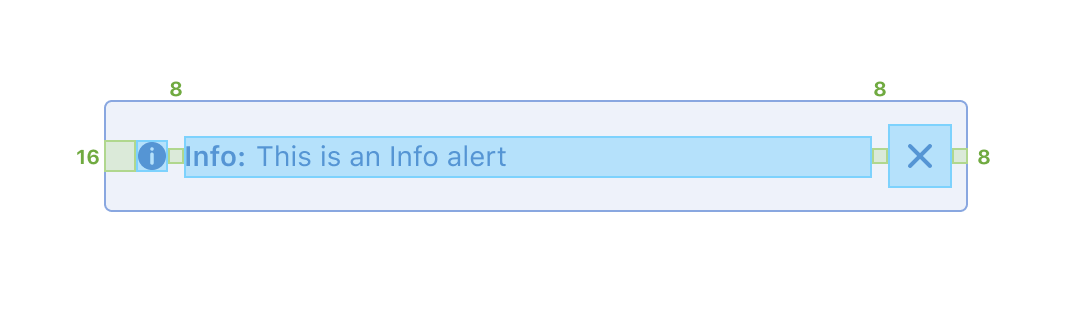
When adding a ClayAlert in React, the space is 17px:
- 8px for element with classes
autofit-col inline-item-before - 4px for element with classes
autofit-col autofit-col-expand - 5px for
<strong class="lead"></strong>element
Environment
| Tech | Version |
| ----- | ------- |
| Clay | v3 |
| React | 16.12.0 |
| Use in module | analytics-reports-web |
| Bug | https://issues.liferay.com/browse/LPS-113812 |
bug
 dgarciasarai
All 3 comments
Just leaving a note, we can remove inline-item-before and not output <strong class="lead"></strong> if there is no lead text. Those changes should provide the desired outcome.
 pat270
on 18 May 2020
pat270
on 18 May 2020
@dgarciasarai just sent a PR for this fix. Release of this should be Thursday.
 bryceosterhaus
on 18 May 2020
bryceosterhaus
on 18 May 2020
❤2
👍1
Thanks!!!
dgarciasarai
on 19 May 2020
Was this page helpful?
0 / 5 - 0 ratings
Related issues
pat270
·
4Comments
 julien
·
3Comments
bryceosterhaus
·
5Comments
dgarciasarai
·
4Comments
julien
·
3Comments
bryceosterhaus
·
5Comments
dgarciasarai
·
4Comments
 joseigor
·
5Comments
joseigor
·
5Comments
Most helpful comment
@dgarciasarai just sent a PR for this fix. Release of this should be Thursday.