Clay: Multistep: the width for each step label should be proportional
Hi Team, we received several weeks ago a ticket from Commerce Team (read LEXI-696). They are complaining that the Step label has a max-width defined.
We would like to know more about the implementation of the component because it doesn't follow the definition made and probably it was based on a technical decision.

_Width Definition_
I took a look at Storybook for Clay 3.0 and I also see the same behavior for Clay 2.0.
What are the steps to reproduce?
- Add a Multistep with 4 steps
- Label each step:
- First Step: "Shipping Address"
- Second Step: "Shipping Method"
- Third Step: "Order Summary"
- Fourth Step: "Order Confirmation"
Current result?

What is the expected result?
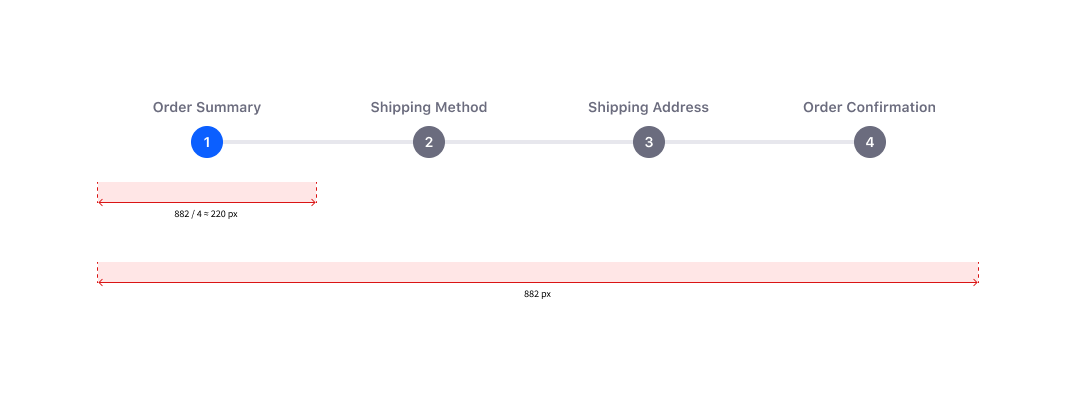
Environment
| Tech | Version |
| ----- | ------- |
| Clay | v2.0.0 |
| Clay | v3.0.0 |
 drakonux
All 4 comments
hey @pat270 maybe we have some problem with CSS, so I figured it would be a little tricky to center text as it is but I can't see the text being truncated.
 matuzalemsteles
on 4 Nov 2019
matuzalemsteles
on 4 Nov 2019
@drakonux @matuzalemsteles
Unfortunately, I'm unable to change the way the text displays based on length solely using CSS. When I was creating this component I brought up the possibility of long text inside this component with lots of steps and was told we would only use Steps. The max-width is my safe guard for overlapping text in smaller screens. The idea behind this is that if someone wanted to use this component the way Commerce is using it, they would change the max-width on the specific Multi Step Form based on their needs.
I can remove max-width but just know long text or lots of steps with text will overlap.
 pat270
on 4 Nov 2019
pat270
on 4 Nov 2019
Thanks, @pat270 I agree with your decision because we are not forcing to have that max-width and that's the flexibility we aim for.
It's all said, isn't it? if they can change the value...
Thanks everyone!
P.S. I have to say that I'm quite surprised by the definition document I'm reviewing. Because if we had those problems you said Patrick, why the current definition is in that direction? 🤔I will create a ticket to update the definition to be closer to the real component.
drakonux
on 5 Nov 2019
Closing this, feel free to reopen if something needs to be updated.
pat270
on 5 Nov 2019
Related issues
 kresimir-coko
·
3Comments
kresimir-coko
·
3Comments
 sandwichnyc
·
5Comments
sandwichnyc
·
5Comments
 bryceosterhaus
·
4Comments
bryceosterhaus
·
4Comments
 ethib137
·
4Comments
ethib137
·
4Comments
 brunofarache
·
5Comments
brunofarache
·
5Comments
Most helpful comment
Thanks, @pat270 I agree with your decision because we are not forcing to have that
max-widthand that's the flexibility we aim for.It's all said, isn't it? if they can change the value...
Thanks everyone!
P.S. I have to say that I'm quite surprised by the definition document I'm reviewing. Because if we had those problems you said Patrick, why the current definition is in that direction? 🤔I will create a ticket to update the definition to be closer to the real component.