Issue 1
.claspignore not working at all. I have tried to ignored individual folders and files then I have changed concept into not ignore some files both way is not working
**/**
!*.gs
!appsscript.json
I found every files has been pushed from my terminal
└─ node_modules/yargs/lib/usage.js
└─ node_modules/yargs/lib/validation.js
└─ node_modules/yargs/lib/yerror.js
└─ node_modules/yargs/yargs.js
└─ src/ActionHandlers.js
└─ src/DeadlineMonitor.js
└─ src/Main.js
└─ src/MessageUtils.js
└─ src/Scheduler.js
└─ src/Settings.js
└─ src/TimePeriod.js
└─ src/Views.js
Pushed 1578 files.
Even it show files pushed files does not appearing in https://script.google.com/d/1FFfwocqXNQQvMky6gsN99j1cxDRkHDoQjdv5qxTKGXQA-_7QilXOpcqA/edit appscript project
If i run clasp push again and again, project appearing all files (ignored node_modules.. etc)
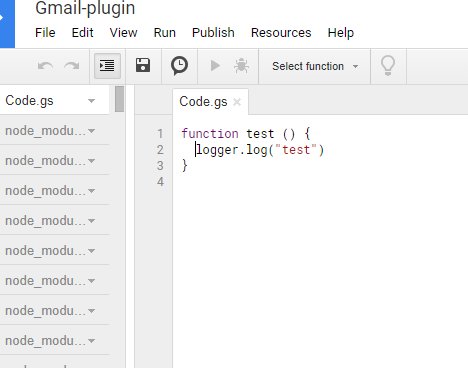
Sometimes appscript.json being updated but not Code.gs . Why google published this buggy development tool? Or am i missed anything. I'm trying this for two days
 freddy-daniel
All 7 comments
I also had the same problem.
 kenchan0130
on 21 Jan 2019
kenchan0130
on 21 Jan 2019
Same here. I am using clasp 2.0.0 on a Windows 64-bit Pro.
 hrzafer
on 22 Jan 2019
hrzafer
on 22 Jan 2019
I have resolved this situation with gulp script. Created script to build my code into dist folder. And added _npm run command_ in my package JSON for push my released code into clasp. It may be helpful until clasp issue resolved
My package JSON
``````````````
......
......

"scripts": {
    "build": "gulp",
    "push": "(cd ./dist && clasp push)",
    "status": "(cd ./dist && clasp status)",
    "watch": "gulp watch",
    "all": "gulp all"
  }

......
......
``````````````
freddy-daniel
on 22 Jan 2019
I have resolved this situation with gulp script. Created script to build my code into dist folder. And added _npm run command_ in my package JSON for push my released code into clasp. It may be helpful until clasp issue resolved
My package JSON
...... ...... "scripts": { "build": "gulp", "push": "(cd ./dist && clasp push)", "status": "(cd ./dist && clasp status)", "watch": "gulp watch", "all": "gulp all" } ...... ......
@freddy-daniel Goog solution. Thanks. I tried using webpack but generated code doesn't work on App Script platform. Is this the reason that your're using gulp?
hrzafer
on 23 Jan 2019
You can specify target directory by rootDir.
https://github.com/google/clasp#rootdir-optional
{
  "scriptId": "XXXXXXXXXXXXXXXXXXXXX",
  "rootDir": "dist/"
}
 takanakahiko
on 23 Jan 2019
takanakahiko
on 23 Jan 2019
Perhaps the problem may be different,
In my environment rootDir is set up, but it seems that it is not reflected on script page side.
kenchan0130
on 23 Jan 2019
@kenchan0130 Thanks.
Maybe, This problem is caused by OS difference.
On Windows, since ignoreMatches is for example hoge\huga, I think that it has not been able to match properly.
takanakahiko
on 23 Jan 2019
Related issues
 grant
·
4Comments
grant
·
4Comments
 OleksandrRakovets
·
3Comments
OleksandrRakovets
·
3Comments
 nirazul
·
7Comments
nirazul
·
7Comments
 nmccready
·
5Comments
nmccready
·
5Comments
 tehhowch
·
3Comments
tehhowch
·
3Comments