Clasp: Clasp deploy doesn't update the deployed version with Google Apps Script Web App
Expected Behavior
Perhaps I'm misunderstanding, but from the readme I'd thought that clasp deploy would allow me to publish a new version of a Web App (in this case bound to a google sheet).
I'd expected the workflow to be as follows:
- clasp version "My new version"
> Created version xx. - clasp deploy xx
> yyyyyyyyyyyyyyyyy @xx - clasp open
browser opens to newly published version "xx"
Actual Behaviour
The version is created as expected, but the web app Project Version remains at the last deployed version not the version used with clasp deploy. To actually deploy it I have to go into the Script Editor then Publish > Deploy as Web App and then select the version "xx"
Related Issues
This seems related to https://github.com/google/clasp/issues/43, however that issue specifically relates to Chrome store apps and this is a Web App which the comments on that issue suggest should be supported.
 onlinelaser
All 38 comments
I think you want to redeploy to update a deployment:
clasp redeploy <deploymentId> <version> <description>
Is that right?
I think I forgot to add it in the "How To..." section. LMK if that works.
 grant
on 23 Mar 2018
grant
on 23 Mar 2018
@grant
I am experiencing the same phenomenon.
Can note update version of Web App with "clasp deploy".
 andysumi
on 9 Apr 2018
andysumi
on 9 Apr 2018
@andysumi What are the commands you're using? Use redeploy to update, deploy to create.
grant
on 9 Apr 2018
@grant
I used both command, but it did not work as expected.
$ clasp version deploy-from-clasp
Created version 4.
$ clasp deploy 4 deploy-from-clasp
- [deploymentId] @4.
$ clasp open
Opening script: [scriptId]

===> I expected version of WebApp it was updated to "4", but it was not updated(it remained "3").

$ clasp redeploy [deploymentId] 4 deploy-from-clasp-again
Updated deployment.
$ clasp open
Opening script: [scriptId]

===> Again, the version of WebApp was not updated.
@grant @andysumi @onlinelaser
I've also used both commands.
True: There is a new version deployed on the Google Apps Scripts
False: There is NOT a new Web App version deployed on Google Apps Scripts
 jhairau
on 18 Apr 2018
jhairau
on 18 Apr 2018
This may be an issue with the API. I'll have to look further.
grant
on 18 Apr 2018
@grant sorry for the delay, finally got back to testing this, and I can also confirm that neither deploy nor deploy followed immediately by a redeploy make the new deployment active 😞
onlinelaser
on 24 Apr 2018
When i use: clasp redeploy <id of deployment> <version> <description>
I get "Updated deployment" in my terminal
But, when i refresh the web browser (F5) i get an error message "Se necesita autorización para realizar esta acción" (You need authorization to perform this action) in the browser.
Also, my previous config was:
Deploy as a web app
Execute the app: As me
Who has access to the app: Anyone, even anonymous
How to send this two config options with a command, and how to solve my issue with the authorization?
 pablodonayre
on 24 Apr 2018
pablodonayre
on 24 Apr 2018
We have the same problem.
 Ryangr0
on 25 Apr 2018
Ryangr0
on 25 Apr 2018
It doesn't appear that clasp deploy can be used to update a web application, and also can't be used to approve permissions and things like that. This would be a very useful addition. At the moment, the "Deploy as Web Application" is the only step in the development process that requires a desktop browser.
 iaindooley
on 21 May 2018
iaindooley
on 21 May 2018
It looks like the script.google.com UI updates the manifest file (appsscript.json) file when you use the UI to publish a web app.
When you use the UI to deploy a web app, it adds this bit of code to appsscript.json:
  "webapp": {
    "access": "MYSELF",
    "executeAs": "USER_DEPLOYING"
  }
This is really important, as it's the configuration details of the web app.
So if you are using clasp, and expect to deploy a web app, you must manually update the manifest file.
Repro
Create the project with clasp
clasp createclasp open- View > Show manifest file
- Observe the manifest is updated
{
  "timeZone": "America/New_York",
  "dependencies": {
  },
  "webapp": {
    "access": "MYSELF",
    "executeAs": "USER_DEPLOYING"
  },
  "exceptionLogging": "STACKDRIVER"
}
Setup other web app files
index.html
<!DOCTYPE html>
<html>
  <head>
    <base target="_top">
  </head>
  <body>
    hi
  </body>
</html>
test.gs
function doGet() {
    return HtmlService
      .createTemplateFromFile('index')
      .evaluate();
}
clasp pushclasp deploy
- Copy the long id
- Go to the URL, it should be something like this:
https://script.google.com/a/{DOMAIN}/macros/s/{VERSION_ID}/exec - See the successful deployment of a web app.
Follow-up
Good news (if this is correct): clasp isn't doing anything wrong.
Bad news: It's really not obvious why creating a web app with clasp fails.
I think a good solution would be to enhance the setup experience around starting a new add-on/web app/script. Some ideas were thrown around in #76, but it seemed out of scope for the clasp project.
We should at least give README tips on how to start with creating the 3 types of scripts to prevent this error.
grant
on 31 May 2018
Is it possible, and/or a good idea to have some sort of flag for clasp deploy like --type (web|api) that adds that to the appsscript.json for the user?
 campionfellin
on 31 May 2018
campionfellin
on 31 May 2018
I don't think adding more CLI flags to clasp will help. clasp should work out of the box. A type should really be for create.
clasp create
What type of project do you want to create?
x Standalone
- Add-on
- Web App

# Advanced way
clasp create --type standalone
clasp create --type addon --docs
clasp create --type webapp
What we really need is more of the following:
- Warn when
clasp pushwould override files. This is probably what happened here with theappsscript.jsonbeing overwritten. - Improve
clasp createto provide options for creating an add-on, executable, or web app. See above. - Improve the process of creating a manifest. It would be great if there was autocompletion support. This is like
package.jsonfor Node modules.
grant
on 31 May 2018
@grant can you shade some light on where we are with this issue? I would LOVE to be able to deploy a new web-app version when I push my updates. I dislike having to need to go to the WEB UI to deploy that new version of my web-app.
 shai
on 24 Jun 2018
shai
on 24 Jun 2018
@shai If I'm reading this ticket correctly you should be able to do everything without the WEB UI, it's just not super clear because you'll need to manually update your appscript.json file. Here are the valid options:
"webapp": {
    "access": "MYSELF",
    "access": "ANYONE",
    "executeAs": "USER_DEPLOYING"
    "executeAs": "USER_ACCESSING"
    "executeAs": "ANYONE_ANONYMOUS"
  },
You need to pick one of the "acces" types and one of the "executeAs" types. Note that "ANYONE_ANONYMOUS" can only be used with "executeAs" type "USER_DEPLOYING"
 TrojanCoder
on 24 Jun 2018
TrojanCoder
on 24 Jun 2018
@TrojanCoder I've actually got this already:
  "webapp": {
    "access": "ANYONE_ANONYMOUS",
    "executeAs": "USER_DEPLOYING"
  },
and when I clasp deploy it says that it deployed a new version but when I go to publish -> deploy as web app ; I see that it's using the old version. Also, when I go and test the code, I see that I'm not getting the updated expected console logs of the newer version.
shai
on 24 Jun 2018
I just tested the steps I wrote above again. Deploying a web app from clasp works. You just need to make sure you update the appsscript.json, clasp push, and clasp deploy.
Steps: https://github.com/google/clasp/issues/63#issuecomment-393370965
Set up and deploy a web app
clasp clone 1kDaDgJUTxkVmr7TkPSqx2wjxMhiY3DH1v_nZfpdkdsPcy2Lfo-09onYz
Cloned 2 files.
└─ appsscript.json
└─ Code.js
vi appsscript.json # add the `access` and `executeAs` fields.
vi index.html # write an HTML skeleton with "hi"
vi Code.js

clasp push
└─ Code.js
└─ appsscript.json
└─ index.html
Pushed 3 files.

clasp deploy
Created version 1.
- AKfycbwP6WvBwvNI3m_d3Ts8bnYBX8y0lG7OQEuV65m2E6t3J44g9Cay8wGZ2JRfQ9mHcpI1 @1.
Go to
https://script.google.com/a/{YOUR_DOMAIN}/macros/s/AKfycbwP6WvBwvNI3m_d3Ts8bnYBX8y0lG7OQEuV65m2E6t3J44g9Cay8wGZ2JRfQ9mHcpI1/exec
See the page: "hi"
Deploy Again
vi index.html # write an HTML skeleton with "hi 2"
clasp push
clasp version
clasp deploy 2
Go to the new URL.
See the page: "hi2"
I haven't tested redeploy, but deploying a web app multiple times should work.
grant
on 27 Jun 2018
So I've just tested that workflow and it does push the deployment up (which was working originally as well) - but it also doesn't make it active as the published project version.
Meaning that you still need to go to the UI and make the project version the one you just deployed :-(
onlinelaser
on 28 Jun 2018
so I'm unsure about why it's working for some and not others? @grant if you last comment you said and showed that it works, but @onlinelaser and myself say it isn't and then you added the API support needed label which implies it doesn't work?
Should I keep trying to get it working or did you verify that it isn't working and we need to wait for a solution?
shai
on 1 Jul 2018
So I've just tested that workflow and it does push the deployment up (which was working originally as well) - but it also doesn't make it active as the published project version.
Meaning that you still need to go to the UI and make the project version the one you just deployed :-(
I added the API support label because it looks like the UI does something different the API cannot do yet.
grant
on 1 Jul 2018
Any news here?
I created an issue https://github.com/google/clasp/issues/286 about deploy, seems to be a duplicate
 lgordey
on 10 Aug 2018
lgordey
on 10 Aug 2018
I found out the way to update the published web app endpoint by clasp.
We should use redeploy to update exists application ( I think we expect it is "deploy" and confusing ).
The function clasp deploy wraps create deployments API, and it always create new endpoints.
https://developers.google.com/apps-script/api/reference/rest/v1/projects.deployments/create
We just need
- setup
appsscript.json clasp deployonly first timeclasp versionandcrasp redeployto update like https://github.com/google/clasp/issues/63#issuecomment-375772312
 satetsu888
on 14 Aug 2018
satetsu888
on 14 Aug 2018
Also note that when you manually deploy as a web app your project (using the "Deploy as web app" menu entry), it automatically generates a new deployment (or update the existing deployment if you update your web app).
This specific deployment is automatically named by Apps Script "web app meta-version", you can grab its ID and then reuse it to update this specific deployment with Clasp.
This way, the UI will stay in sync, meaning you will be able to deploy either manually (using the "Deploy as web app" menu entry) or programmatically.
 RomainVialard
on 27 Sep 2018
RomainVialard
on 27 Sep 2018
I think you want to
redeployto update a deployment:
clasp redeploy <deploymentId> <version> <description>
Is that right?I think I forgot to add it in the "How To..." section. LMK if that works.
C:\Users\Freddy\Desktop\gmail add-on  ([email protected])
λ clasp redeploy AKfycbzwBPYA5QYbALsLecxp5_OuOxCrbBKzs78D8XDs9m3kDg2DSvCG-fyNG82ssSoOSDM7gg 1 Test
🤔  Unknown command "clasp redeploy"

Forgot clasp commands? Get help:
  clasp --help
 freddy-daniel
on 15 Jan 2019
freddy-daniel
on 15 Jan 2019
FYI: clasp redeploy has been removed in favor of clasp deploy with -- arguments.
grant
on 17 Jan 2019
The confusion that I ran into was getting the correct deploymentId to use with clasp deploy.
You need to got to "Publish > Deploy from Manifest" and Get ID of the deployment you want to use.
Then use clasp deploy -i <<ID from the manifest>>
 rheajt
on 22 Jan 2019
rheajt
on 22 Jan 2019
Also note that when you manually deploy as a web app your project (using the "Deploy as web app" menu entry), it automatically generates a new deployment (or update the existing deployment if you update your web app).
This specific deployment is automatically named by Apps Script "web app meta-version", you can grab its ID and then reuse it to update this specific deployment with Clasp.
This way, the UI will stay in sync, meaning you will be able to deploy either manually (using the "Deploy as web app" menu entry) or programmatically.
how do I deloy programmatically?
 zffocussss
on 26 Feb 2019
zffocussss
on 26 Feb 2019
I just tested the steps I wrote above again. Deploying a web app from clasp works. You just need to make sure you update the
appsscript.json,clasp push, andclasp deploy.Steps: #63 (comment)
Set up and deploy a web app
clasp clone 1kDaDgJUTxkVmr7TkPSqx2wjxMhiY3DH1v_nZfpdkdsPcy2Lfo-09onYz
Cloned 2 files.
└─ appsscript.json
└─ Code.js
vi appsscript.json # add the `access` and `executeAs` fields.
vi index.html # write an HTML skeleton with "hi"
vi Code.js

clasp push
└─ Code.js
└─ appsscript.json
└─ index.html
Pushed 3 files.

clasp deploy
Created version 1.
- AKfycbwP6WvBwvNI3m_d3Ts8bnYBX8y0lG7OQEuV65m2E6t3J44g9Cay8wGZ2JRfQ9mHcpI1 @1.
Go to
https://script.google.com/a/{YOUR_DOMAIN}/macros/s/AKfycbwP6WvBwvNI3m_d3Ts8bnYBX8y0lG7OQEuV65m2E6t3J44g9Cay8wGZ2JRfQ9mHcpI1/execSee the page: "hi"
Deploy Again
vi index.html # write an HTML skeleton with "hi 2"
clasp push
clasp version
clasp deploy 2
Go to the new URL.
See the page: "hi2"I haven't tested
redeploy, but deploying a web app multiple times should work.
what is difference between deploy and publish?
I just use clasp deploy.but How can I publish this new version to chrome web store?
zffocussss
on 26 Feb 2019
hello, what about a google sheets addon, is the deploy option updating a published version?
 darul75
on 1 Mar 2019
darul75
on 1 Mar 2019
hello, what about a google sheets addon, is the deploy option updating a published version?
I think there is no difference between sheet and doc.clasp deploy will create a new version number and deploymentId,but you must choose the deplomentID and publish manually
zffocussss
on 4 Mar 2019
I'm developing an API executable, and encountered a similar issue.
I can create deployments via clasp, but I can't run these deployed API until I manually update the version via web console.

(new deployments exist, but not selected.)
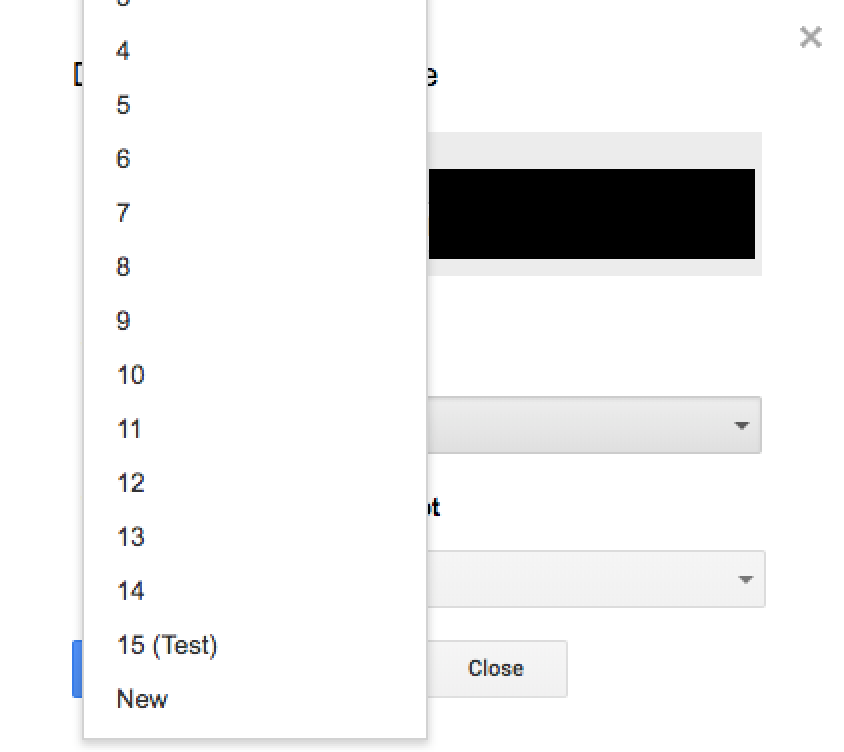
Are there ways to update the published version via clasp?
 jooohn
on 11 Apr 2019
jooohn
on 11 Apr 2019
It seems that clasp deploy a new deployment ID when not specified deployment ID with -i parameter.
So if your just updating a web app using latest code, just get url from apps script website
which like this https://script.google.com/macros/s/{deploymentID}/exec
and specify -i parameter with deploymentID when new code deploy
example command: clasp push && clasp deploy -i deploymentID
 brianchul
on 17 Oct 2019
brianchul
on 17 Oct 2019
I found this trick working for deploy a new version of webapp.
clasp deployments
- Select the version (if exists ) where there is
web app meta-versionattribute - I attribute is not found, use the last deployment id
LAST_DEPLOYMENT_ID=$( clasp deployments | pcregrep -o1 '\- ([A-Za-z0-9\-\_]+) @\d+ - web app meta-version' )
    if [ -z "$LAST_DEPLOYMENT_ID" ]
    then
        LAST_DEPLOYMENT_ID=$( clasp deployments | tail -1 | pcregrep -o1 '\- ([A-Za-z0-9\-\_]+)' )
    fi
After selecting deploment ID, proceed with
clasp deploy --deploymentId $LAST_DEPLOYMENT_ID
I found that web app meta-version attribute only appaers when web-app application is update from AppsScript code editor, so we need to consider the deploymentIDs order to get the proper version.
Also the webapp should remain published to last existing version or the "select last row" trick will not work.
I tried a couple of times and seems to work, you can try and test as well.
 NicolaSpreafico
on 6 Dec 2019
NicolaSpreafico
on 6 Dec 2019
Summarizing:
- There is a difference between version and deployment. A _version_ is similar to a git tag, while a _deployment_ is actual code available for execution and accessible at
https://script.google.com/macros/s/{deploymentID}/exec - list of available deployments can be obtained by running
clasp deployments - there is always only one published deployment which is available for end-users. The published deployment is is flagged as
web app meta-versionin the list of deployments. clasp deploycreates new deployment if no deploymentId is specified and creates new version if no version is specified- new deployments are useful for testing before making them default (using link mentioned in point 1)
- in order to make version available for end-users you have to publish it by deploying it into published deployment by running\
clasp --deploymentId {published_deployment_id} --version {selected_version_here}
So the process:
- use
clasp deploymentsand
- select one deployment you will use for testing => test_deployment_id
- get published deployment (one having web app meta-version flag) => pub_deployment_id
- modify your code
clasp pushclasp deploy --deploymentId $test_deployment_idcreates version => new_version- test your version at\
https://script.google.com/macros/s/{test_deployment_id}/exec - if satisfied, deploy your version into published deployment\
clasp deploy --deploymentId $pub_deployment_id --versionNumber $new_version
So, in the end it looks that clasp deploy works as designed. What's missing is the documentation :-)
 sovcik
on 25 Mar 2020
sovcik
on 25 Mar 2020
https://script.google.com/macros/s/{test_deployment_id}/exec
When I deploy my test_deployment_id and tries to open it on the browser, it redirects to
https://script.google.com/a/macros/safewebmed.com.br/s/{test_deployment_id}/exec
and shows an error page:
Sorry, unable to open the file at this time.
Please check the address and try again.
Get stuff done with Google Drive
Apps in Google Drive make it easy to create, store and share online documents, spreadsheets, presentations and more.
Learn more at drive.google.com/start/apps.
 kpoman
on 18 Apr 2020
kpoman
on 18 Apr 2020
regarding @sovcik Summarizing
in item 6 of first ordered list
- in order to make version available for end-users you have to publish it by deploying it into published deployment by running
clasp --deploymentId {published_deployment_id} --version {selected_version_here}sub-command
deployis occasionally omitted afterclasp, Presumably:
clasp deploy --deploymentId {published_deployment_id} --version {selected_version_here}
 vuGitH
on 29 Apr 2020
vuGitH
on 29 Apr 2020
- test your version at
https://script.google.com/macros/s/{test_deployment_id}/exec
after doing that step, the browser autoredirects to https://script.google.com/a/macros/mydomain.com/s/{test_deployment_id}/exec
and the page shows this error:
Sorry, unable to open the file at this time.
Please check the address and try again.
Would really like to get this working.
kpoman
on 15 Jun 2020
Apparently, when we execute clasp deploy, the command forgets to create an entry point to the webapp. See below:
Entry points after deploying from clasp:
    {
      "deploymentId": "AKfycbwGoFhpo5qekznUEn9z4Crt9BtFz0ubDsjK9sNlcJz0xTroscdU",
      "deploymentConfig": {
        "scriptId": "1jeLVzVdwPdBX5prcwCUeTc4nkQ8XAxFSd7QcuJJ96MB_UozF0iUMShiO",
        "versionNumber": 251,
        "manifestFileName": "appsscript",
        "description": "web app meta-version"
      },
      "updateTime": "2020-06-23T08:08:57.828Z",
      "entryPoints": [
        {
          "entryPointType": "EXECUTION_API",
          "executionApi": {
            "entryPointConfig": {
              "access": "ANYONE"
            }
          }
        }
      ]
    }
Entry points after deploying from the Script Editor:
{
      "deploymentId": "AKfycbwGoFhpo5qekznUEn9z4Crt9BtFz0ubDsjK9sNlcJz0xTroscdU",
      "deploymentConfig": {
        "scriptId": "1jeLVzVdwPdBX5prcwCUeTc4nkQ8XAxFSd7QcuJJ96MB_UozF0iUMShiO",
        "versionNumber": 251,
        "manifestFileName": "appsscript",
        "description": "web app meta-version"
      },
      "updateTime": "2020-06-23T08:10:12.540Z",
      "entryPoints": [
        {
          "entryPointType": "WEB_APP",
          "webApp": {
            "url": "https://script.google.com/macros/s/AKfycbwGoFhpo5qekznUEn9z4Crt9BtFz0ubDsjK9sNlcJz0xTroscdU/exec",
            "entryPointConfig": {
              "access": "ANYONE_ANONYMOUS",
              "executeAs": "USER_DEPLOYING"
            }
          }
        },
        {
          "entryPointType": "EXECUTION_API",
          "executionApi": {
            "entryPointConfig": {
              "access": "ANYONE"
            }
          }
        }
      ]
    }
This is why we get a Drive Error when, after deploy from clasp, we try to enter the /dev page.
referenced here: https://github.com/googleapis/google-api-python-client/issues/866
kpoman
on 23 Jun 2020
Related issues
grant
·
3Comments
 PopGoesTheWza
·
4Comments
PopGoesTheWza
·
4Comments
 Haris-Jamil
·
6Comments
Haris-Jamil
·
6Comments
 OleksandrRakovets
·
3Comments
OleksandrRakovets
·
3Comments
 smandava
·
8Comments
smandava
·
8Comments
Most helpful comment
I'm developing an API executable, and encountered a similar issue.
I can create deployments via clasp, but I can't run these deployed API until I manually update the version via web console.
(new deployments exist, but not selected.)
Are there ways to update the published version via clasp?