感谢你向 Clash Core 提交 issue!
在提交之前,请确认:
- [ ] 我已经在 Issue Tracker 中找过我要提出的问题
- [x] 这是 Clash 核心的问题,并非我所使用的 Clash 衍生版本(如 Openclash、Koolclash 等)的特定问题
- [ ] 我已经使用 Clash core 的 dev 分支版本测试过,问题依旧存在
- [ ] 如果你可以自己 debug 并解决的话,提交 PR 吧!
请注意,如果你并没有遵照这个 issue template 填写内容,我们将直接关闭这个 issue。
我都确认过了,我要继续提交。
请附上任何可以帮助我们解决这个问题的信息,如果我们收到的信息不足,我们将对这个 issue 加上 Needs more information 标记并在收到更多资讯之前关闭 issue。
clash core config
port: 7890
socks-port: 7891
allow-lan: true
mode: Rule
log-level: info
external-controller: 0.0.0.0:9090

redir-port: 7892
dns:
  enable: true
  ipv6: false
  listen: 0.0.0.0:53
  enhanced-mode: redir-host
  nameserver:
     - 114.114.114.114
     - 223.5.5.5
  fallback:
     - tls://dns.rubyfish.cn:853
     - 8.8.8.8

cfw-bypass:
  - qq.com
  - music.163.com
  - "*.music.126.net"
  - localhost
  - 127.*
  - 10.*
  - 172.16.*
  - 172.17.*
  - 172.18.*
  - 172.19.*
  - 172.20.*
  - 172.21.*
  - 172.22.*
  - 172.23.*
  - 172.24.*
  - 172.25.*
  - 172.26.*
  - 172.27.*
  - 172.28.*
  - 172.29.*
  - 172.30.*
  - 172.31.*
  - 192.168.*
  - <local>
cfw-latency-timeout: 5000
Proxy:
***(无udp)
Proxy Group:
***
环境 Environment
- Clash Core 的操作系统 (the OS that the Clash core is running on)
debian buster - 使用者的操作系统 (the OS running on the client)
windows - 网路环境或拓扑 (network conditions/topology)
主路由(192.168.123.1)<---clash作为旁路网关(192.168.123.23)
主路由(192.168.123.1)<---AP
- iptables,如果适用 (if applicable)
sudo iptables -t nat -N Clash
sudo iptables -t nat -A Clash -d 192.168.123.0/24 -j RETURN
sudo iptables -t nat -A Clash -p tcp -j REDIRECT --to-ports 7892
sudo iptables -t nat -A PREROUTING -p tcp -j Clash
说明 Description
进行了几次实验
- 网关设为旁路由时,视频通话可以接通,对方不能看见我动,我可以看见对方动
- 网关设为主路由时,视频通话可以接通,正常
- 移动数据网络,正常
- 尝试添加udp
sudo iptables -t nat -N Clashudp
sudo iptables -t nat -A Clashudp -d 192.168.123.0/24 -j RETURN
sudo iptables -t nat -A Clashudp -p udp -j REDIRECT --to-ports 7892
sudo iptables -t nat -A PREROUTING -p udp -j Clashudp
出现形式如下回环风暴
192.168.123.23:<random port>--->192.168.123.23:7892 (udp)
- 与远端服务器使用
netcat进行udp连通性测试(旁路由作为网关)正常
 Alice-space
All 26 comments
可参考以下规则,尝试将udp数据绕过clash并过滤DNS监听:
#!/bin/sh
proxy_port=7892
lan_ip=192.168.2.1
ssh_port=22

# ports redirect for clash except port 22 for ssh connection
iptables -t nat -A PREROUTING -p tcp --dport $ssh_port -j ACCEPT

# new
iptables -t nat -N CLASH
iptables -t nat -A CLASH -d 192.168.0.0/16 -j RETURN
iptables -t nat -A CLASH -d 10.0.0.0/8 -j RETURN
iptables -t nat -A CLASH -d 127.0.0.0/8 -j RETURN
iptables -t nat -A CLASH -d 169.254.0.0/16 -j RETURN
iptables -t nat -A CLASH -d 172.16.0.0/12 -j RETURN
iptables -t nat -A CLASH -d 224.0.0.0/4 -j RETURN
iptables -t nat -A CLASH -d 240.0.0.0/4 -j RETURN

# redirect to Clash and except udp
iptables -t nat -A CLASH -p tcp -j REDIRECT --to-ports $proxy_port
iptables -t nat -A PREROUTING ! -p udp -j CLASH

# DNS
iptables -t nat -I PREROUTING -p udp -m udp -d $lan_ip --dport 53 -j DNAT --to-destination $lan_ip:55
 ZiGmaX809
on 27 Apr 2020
ZiGmaX809
on 27 Apr 2020
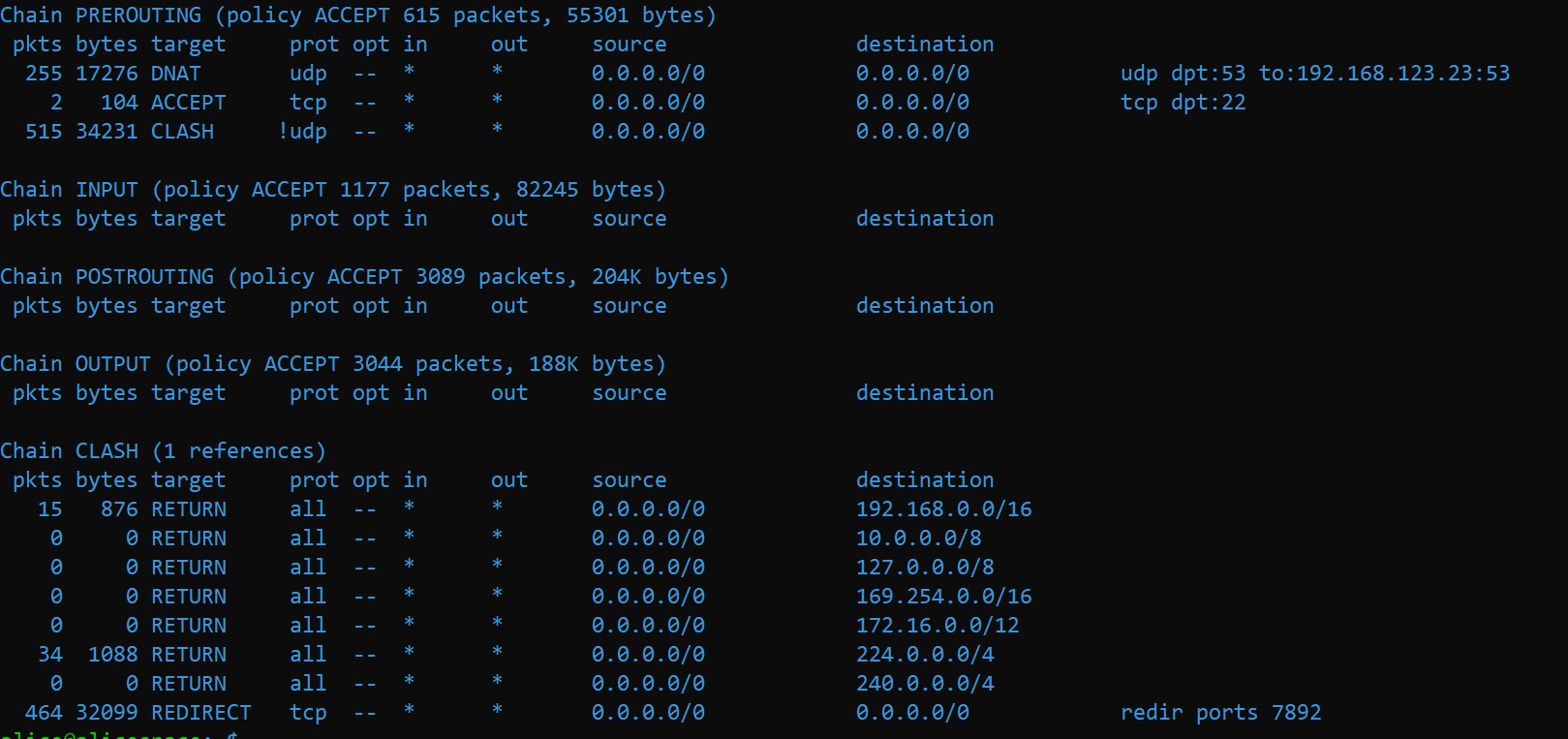
没有改变,视频开始后仍然人物静止
iptables如下
Alice-space
on 27 Apr 2020
使用了fake-ip模式
使用如下iptables
sudo iptables -t nat -N clash
sudo iptables -t nat -N clash_dns

sudo iptables -t nat -A PREROUTING -p tcp --dport 53 -d 198.19.0.0/24 -j clash_dns
sudo iptables -t nat -A PREROUTING -p udp --dport 53 -d 198.19.0.0/24 -j clash_dns
sudo iptables -t nat -A PREROUTING -p tcp -j clash

sudo iptables -t nat -A clash_dns -p udp --dport 53 -d 198.19.0.0/24 -j DNAT --to-destination 192.168.123.23:53
sudo iptables -t nat -A clash_dns -p tcp --dport 53 -d 198.19.0.0/24 -j DNAT --to-destination 192.168.123.23:53

sudo iptables -t nat -A clash -d 0.0.0.0/8 -j RETURN
sudo iptables -t nat -A clash -d 10.0.0.0/8 -j RETURN
sudo iptables -t nat -A clash -d 127.0.0.0/8 -j RETURN
sudo iptables -t nat -A clash -d 169.254.0.0/16 -j RETURN
sudo iptables -t nat -A clash -d 172.16.0.0/12 -j RETURN
sudo iptables -t nat -A clash -d 192.168.0.0/16 -j RETURN
sudo iptables -t nat -A clash -d 224.0.0.0/4 -j RETURN
sudo iptables -t nat -A clash -d 240.0.0.0/4 -j RETURN

sudo iptables -t nat -A clash -p tcp -j REDIRECT --to-ports 7892
dns设置
dns:
  enable: true
  ipv6: false
  listen: 0.0.0.0:53
  enhanced-mode: fake-ip
  fake-ip-range: 198.18.0.1/16
  nameserver:
     - 114.114.114.114
     - 223.5.5.5
  fallback:
     - tls://dns.rubyfish.cn:853
     - 8.8.8.8
其实没有必要去监听和转发53端口的tcp数据,dns只用udp。
还有我之前建议的匹配! -p udp目的是为了绕过邮件使用的iamp和pop3等协议。
还有我倒是没注意一开始你用的redir-host模式。
ZiGmaX809
on 27 Apr 2020
谢谢您
真的奇怪
我之前确实用的是redir-host
换成上面的fakeip就可以,而且现在邮件客户端也可以用,用redir-host就总有问题
不知道为什么
Alice-space
on 27 Apr 2020
谢谢您
真的奇怪
我之前确实用的是redir-host
换成上面的fakeip就可以,而且现在邮件客户端也可以用,用redir-host就总有问题
不知道为什么
dns被污染
ZiGmaX809
on 27 Apr 2020
现在基本可以使用,但是存在严重的断流问题
yt视频看一会就会断流,整个旁路由断线,ssh也无法连接,国内无法访问,这个很严重。
相反,在手机等终端使用clash就没有这个问题
Alice-space
on 27 Apr 2020
现在基本可以使用,但是存在严重的断流问题
yt视频看一会就会断流,整个旁路由断线,ssh也无法连接,国内无法访问,这个很严重。
相反,在手机等终端使用clash就没有这个问题
能夠讓我們重現這個問題的資訊不足,看起來比較像是你旁路由性能不夠吧
谢谢您
真的奇怪
我之前确实用的是redir-host
换成上面的fakeip就可以,而且现在邮件客户端也可以用,用redir-host就总有问题
不知道为什么
這看起來像是 DNS 污染
 BirkhoffLee
on 28 Apr 2020
BirkhoffLee
on 28 Apr 2020
现在基本可以使用,但是存在严重的断流问题
yt视频看一会就会断流,整个旁路由断线,ssh也无法连接,国内无法访问,这个很严重。
相反,在手机等终端使用clash就没有这个问题能夠讓我們重現這個問題的資訊不足,看起來比較像是你旁路由性能不夠吧
谢谢您
真的奇怪
我之前确实用的是redir-host
换成上面的fakeip就可以,而且现在邮件客户端也可以用,用redir-host就总有问题
不知道为什么這看起來像是 DNS 污染
谢谢!
我现在做做性能测试
主路由:newifi D2 (padavan)
旁路由:i3-7300T +16G RAM(debian buster)
均为千兆网卡、千兆网线

关停frp反向代理与minecraft服务器后,闲置如上
现在启动clash与iptables
cpu占用0.7%,RAM147M/15.5G
采用如下iptables
sudo iptables -t nat -N clash
sudo iptables -t nat -N clash_dns

sudo iptables -t nat -A PREROUTING -p tcp --dport 53 -d 198.19.0.0/24 -j clash_dns
sudo iptables -t nat -A PREROUTING -p udp --dport 53 -d 198.19.0.0/24 -j clash_dns
sudo iptables -t nat -A PREROUTING -p tcp -j clash

sudo iptables -t nat -A clash_dns -p udp --dport 53 -d 198.19.0.0/24 -j DNAT --to-destination 192.168.123.23:53
sudo iptables -t nat -A clash_dns -p tcp --dport 53 -d 198.19.0.0/24 -j DNAT --to-destination 192.168.123.23:53

sudo iptables -t nat -A clash -d 0.0.0.0/8 -j RETURN
sudo iptables -t nat -A clash -d 10.0.0.0/8 -j RETURN
sudo iptables -t nat -A clash -d 127.0.0.0/8 -j RETURN
sudo iptables -t nat -A clash -d 169.254.0.0/16 -j RETURN
sudo iptables -t nat -A clash -d 172.16.0.0/12 -j RETURN
sudo iptables -t nat -A clash -d 192.168.0.0/16 -j RETURN
sudo iptables -t nat -A clash -d 224.0.0.0/4 -j RETURN
sudo iptables -t nat -A clash -d 240.0.0.0/4 -j RETURN

sudo iptables -t nat -A clash -p tcp -j REDIRECT --to-ports 7892
clash采用如下配置
dns:
enable: true
 ipv6: false
listen: 0.0.0.0:53
enhanced-mode: fake-ip
 fake-ip-range: 198.18.0.1/16
nameserver:
 - 114.114.114.114
- 223.5.5.5
fallback:
- tls://dns.rubyfish.cn:853
- 8.8.8.8
微信视频仍然出现上述现象,接通后人像静止无声音。
在面板内关闭所有连接后,微信重新与49.4.*.*建立长连接后视频通话正常。
挂断后再次拨打(长连接不断),接通后人像静止无声音。
看视频正常,浏览网页速度正常
sudo iptables -t nat -A POSTROUTING -s 192.168.123.0/255.255.255.0 -o enp0s31f6 -j SNAT --to-source 192.168.123.23
添加如上语句后,微信视频通话正常。
播放在线视频(youtube、classin)几秒后就会稳定复现崩溃.
断连几秒,ssh连接断开reset by 192.168.123.23
网页出现DNS_PROBE_FINISHED_NO_INTERNET,几秒后正常
再次尝试播放依旧如此
是因为性能不够吗?还是配置的错误?谢谢!
Alice-space
on 28 Apr 2020
我发现了一个低级错误
fakeip段掩码是255.255.0.0
iptables掩码段是255.255.255.0
。。。被自己蠢到了
Alice-space
on 28 Apr 2020
仍然出现如上问题
计划使用tun模式。。再搞搞
Alice-space
on 28 Apr 2020
问题没有解决
使用iptables将WeChat流量49.4.*.*导向主路由
sudo iptables -t nat -A clash -d 49.4.0.0/16 -j RETURN
你试一下 iphone/ipad 都可以正常微信视频。 但是只有 Android 不行,对吧?
 jianhaochen
on 10 May 2020
jianhaochen
on 10 May 2020
@jianhaochen
经过验证,确实如此
为什么呢?Android和苹果的机制不同吗?
求大佬解释!
Alice-space
on 11 May 2020
android 的 wifi 使用 http proxy 模式 可以正常 视频。目前我是这么解决
jianhaochen
on 13 May 2020
@Kr328 You can check it out if you have time.
 Dreamacro
on 13 May 2020
Dreamacro
on 13 May 2020
我也是在wifi内手动设置http proxy
目前正常使用,除一些应用不遵循系统代理需要手动设置,其余正常
Alice-space
on 13 May 2020
尝试过 tun 了吗
从 iptables 上看 UDP 流量不经过 clash
在 fake-ip 模式下 应用解析到的 IP 是一个不可达的 IP
不经过 clash 时 数据无法到达 应用的服务器
使用 tun 能方便的处理 UDP
 Kr328
on 20 May 2020
Kr328
on 20 May 2020
请问tun 旁路网关怎么设置呢?
iptables
Alice-space
on 22 May 2020
我也有一样的问题 但是似乎和楼上的相反 redir-host可以视频 fake ip微信视频无解
 wangdatou2009
on 22 May 2020
wangdatou2009
on 22 May 2020
我用的 Clash v0.20.0 linux arm Thu May 7 14:03:42 UTC 2020 ,fake-ip模式,部署树莓派做的透明网关。
#创建clash chian
iptables -t nat -N clash
iptables -t nat -A PREROUTING -p tcp -j clash


#局域网的ip 全部return出去
iptables -t nat -A clash -d 127.0.0.0/8 -j RETURN
iptables -t nat -A clash -d 169.254.0.0/16 -j RETURN
iptables -t nat -A clash -d 172.16.0.0/12 -j RETURN
iptables -t nat -A clash -d 192.168.0.0/16 -j RETURN
iptables -t nat -A clash -d 224.0.0.0/4 -j RETURN
iptables -t nat -A clash -d 240.0.0.0/4 -j RETURN

#经过上面的过滤,剩下的tcp包交给clash
iptables -t nat -A clash -p tcp -j REDIRECT --to-ports 7892

#这是修复微信视频聊天卡住增加的,让fake-ip的udp包走clash
iptables -t nat -A clash -p udp -d 198.18.0.0/16 -j REDIRECT --to-ports 7892

#增加本机(树莓派)对fake-ip的访问的处理
iptables -t nat -A OUTPUT -p tcp -d 198.18.0.1/16 -j REDIRECT --to-ports 7892
我测试时候,使用树莓派网关的苹果手机(wifi) 给使用4g的苹果手机发视频接通后
- wifi 看 4g 画面正常
- 4g 看wifi 画面卡住不动,过几秒提示对方网络不佳后直接断掉。
以这个现象猜测,是udp 包送不出去,但是我部署的smartdns可以正常工作, 那就不是所有udp包出不去。
假设微信视频流程是,微信客户端先通过dns 解析出视频需要发送的ip地址,通过udp协议把视频流发给服务器。由于使用fakeip模式,解析出的ip是虚假的 198.18.0.0/16,之前的规则udp包不会经过clash,而直接送给了真正的网关这就有问题了。
配置了 iptables -t nat -A clash -p udp -d 198.18.0.0/16 -j REDIRECT --to-ports 7892 这条规则,把协议是udp并且ip是fake-ip的包让从clash走clash就可以还原出real ip,再送给网关,就通了。如果有同样问题的可以试试,因为微信的视频流程是我猜的,所以我这个可能是巧合正常了
 name327
on 29 May 2020
name327
on 29 May 2020
按照 @name327 的 iptables 方案
我这边用华为安卓实测, 在 redir 模式下,微信视频已经可以使用了。
感谢
jianhaochen
on 5 Jun 2020
@Alice-space 你的方案在我这边会造成死循环,全部都无法上网。
@name327 的方案亲自测试可行
jianhaochen
on 6 Jun 2020
经过一段折腾,目前采取如下方案
sudo iptables -t nat -N clash
sudo iptables -t nat -N clash_dns

sudo iptables -t nat -A PREROUTING -j clash_dns
sudo iptables -t nat -A PREROUTING -j clash

sudo iptables -t nat -A POSTROUTING -j SNAT --to-source 192.168.123.23

sudo iptables -t nat -A clash_dns -p udp --dport 53 -j DNAT --to-destination 192.168.123.23:53
sudo iptables -t nat -A clash_dns -p tcp --dport 53 -j DNAT --to-destination 192.168.123.23:53

sudo iptables -t nat -A clash -d 0.0.0.0/8 -j RETURN
sudo iptables -t nat -A clash -d 10.0.0.0/8 -j RETURN
sudo iptables -t nat -A clash -d 127.0.0.0/8 -j RETURN
sudo iptables -t nat -A clash -d 169.254.0.0/16 -j RETURN
sudo iptables -t nat -A clash -d 172.16.0.0/12 -j RETURN
sudo iptables -t nat -A clash -d 192.168.0.0/16 -j RETURN
sudo iptables -t nat -A clash -d 224.0.0.0/4 -j RETURN
sudo iptables -t nat -A clash -d 240.0.0.0/4 -j RETURN

sudo iptables -t nat -A clash -p tcp -j REDIRECT --to-ports 7892
在出口加上了SNAT,目前微信视频正常,也没有出现死循环
使用fakeip模式
wechat流量据知乎说是tcp长连接,经过我这里的实测确实如此,所以不用开启udp
@jianhaochen @name327
建议看一看各种流量的统计数据,是不是真的走了udp
sudo iptables -nvL -t nat
经过一段折腾,目前采取如下方案
sudo iptables -t nat -N clash
sudo iptables -t nat -N clash_dns

sudo iptables -t nat -A PREROUTING -j clash_dns
sudo iptables -t nat -A PREROUTING -j clash

sudo iptables -t nat -A POSTROUTING -j SNAT --to-source 192.168.123.23

sudo iptables -t nat -A clash_dns -p udp --dport 53 -j DNAT --to-destination 192.168.123.23:53
sudo iptables -t nat -A clash_dns -p tcp --dport 53 -j DNAT --to-destination 192.168.123.23:53

sudo iptables -t nat -A clash -d 0.0.0.0/8 -j RETURN
sudo iptables -t nat -A clash -d 10.0.0.0/8 -j RETURN
sudo iptables -t nat -A clash -d 127.0.0.0/8 -j RETURN
sudo iptables -t nat -A clash -d 169.254.0.0/16 -j RETURN
sudo iptables -t nat -A clash -d 172.16.0.0/12 -j RETURN
sudo iptables -t nat -A clash -d 192.168.0.0/16 -j RETURN
sudo iptables -t nat -A clash -d 224.0.0.0/4 -j RETURN
sudo iptables -t nat -A clash -d 240.0.0.0/4 -j RETURN

sudo iptables -t nat -A clash -p tcp -j REDIRECT --to-ports 7892
在出口加上了SNAT,目前微信视频正常,也没有出现死循环
使用fakeip模式wechat流量据知乎说是tcp长连接,经过我这里的实测确实如此,所以不用开启udp
@jianhaochen @name327
建议看一看各种流量的统计数据,是不是真的走了udpsudo iptables -nvL -t nat
可以啊,这个解决了微信qq的问题,
 abcdelf
on 2 Aug 2020
abcdelf
on 2 Aug 2020
This issue is stale because it has been open 60 days with no activity. Remove stale label or comment or this will be closed in 5 days
![github-actions[bot] picture](https://avatars2.githubusercontent.com/in/15368?v=4&s=40) github-actions[bot]
on 29 Oct 2020
github-actions[bot]
on 29 Oct 2020
Related issues
 Anankke
·
5Comments
Anankke
·
5Comments
 luvletter2333
·
5Comments
luvletter2333
·
5Comments
 mchotdograp
·
5Comments
mchotdograp
·
5Comments
 man2018
·
3Comments
man2018
·
3Comments
 HuLian21
·
7Comments
HuLian21
·
7Comments