Clarity: Scrolling datagrid not resizing columns, incorrect alignment when using server-driven datagrid
Select one ... (check one with "x")
[x] bug
[ ] feature request
[ ] enhancement
Expected behavior
Columns resize correctly and align correctly using server-driven datagrid,
Actual behavior
Columns do not resize once data is loaded.
Cell alignment is incorrect once dataset triggers scrollbar.
Column headers have incorrect width for values < 96px.
Reproduction of behavior
http://plnkr.co/edit/JbbJ58SQGOvPbFp5vNq4?p=preview
Environment details
Angular version: 4.0.1
Clarity version: 0.9.2
OS and version: Win 10
Browser: Chrome 58.0.3029.81 | Firefox 50.0.2
 brinton-chand
All 8 comments
So from this plunker, I see 2 actual bugs. I'm not sure what you mean by "Cell alignment is incorrect once dataset triggers scrollbar", I looked around in the plunker for some time and didn't see anything that could match this description.
Here are the bugs with more detail:
- Data lazy-loaded but given to us through
*clrDgItemsdoesn't trigger a column resize. It's an edge case we missed: lazy loading with*ngForworks fine and correctly sizes columns, because that's the default server-driven case, but lazy loading the full dataset to then use*clrDgItemsto have a full client-side datagrid is something we missed. - The column resizing feature introduced in #766 forced a minimum width on column headers, but did not do so on cells. Because of this, we get a misalignment when the user-defined width on a column is smaller than the allowed min-width. Maybe @Shijir can look at that.
Thank for filing the bugs!
 youdz
on 1 May 2017
youdz
on 1 May 2017
Happy to help, and sorry for the cryptic description - column alignment would stay correct until there were enough rows to trigger the scrollbar overflow, after which the cell columns would resize and misalign - but it sounds like that is a symptom of your first point.
On a site note, I couldn't find any documentation for the datagrid scrolling feature outside of the 0.8.10 changelog notes.
brinton-chand
on 3 May 2017
Just checking to see if there is a workaround we can do before the fix is implemented for item 1 around the *clrDgItems not auto-resizing the columns on dynamic data loading, or if I could get a hint about the direction to look to try implementing a fix. Thanks!
 TechRazor
on 16 May 2017
TechRazor
on 16 May 2017
@TechRazor
I've had some success with manually triggering change detecting and then calling the resize function on the datagrid using ViewChild after updating the data source, see below.
@ViewChild('myDataGrid') myDataGrid;
this.ref.detectChanges();
this.myDataGrid.organiser.resize();
This appears to fix my issues while waiting for a update.
brinton-chand
on 17 May 2017
Thanks @brinton-chand, that worked for getting the columns to resize after the dynamic data loaded.
TechRazor
on 17 May 2017
I want to share some thoughts regarding 'resize' option.
When height of table changes - pagination placement changed as well.
So you can't paginate well - you need to catch arrow each time on different place (height).
Therefore it worth to consider resize as optional.
I think I rather prefer scroll (that could be replaced with 'perfect scroll' - which also solves spacing issues due to padding shifts) when content size bigger then content of first page

And whitespace when content smaller
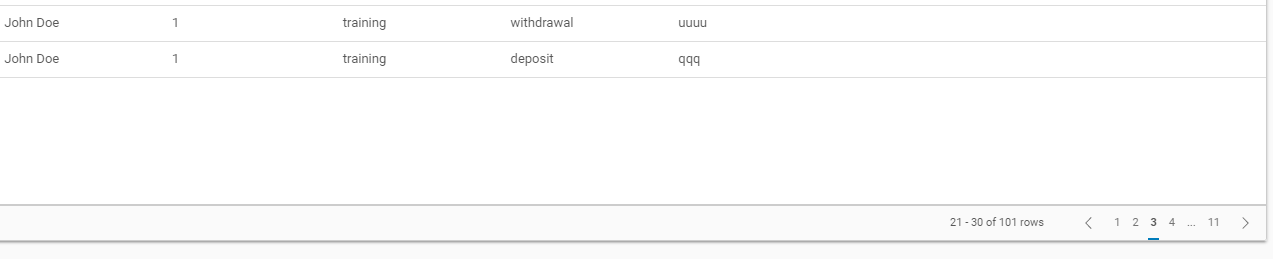
Rather then pagination height jumps.
 ph55
on 13 Jun 2017
ph55
on 13 Jun 2017
@TechRazor
@brinton-chand
I am avoiding the CSS changes to .data-cell class.
Can you guys tell me how or where to add this code below?
@ViewChild('myDataGrid') myDataGrid;
this.ref.detectChanges();
this.myDataGrid.organiser.resize();
Thank you.
 sK-1005
on 12 Oct 2018
sK-1005
on 12 Oct 2018
Hi there 👋, this is an automated message. To help Clarity keep track of discussions, we automatically lock closed issues after 14 days. Please look for another open issue or open a new issue with updated details and reference this one as necessary.
![github-actions[bot] picture](https://avatars.githubusercontent.com/in/15368?v=4&s=40) github-actions[bot]
on 19 Sep 2020
github-actions[bot]
on 19 Sep 2020
Related issues
 elesueur
·
3Comments
elesueur
·
3Comments
 ChrisKaun
·
3Comments
ChrisKaun
·
3Comments
 aaronfrost
·
3Comments
aaronfrost
·
3Comments
 nkolchakov
·
3Comments
nkolchakov
·
3Comments
 mayesgr
·
3Comments
mayesgr
·
3Comments
Most helpful comment
So from this plunker, I see 2 actual bugs. I'm not sure what you mean by "Cell alignment is incorrect once dataset triggers scrollbar", I looked around in the plunker for some time and didn't see anything that could match this description.
Here are the bugs with more detail:
*clrDgItemsdoesn't trigger a column resize. It's an edge case we missed: lazy loading with*ngForworks fine and correctly sizes columns, because that's the default server-driven case, but lazy loading the full dataset to then use*clrDgItemsto have a full client-side datagrid is something we missed.Thank for filing the bugs!