Ckeditor5: Block toolbar doesn't scroll within scrollable div
📝 Provide detailed reproduction steps (if any)
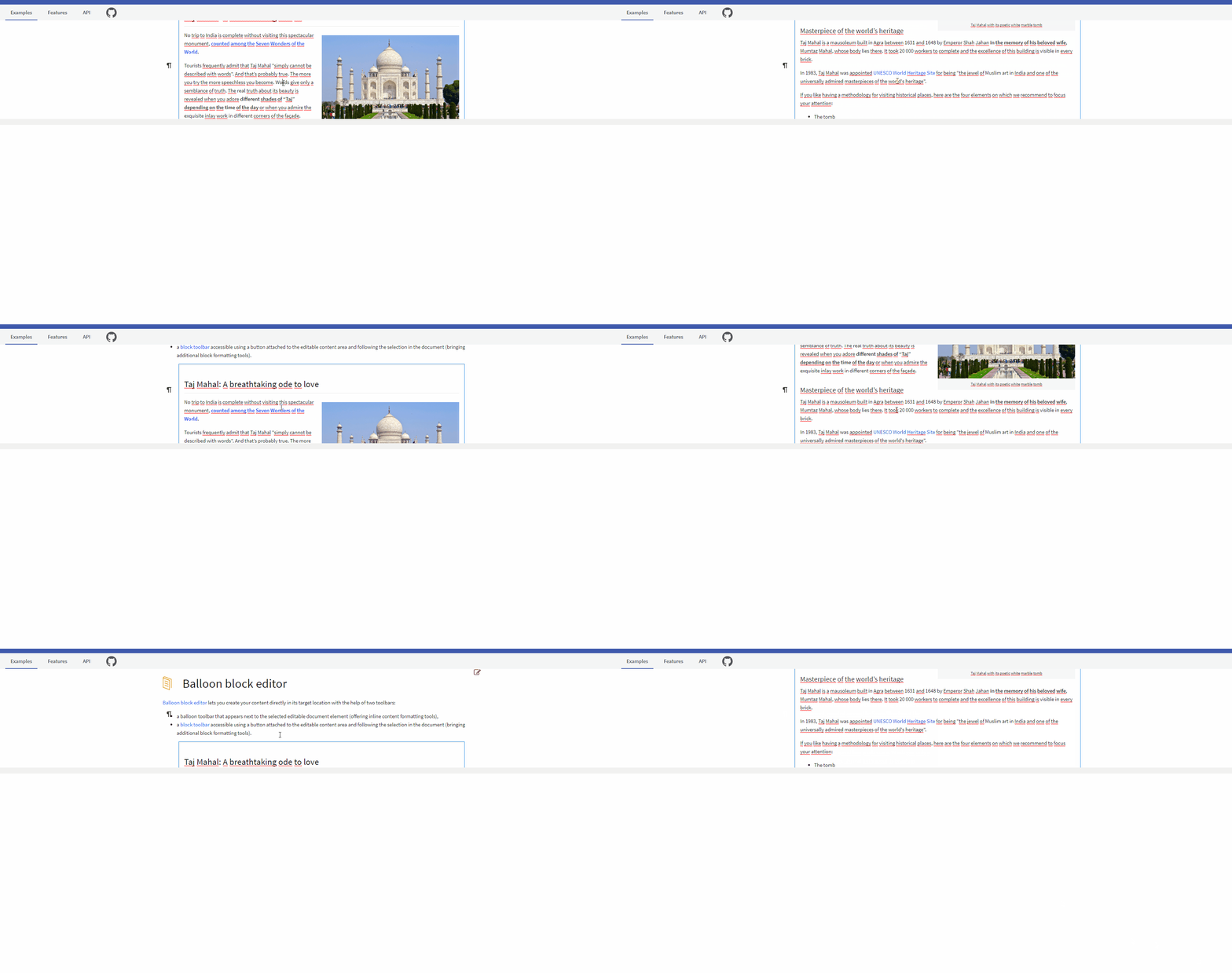
- go to https://ckeditor.com/docs/ckeditor5/latest/examples/builds/balloon-block-editor.html or any other example with a block toolbar
- create / modify css/dom to have a scrollable div around editor (e.g. add
    max-height: 300px;
    overflow: scroll;
to main section on the example page)
- scroll div
✔️ Expected result
Toolbar sticks to row/cursor.
❌ Actual result
Block toolbar does not stick to row/cursor.
📃 Other details
- Browser: Chrome 84.0.4147.89
- OS: Windows 10 Pro
- CKEditor version: 20.0.0
- Installed CKEditor plugins: BlockToolbar
If you'd like to see this fixed sooner, add a 👍 reaction to this post.
 Shaegi
All 2 comments
Hiding the button when the document is being scrolled should help a lot.
But still, whenever the element the buttons "anchored" to scrolls out of the viewport, the button will follow, which is a twin issue to #5328 (same but about balloons).
The good news, however is that IIRC the block toolbar button has a custom positioning implementation unrelated the balloon system so fixing it does not require systemic changes. It could be a pretty easy fix because the toolbar already operates on the Rect-level when it comes to editable and the target https://github.com/ckeditor/ckeditor5/blob/master/packages/ckeditor5-ui/src/toolbar/block/blocktoolbar.js#L433 so it's all about checking whether the "target is out of editable".
 oleq
on 10 Aug 2020
oleq
on 10 Aug 2020
Hiding the button when the document is being scrolled should help a lot.
But not fix the problem entirely, if I understand correctly — the button will still be in a weird between-the-lines position when the document stops scrolling. I think hiding the button is not necessary if the button is positioned correctly at all times.
 neongreen
on 9 Dec 2020
neongreen
on 9 Dec 2020
Related issues
 Reinmar
·
3Comments
Reinmar
·
3Comments
 wwalc
·
3Comments
wwalc
·
3Comments
 devaptas
·
3Comments
devaptas
·
3Comments
 jodator
·
3Comments
jodator
·
3Comments
 PaulParker
·
3Comments
PaulParker
·
3Comments