Ckeditor5: To Add multiple attribute on inline element
In our case, there had some required to trans multiple attrs from Model To View and it just keep in object, not for DOM,I tried to add upcastDispatcher on that but it can not locate the right position, I console on it and found which in conversionApi the data.modelCursor isn't correct it throw this [Exception: CKEditorError: model-position-path-incorrect: The position's path is incorrect.
versions
"@ckeditor/ckeditor5-basic-styles": "^19.0.1",
"@ckeditor/ckeditor5-core": "^19.0.1",
"@ckeditor/ckeditor5-dev-utils": "^20.0.0",
"@ckeditor/ckeditor5-editor-classic": "^19.0.1",
"@ckeditor/ckeditor5-essentials": "^19.0.1",
"@ckeditor/ckeditor5-highlight": "^19.0.1",
"@ckeditor/ckeditor5-paragraph": "^19.1.0",
"@ckeditor/ckeditor5-restricted-editing": "^19.0.1",
"@ckeditor/ckeditor5-theme-lark": "^19.1.0",
"@ckeditor/ckeditor5-widget": "^19.1.0",
"postcss-loader": "^3.0.0",
"raw-loader": "^3.1.0",
"style-loader": "^1.2.1",
"webpack": "^4.43.0",
"webpack-cli": "^3.3.11"
original HTML
<div id="editor">
  <p>
    before
    <span class="inlineSignificantData" data-significantParaDataType="pd02">test on multiple attrs</span>
    after
  </p>
</div>
now i want to add another attrs on Model until it convert to View to extract, i confirm that it will pass the schema, but it finally shows wrong
code is here
   data.upcastDispatcher.on('element:span', (evt, data, conversionApi) => {
   const { consumable, schema, writer } = conversionApi
   const { viewItem } = data
   if (consumable.test(viewItem, {classes:'inlineSignificantData',attributes: ['significantParaDataType' ,'extraCustomAttr','name'] })) {
    const { modelRange } = conversionApi.convertChildren(data.viewItem, data.modelCursor)
    writer.setAttributes(
       {
         name: 'inlineSignificantData',
         significantParaDataType:'psd02',
         extraCustomAttr:'test1',
       },
       modelRange
     )

   }
 },{priority:'high'})
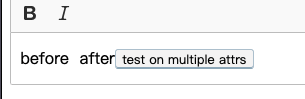
in finally HTML this span show in wrong place
 pheeno
All 3 comments
Hi, the main issue I see is that you've registered inline element (span) as an element. In CKEditor 5, the best way to handle inline elements is representing them as model attributes which convert to inline elements in the view, e.g. span.
Here is a simple example of handling span element with a class attribute:
class AllowSpanElement extends Plugin {
    init() {
       this.editor.model.schema.extend( '$text', { allowAttributes: [ 'spanClasses' ] } );

       // Add an upacast (view-to-model) converter for class attribute of a span.
       this.editor.conversion.for( 'upcast' ).elementToAttribute( {
            view: {
                 name: 'span',
                 attributes: { class: true }
            },
            model: {
                 key: 'spanClasses',
                 value: viewElement => viewElement.getAttribute( 'class' )
            }
       } );

       // Add an downcast (model-to-view) converter for class attribute of a span.
       this.editor.conversion.for( 'downcast' ).attributeToElement( {
            model: 'spanClasses',
            view: ( modelAttributeValue, viewWriter ) => {
                 return viewWriter.createAttributeElement( 'span', {
                      class: modelAttributeValue
                 } );
            }
       } );
    }
}
It should give you an idea, how to handle such elements.
 Mgsy
on 29 Jun 2020
Mgsy
on 29 Jun 2020
excellent it's very helpful thank you !
pheeno
on 29 Jun 2020
excellent it's very helpful thank you !
No problem, have fun with CKEditor 5 :)
Mgsy
on 29 Jun 2020
Related issues
 Reinmar
·
3Comments
Reinmar
·
3Comments
Reinmar
·
3Comments
Reinmar
·
3Comments
 wwalc
·
3Comments
wwalc
·
3Comments
 pomek
·
3Comments
wwalc
·
3Comments
pomek
·
3Comments
wwalc
·
3Comments