Ckeditor5: Headings with IDs and links
I'm not sure if this is a docs issue or a bug. Either way, I'd love some help figuring it out.
End goal
I have headings with IDs <hN id="someID">Text</hN> and I want them to have a link automatically added inside, surrounding the text, like <hN id="someID"><a href="#someID">Text</a></hN>.
What we've tried
For all the following, the same schema was used:
        schema.register( 'questionTitle', {
            isLimit: true,
            allowIn: 'question',
            allowAttributes: [ 'id', 'toc-link-href' ],
            allowContentOf: '$block'
        } );
There are also converters for the questionTitle element itself, which I'm including just in case that conflicts with the rest of this for some reason:
questionTitle converters
        // <questionTitle> converters
        conversion.for( 'upcast' ).elementToElement( {
            view: {
                name: 'h5'
            },
            model: ( viewElement, modelWriter ) => {
                const id = viewElement.getAttribute('id') || this._nextId();
                let element = modelWriter.createElement( 'questionTitle', {
                    'id': id,
                } );
                modelWriter.setAttribute('toc-link-href', '#' + id, element);
                return element;
            },
            // Use high priority to overwrite heading converters defined in
            // customelementattributepreservation.js.
            converterPriority: 'high',
        } );
        conversion.for( 'dataDowncast' ).elementToElement( {
            model: 'questionTitle',
            view: ( modelElement, viewWriter ) => {
                //debugger;
                return viewWriter.createEditableElement( 'h5', {
                    'id': modelElement.getAttribute( 'id' ) || this._nextId(),
                } );
            },
            // Use high priority to overwrite heading converters defined in
            // customelementattributepreservation.js.
            converterPriority: 'high'
        } );
        conversion.for( 'editingDowncast' ).elementToElement( {
            model: 'questionTitle',
            view: ( modelElement, viewWriter ) => {
                const h5 = viewWriter.createEditableElement( 'h5', {
                    'id': modelElement.getAttribute( 'id' ) || this._nextId(),
                } );

                enablePlaceholder( {
                    view: editing.view,
                    element: h5,
                    text: 'Question Title'
                } );

                return toWidgetEditable( h5, viewWriter );
            },
            // Use high priority to overwrite heading converters defined in
            // customelementattributepreservation.js.
            converterPriority: 'high'
        } );
attributeToElement
Seems like the easiest way to go, so we've tried a few things here. For example:
        conversion.for( 'dataDowncast' ).attributeToElement( {
            model: {
                key: 'toc-link-href',
                name: 'questionTitle'
            },
            view: ( attributeValue, viewWriter ) => {
                if ( !attributeValue ) {
                    return;
                }
                const a = viewWriter.createAttributeElement( 'a', { href: attributeValue, toc: true },{ priority: 5} );
                return a;
            }, converterPriority: 'highest'
        } );
Or variations:
        conversion.for( 'dataDowncast' ).attributeToElement( {
            model: 'toc-link-href',
            view: ( attributeValue, viewWriter ) => {
                if ( !attributeValue ) {
                    return;
                }
                const a = viewWriter.createAttributeElement( 'a', { href: attributeValue, toc: true },{ priority: 5} );
                return a;
            }, converterPriority: 'highest'
        } );
Even if we forget about the href for a second and just try to get any element at all:
        conversion.for( 'dataDowncast' ).attributeToElement( {
            model: 'toc-link-href',
            view: 'a',
            converterPriority: 'highest'
        } );
The view function runs, as expected, but the AttributeElement is never inserted into the document. It seems to just disappear. Why? I saw https://github.com/ckeditor/ckeditor5/issues/4321, but it's closed and there's a PR addressing it. Can attributeToElement still not be used on non-$text elements?
Results
Model:
<questionTitle id="4" toc-link-href="#4">Text</questionTitle>
Data View:
<h5 id="4">Text</h5>
dispatcher
After trying a bunch of different model/view config definitions and createAttributeElement priorities (which I still don't understand), we switched to the lower-level dispatcher to see if that made a difference. There doesn't seem to be any documentation on how to do this, but pulling from the ImageLink plugin mentioned in https://github.com/ckeditor/ckeditor5/issues/702#issuecomment-391730463, I came up with this:
        conversion.for( 'dataDowncast' ).add( dispatcher => {
            dispatcher.on( 'attribute:toc-link-href', ( evt, data, conversionApi ) => {
              const href = data.attributeNewValue;
              // The heading will be already converted - so it will be present in the view.
              const viewHeading = conversionApi.mapper.toViewElement( data.item );

              // Below will wrap newly created link element by already converted heading.

              // 1. Create empty link element.
              const linkElement = conversionApi.writer.createContainerElement( 'a', { href, toc: true } );

              // 2. Insert link after associated heading.
              const positionAfterHeading = conversionApi.writer.createPositionAfter( viewHeading );
              conversionApi.writer.insert( positionAfterHeading, linkElement );

              // 3. Move whole link to a converted heading.
              const rangeOnLink = conversionApi.writer.createRangeOn( linkElement );
              const positionAtHeading = conversionApi.writer.createPositionAt( viewHeading, 0 );
              conversionApi.writer.move( rangeOnLink, positionAtHeading );
            }, { priority: 'normal' } );
        } );
This one at least puts an element in the data view, but it doesn't wrap the text, and I have no idea how to accomplish that. I still don't understand what the position or mapping code is doing at all. Is there a way to get this to wrap the text inside the heading with the a?
Results
Model:
<questionTitle id="4" toc-link-href="#4">Text</questionTitle>
Data View:
<h5 id="4">Text<a href="#4" toc="true"> </a></h5>
Are either of these solutions close to what we should be doing? Is there a better way? This feels like it should be possible, but I can't figure out how to get it working.
 rshipp
All 4 comments
Hi! How about using UpcastDispatcher and adding simple linkHref attribute to the text?
conversion.for( 'upcast' ).add( dispatcher => {
    dispatcher.on( 'element:h5', ( evt, data, conversionApi ) => {
        const { schema, writer } = conversionApi;

        for ( const item of data.modelRange.getItems( { shallow: true } ) ) {
            const href = item.getAttribute( 'toc-link-href' );

            for ( const child of item.getChildren() ) {
                if ( child.is( 'text' ) ) {
                    writer.setAttribute( 'linkHref', href, text );
                }
            }
        }
    } );
}, { priority: 'low' } );
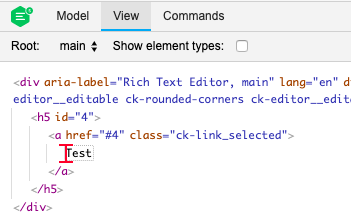
This is the example model/view representation for the following HTML - <h5 id="4">Test</h5>:
Model:
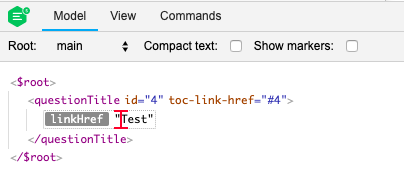
View:
 Mgsy
on 18 May 2020
Mgsy
on 18 May 2020
😮 I didn't know you could modify children like that, looks perfect. We'll try it out, thanks!
rshipp
on 18 May 2020
:open_mouth: I didn't know you could modify children like that, looks perfect. We'll try it out, thanks!
Great to hear that :) If you don't mind, I'll close this issue, as my answer seems to solve your case. If you'll have any additional questions, feel free to post it.
Mgsy
on 18 May 2020
This worked beautifully! Thanks again.
rshipp
on 20 May 2020
Related issues
 Reinmar
·
3Comments
Reinmar
·
3Comments
 oleq
·
3Comments
oleq
·
3Comments
 wwalc
·
3Comments
wwalc
·
3Comments
 MansoorJafari
·
3Comments
wwalc
·
3Comments
MansoorJafari
·
3Comments
wwalc
·
3Comments