Ckeditor5: Are infoboxes supported? (question)
Sorry, it's just a question but there's no label that fits.
I'm wondering if infoboxes/alerts/notices are supported. I could not find it in the docs. I'm talking about these:
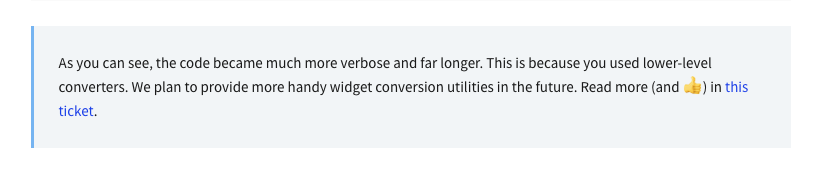
question
 gavinhewitt
All 2 comments
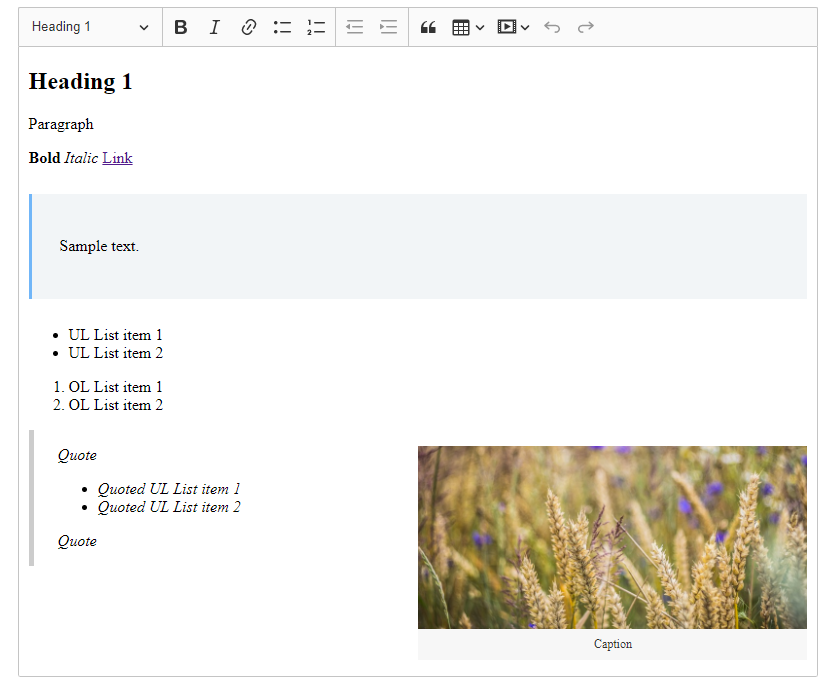
Hello, infoboxes are not supported in CKEditor 5, however, you can implement it by yourself. The easiest way to do it will be creating a block widget.
I've made a quick PoC showing a basic implementation based on the mentioned guide:
import Plugin from '@ckeditor/ckeditor5-core/src/plugin';
import { toWidget, toWidgetEditable } from '@ckeditor/ckeditor5-widget/src/utils';
import Widget from '@ckeditor/ckeditor5-widget/src/widget';

export default class InfoBox extends Plugin {
    init() {
        this._defineSchema();
    this._defineConverters();
    }

    _defineSchema() {
        const schema = this.editor.model.schema;

        schema.register( 'infoBox', {
            // Behaves like a self-contained object (e.g. an image).
            isObject: true,

            // Allow in places where other blocks are allowed (e.g. directly in the root).
            allowWhere: '$block'
        } );

        schema.register( 'infoBoxDescription', {
            // Cannot be split or left by the caret.
            isLimit: true,
            allowIn: 'infoBox',
            // Allow content which is allowed in the root (e.g. paragraphs).
            allowContentOf: '$root'
        } );
    }

    _defineConverters() {
       const conversion = this.editor.conversion;

       conversion.for( 'upcast' ).elementToElement( {
           model: 'infoBox',
           view: {
               name: 'div',
               classes: 'info-box'
           }
       } );
       conversion.for( 'dataDowncast' ).elementToElement( {
           model: 'infoBox',
           view: {
               name: 'div',
               classes: 'info-box'
           }
       } );

       conversion.for( 'editingDowncast' ).elementToElement( {
         model: 'infoBox',
         view: ( modelElement, viewWriter ) => {
             const div = viewWriter.createContainerElement( 'div', { class: 'info-box' } );

             return toWidget( div, viewWriter, { label: 'info box widget' } );
         }
     } );

     conversion.for( 'upcast' ).elementToElement( {
        model: 'infoBoxDescription',
        view: {
            name: 'div',
            classes: 'info-box-description'
        }
    } );
    conversion.for( 'dataDowncast' ).elementToElement( {
        model: 'infoBoxDescription',
        view: {
            name: 'div',
            classes: 'info-box-description'
        }
    } );
    conversion.for( 'editingDowncast' ).elementToElement( {
        model: 'infoBoxDescription',
        view: ( modelElement, viewWriter ) => {
            // Note: You use a more specialized createEditableElement() method here.
            const div = viewWriter.createEditableElement( 'div', { class: 'info-box-description' } );

            return toWidgetEditable( div, viewWriter );
        }
    } );
   }
}
.info-box {
    position: relative;
    margin: 1.666em 0;
    background: #f2f5f7;
    border-left: 3px solid #64b5f6;
    padding: 1.666em;
}
<div id="editor">
    <p>Paragraph</p>
    <div class="info-box">
        <div class="info-box-description">
            <p>
                Sample text.
            </p>
        </div>
    </div>
</div>
 Mgsy
on 24 Feb 2020
Mgsy
on 24 Feb 2020
🎉2
❤1
Great, thanks!
gavinhewitt
on 25 Feb 2020
Was this page helpful?
0 / 5 - 0 ratings
Related issues
 hybridpicker
·
3Comments
hybridpicker
·
3Comments
 pjasiun
·
3Comments
pjasiun
·
3Comments
 PaulParker
·
3Comments
PaulParker
·
3Comments
 pomek
·
3Comments
pomek
·
3Comments
 oleq
·
3Comments
oleq
·
3Comments
Most helpful comment
Hello, infoboxes are not supported in CKEditor 5, however, you can implement it by yourself. The easiest way to do it will be creating a block widget.
I've made a quick PoC showing a basic implementation based on the mentioned guide: