Ckeditor5: Code coverage dropped below 100%
The List code coverage is  (99% now) :scream:
As coverals report the change was on removing BS from this repo which suggests that either engine changed or we do not record coverage from other browsers (is this possible @pomek?)
 jodator
All 11 comments
What does yarn run test -c say?
 oleq
on 13 Jun 2019
oleq
on 13 Jun 2019
we do not record coverage from other browsers (is this possible @pomek?)
We generate CC only from Chrome.
 pomek
on 13 Jun 2019
pomek
on 13 Jun 2019
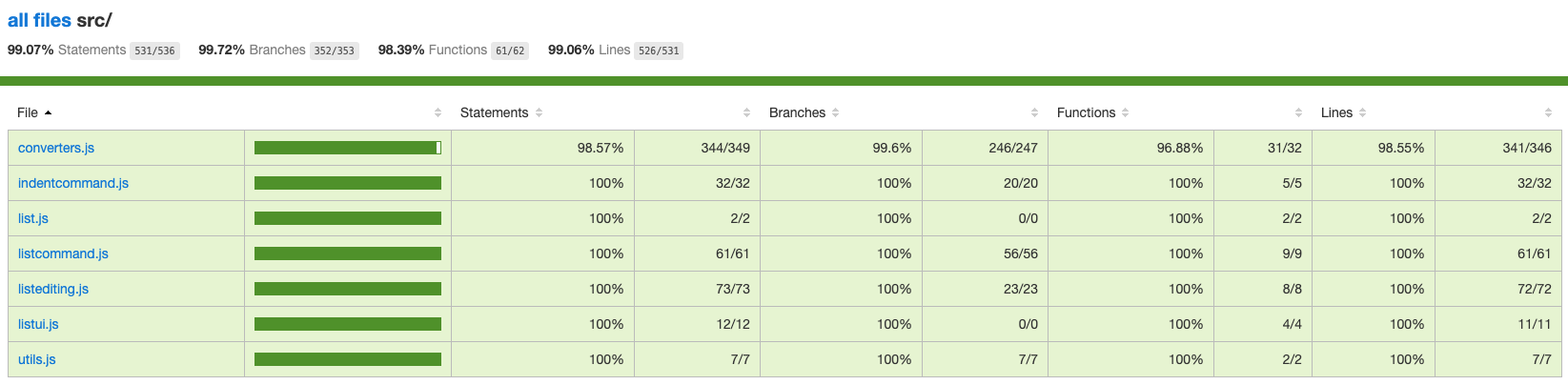
I executed tests locally.
pomek
on 14 Jun 2019
It looks like CC dropped below 100% here – https://travis-ci.org/ckeditor/ckeditor5-list/builds/521189123 (https://github.com/ckeditor/ckeditor5-list/commit/d7344e1792afc53ef14ea33d9292142869cd4601).
pomek
on 14 Jun 2019
I checked a few revision commits (last one: https://github.com/ckeditor/ckeditor5/commit/ed8b69cb87a3d71375425e0c05710c691e06aad8) and CC is below 100% on each of them. I guess it's not our fault. The one thing that has been changed during the period is Chrome's version. Not sure how it could be related to each other but it looks like it is.
pomek
on 14 Jun 2019
pomek
on 14 Jun 2019
But still - didn't we introduce something in the engine that created that drop? I know that the commits are unrelated to coverage drop but it might be also engine (as well as the Chrome version change) changes that causes this drop.
jodator
on 14 Jun 2019
- The following line is never executed https://github.com/ckeditor/ckeditor5-list/blob/master/src/converters.js#L867.
- The first bad master-revision is https://github.com/ckeditor/ckeditor5/commit/11285da4668c9a3dc6738ca51eaf461edb4ab2ff.
- Generated by the following commit in ckeditor5-paragraph https://github.com/ckeditor/ckeditor5-paragraph/commit/eca096fcba5ce3417043638fe8e6192223f836df.
- Part of https://github.com/ckeditor/ckeditor5-paragraph/pull/45.
cc @scofalik
Bisect people 😛
oleq
on 18 Jun 2019
😢
 scofalik
on 18 Jun 2019
scofalik
on 18 Jun 2019
AFAICS after the changes in autoparagraphing our code no longer produce this case: https://github.com/ckeditor/ckeditor5-list/blob/741e550ad2b0b55bf0e788230bcbe04703c06ad3/src/converters.js#L865.
The only way to test this is to create a custom converter that would set data.modelCursor to an unexpected position, ie in newly created element:
editor.conversion.for( 'upcast' ).add( dispatcher => dispatcher.on( 'element:splitBlock', ( evt, data, conversionApi ) => {
    conversionApi.consumable.consume( data.viewItem, { name: true } );

    const splitBlock = conversionApi.writer.createElement( 'paragraph' );
    const splitResult = conversionApi.splitToAllowedParent( splitBlock, data.modelCursor );

    conversionApi.writer.insert( splitBlock, splitResult.position );

    const child = data.viewItem.getChild( 0 );
    conversionApi.convertItem( child, conversionApi.writer.createPositionAt( splitBlock, 0 ) );

    data.modelRange = conversionApi.writer.createRangeOn( splitBlock );
    data.modelCursor = conversionApi.writer.createPositionAt( splitBlock, 'end' );
} ) );
and use it inside a list:
clipboard.fire( 'inputTransformation', {
    content: parseView( '<ul><li><splitBlock>baz</splitBlock></li><li>Z</li></ul>' )
} );
This would create an else statement to test - I have hovewer problem with this as the output is:
<listItem listIndent="0" listType="bulleted">Abaz</listItem>
<listItem listIndent="0" listType="bulleted">Z[]</listItem>
<listItem listIndent="1" listType="bulleted">B</listItem>
<listItem listIndent="2" listType="bulleted">C</listItem>
so the splitBlock is "removed" and the baz text is moved to already existing list item.
Now should we test for a wrong API use at all? /cc @scofalik
jodator
on 5 Aug 2019
The question is "What is a wrong API use?". I don't think we should test or write cases for wrong API usage (apart of places where we throw something). But I am not entirely sure this is an incorrect cast. I remember that modelCursor was supposed to be flexible but I don't remember how much.
This situation:
data.modelCursor = conversionApi.writer.createPositionAt( splitBlock, 'end' );
looks like it actually could be happening in the old paragraphing. I would check for that. This would make sense if after my changes (to autoparagraphing) this is not happening anymore.
scofalik
on 5 Aug 2019
Related issues
 MansoorJafari
·
3Comments
MansoorJafari
·
3Comments
 Reinmar
·
3Comments
jodator
·
3Comments
Reinmar
·
3Comments
jodator
·
3Comments
 devaptas
·
3Comments
Reinmar
·
3Comments
devaptas
·
3Comments
Reinmar
·
3Comments
Most helpful comment
😢