Ckeditor5: [Word] Image not uploaded when copying full document content
The image is not uploaded when copying the full contents of the Word document.
When copying only the image with the surrounding paragraphs, the image is uploaded again.
Test Word file:
PasteFromWordTest.docx
EDIT: I used Word 2016 (Office 365 ProPlus), version 1808
If you'd like to see this fixed sooner, add a 👍 reaction to this post.
 fubar-coder
All 37 comments
cc @Mgsy @f1ames
 Reinmar
on 11 Feb 2019
Reinmar
on 11 Feb 2019
Hi, @fubar-coder, I've just tested PFO with the provided document and I'm not able to reproduce this issue. The image was uploaded properly (using Word for Office 365, version 1901).
Could you give us more information about your development environment or show us your CKEditor 5 config?
 Mgsy
on 11 Feb 2019
Mgsy
on 11 Feb 2019
I used the CKEditor 5 demo (classic): https://ckeditor.com/ckeditor-5/demo/
Other than that, I cannot tell you much more except that I used Word 1808.
fubar-coder
on 11 Feb 2019
Unfortunately, I'm still not able to reproduce your issue - the content is pasted properly in all demos (checked on Windows/Mac in all browsers).
Could you record a screencast which shows exact steps to reproduce? Additionally, you can check the console whether there is any error.
Mgsy
on 11 Feb 2019
FYI: I used Chrome 71.0.3578.98.
EDIT: The problem still exists in version 72.0.3626.96. Firefox works as expected.
fubar-coder
on 11 Feb 2019
@f1ames, is it possible that the Word version (Word 2016, version 1808) could generate some problems with pasting images?
@fubar-coder, could you check whether you can reproduce it in our Paste from Word sample? Also, please open the console to spot any errors.
Mgsy
on 12 Feb 2019
The problem is reproducible. I attached the console log.
ckeditor.com-1549966746009.log
fubar-coder
on 12 Feb 2019
Works for me too - Word 16.21 (190117) on Chrome 71.0.3578.98 (macOS).
When tested with Paste from Word sample I got Error: Illegal file mime type from Easy Image plugin (upload error, seems like .gif is not supported), but the image itself is inserted correctly:

so this is something different.
Looking at the log attached by @fubar-coder it looks like the image is not correctly transformed into base64 representation. I'm not sure why it does not happen in our environments 🤔
To clarify, @fubar-coder you were able to reproduce the issue on Paste from Word sample with Chrome? What OS do you use?
I would like to ask you to try with this codepen sample to see if it works. And then, after pasting, if you could share the content of Clipboard HTML container (below editor) e.g. as gist (because it will be quite large).
 f1ames
on 12 Feb 2019
f1ames
on 12 Feb 2019
Yes, I can reproduce this problem with the given sample. I use Windows 10, 1809, Build 17763.253.
This is the gist which contains two files: one for Chrome (with the error) and one for Firefox (succeeding)
https://gist.github.com/fubar-coder/10a04caa0fa4d6fd4da48076f5fb5740
fubar-coder
on 13 Feb 2019
Thanks for clarification and sharing output code @fubar-coder!
The strange thing is that the output is basically identical for both browsers (apart from the empty line on the beginning which is always added in Firefox) - see the diff https://www.diffchecker.com/u9nwqdkS.
At least we know that the issues is not Word clipboard output itself. I assume the case might be that for some reason extracting image RTF data fails in Chrome. One cause may be the fact that extraction function checks for jpg/png like types in RTF data:
Maybe with particular Windows/Word versions the type is different 🤔
Since we are not able to reproduce it on Windows with the similar setup, I would ask you @fubar-coder for one more thing. Same as before if you could try with this codepen sample and share whole Images RTF data as a gist, I would greatly appreciate.
f1ames
on 13 Feb 2019
Chrome didn't show anything in the "Images RTF". I also created a Gist for "Images RTF" while using Firefox:
https://gist.github.com/fubar-coder/7a66caac06db86ed0d5fc7f71ba727bc
fubar-coder
on 13 Feb 2019
Some additional note: data.dataTransfer.getData( 'text/rtf' ) returns an empty string 😕
EDIT: Maybe this bug (or a similar one) is back: https://bugs.chromium.org/p/chromium/issues/detail?id=317807
fubar-coder
on 13 Feb 2019
Thanks again @fubar-coder.
Some additional note:
data.dataTransfer.getData( 'text/rtf' )returns an empty string
That's strange TBH and since you are using recent version of the Chrome browser https://bugs.chromium.org/p/chromium/issues/detail?id=317807 should be fixed. Is it possible that you have any active 3rd-party software or a Chrome extensions which may manipulate clipboard contents (you may try to run the sample with all extensions turned off if you have any to check it)?
f1ames
on 14 Feb 2019
Yes, I tried both the "Incognito Window" and also disabled all extensions and restarted the browser, but the problem stays.
fubar-coder
on 14 Feb 2019
The same problem with an identical error message - https://github.com/ckeditor/ckeditor5/issues/1710 (I can't reproduce it).
Here is the file from the ticket:
123.docx
Mgsy
on 29 Apr 2019
是的,我尝试了“隐身窗口”并禁用了所有扩展并重新启动了浏览器,但问题仍然存在。
I had the same problem.How did you finally solve it ?
 Hubmayun123
on 9 May 2019
Hubmayun123
on 9 May 2019
I see that I can reproduce similar or same issue, when image is located inside a table. In such scenario I couldn't get an image pasted in CKEditor.
 msamsel
on 28 May 2019
msamsel
on 28 May 2019
Another case reported - https://github.com/ckeditor/ckeditor5-paste-from-office/issues/60.
Mgsy
on 9 Jul 2019
Doesn't work for me too. Maybe it's because MS Word version is 2013.
 lasfin
on 30 Jul 2019
lasfin
on 30 Jul 2019
@lasfin, can I ask you to provide a sample file which allows you to reproduce the problem? Also, it will be great if you can copy the content from this file, paste it to this codepen sample and share result from Clipboard HTML.
I will also confirm this issue as so many people experience it. Unfortunately, it's hard to debug because none of us can reproduce it.
Mgsy
on 30 Jul 2019
@Mgsy
test.docx
lasfin
on 30 Jul 2019
Finally, I was able to reproduce this issue, however only in our manual tests. My environment:
- Windows 10
- MS Word 365 (16.0.12026.20334)
The scenario which worked for me:
- Add
PFOplugin to Easy Image manual test. - Insert an image to the Word document.
- Ctrl + A.
- Ctrl + C.
- Paste inside the Easy Image manual test.
Error:
Not allowed to load local resource: file:///C:/Users/****/AppData/Local/Temp/msohtmlclip/01/clip_image001.png
@Mgsy Hello!
With problem https://github.com/ckeditor/ckeditor5/issues/2493#issuecomment-545326729
Now, I'am stuck in this mistake.
Do you have a solution for this issues?
 tuannd255
on 18 Feb 2020
tuannd255
on 18 Feb 2020
Hi @tuannd255. Unfortunately, we haven't worked on this issue yet, so I'm afraid I can't propose any solution. However, you can add 👍 to the first post to raise the popularity of the issue.
Mgsy
on 18 Feb 2020
Windows 7(64bit)
Google Chrome 80.0.3987.132
Microsoft Office Professional Plus 2013
Classic editor5
"@ckeditor/ckeditor5-editor-classic": "^17.0.0",
"@ckeditor/ckeditor5-editor-decoupled": "^17.0.0",
"@ckeditor/ckeditor5-editor-inline": "^17.0.0",
"@ckeditor/ckeditor5-engine": "^17.0.0",
"@ckeditor/ckeditor5-enter": "^17.0.0",
"@ckeditor/ckeditor5-essentials": "^17.0.0",
"@ckeditor/ckeditor5-font": "^17.0.0",
...
Not allowed to load local resource: file:///C:/Users/**/AppData/Local/Temp/msohtmlclip1/01/clip_image001.jpg
 Adaer
on 17 Mar 2020
Adaer
on 17 Mar 2020
Windows 7(64bit)
Google Chrome 80.0.3987.132
Microsoft Office Professional Plus 2013
Classic editor5
"@ckeditor/ckeditor5-editor-classic": "^17.0.0",
"@ckeditor/ckeditor5-editor-decoupled": "^17.0.0",
"@ckeditor/ckeditor5-editor-inline": "^17.0.0",
"@ckeditor/ckeditor5-engine": "^17.0.0",
"@ckeditor/ckeditor5-enter": "^17.0.0",
"@ckeditor/ckeditor5-essentials": "^17.0.0",
"@ckeditor/ckeditor5-font": "^17.0.0",
...
Not allowed to load local resource:
file:///C:/Users/**/AppData/Local/Temp/msohtmlclip1/01/clip_image001.jpg
@Mgsy Hi,
Test link: https://ckeditor.com/docs/ckeditor5/latest/features/pasting/paste-from-word.html
Test word: CKEditor5.PFO.Sample.Recognition_of_Achievement.docx.
Problem description:
When the Paste from Office content has a headline and image.
<h2 style="text-align:center;">
<span style="color:#4472C4;">Recognition of Achievement</span>
</h2>
error: Not allowed to load local resource: file:///C:/Users/**/AppData/Local/Temp/msohtmlclip1/01/clip_image001.jpg
Not headline, will be pasted successfully!
Adaer
on 17 Mar 2020
When copying 'heading 1' and image from word.
error: Not allowed to load local resource:
file:///C:/Users/**/AppData/Local/Temp/msohtmlclip1/01/clip_image001.jpg
Adaer
on 17 Mar 2020
Hi @Adaer, thanks for this insight!
I can reproduce this - when you copy whole content containing some image it throws the usual error: file:///C:/Users/**/AppData/Local/Temp/msohtmlclip1/01/clip_image001.jpg
But when you copy the whole content ( + image ) without the Word headline, it pastes just fine.
 FilipTokarski
on 17 Mar 2020
FilipTokarski
on 17 Mar 2020
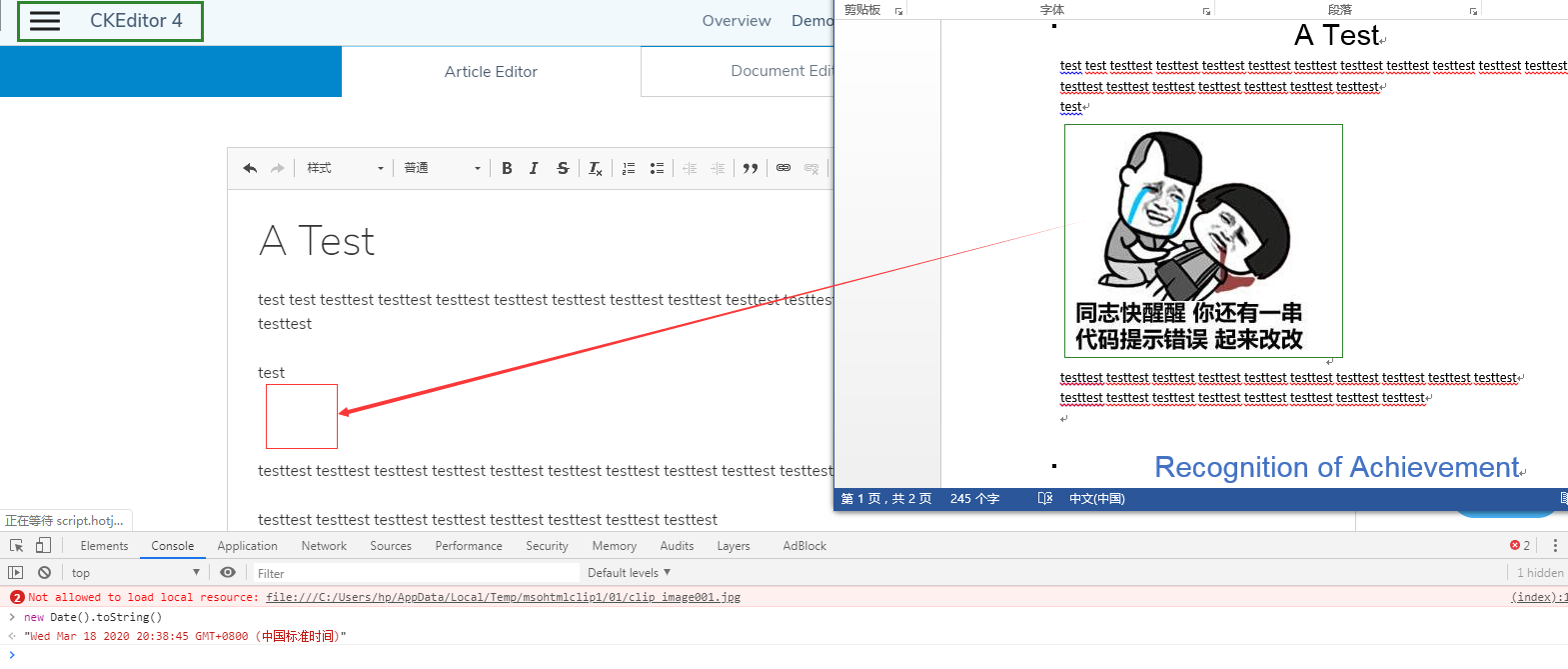
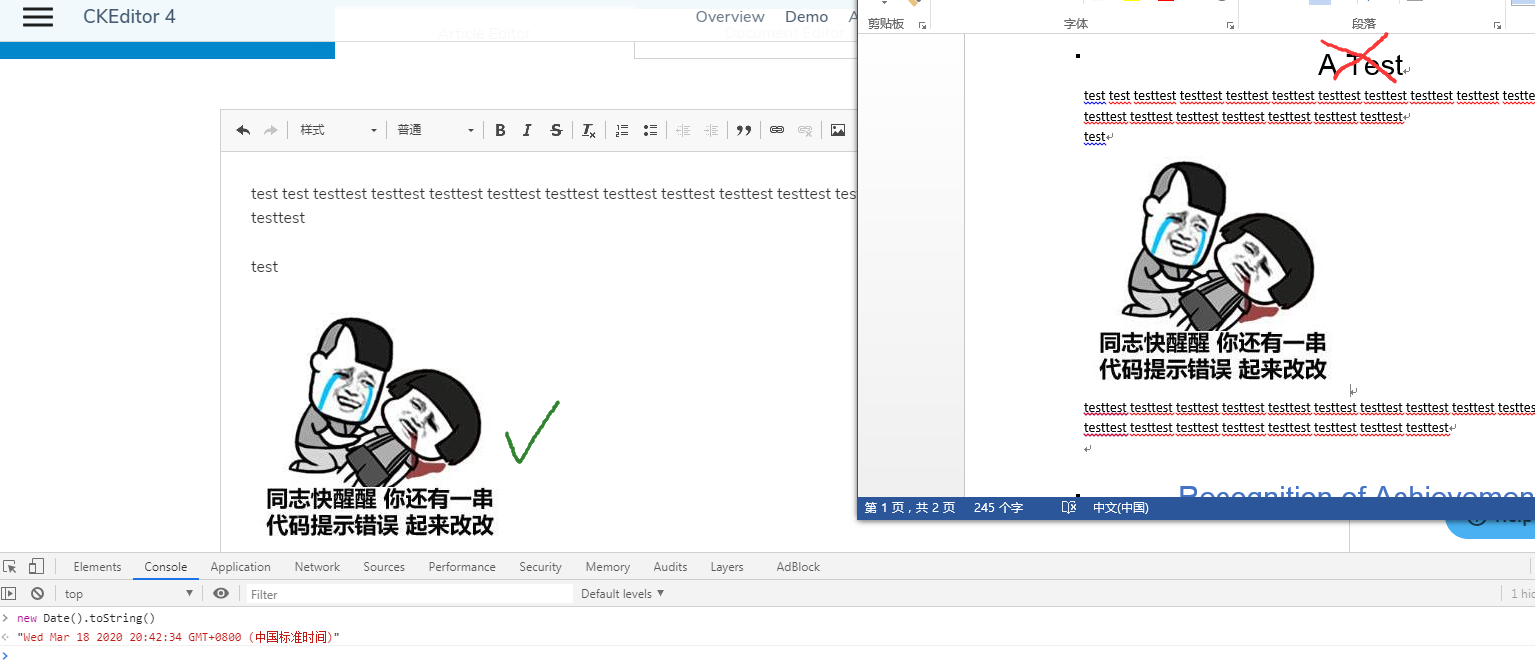
Out of curiosity – does it work well in CKEditor 4?
Reinmar
on 18 Mar 2020
Out of curiosity – does it work well in CKEditor 4?
Test link: https://ckeditor.com/ckeditor-4/demo/
Google Chrome 80.0.3987.132.
Paste test screenshot:
 Adaer
on 18 Mar 2020
Adaer
on 18 Mar 2020
I was able to reproduce this issue last week, but today I'm unable to reproduce the problem. Might be that the Chrome team fixed this overnight (v84.0.4147.105 @ Win10).
@Adaer @tuannd255 @lasfin @fubar-coder can any of you confirm that the issue is no longer reproducible?
Repro steps:
- Open https://ckeditor.com/docs/ckeditor5/latest/features/pasting/paste-from-word.html
- Open test.docx in MS Word.
- Copy all the content in Word (ctrl+ a , ctrl + c).
- Paste into the editor.
Expected and current result: Image gets pasted.
Unexpected (can no longer repro): Console error like `NI was able to reproduce this issue last week, but today I'm unable to reproduce the problem. Might be that the Chrome team fixed this overnight (v84.0.4147.105 @ Win10).
@Adaer @tuannd255 @lasfin @fubar-coder can any of you confirm that the issue is no longer reproducible?
Repro steps:
- Open https://ckeditor.com/docs/ckeditor5/latest/features/pasting/paste-from-word.html
- Open test.docx in MS Word.
- Copy all the content in Word (ctrl+ a , ctrl + c).
- Paste into the editor.
Expected and current result: Image gets pasted.
Unexpected (can no longer reproduce): Console error like Not allowed to load local resource: file:///C:/Users/****/AppData/Local/Temp/msohtmlclip/01/clip_image001.png
 mlewand
on 12 Aug 2020
mlewand
on 12 Aug 2020
Bumped into a bug that may be related, described here: https://github.com/ckeditor/ckeditor5/issues/7915
Word version: 16.40
Browser: Chrome v84.0.4147.125 on macOS (Catalina)
CKEditor version: 21.0.0
List of CKEditor plugins in use:
SimpleUploadAdapter,
    Autoformat,
    BlockQuote,
    Bold,
    Essentials,
    Heading,
    Image,
    ImageCaption,
    ImageResize,
    ImageStyle,
    ImageToolbar,
    ImageUpload,
    Italic,
    Link,
    List,
    MediaEmbed,
    Paragraph,
    PasteFromOffice,
    Strikethrough,
    Subscript,
    Superscript,
    TextTransformation,
    Underline,
    Code,
 marcellofuschi
on 24 Aug 2020
marcellofuschi
on 24 Aug 2020
Some time ago, while testing this issue, I was not able to reproduce it. However, now I can reproduce it, e.g. in our all-features manual test with this test file.
Note: I can't reproduce it in the default sample from our online builder (with the default set of plugins).
Mgsy
on 5 Oct 2020
@mlewand I can still reproduce the bug, but I only tested it with the Word document I provided in this issue (initial comment).
fubar-coder
on 9 Oct 2020
Test Word file:
PasteFromWordTest.docx
In the case of copying the whole content (including styled headings), the text/rtf is not available in the DataTransfer object which is used for retrieving image data. Moreover, if the copied text does not include any images but includes any styles (for example Heading 1) the text/rtf is not available but this isn't an issue for the editor, because RTF is used only to access images from pasted content. OTOH if the copied document fragment does include an image but there are no styled elements (like heading 1) the text/rtf is available so an image is pasted properly. This is happening on macOS 10.14.6, Word for Mac 16.44. The same seems not to happen on Windows and Word 16.0 (2011). But this seems to be a case in some other configurations.
While checking other text editors I noticed that some of them just ignore the image in the content, and some are displaying a warning that some images failed to import.
I guess the only solution would be to remove unhandled images from pasted content (so the editor won't throw an error while trying to access local file) and maybe display some notification.
This is a different case. In this file there is no <img> element in pasted data, there is just <v:shape><v:imagedata src="...."/></v:shape> and this case is not implemented in the CKEditor 5. This seems to be handled in CKEditor 4: https://github.com/ckeditor/ckeditor4/blob/5380706bb4ceb6092dadb2b7067d6c14efec6b26/plugins/pastefromword/filter/default.js#L368
 niegowski
on 22 Dec 2020
niegowski
on 22 Dec 2020
I don't understand one thing. What does CKEditor 4 do differently that it handles one of the cases well? I mean this: https://github.com/ckeditor/ckeditor5/issues/2493#issuecomment-600604339
It'd be great if you could describe each case in terms of:
- what happens and on which OSes?
- did anyone solve it?
- if so or if you see that it's solvable anyway – what do we have to do to also solve it? is it expensive?
- if no one solved it and it really can't be solved, what can we do to ensure the best UX?
Reinmar
on 22 Dec 2020
I don't understand one thing. What does CKEditor 4 do differently that it handles one of the cases well? I mean this: #2493 (comment)
It's handling that case in the exact same way as CKEditor 5 - notice that in that screenshots one paste includes "A Test" heading and the other does not.
- what happens and on which OSes?
I tested only on 2 computers (a different OS, a different version of Word), and on the other one it worked just ok.
- did anyone solve it?
I checked 3 editors and none of them solved it (image is ignored or warning notification appears as mentioned above).
- if so or if you see that it's solvable anyway – what do we have to do to also solve it? is it expensive?
I can't see any reasonable solution (I consider asking users to allow HD access would not be reasonable).
- if no one solved it and it really can't be solved, what can we do to ensure the best UX?
I think that displaying notification would be reasonable. And of course, the editor should not try accessing local files - that also should be fixed.
niegowski
on 22 Dec 2020
Related issues
 MCMicS
·
3Comments
MCMicS
·
3Comments
 pjasiun
·
3Comments
pjasiun
·
3Comments
 jodator
·
3Comments
jodator
·
3Comments
 oleq
·
3Comments
Reinmar
·
3Comments
oleq
·
3Comments
Reinmar
·
3Comments
Most helpful comment