Ckeditor5: Existing inline styles being stripped out by editor, when editing.
Is this a bug report or feature request? (choose one)
🐞 Bug report | 🆕 Feature request | Other
This is a question/or Feature request
💻 Version of CKEditor
@ckeditor/ckeditor5-build-decoupled-document": "^12.3.1"
📋 Steps to reproduce
1.
2.
✅ Expected result
When a document is opened in editor ready to be edited, it should retain all of the pre-existing content including any inline styles.
❎ Actual result
Inline styles on the document are lost.
📃 Other details that might be useful
Is there a setting which can be set in order to retain pre-existing inline styles while editing a document. I am developing a new editor which will be used to create new and edit existing documents, we want to retain all of the styles currently on the documents. I am relatively new to the Ckeditor/wysiwyg world, please excuse me if this is a silly question.
 seaniemc
All 9 comments
CKEditor 5 has its own data model, so your inline styles are lost, because the editor can't recognize them. To preserve them, you should extend the Schema and create a proper conversion.
I'd like to encourage you to read our CKEditor 5 architecture guide and go through the Creating a simple plugin guide to understand how it works.
 Mgsy
on 9 Sep 2019
Mgsy
on 9 Sep 2019
@Mgsy IMHO I think the style should be preserved since it probably comes from a template where you want to specify some initial behavior. Could keep it the same way it does when you are editing and have some style in a paragraph, press enter twice and continue typing, it will have it's style preserved even in the empty paragraph, only when you save it or type and delete something it will clean it's style.
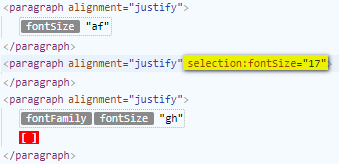
To me it seams desired and even a bug the editor removing the style when I call editor.setData('<p style="text-align:center;"><strong> </strong></p>') and I don't get the BOLD style but I do get the text-align style.
IMHO it should keep both, since it is being defined by code/template.
 dkrahn
on 18 Sep 2019
dkrahn
on 18 Sep 2019
To me it seams desired and even a bug the editor removing the style when I call
editor.setData('<p style="text-align:center;"><strong> </strong></p>')and I
is fixed on master with https://github.com/ckeditor/ckeditor5-engine/issues/404 so it should be available in the next release.
 jodator
on 18 Sep 2019
jodator
on 18 Sep 2019
@jodator I just want to clarify that the https://github.com/ckeditor/ckeditor5-engine/issues/404 release, will make the need for my own model schema and conversions obsolete? And the Editor will now retain exsisting styles.
seaniemc
on 20 Sep 2019
@seaniemc I meant the case in the previous comment - when there was a in some inline style element (like <strong>) that is supported by the editor.
When it comes to the _any_ inline content styles you have to have a plugin added to the editor that supports such style. In other words, we do not retain all possible styles as this requires extending the model's schema and defining a conversion.
jodator
on 20 Sep 2019
@jodator Thats what I taught. Is there any good examples of such a plugin that you could reference me to use, I have created something based on a comment I seen in one of the issues on the github page. Below is the code for such but i am not sure if I have implemeted it correctly in the proper manner. Any advise or tips would be great I am using Angular.
private allowedAttributes = [
'width', 'height', 'style', 'target', 'class', 'id', 'name', 'title', 'type', 'olddisplay', 'align', 'lang',
'border', 'cellspacing', 'cellpadding', 'color', 'valign', 'clear', 'src', 'shapes', '&',
'prefix', 'tagtype', 'datetime', 'cite', 'cols', 'colspan', 'noshade', 'text-decoration',
'shape', 'start', 'background-color', 'alt', 'strong', 'onclick', 'files', '<hr />',
'com', 'background-color', 'rowspan', 'span', 'page', 'content',
'action', 'method', 'value', 'autofocus', 'maxlength', 'rows', 'for', 'aria-label', 'checked', 'selected',
'rel', 'scope', 'location', 'cellpacing', 'block-id',
'original-style', 'datatype', 'property', 'controls', 'controlslist', 'data-attr', 'poster', 'preload',
'tabindex', 'role', 'aria-describedby', 'aria-disabled','aria-haspopup', 'onmouseover', 'onmouseout', 'onmouseup', 'xsd', 'xsi',
'href', 'col', 'doc', 'attach', 'pls', 'vspace', 'hspace', 'slatepath'];
public onReady( editor ) {
this.stylesConversion(editor);
editor.plugins.get('FileRepository').createUploadAdapter = (loader) => {
return new UploadAdapter(loader, this.http, this.articleObj);
};
}
private stylesConversion(editor) {
//creates a new schema to to keep preexisting styles
editor.model.schema.extend('$root', { allowAttributes: this.allowedAttributes });
editor.model.schema.extend('$block', { allowAttributes: this.allowedAttributes });
editor.model.schema.extend('$text', { allowAttributes: this.allowedAttributes });
for (var i = 0; i < this.allowedAttributes.length; i++) {
editor.conversion.attributeToAttribute({ model: this.allowedAttributes[i], view: this.allowedAttributes[i] });
}
editor.model.schema.extend('paragraph', { allowAttributes: '__style' });
editor.conversion.for('upcast').attributeToAttribute({
model: {
key: '__style',
name: 'paragraph'
},
view: 'style'
});
editor.conversion.for('downcast').add(dispatcher => {
dispatcher.on('attribute:__style:paragraph', (evt, data, conversionApi) => {
conversionApi.consumable.consume(data.item, evt.name);
const viewElement = conversionApi.mapper.toViewElement(data.item);
conversionApi.writer.setAttribute('style', data.attributeNewValue, viewElement);
});
});
}
Well if this works then it should do the trick - especially for passing any style. With all the attributes allowed on every block it might get unexpected results on breaking a block (by Enter).
jodator
on 20 Sep 2019
To me it seams desired and even a bug the editor removing the style when I call
editor.setData('<p style="text-align:center;"><strong> </strong></p>')and Iis fixed on master with ckeditor/ckeditor5-engine#404 so it should be available in the next release.
current release has fixed ?
 cathy0023
on 8 Oct 2019
cathy0023
on 8 Oct 2019
can anyone help me how can i apply style attribute on link tag.
 usama-ayub
on 16 Oct 2019
usama-ayub
on 16 Oct 2019
Related issues
 wwalc
·
3Comments
wwalc
·
3Comments
 Reinmar
·
3Comments
wwalc
·
3Comments
Reinmar
·
3Comments
wwalc
·
3Comments
 metalelf0
·
3Comments
Reinmar
·
3Comments
metalelf0
·
3Comments
Reinmar
·
3Comments
Most helpful comment
is fixed on master with https://github.com/ckeditor/ckeditor5-engine/issues/404 so it should be available in the next release.