Ckeditor5: How to disable inserting text in all elements except some custom elements
Is this a bug report or feature request? (choose one)
Other => question
💻 Version of CKEditor
CKEditor 5 with custom Editor (inspired by Classic Editor and Multiroot editor)
:question: Question
I want to disable inserting text in all element except some i have created.
I've try with addChildCheck but even if this function return false the text is inserted.
I'va also tried to see with extend of an element but the allowIn add elements and not remove actual elements.
How can i do that?
 Dawen18
All 9 comments
safdsa
 Rajeshkodati
on 30 Aug 2019
Rajeshkodati
on 30 Aug 2019
Hi @Dawen18, can you explain more precisely what do you want to achieve? Do you want to disable inserting text in custom elements inside the editor (i.e. divs) or in specified editor's editable fields (in case of the multi-root editor which you've mentioned)?
 Mgsy
on 2 Sep 2019
Mgsy
on 2 Sep 2019
Hi, @Mgsy
I want to disable inserting of text in $root element and allow only in some element I've registered.
For example textElement can contain $text but no other can.
Dawen18
on 2 Sep 2019
@jodator, can you write some tips on how to achieve it?
Mgsy
on 9 Sep 2019
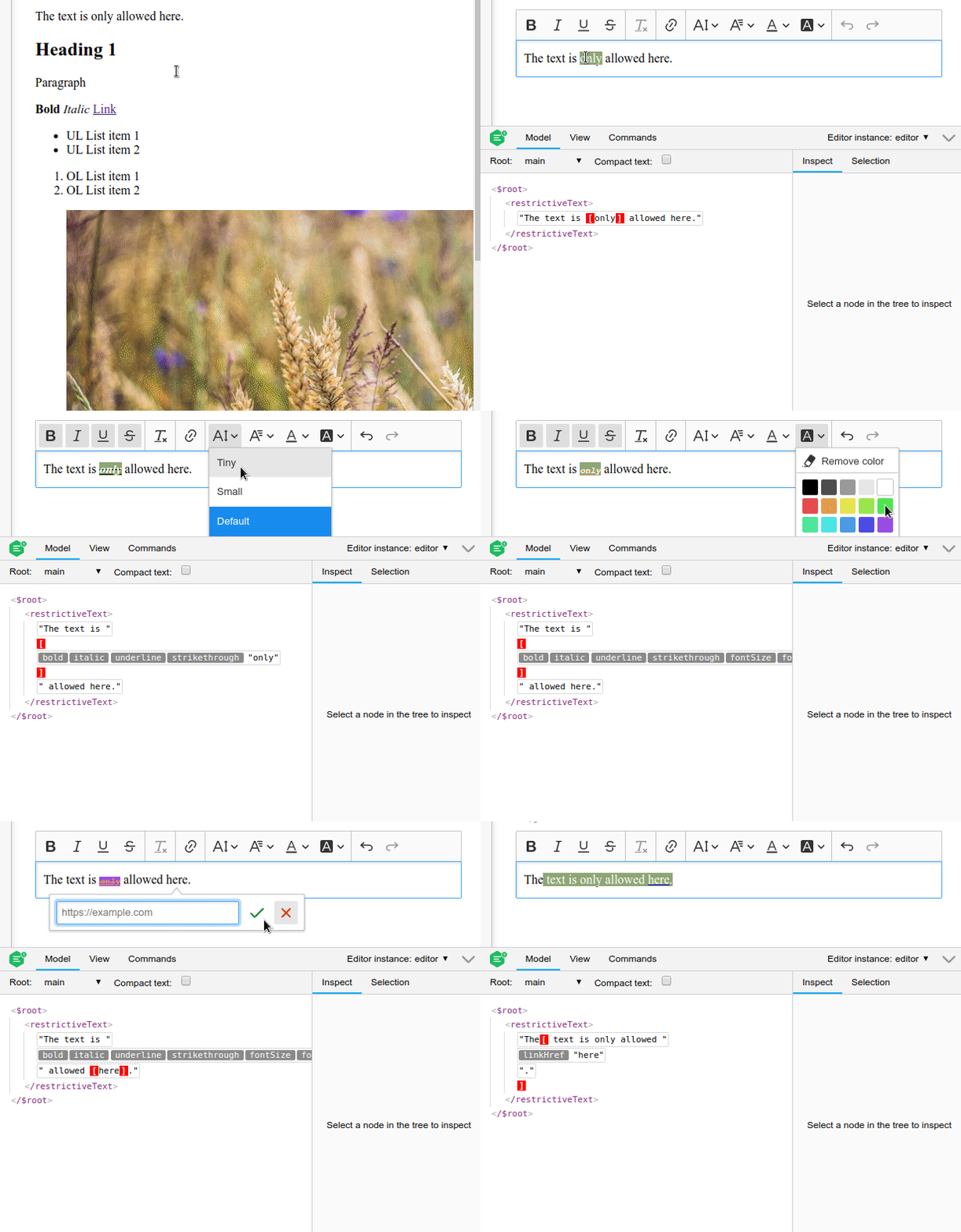
So a quick example of such plugin would be like below:
import ClassicEditor from '@ckeditor/ckeditor5-editor-classic/src/classiceditor';

import Plugin from '@ckeditor/ckeditor5-core/src/plugin';
import Essentials from '@ckeditor/ckeditor5-essentials/src/essentials';
import Bold from '@ckeditor/ckeditor5-basic-styles/src/bold';
import Italic from '@ckeditor/ckeditor5-basic-styles/src/italic';
import Link from '@ckeditor/ckeditor5-link/src/link';
import Font from '@ckeditor/ckeditor5-font/src/font';
import Underline from '@ckeditor/ckeditor5-basic-styles/src/underline';
import Strikethrough from '@ckeditor/ckeditor5-basic-styles/src/strikethrough';
import RemoveFormat from '@ckeditor/ckeditor5-remove-format/src/removeformat';

class RestrictiveText extends Plugin {
    init() {
        const editor = this.editor;
        const schema = editor.model.schema;

        // Define model element that can have a text.
        schema.register( 'restrictiveText', {
            allowIn: '$root',
            // allowContentOf: '$block',
            isBlock: true,
            isObject: true
        } );

        schema.addChildCheck( ( context, childDefinition ) => {
            // Return Boolean value only for text nodes.
            if ( childDefinition.name == '$text' ) {
                // Allow text only inside `restrictiveText` model element.
                return context.endsWith( 'restrictiveText' );
            }
        } );

        // Add a basic conversion:
        editor.conversion.elementToElement( {
            model: 'restrictiveText',
            view: {
                name: 'div',
                classes: 'allow-text'
            },
            converterPriority: 'highest'
        } );
    }
}

ClassicEditor
    .create( document.querySelector( '#editor' ), {
        plugins: [ Essentials, Bold, Italic, Underline, Strikethrough,
            RemoveFormat, Link, Font, RestrictiveText ],
        toolbar: [
            'bold',
            'italic',
            'underline',
            'strikethrough',
            '|',
            'removeFormat',
            '|',
            'link',
            '|',
            'fontSize',
            'fontFamily',
            'fontColor',
            'fontBackgroundColor',
            '|',
            'undo',
            'redo'
        ]
    } );
The editor is initialized over this content:
<div id="editor">
    <div class="allow-text">The text is only allowed here.</div>
    <h2>Heading 1</h2>
    <p>Paragraph</p>
    <p><strong>Bold</strong> <i>Italic</i> <a href="https://ckeditor.com">Link</a></p>
    <ul>
        <li>UL List item 1</li>
        <li>UL List item 2</li>
    </ul>
    <ol>
        <li>OL List item 1</li>
        <li>OL List item 2</li>
    </ol>
    <figure class="image image-style-side">
        <img alt="bar" src="sample.jpg">
        <figcaption>Caption</figcaption>
    </figure>
    <blockquote>
        <p>Quote</p>
        <ul>
            <li>Quoted UL List item 1</li>
            <li>Quoted UL List item 2</li>
        </ul>
        <p>Quote</p>
    </blockquote>
</div>
And you can see it in action here:
 jodator
on 9 Sep 2019
jodator
on 9 Sep 2019
Hi @jodator
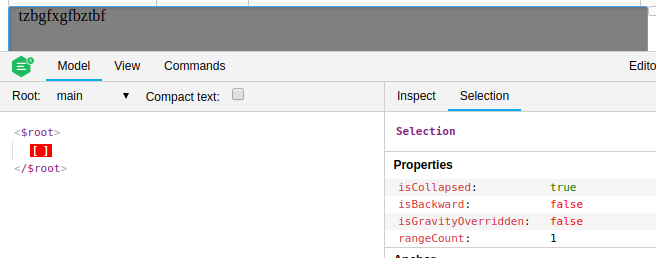
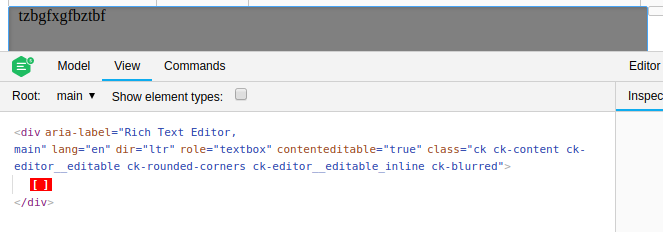
I already tested with addChildCheck. It works because model and view not contains $text but text are still visible in editor.
But as I could have done something wrong, I tested by adding a plugin in my editor that contains your code, but it does not work.
As you can see, $ text is always added in the editor but is not actually added in the model and view. And I have an Error.
<Uncaught CKEditorError: model-nodelist-offset-out-of-bounds: Given offset cannot be found in the node list. Read more: https://ckeditor.com/docs/ckeditor5/latest/framework/guides/support/error-codes.html#error-model-nodelist-offset-out-of-bounds
  CKEditorError
  offsetToIndex
  offsetToIndex
  get index
  get textNode
  validateTextNodePosition
  _validateSelectionRange
Can I disable text adding in editor?
Dawen18
on 10 Sep 2019
Any news on this issue?
 jmendes92
on 18 Sep 2019
jmendes92
on 18 Sep 2019
@Dawen18 - the editor must have something inside - at your screenshot, there are no text nodes probably. I see an empty root with a selection set inside it. Empty root without any other content inside isn't something that we aim for when testing the editor. We enforce at least one empty paragraph which can have text inside. If you don't put any other node inside it may cause problems in some features. That's why I've created a restrictiveText element that can have text inside.
@MendesJ what in particular do you mean here? At the moment I don't see a bug in editor that is initialized improperly.
jodator
on 18 Sep 2019
@jodator Ok thanks, I will test with at least one element and come back to you.
Dawen18
on 18 Sep 2019
Related issues
 oleq
·
3Comments
oleq
·
3Comments
 benjismith
·
3Comments
benjismith
·
3Comments
 MansoorJafari
·
3Comments
MansoorJafari
·
3Comments
 pandora-iuz
·
3Comments
pandora-iuz
·
3Comments
 hybridpicker
·
3Comments
hybridpicker
·
3Comments