Ckeditor5: ckEditor-Angular, viewportTopOffset: is not working
Is this a bug report or feature request? (choose one)
🐞 Bug report
ckEditor 5 - with Angular
ClassicEditor
add viewportTopOffset in config json as below
public ckEditorConfig = {
      viewportTopOffset: 300,
        toolbar: [
          'heading',.....
.........
✅ Toolbar should work as sticky
❎ Not working as sticky
 kapilthakkar2912
All 4 comments
Hello, viewportTopOffset property should be defined inside toolbar (look at the example on our documentation page).
Your config should look like this:
```js
public ckEditorConfig = {
toolbar: {
items: [ 'heading' ],
viewportTopOffset: 300
}
// ...
}
 Mgsy
on 5 Jun 2019
Mgsy
on 5 Jun 2019
Sorry my bad :(
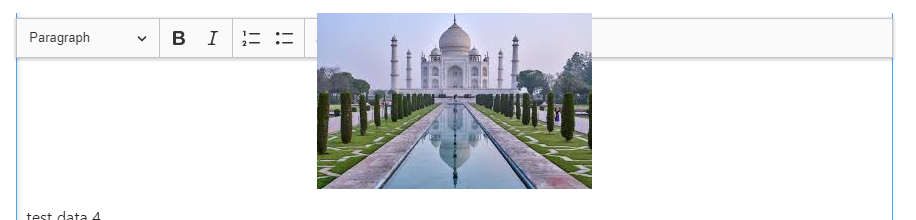
But when image added then toolbar get overlap.
kapilthakkar2912
on 5 Jun 2019
Hi @kapilthakkar2912,
Probably your CSS overrides the default CKEditor 5 CSS for the image. We can't do anything about it. You should create a page which CSS don't affect the CKEditor 5 editor.
These are the default styles for the image element:
.ck-content .image>img {
    display: block;
    margin: 0 auto;
    max-width: 100%;
}
And note that if you have:
img {
   // some prop: value;
}
Then it will affect all images, including images in the CKEditor 5 editor.
 ma2ciek
on 5 Jun 2019
ma2ciek
on 5 Jun 2019
Hi @ma2ciek ,
Thank you for your replay.
I have added following css code in style.css and its work :).
.ck-content .image>img {
    display: block;
    margin: 0 auto;
    max-width: 100%;
}
Related issues
 Reinmar
·
3Comments
Reinmar
·
3Comments
 pomek
·
3Comments
pomek
·
3Comments
 hybridpicker
·
3Comments
hybridpicker
·
3Comments
 hamenon
·
3Comments
hamenon
·
3Comments
 PaulParker
·
3Comments
PaulParker
·
3Comments