Ckeditor5: Apostrophes not pasting from word
🐞 Bug report
💻 Version of CKEditor: 5, document editor from cdn
📋 Steps to reproduce
- create word or other text doc
- enter text with apostrophes
- copy and paste to CK 5
4 all text but apostrophes appear
✅ Expected result
text with apostrophes appear
❎ Actual result
text but apostrophes appear
📃 Other details that might be useful
problem appears on Windows and Mac, Chrome and Firefox, Word and simpler apps, ie textedit
 addsimm
All 15 comments
cc @f1ames
 oleq
on 21 Jan 2019
oleq
on 21 Jan 2019
Tried with https://ckeditor5.github.io/ and https://ckeditor.com/docs/ckeditor5/latest/examples/builds/document-editor.html on Chrome 71 with Word 16.21 on macOS and it seems to be working fine - ` and ' are pasted correctly.
@addsimm Could you provide a troublesome Word file so we can check it? Do you have any errors in the browser dev console?
 f1ames
on 21 Jan 2019
f1ames
on 21 Jan 2019
Sure:
SUITE MEMORIES.docx
addsimm
on 24 Jan 2019
@addsimm I'm not able to reproduce the issue (see .gif below):
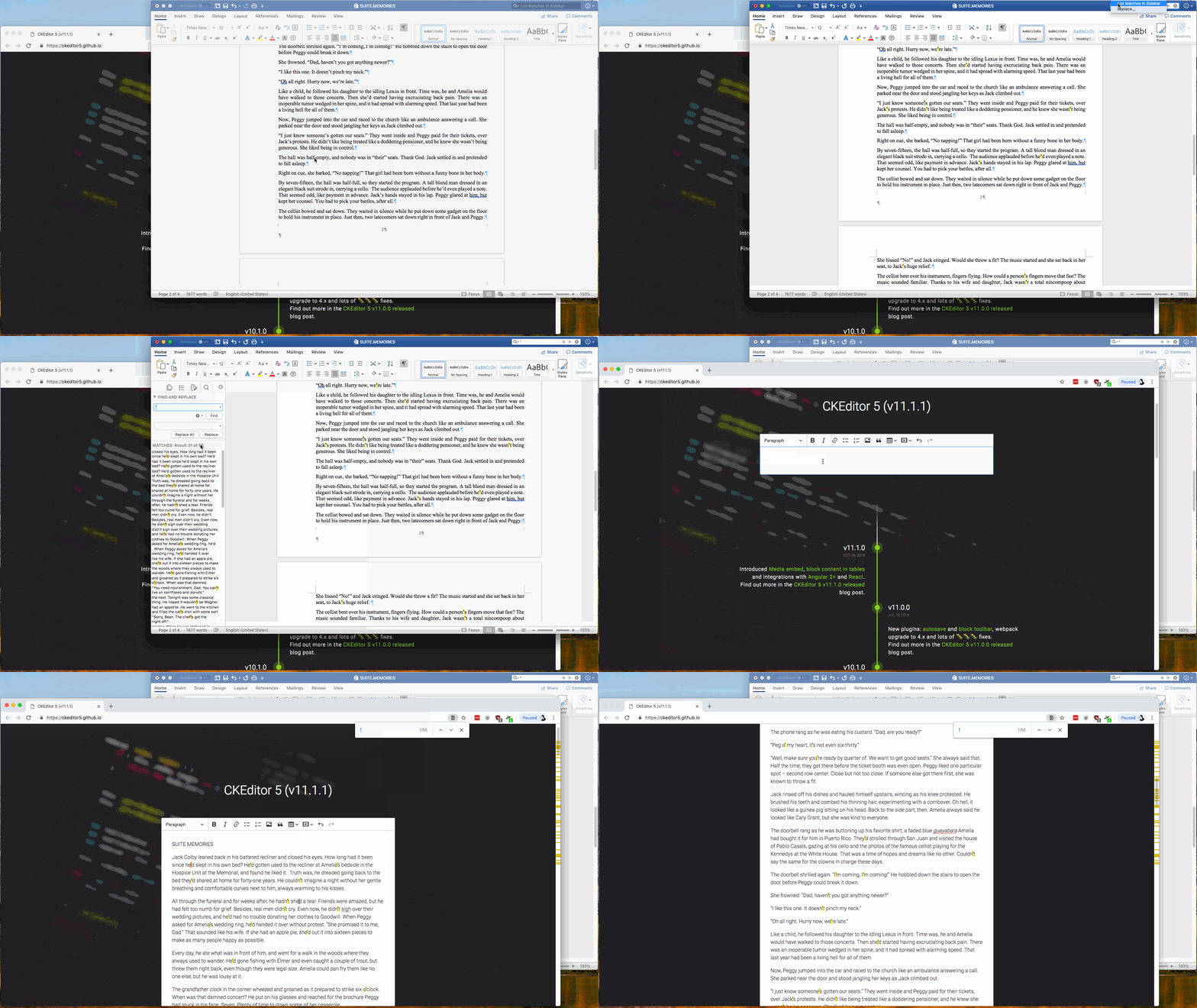
apostrophes are preserved when pasting from Word. I have checked on macOS (10.13.6) with Chrome, Firefox and Safari and results are the same. Also checked on Windows 10 with Chrome and Firefox when it also works fine. The Word version I opened the file with is 16.21 (on macOS) and 16.0.11126.20266 (Windows).
Btw. found different issue when content is not pasted at all https://github.com/ckeditor/ckeditor5-paste-from-office/issues/49.
f1ames
on 25 Jan 2019
I will work on seeing if I can replicate it.
Sent from my iPhone
On Jan 25, 2019, at 2:11 AM, Krzysztof Krztoń notifications@github.com wrote:
@addsimm I'm not able to reproduce the issue (see .gif below):
apostrophes are preserved when pasting from Word. I have checked on macOS (10.13.6) with Chrome, Firefox and Safari and results are the same. Also checked on Windows 10 with Chrome and Firefox when it also works fine. The Word version I opened the file with is 16.21 (on macOS) and 16.0.11126.20266 (Windows).
Btw. found different issue when content is not pasted at all ckeditor/ckeditor5-paste-from-office#49.
—
You are receiving this because you were mentioned.
Reply to this email directly, view it on GitHub, or mute the thread.
addsimm
on 25 Jan 2019
@addsimm Could it be related to the issue you have reported earlier with the encoding -https://github.com/ckeditor/ckeditor5/issues/1431 (unless you already solved it)? So for example apostrophes are somehow pasted as some other (e.g. non-printable) characters?
f1ames
on 25 Jan 2019
The problem is more complicated than I thought; it is also intermittent.
In a nutshell, the punctuation is being dropped during certain saves / pastes but not in others. As soon as I can get something nailed down, I will provide a more detailed report.
I don't think its related to #1431, but it may be.
addsimm
on 29 Jan 2019
So here is what is happening:
I 'select all' in a word document (attached), hit copy, move to chrome with ck 5 (code below)
and right click to paste. We see this:
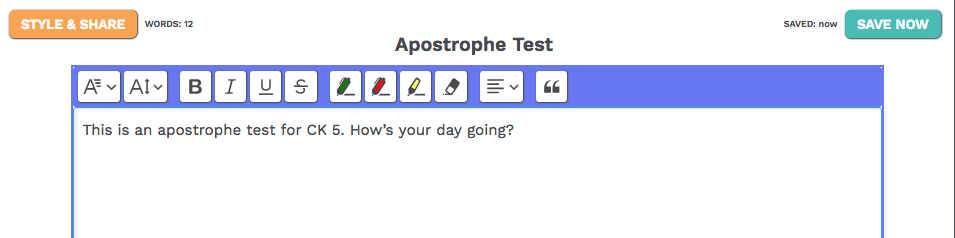
Then I save and refresh the page - no apostrophe:
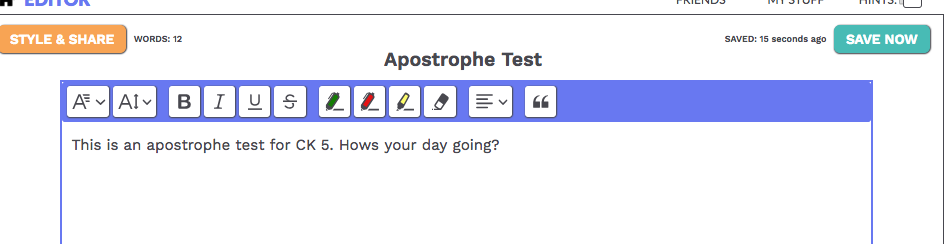
if the apostrophe is typed directly into the editor it saves and reloads as expected,
Here is the relevant JS (I also attached the config file)
:
const editor_container = document.getElementById('editor_container');
     let original_story_content = "{{ story.story_content | escapejs }}";
     let ck_editor = null;

    $(document).ready(function () {
        // console.log("original_story_content: " + original_story_content);
        ck_editor = CKEDITOR.appendTo(
            editor_container,
            {
                customConfig: '/static/ckeditor/config.js',
                startupFocus: true,
            },
            original_story_content);

        setInterval(storyUpdateContent, 180000); // auto_saving in ms.
    });

function storyUpdateContent() {
         if (!ck_editor) {
              return;
        }

        let new_content = ck_editor.getData();
        const data = {
            'story_id': '{{ story.id }}',
            'new_content':  new_content
        };

        // console.log('storyUpdateContent, data:' + JSON.stringify(data));

        if (new_content !== original_story_content) {
            $('.save_now').css('display', 'none');
            $('#saving_message').html("Saving ...").toggle();
            $.ajax({
                   type: "POST",
                   url: '{% url 'stories:story_update' %}',
                   data: data,
                   success: function (serverResponse_data) {
                       // console.log('successfully saved, date:  ' + serverResponse_data);
                       original_story_content = new_content;
                       $('#story_updated').html('Last: ' + serverResponse_data);
                       setTimeout(function () {
                            $('.save_now').css('display', 'flex');
                            $('#saving_message').toggle();
                        }, 1200);
                },
                error: function (serverResponse_data) {
                    console.log('error:' + JSON.stringify(serverResponse_data).split(',').join('\n'));
                }
            });
        } else {
             // console.log('no new story content');
             new_content = null;
             $('.save_now').css('display', 'none');
             $('#saving_message').html("No changes").toggle();
             setTimeout(function () {
                  $('.save_now').css('display', 'flex');
                  $('#saving_message').toggle();
              }, 1200);
        }
    }

// config.js:

/**
 * @license Copyright (c) 2003-2018, CKSource - Frederico Knabben. All rights reserved.
 * For licensing, see https://ckeditor.com/legal/ckeditor-oss-license
 */


CKEDITOR.editorConfig = function (config) {
    config.extraPlugins = 'wordcount,notification';
    config.toolbarGroups = [
    {name: 'document', groups: ['mode', 'document', 'doctools']},
    {name: 'clipboard', groups: ['clipboard', 'undo']},
    {name: 'styles', groups: ['styles']},
    {name: 'forms', groups: ['forms']},
    {name: 'basicstyles', groups: ['basicstyles', 'cleanup']},
    {name: 'colors', groups: ['colors']},
    {name: 'paragraph', groups: ['list', 'indent', 'blocks', 'align', 'bidi', 'paragraph']},
    {name: 'links', groups: ['links']},
    {name: 'insert', groups: ['insert']},

    {name: 'editing', groups: ['find', 'selection', 'spellchecker', 'editing']},
    {name: 'tools', groups: ['tools']}
    ];

   config.wordcount = {

    // Whether or not you want to show the Paragraphs Count
    showParagraphs: false,

    // Whether or not you want to show the Word Count
    showWordCount: true,

    // Whether or not you want to show the Char Count
    showCharCount: false,

    // Maximum allowed Word Count, -1 is default for unlimited
    maxWordCount: -1,

    // Maximum allowed Char Count, -1 is default for unlimited
    maxCharCount: -1,

  };
  config.removePlugins = 'elementspath,contextmenu,liststyle,tabletools,tableselection';
  config.resize_enabled = false;
  config.width = '93%';
  config.height = 360;
  config.contentsCss = 'https://fonts.googleapis.com     /css?family=Abril+Fatface|Cookie|Tinos|Cousine|Lato';
config.font_names = "Display/Abril Fatface;" + "Cursive/Cookie;" + "Fixed/Cousine;" + "Sans/Lato;" + "Serif/Tinos";
config.tabSpaces = 4;
config.fontSize_sizes = '12/12px; 14/14px;16/16px;20/20px;24/24px;28/28px;';
config.disableNativeSpellChecker = false;
config.toolbarCanCollapse = false;

config.removeButtons = 'Source,Save,NewPage,Preview,Print,Templates,Paste,PasteText,PasteFromWord,SelectAll,Scayt,Form,Checkbox,Radio,TextField,Textarea,Select,Button,ImageButton,HiddenField,Superscript,Subscript,CopyFormatting,NumberedList,BulletedList,CreateDiv,JustifyRight,BidiLtr,BidiRtl,Language,Link,Unlink,Anchor,Image,Flash,Table,Smiley,SpecialChar,PageBreak,Iframe,Format,ShowBlocks,About,Copy,Cut,Replace,RemoveFormat,Indent,Outdent,JustifyBlock,HorizontalRule,Styles,Undo,Redo,Blockquote';

};
Thanks for details @addsimm.
First of all the JS code you attached looks like CKEditor 4 initialization and config code not CKEditor 5, but on screenshots I can see CKEditor 5, which is quite confusing. ARe you sure that's the relevant code?
Then I save and refresh the page - no apostrophe
It often means that some parts of the content are removed by the saving/fetching mechanism not editor itself. Could you check the data which you are setting in the editor after save (before it is set in the editor) to see if the apostrophe is still there?
f1ames
on 14 Feb 2019
Sorry about that, here is the correct code:
<script src="https://cdn.ckeditor.com/ckeditor5/11.2.0/decoupled-document/ckeditor.js"></script>
<script>
let original_story_content = "{{ story.story_content | escapejs }}";
$(document).ready(function () {
console.log("$(document).ready, original_story_content.length):\n" + original_story_content.length + '\n\n original_story_content: ' + original_story_content);
// if (original_story_content.length < 2) {
// original_story_content = '<p> </p>'
// }
setInterval(storyUpdateContent, 18000); // auto_saving in ms.
options = {
fontFamily: {
options: [
"Abril Fatface", // Display
"Cookie", // Cursive
"Cousine", // Fixed
"Lato", // Sans
"Tinos" // Serif
]
},
fontSize: {
options: [
10,
14,
'default',
26,
30
]
},
toolbar: ['fontFamily', 'fontSize', '|', '|', 'bold', 'italic', 'underline',
'strikethrough', '|', '|', 'highlight:greenPen', 'highlight:redPen',
'highlight:yellowMarker', 'removeHighlight', '|', '|', "alignment", '|',
'|', 'blockQuote'],
alignment: {
options: ['left', 'center', 'right']
},
language: 'en',
removePlugins: ['Autoformat']
};
DecoupledEditor
.create(document.querySelector('#editor'), options)
.then(editor => {
const toolbarContainer = document.querySelector('#toolbar-container');
toolbarContainer.appendChild(editor.ui.view.toolbar.element);
editor.model.document.on('change:data', function () {
countWords();
});
window.myeditor = editor;
countWords();
// console.log('editor: ', Array.from(editor.ui.componentFactory.names())); // .join('\n')
})
.catch(error => {
console.error(error);
});
});
function storyUpdateContent() {
if (!window.myeditor) {
return;
}
let new_content = window.myeditor.getData();
console.log('storyUpdateContent(), new_content:\n' + new_content);
if (new_content !== original_story_content) {
$('.save_now').css('display', 'none');
$('#saving_message').html("Saving ...").toggle();
$.ajax({
type: "POST",
url: '{% url 'stories:story_update' %}',
data: {
'new_content': new_content,
'story_id': '{{ story.id }}'
},
success: function (serverResponse_data) {
console.log('successfully saved, date: ' + serverResponse_data);
original_story_content = new_content;
$('#story_updated').html('SAVED: ' + serverResponse_data);
setTimeout(function () {
$('.save_now').css('display', 'flex');
$('#saving_message').toggle();
}, 1200);
},
error: function (serverResponse_data) {
console.log('error:' + JSON.stringify(serverResponse_data).split(',').join('\n'));
}
});
} else {
// console.log('no new story content');
new_content = null;
$('.save_now').css('display', 'none');
$('#saving_message').html("No changes").toggle();
setTimeout(function () {
$('.save_now').css('display', 'flex');
$('#saving_message').toggle();
}, 1200);
}
}
Note: I put in the original_story_content.length check to test potential fix, which did not work.
Here is the console output:
After editor is created:
$(document).ready, original_story_content.length):
1
original_story_content:
After first and subsequent saves without pasting:
storyUpdateContent(), new_content:
successfully saved, date: now
After paste and clicking save now:
$(document).ready, original_story_content.length):
13
original_story_content:
storyUpdateContent(), new_content:
This is an apostrophe test for CK 5. How’s your day going?
successfully saved, date: now
Result: after page reload, no apostrophe
However, if you type the test phrase in, the console log is the same but there is an apostrophe after reload.
I guess the point is that the two input methods produce the same console.log output in terms of what data is sent to the back end but different returns on the original_story_content data
Here is the back end code (python/django):
def ajax_story_update(request):
    if not request.is_ajax():
        return HttpResponse('SERVER RESPONSE ajax_story_update, Not an ajax call.')

    story = None
    str_story_id = request.POST.get('story_id', 'missing')
    draft = request.POST.get('section', 'missing')

    if draft != 'missing':
        story = get_object_or_404(Story, description=str(request.user.id) + '_draft')

    if str_story_id != 'missing':
        story_id = int(str_story_id)
        story = get_object_or_404(Story, pk=story_id)

    if not story:
        return HttpResponse("SERVER RESPONSE: ajax_story_update, story not found!")

    new_content = request.POST.get('new_content', 'missing')
    if new_content == 'missing':
        return HttpResponse("SERVER RESPONSE: new content not found!")

    clean_content = new_content.strip().encode('ascii', 'ignore')

    story.story_content = clean_content

    story.save()

    return HttpResponse(naturaltime(story.updated))
Any update on this?
addsimm
on 24 Feb 2019
@addsimm Have you had a chance to check what data is sent from the backend when you refresh the page with CKEditor (before it is set in the editor)? Is apostrophe still there or is it missing?
However, if you type the test phrase in, the console log is the same but there is an apostrophe after reload.
The apostrophe from Word may be a different character (see e.g. this explanation http://snowball.tartarus.org/texts/apostrophe.html) that the one you type directly. So the one from Word may be filtered by some backend code I suppose.
clean_content = new_content.strip().encode('ascii', 'ignore')
This line may be the the cause, have you tired without .encode( ... ) or with .encode('ascii', 'replace') (which "replaces the unencodable unicode to a question mark ?" - https://www.programiz.com/python-programming/methods/string/encode)?
f1ames
on 25 Feb 2019
Yes the return from the backend is provided by the java script original_story_content.
That is a good hypothesis! I remember a problem in the paste that suggests MS word defaults "smart" apostrophes.
I will try some variations on that line and see what happens.
addsimm
on 25 Feb 2019
Here's another potential bug, if you want I can write another ticked:
I treid pasting this from MSWord:
This is an apostrophe: ‘’’’’ how’s your day?
And the js console produced this error immediately - with no pasting:
 space.js:37 Uncaught TypeError: Cannot read property 'data' of undefined
at Ep.t.querySelectorAll.forEach.t (space.js:37)
at NodeList.forEach (<anonymous>)
at space.js:34
at Ep (parse.js:40)
at Qb.builtinPlugins.requires._normalizeWordInput (pastefromoffice.js:64)
at Ll.listenTo (pastefromoffice.js:45)
at Ll.fire (emittermixin.js:196)
at to.listenTo (clipboard.js:78)
at to.fire (emittermixin.js:196)
at to.n (clipboardobserver.js:48)
the smart single quote that faces to the right causes the TypeError, the one to the right is the one that disappears on reload.
The good news is that removing .encode('ascii', 'ignore') seems to solve the left quote problem!
addsimm
on 25 Feb 2019
@addsimm Could you report the second issue in https://github.com/ckeditor/ckeditor5-paste-from-office repository?
The good news is that removing .encode('ascii', 'ignore') seems to solve the left quote problem!
Great news! I'm closing this issue then.
f1ames
on 25 Feb 2019
Related issues
 MCMicS
·
3Comments
MCMicS
·
3Comments
 pandora-iuz
·
3Comments
pandora-iuz
·
3Comments
 hamenon
·
3Comments
hamenon
·
3Comments
 msamsel
·
3Comments
oleq
·
3Comments
msamsel
·
3Comments
oleq
·
3Comments