Ckeditor5: Paste from Word - basic formatting support
Extracted from #1003.
Paste from Word is a huge feature and we will work on it iteratively. As a first batch of features we would like to support was extracted (see https://github.com/ckeditor/ckeditor5/issues/1003#issuecomment-409196061), I have created this task to cover all related stuff to not clutter the parent/umbrella issue too much.
The first batch of features contains (not the final list and may change):
- bold, italics, underline, strikethrough
- headings
- links
- lists
- images
First step is to see if any of this already works correctly and also take a quick look at markup generated by different Word versions and some similar software (GDocs, Libre Office) to get broader view.
 f1ames
All 12 comments
I did some testing to see what already works and results are pretty promising. Tested Word 2016 with Chrome, Firefox, Edge, Word 2013 with Chrome, Firefox and Safari with Word 2011. Also added tables and quotes to the above list to check.
Test documents
Word 2016
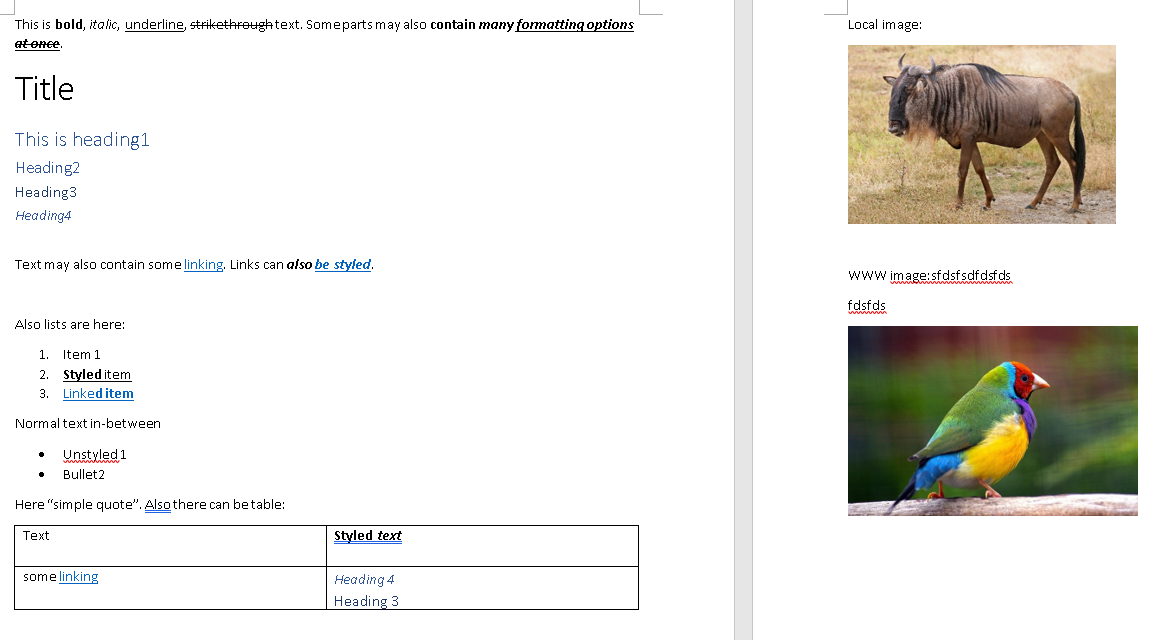
Word 2013/2011

Results
Chrome, Firefox (both Word 2016 and 2013) and Edge (Word 2016)
_Results are the same for all the above. However, on Edge there is a visible delay when pasting content from Word._
- bold, italics, underline, strikethrough - OK
- headings - partially OK1
- links - OK
- lists - broken2
- images - partially broken3
- tables - OK4
- quotes - broken5
- Since CKEditor default heading transformations covers
h2-h4,h1is transformed into paragraph which might be considered an issue, see https://github.com/ckeditor/ckeditor5/issues/1184#issuecomment-409578965. - Lists are represented by the markup like:
<p class=MsoNormal>Also lists are here:<o:p></o:p></p>
<p class=MsoListParagraphCxSpFirst style='text-indent:-18.0pt;mso-list:l0 level1 lfo1'><![if !supportLists]>
<span
style='mso-fareast-font-family:Calibri;mso-fareast-theme-font:minor-latin;
mso-bidi-font-family:Calibri;mso-bidi-theme-font:minor-latin'>
<span
style='mso-list:Ignore'>1.
<span style='font:7.0pt "Times New Roman"'>
</span>
</span>
</span><![endif]>Item 1
<o:p></o:p>
</p>
and are not correctly transformed.
- If image is copied itself it works (is uploaded same as with drag and drop). If it is copied with text markup is transformed correctly, but there is a path to local image (
file://). - Headings do not work at the moment, but it is not yet supported by the editor itself (soon should be - https://github.com/ckeditor/ckeditor5-table/issues/56).
- There is no quote like element, normally one would use
"..."which is not represented as a quote by the markup.
Safari (Word 2011)
_Word 2011 on macOS is an equivalent of Word 2013 on Windows_.
- bold, italics, underline, strikethrough - OK
- headings - partially OK (same as in other browsers)
- links - OK
- lists - broken (same cause as in other browsers)
- images - broken (doesn't work for image copied with and without text)
- tables - OK
- quotes - broken (same cause as in other browsers)
Just to sum up, pasting from Word works well with bold, italics, underline, strikethrough, headings, links, tables and doesn't work with lists, images and quotes.
f1ames
on 1 Aug 2018
Not sure how to count support for headings. Technically they "work" but in reality the fact that heading 1 isn't preserved is wrong IMHO. After all what's wrong with using "heading 1" in MS Word documents?
Perhaps during pasting we should detect if there is "H1" used there and automatically convert all headings one level down if H1 is not available. I guess this problem will be another argument for doing https://github.com/ckeditor/ckeditor5-heading/issues/98 sooner than later. It is probably more common to have H1 is Word documents than in content copied from websites.
 wwalc
on 1 Aug 2018
wwalc
on 1 Aug 2018
Not sure how to count support for headings. Technically they "work" but in reality the fact that heading 1 isn't preserved is wrong IMHO.
I agree. Technically it works (tags/content transformation is fine), but since CKEditor supports h2+, h1 is transformed into paragraph - so from paste from Word point of view it's broken.
Adding support for h1 in the editor itself (so https://github.com/ckeditor/ckeditor5-heading/issues/98) would solve this issue automatically. If we don't want this approach, PFW plugin could do what @wwalc suggested:
Perhaps during pasting we should detect if there is "H1" used there and automatically convert all headings one level down if H1 is not available.
and it should solve this issue (the question is if we should always downgrade the headers or only if there is a h1?).
Another issue might be that heading transformations list is configurable and might be changed so then downgrading headers may by tricky or result in some unexpected behaviour. Still I agree that converting h1 to p by default is quite confusing.
f1ames
on 1 Aug 2018
Other text editors
Did some quick check with other text editors to catch a glimpse of state of things:
Pages
_It has quite nice and clear markup when pasted_.
Works
- bold, italics
- tables
- links
- lists (🎉)
Broken
- quote
- images
- underline/strikethrough (these elements are just formatted via styling and not represented in a markup with
<u>or<s>tags)
Word online
Works
- bold, italics
- tables (to some extend, whole content gets bolded)
- links
- images (pasted as
base64string)
Broken
- quotes
- headers (represented only with styles and not
h*elements) - list (has structure like
ul > li > pso instead of list, paragraphs are created) - underline/strikethrough (same as headers)
Google Docs
_Both Word online and Google docs generate very similar markup on copy. Structure is more or less correct with a lot of inline CSS._
Works
- bold, italics, underline, strikethrough
- tables (to some extend, whole content gets bolded)
- links
- headings (
h1is transformed intop) - images (with link to online resource)
Broken
- quotes
- list (has structure like
ul > li > pso instead of list, paragraphs are created)
Libre Office (Writer)
Works
- bold, italics, underline, strikethrough
- tables
- links
- headings (
h1is transformed intop)
Broken
- quotes
- images
- list (has structure like
ul > li > pso instead of list, paragraphs are created)
In most cases if correct markup is provided (even with lots of styling), the content is transformed correctly by CKEditor (only if given elements have proper converters). Most common issues:
- In some cases elements are represented only with styling and not proper HTML tags (
h*,u,s). - In any of the above editors I haven't seen a dedicated option to insert quotes. Usually it is adviced to use regular
"", which in most cases are changed to “ and ” upon typing. Also this creates inline quote, and CKEditor support block quotes ATM. - In most editors, it is possible to insert block elements as list items (e.g. headers). CKEditor does not support such structure so it will need some additional handling (important as Word 2016 also allows that so should be kept in mind when working on lists support). That's probably a cause why lists do not work in Google Docs and Libre Office (see above).
f1ames
on 2 Aug 2018
Extracted headers issue to https://github.com/ckeditor/ckeditor5-paste-from-word/issues/2.
f1ames
on 6 Aug 2018
Is there a tool or something we can suggest people use intermediately? I don't think we can finish our move to ckeditor5 without word pasting unless I can provide an alternative way to do it.
 robclancy
on 27 Sep 2018
robclancy
on 27 Sep 2018
@robclancy It might be hard to find such tool as Word usually produces non-semantic (or even incorrect) HTML (for example, lists are represented with specially styled <p> tags instead of <ul> and <li> tags) so you need something which will take incorrect HTML and transform it into correct one so CKEditor can understand it. I'm not aware of any external tool of such type.
Anyway, we are actively working on Paste from Office plugin so the MVP should be available in the foreseeable future.
@robclancy Do you have any statistics or insight which Word features (heading, images, list, tables, etc) are the most common in the content pasted to CKEditor (from Word) in your product/app?
f1ames
on 28 Sep 2018
@f1ames our app is a content provider platform. We provide a wide range but articles are the main thing so your general article would be pasted but with images being manual. We also do things like storyboards for video production in tables that would be copied over.
But it would mainly be headings, formatting (like fonts, color, which we would want filtered out) and maybe lists sometimes (they have a habit of just doing - with a number in lists which frustrates me a lot). Then tables for the more niche areas that don't need to be perfect.
We are using froala now and moving to ckeditor5 once we can, I have made an add-on already but this paste and some other things you're working on need to be done first. We already use it for things that don't need the more detailed editor (comments for example).
Hopefully after our next milestone I can start to contribute.
robclancy
on 1 Oct 2018
Is there a progress update on this? I might be able to look into it more myself in the coming weeks but don't want to be doing something someone who knows better is already doing.
robclancy
on 12 Nov 2018
The first version of the Paste from Office feature is nearly ready. It will be released with the upcoming release.
If you'd like to test it you can either wait for https://github.com/ckeditor/ckeditor5/issues/1351 to be resolved (PFO will then be on in all samples in the nightly docs: https://ckeditor5.github.io/docs/nightly/ckeditor5/latest/api/index.html) or you can check it out via https://ckeditor.com/docs/ckeditor5/latest/framework/guides/contributing/development-environment.html
 Reinmar
on 12 Nov 2018
Reinmar
on 12 Nov 2018
I'm closing this ticket in favor of more specific issues reported in https://github.com/ckeditor/ckeditor5-paste-from-office
Reinmar
on 12 Nov 2018
Great, thanks.
robclancy
on 13 Nov 2018
Related issues
 MansoorJafari
·
3Comments
MansoorJafari
·
3Comments
 pjasiun
·
3Comments
pjasiun
·
3Comments
 PaulParker
·
3Comments
PaulParker
·
3Comments
 metalelf0
·
3Comments
metalelf0
·
3Comments
 hybridpicker
·
3Comments
hybridpicker
·
3Comments
Most helpful comment
Other text editors
Did some quick check with other text editors to catch a glimpse of state of things:
Pages
_It has quite nice and clear markup when pasted_.
Works
Broken
<u>or<s>tags)Word online
Works
base64string)Broken
h*elements)ul > li > pso instead of list, paragraphs are created)Google Docs
_Both Word online and Google docs generate very similar markup on copy. Structure is more or less correct with a lot of inline CSS._
Works
h1is transformed intop)Broken
ul > li > pso instead of list, paragraphs are created)Libre Office (Writer)
Works
h1is transformed intop)Broken
ul > li > pso instead of list, paragraphs are created)In most cases if correct markup is provided (even with lots of styling), the content is transformed correctly by CKEditor (only if given elements have proper converters). Most common issues:
h*,u,s)."", which in most cases are changed to “ and ” upon typing. Also this creates inline quote, and CKEditor support block quotes ATM.