Ckeditor5: CKEditor 5 integration for Angular 2+
Update:
The ckeditor5-angular package has been published on the NPM 🎉
See our docs to check how you can customize and integrate the <ckeditor> component in your Angular application. If you have any trouble, please, report it in the ckeditor/ckeditor5-angular repository. Feature request are welcome too :)
All feedback is welcome!
 oleq
oleq
All 27 comments
ATM only the first option is possible and yet it is very, very ugly:
import( `../../../node_modules/@ckeditor/ckeditor5-build-${ buildName }/build/ckeditor.js` )
  .then( EditorBuild => this.createEditor( EditorBuild ) );
Isn't better to statically specify the editor type and use the static import? Does someone want to dynamically pick the editor type? Or you did it to create a lighter bundle and import editor's build when the it's needed?
 ma2ciek
on 14 May 2018
ma2ciek
on 14 May 2018
Note, that in TS lowercase is used for basic types and uppercase for e.g. boxed types (like new String()), so you should use string instead of String - https://www.typescriptlang.org/docs/handbook/basic-types.html.
ma2ciek
on 14 May 2018
Isn't better to statically specify the editor type and use the static import? Does someone want to dynamically pick the editor type? Or you did it to create a lighter bundle and import editor's build when the it's needed?
The import should be somewhere in the component's consumer code. It must not be in the component's code itself. The component must work with any build of your choice.
 Reinmar
on 14 May 2018
Reinmar
on 14 May 2018
To exemplify what I mean – that's how we see the use of the React component:
import React, { Component } from 'react';
import './App.css';
import CKEditor from 'cke5-react';
import ClassicEditorBuild from '@ckeditor/ckeditor5-build-classic';


class App extends Component {
    render() {
        return (
            <div className="App">
                <h2>CKEditor 5 using build-classic</h2>
                <CKEditor
                    editor={ ClassicEditorBuild }
                    data="<p>Hello from CKEditor 5</p>"
                    onChange={ data => console.log( data ) }
                />
            </div>
        );
    }
}

export default App;
The ClassicEditorBuild is imported by the consumer and passed to the component in one of its attributes.
Reinmar
on 14 May 2018
So it can be done similarly from the parent component:
import { Component } from '@angular/core';

import * as ClassicEditorBuild from '@ckeditor/ckeditor5-build-classic';

@Component( {
    selector: 'my-app',
    template:
        `<main>
            <ckeditor [editor]="editor" [data]="data"></ckeditor>
        </main>`
} )
export class AppComponent {
    private editor = ClassicEditorBuild;
    private data = "<p>Some content</p>"
}
So later the editor constructor will be visible in the ckeditor component and can be imported via @Input.
The only thing is, that we don't have any TS typings for our JS files, so there is a warning when importing some CKEditor5 stuff.
ma2ciek
on 14 May 2018
I think for:
use customized editor builds, e.g. to narrow or extend the set of the features, which can be achieved in 2 ways:
building the editor beside the Angular project, and then including it like an official build,
integration of the building process witin the Angular project
you will need to use an implementation of an abstract factory with componentFactoryResolver where either a known build name is passed in (such as ckeditor5-build-classic) or another component is passed in (for people who are building their own and including it in their projects) and you make the decision on which to instantiate.
You might do it with a switch statement around your dynamic import in ngOnInit, or, more elegantly, as separate named components of their own (where there is a CkEditorClassicBuildComponent installed via a separate npm package).
 pburrows
on 14 May 2018
pburrows
on 14 May 2018
Glad you guys are going to implement Angular!
i just play around ckeditor 5 and face some problem in Angular.
i try to Installing plugins by "build your editor from source."
is it possible to do that now?
this is my simple code.
`import { Component } from '@angular/core';
// import * as ClassicEditorBuild from '@ckeditor/ckeditor5-build-classic'; it work
import ClassicEditor from '@ckeditor/ckeditor5-editor-classic/src/classiceditor';
import Bold from '@ckeditor/ckeditor5-basic-styles/src/bold';
@Component({
selector: 'app-root',
templateUrl: './app.component.html',
styleUrls: ['./app.component.css']
})
export class AppComponent {
start() {
ClassicEditor
.create(document.querySelector('#editor'), {
plugins: [Bold],
toolbar: ['bold']
})
.then(editor => {
console.log('Editor was initialized', editor);
})
.catch(error => {
console.error(error.stack);
});
}
}`
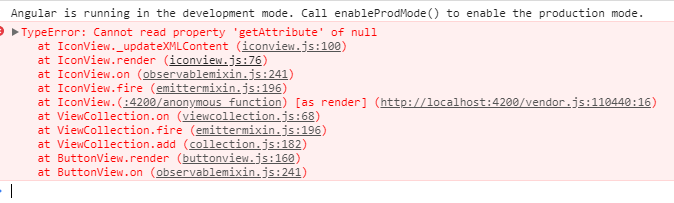
and i get this error

 keatkeat87
on 15 May 2018
keatkeat87
on 15 May 2018
@keatkeat87 Are you using
            {
                // Or /ckeditor5-[^/]+\/theme\/icons\/[^/]+\.svg$/ if you want to limit this loader
                // to CKEditor 5 icons only.
                test: /\.svg$/,

                use: [ 'raw-loader' ]
            },
in your webpack config?
oleq
on 15 May 2018
/ckeditor5-[^/]+\/theme\/icons\/[^/]+\.svg$/ isn't correct on Windows. Not sure if it does matter but I recommend to use: /ckeditor5-[^/\\]+[/\\]theme[/\\]icons[/\\][^/\\]+\.svg$/
 pomek
on 15 May 2018
pomek
on 15 May 2018
@keatkeat87, your question is out of the scope of this ticket (which is about creating the Angular component). Please open a new ticket (unless, of course, guys already solved your issue).
I'll remove these 4 comments to keep this thread clean.
Reinmar
on 15 May 2018
EDIT: Actually, GH allows now to hide comments so I'll do that :)
Reinmar
on 15 May 2018
Looking at it, I assume (change)="something()" is the way to catch event, but that did not fire anything, what is the way to catch events?
 ayyash
on 16 May 2018
ayyash
on 16 May 2018
@ayyash, I guess, for that CKEditorComponent would need a property @Output change = new EventEmitter<void>(); and then you should delegate the CKEditor's change event inside the setUpEditorEvents method via this.change.emit().
ma2ciek
on 16 May 2018
Okay I have a problem, this line editor.on( 'change', () => { ... never really gets caught, nor did 'blur', am I missing anything?
ayyash
on 16 May 2018
There's editor.model.document.on( 'change', () => {} ) event, which you can use. See https://docs.ckeditor.com/ckeditor5/latest/api/module_engine_model_document-Document.html.
ma2ciek
on 16 May 2018
And we've got a first pull request: https://github.com/ckeditor/ckeditor5-angular/pull/2 by @oleq.
Feedback needed :)
Reinmar
on 25 May 2018
Any updates on this??
 piernik
on 12 Jul 2018
piernik
on 12 Jul 2018
Any updates on this??
I'm actively working on this, so I'll keep you updated.
ma2ciek
on 12 Jul 2018
@ma2ciek That's great news - powodzenia!
piernik
on 12 Jul 2018
@piernik, you can check out the current implementation on the https://github.com/ckeditor/ckeditor5-angular/pull/2 I've updated many things and this implementation should work well with angular@6 :) We'll be releasing it soon.
ma2ciek
on 13 Jul 2018
Is it available on npm?
piernik
on 14 Jul 2018
@piernik Not yet, but there's an issue for that.
oleq
on 17 Jul 2018
Update: The ckeditor5-angular package has just been published - https://www.npmjs.com/package/@ckeditor/ckeditor5-angular 🎉
Run npm install @ckeditor/ckeditor5-angular to play with it.
If you have any trouble, please, report it in the https://github.com/ckeditor/ckeditor5-angular.
All feedback is welcomed!
ma2ciek
on 26 Jul 2018
Does it work with Angular 6?
 Sovai
on 10 Aug 2018
Sovai
on 10 Aug 2018
Yes, it should work.
pomek
on 10 Aug 2018
Is there any documentation about how to access/use the API via the ckeditor5-angular package? I want to be able to do operations such as access the selected text and insert text and links into the document.
I can get hold of the Component by using a @ViewChild declaration but I don't know where to go from there.
 AlanObject
on 29 Jan 2019
AlanObject
on 29 Jan 2019
Hi, @AlanObject.
Could you post the issue in the https://github.com/ckeditor/ckeditor5-angular?
Docs for the ckeditor5-angular package are available here.
ma2ciek
on 29 Jan 2019
Related issues
pomek
·
3Comments
 wwalc
·
3Comments
Reinmar
·
3Comments
wwalc
·
3Comments
Reinmar
·
3Comments
 PaulParker
·
3Comments
PaulParker
·
3Comments
 jodator
·
3Comments
jodator
·
3Comments
Most helpful comment
Update: The
ckeditor5-angularpackage has just been published - https://www.npmjs.com/package/@ckeditor/ckeditor5-angular 🎉Run
npm install @ckeditor/ckeditor5-angularto play with it.If you have any trouble, please, report it in the https://github.com/ckeditor/ckeditor5-angular.
All feedback is welcomed!