Ckeditor5: Q: Define the position of the editor's first line
Is this a bug report or feature request? (choose one)
Other, question
💻 Version of CKEditor
ckeditor5-build-classic-1.0.0-beta.3
Question
Could you tell us how we could insert text into the first line of editor? We have a button/plugin which should always insert a timestamp into the first line.
We can insert the timestamp like this:
editor.model.change( writer => {
const insertPosition = editor.model.document.selection.getFirstPosition();
writer.insertText(timestamp, insertPosition);
} );
The insertPosition should be the position of the editor's first line. Could you help us how we can define it please?
 balszab
All 7 comments
I am not sure what you exactly mean. Do you want to add a timestamp in a newly created line at the beginning of the content? Or before the first text that is already in the editor?
Inserting in a new line
In the first case, you'll want to create a new paragraph element at the very beginning of the model root. Create and insert a paragraph using model.Writer#insertElement. The insert position in this case would be path [ 0 ] inside editor.model.document.getRoot().
Inserting before the first text
In this case, my first idea would be to iterate through the model tree root and find the first position in which model.Schema allows $text.
Note, that if the image would be the first element in the root, the position would be found in a paragraph below it or even in the caption. In this case, you might want to check what is the first element, or just create a new element as written in the first solution.
Here are some references:
The model root is available at editor.model.document.getRoot().
Use model.TreeWalker to iterate through the model tree.
Use model.Schema#childCheck to check if $text can be inserted at current position.
Use model.Schema#isObject to filter out elements like an image.
 scofalik
on 25 Apr 2018
scofalik
on 25 Apr 2018
I think that alternative solution to @scofalik's 2nd scenario is using the getNearestSelectionRange() like I explained in https://stackoverflow.com/questions/49358150/is-there-any-way-to-select-all-the-content-of-ckeditor-5-by-code.
However, if an image (or another object) starts the content, then you'll get a non-collapsed range which will contain this image). In such situation, you'll want to insert a paragraph before it like in @scofalik's first scenario.
 Reinmar
on 25 Apr 2018
Reinmar
on 25 Apr 2018
@scofalik Let me explain it in more detail. :)
We have two cases.
First case
1st one is when the editor is empty. It contains nothing.
If we press the timestamp button (Number 1. on the screenshot) it inserts the timestamp into the editor's first line (2.) and places the cursor to the second line (3.).

Second case
2nd case when the editor already has content. It can be a simple/formatted text, url or an image.
The screenshot below represents the state before we want to insert the timestamp. (Now it just contains text)
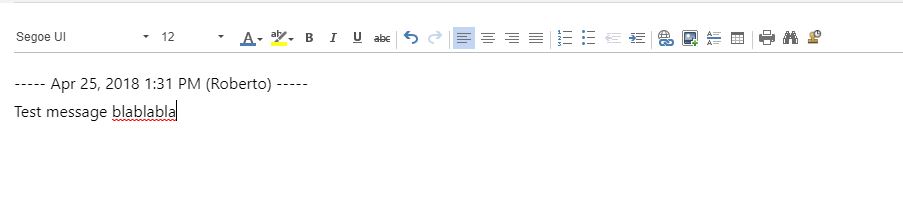
Number 1. is the already typed content.
If we press the button (2.) then we insert the timestamp into the first line (3.) and place the cursor to the second line (4.)
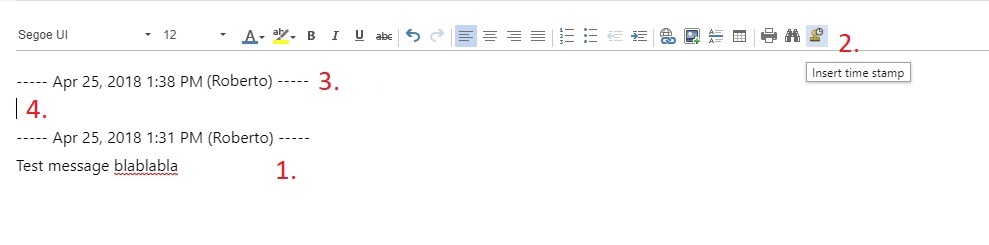
The second case is pretty similar to the first one. Only difference is that we "push" down the already added content a bit.
I hope my explanation could help you. :)
balszab
on 25 Apr 2018
So you always want to insert one paragraph at the very beginning of the content and then make sure to place the selection in another paragraph (empty as well, so if it's missing you will need to insert it too).
To underline this – you have to insert <paragraph>TIMESTAMP</paragraph> not just some text node. Like this:
editor.model.change( writer => {
    const p = writer.createElement( 'paragraph' );
    writer.insertText( 'TIMESTAMP', p );

    // Insert the paragraph at the position 0 in the root.
    writer.insert( p, editor.model.document.getRoot() );
} );
Then, you need to check what's the 2nd element in the root and if it's not an empty paragraph, then create another one and finally set the selection in the 2nd element of the root.
Reinmar
on 26 Apr 2018
I will only add that you can create paragraph element with text already in one step:
const p = writer.createElement( 'paragraph', null, 'TIMESTAMP' );
Above should work.
scofalik
on 26 Apr 2018
Nope, you can't:
    /**
     * Creates a new {@link module:engine/model/element~Element element}.
     *
     *      writer.createElement( 'paragraph' );
     *      writer.createElement( 'paragraph', { alignment: 'center' } );
     *
     * @param {String} name Name of the element.
     * @param {Object} [attributes] Elements attributes.
     * @returns {module:engine/model/element~Element} Created element.
     */
    createElement( name, attributes ) {
        return new Element( name, attributes );
    }
Wow, I was sure this is possible. Weird.
scofalik
on 27 Apr 2018
Related issues
 oleq
·
3Comments
oleq
·
3Comments
oleq
·
3Comments
oleq
·
3Comments
 hamenon
·
3Comments
hamenon
·
3Comments
 msamsel
·
3Comments
msamsel
·
3Comments
 benjismith
·
3Comments
benjismith
·
3Comments