Ckeditor5: Only the first level from a multileveled list is pasted into the editor
Is this a bug report or feature request?
🐞 Bug report
💻 Version of CKEditor
CKEditor 5 Developer Preview (v1.0.0-beta.2)
📋 Steps to reproduce
Create a nested list in Google docs:
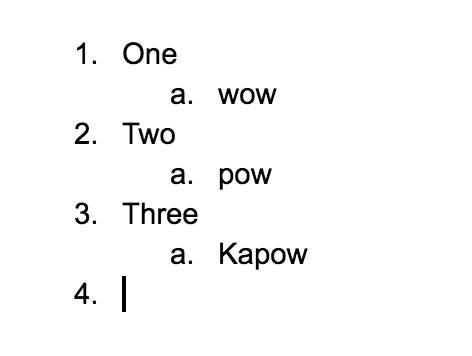
Paste it into CKEditor
✅ Expected result
All the levels of the multileveled list are pasted in the sidebar.
❎ Actual result
Only the first level from a multileveled list is pasted.
📃 Other details that might be useful

 vladikoff
All 13 comments
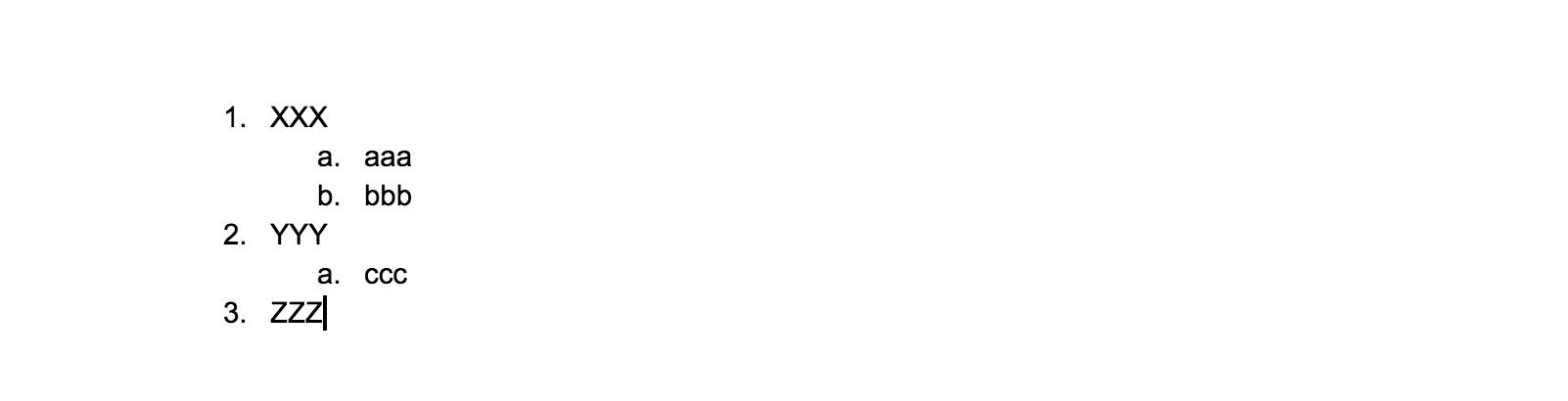
Unfortunately, GDocs outputs some invalid HTML. There's ol > ol there and, mostlikely, the editor does not handle this gracefully:
<meta charset='utf-8'>
<meta charset="utf-8">
<b style="font-weight:normal;" id="docs-internal-guid-fc08fc04-b0d3-82e2-0ae8-a28e0f2c2ad3">
   <ol style="margin-top:0pt;margin-bottom:0pt;">
      <li dir="ltr" style="list-style-type:decimal;font-size:11pt;font-family:Arial;color:#000000;background-color:transparent;font-weight:400;font-style:normal;font-variant:normal;text-decoration:none;vertical-align:baseline;white-space:pre;">
         <p dir="ltr" style="line-height:1.38;margin-top:0pt;margin-bottom:0pt;"><span style="font-size:11pt;font-family:Arial;color:#000000;background-color:transparent;font-weight:400;font-style:normal;font-variant:normal;text-decoration:none;vertical-align:baseline;white-space:pre;white-space:pre-wrap;">XXX</span></p>
      </li>
      <ol style="margin-top:0pt;margin-bottom:0pt;">
         <li dir="ltr" style="list-style-type:lower-alpha;font-size:11pt;font-family:Arial;color:#000000;background-color:transparent;font-weight:400;font-style:normal;font-variant:normal;text-decoration:none;vertical-align:baseline;white-space:pre;">
            <p dir="ltr" style="line-height:1.38;margin-top:0pt;margin-bottom:0pt;"><span style="font-size:11pt;font-family:Arial;color:#000000;background-color:transparent;font-weight:400;font-style:normal;font-variant:normal;text-decoration:none;vertical-align:baseline;white-space:pre;white-space:pre-wrap;">aaa</span></p>
         </li>
         <li dir="ltr" style="list-style-type:lower-alpha;font-size:11pt;font-family:Arial;color:#000000;background-color:transparent;font-weight:400;font-style:normal;font-variant:normal;text-decoration:none;vertical-align:baseline;white-space:pre;">
            <p dir="ltr" style="line-height:1.38;margin-top:0pt;margin-bottom:0pt;"><span style="font-size:11pt;font-family:Arial;color:#000000;background-color:transparent;font-weight:400;font-style:normal;font-variant:normal;text-decoration:none;vertical-align:baseline;white-space:pre;white-space:pre-wrap;">bbb</span></p>
         </li>
      </ol>
      <li dir="ltr" style="list-style-type:decimal;font-size:11pt;font-family:Arial;color:#000000;background-color:transparent;font-weight:400;font-style:normal;font-variant:normal;text-decoration:none;vertical-align:baseline;white-space:pre;">
         <p dir="ltr" style="line-height:1.38;margin-top:0pt;margin-bottom:0pt;"><span style="font-size:11pt;font-family:Arial;color:#000000;background-color:transparent;font-weight:400;font-style:normal;font-variant:normal;text-decoration:none;vertical-align:baseline;white-space:pre;white-space:pre-wrap;">YYY</span></p>
      </li>
      <ol style="margin-top:0pt;margin-bottom:0pt;">
         <li dir="ltr" style="list-style-type:lower-alpha;font-size:11pt;font-family:Arial;color:#000000;background-color:transparent;font-weight:400;font-style:normal;font-variant:normal;text-decoration:none;vertical-align:baseline;white-space:pre;">
            <p dir="ltr" style="line-height:1.38;margin-top:0pt;margin-bottom:0pt;"><span style="font-size:11pt;font-family:Arial;color:#000000;background-color:transparent;font-weight:400;font-style:normal;font-variant:normal;text-decoration:none;vertical-align:baseline;white-space:pre;white-space:pre-wrap;">ccc</span></p>
         </li>
      </ol>
      <li dir="ltr" style="list-style-type:decimal;font-size:11pt;font-family:Arial;color:#000000;background-color:transparent;font-weight:400;font-style:normal;font-variant:normal;text-decoration:none;vertical-align:baseline;white-space:pre;">
         <p dir="ltr" style="line-height:1.38;margin-top:0pt;margin-bottom:0pt;"><span style="font-size:11pt;font-family:Arial;color:#000000;background-color:transparent;font-weight:400;font-style:normal;font-variant:normal;text-decoration:none;vertical-align:baseline;white-space:pre;white-space:pre-wrap;">ZZZ</span></p>
      </li>
   </ol>
</b>
 Reinmar
on 10 Apr 2018
Reinmar
on 10 Apr 2018
Just to make it easier – that's the structure I've been pasting:
Reinmar
on 10 Apr 2018
Yes ol > ol will be skipped: https://github.com/ckeditor/ckeditor5-list/blob/master/src/converters.js#L416-L427
It sucks that GDocs create such output because it looks like a bug on our side.
Since Google probably won't fix it and we can expect similar (worse) output from Paste From Word, I think that we should handle this kind of incorrect HTML.
 scofalik
on 11 Apr 2018
scofalik
on 11 Apr 2018
Haha ;) Wait for Word. It's a different level of mess.
Reinmar
on 11 Apr 2018
@mlewand Do you remember that quote we had in CKEditor 4 docs about how bad Word's output is?
Reinmar
on 11 Apr 2018
HTML exposed by Microsoft Word does not comply to any imaginable rules. It is a poetry of what can be done wrong.
This statement is a highlight of our docs :)
https://docs.ckeditor.com/ckeditor4/latest/guide/dev_pastefromword.html
 AnnaTomanek
on 11 Apr 2018
AnnaTomanek
on 11 Apr 2018
Yes the quote provided by @AnnaTomanek is the best one. Looks like MS Word is not the only app producing markup like that.
The worst cases I remember were on IE11, which attempted to "normalize" Word HTML, and did not expose text/html data transfer an example list markup produced by Word+IE11 combo can be seen here. Gotta love these b directly in ol, nested (unclosed) paragraphs - all the good stuff.
Back to the topic: I remeber GDocs were wrapping their markup with a b element that contains their internal id for a given snippet. That's already a mess in terms of markup (nesting block elements in b). At the same time be warned that hey do not convey some information (like page breaks) in the clipboard, but they (most likely) retrieve it based on this funny id on paste between GDoc windows.
 mlewand
on 11 Apr 2018
mlewand
on 11 Apr 2018
It looks like this is still an issue, at least with word. It also appears that in CKEditor 4 it does work.
template with bullet levels.docx
https://ckeditor.com/ckeditor-4/demo/ --Works
https://ckeditor.com/ckeditor-5/demo/ --Doesn't work
 Jack-s
on 31 May 2019
Jack-s
on 31 May 2019
Actually this issue has been fixed in v12.4.0.
You can give it a try here: https://ckeditor.com/docs/ckeditor5/latest/features/pasting/paste-from-google-docs.html
mlewand
on 4 Sep 2019
@mlewand Sorry but it doesn't look like it is actually fixed. I just tried the link you posted with the attached word file and it still doesn't work. It does paste part of the text from the nested list but not formatted as another list and doesn't paste the text from the third level list at all.
Jack-s
on 4 Sep 2019
@Jack-s This is a separate issue – CKEditor 5 does not support yet pasting nested lists from Word (https://github.com/ckeditor/ckeditor5-paste-from-office/issues/19).
In this ticket, we worked on content disappearing when pasting an incorrectly formatted (in terms of HTML rules) list structure. Such incorrect list structures are created by e.g. Google Docs, Gmail or Evernote.
Support for pasting lists from Word is something different because Word doesn't even produce any reasonable markup for lists. It's a manual job of picking information from a garbage "HTML".
Reinmar
on 4 Sep 2019
@Reinmar OK thanks, but what about the content that "disappears" from word as well (the third indentation level)? Not sure if it needs to be fixed independently of the general "paste from office" feature.
Jack-s
on 4 Sep 2019
@Jack-s This is still a separate issues, the two cases are unrelated to each other that's why should be tracked separately. Feel free to subscribe ckeditor/ckeditor5-paste-from-office#19 to get further updates.
mlewand
on 5 Sep 2019
Related issues
 pomek
·
3Comments
pomek
·
3Comments
 wwalc
·
3Comments
wwalc
·
3Comments
 metalelf0
·
3Comments
Reinmar
·
3Comments
wwalc
·
3Comments
metalelf0
·
3Comments
Reinmar
·
3Comments
wwalc
·
3Comments
Most helpful comment
This statement is a highlight of our docs :)
https://docs.ckeditor.com/ckeditor4/latest/guide/dev_pastefromword.html