Ckeditor5: Placeholder widget (like in CKEditor 4)
🆕 Feature request
CKEditor 4 had the placeholder widget. Does something like this exist in CKEditor 5?
💻 Version of CKEditor
"@ckeditor/ckeditor5-basic-styles": "1.0.0-alpha.2",
"@ckeditor/ckeditor5-core": "1.0.0-alpha.2",
"@ckeditor/ckeditor5-dev-webpack-plugin": "3.0.6",
"@ckeditor/ckeditor5-editor-inline": "1.0.0-alpha.2",
"@ckeditor/ckeditor5-engine": "1.0.0-alpha.2",
"@ckeditor/ckeditor5-essentials": "1.0.0-alpha.2",
"@ckeditor/ckeditor5-image": "1.0.0-alpha.2",
"@ckeditor/ckeditor5-paragraph": "1.0.0-alpha.2",
"@ckeditor/ckeditor5-ui": "1.0.0-alpha.2",
 flipchart
All 17 comments
No, not yet.
Could you describe why do you need this feature? It will help us to understand how it should be proposed. In CKEditor 4 the placeholder feature is very generic and it's hard to tell for us whether we should have a similar feature in CKEditor 5 or perhaps some building blocks which would allow other developers to implement their customised placeholders.
 Reinmar
on 5 Mar 2018
Reinmar
on 5 Mar 2018
I use it for an invoice template designer for placeholders like "Client Name", "Invoice Number", etc. which are then replaced at print time with their real values.
What we need it to have an inline element which the user can select, move around (preferably with cut/paste), delete like text, and edit (via a dialog box like hyperlinks) would be ideal. An element similar to images, but "more inline" like text
flipchart
on 5 Mar 2018
Cool. Thanks. And what do you expect to see in the output (data produced by the editor)?
Reinmar
on 6 Mar 2018
I'm not really fussed as long as it's different from other elements. In CkEditor4 I used a span element with a specific class. That would work fine again
flipchart
on 7 Mar 2018
A question. Is there any way at the moment to create a custom element that I could use for this? Since ckeditor5 understands <img /> and <ul /> elements, can I not add some other element and wire up how the editor should use it? Or are these elements deeply integrated in the editor?
flipchart
on 7 Mar 2018
You could try doing it yourself using EmptyElement (in the view) and just a normal element in the model. So a similar solution to images. We already have some utilities for widgets, which are used in Image plugin, so if you are interested you can dig more into that. Handling selection is crucial, I guess.
The next step would be providing a UI to handle such element. I assume that in the simplest solution you'd want to have placeholder id (to differentiate between various placeholders) and placeholder label (a text showed in placeholder element). Maybe you could re-use components from Link feature.
 scofalik
on 7 Mar 2018
scofalik
on 7 Mar 2018
Thanks, good to know it's doable currently. I'll take a look at what you mentioned.
flipchart
on 7 Mar 2018
@scofalik are you sure you can use EmptyElement if you'd like something like <span class=placeholder>placeholder text</span>?
I think that in the view you'd rather need a toWidget( new ContainerElement() ). Container so it can contain e.g. some text and it should act as a widget because it will make selection behave like on images.
One thing which might not work here is that we haven't yet worked on any inline widgets. Block widgets like images behave a bit differently – e.g. the selection movement around them is different.
Additionally, the image feature is really complex and it won't serve as an easy to understand example. The guides for that are still not done.
Reinmar
on 7 Mar 2018
I didn't want to propose ContainerElement because I wasn't sure how it will work with an inline element. I am not sure if proposed solution will work, but if I would like to bootstrap it quickly, I'd start from there. I also was thinking about a solution where you don't want caret inside the element, hence EmptyElement. I was thinking about UIElement too, cause you can render it in a custom way, but again, I am not sure how it will work as a widget (it wasn't meant for that).
Additionally, the image feature is really complex and it won't serve as an easy to understand example. The guides for that are still not done.
This is true.
scofalik
on 7 Mar 2018
I made a small PoC of an inline widget: (read more in https://github.com/ckeditor/ckeditor5/issues/1049#issuecomment-394394808)

Unfortunately, as we expected, we need to first solve some issues in the engine for inline widgets to really work. Right now they'd be usable and if used if care even production ready, but that's not yet the level of support that we'd accept. You can find more about that in https://github.com/ckeditor/ckeditor5/issues/1049#issuecomment-394394808.
Reinmar
on 7 Jun 2018
We would want this for very similar functionality as mentioned by flipchart. In our case editing email templates with various variables available to add in (e.g. first name, last name).
 ryancogswell
on 24 Jul 2018
ryancogswell
on 24 Jul 2018
We are also looking for this feature, also it would be nice be able to drag and drop those "tags" or "placeholders"
 Havunen
on 24 Oct 2018
Havunen
on 24 Oct 2018
We introduced all the features needed to implement a feature like placeholders in v12.0.0 which is now officially out.
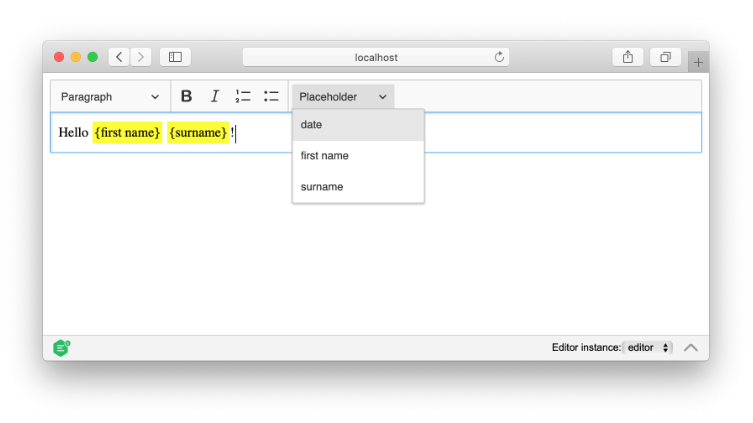
We didn't decide, though to implement a ready-to-use placeholder feature as it's usually needed to work differently in various systems. However, we wrote a detailed guide on implementing such a feature: https://ckeditor.com/docs/ckeditor5/latest/framework/guides/tutorials/implementing-an-inline-widget.html
Reinmar
on 6 Mar 2019
@Reinmar would it be possible to see a live demo of this guide, with access to the source? I can't seem to replicate what I'm reading as there seems to be some inconsistencies in the files between the different steps (placeholderediting sometimes using a constructor, sometimes the initmethod,..).
 deonclem
on 8 Mar 2019
deonclem
on 8 Mar 2019
We plan to add a "Full source code" section at the end and a live demo. For now, let me just clarify that it should be init() everywhere. It's a mistake that constructor() was used, although, it'd be fine (and work) too if it was used consistently.
Before adding the UI part, it should look like this:
// placeholder/placeholderediting.js

import Plugin from '@ckeditor/ckeditor5-core/src/plugin';

import {
    toWidget,
    viewToModelPositionOutsideModelElement
} from '@ckeditor/ckeditor5-widget/src/utils';
import Widget from '@ckeditor/ckeditor5-widget/src/widget';

import PlaceholderCommand from './placeholdercommand';

import './theme/placeholder.css';

export default class PlaceholderEditing extends Plugin {
    init() {
        console.log( 'PlaceholderEditing#init() got called' );

        this._defineSchema();
        this._defineConverters();

        this.editor.commands.add( 'placeholder', new PlaceholderCommand( this.editor ) );

        this.editor.editing.mapper.on(
            'viewToModelPosition',
            viewToModelPositionOutsideModelElement( this.editor.model, viewElement => viewElement.hasClass( 'placeholder' ) )
        );
    }

    _defineSchema() {
        const schema = this.editor.model.schema;

        schema.register( 'placeholder', {
            // Allow wherever text is allowed:
            allowWhere: '$text',

            // The placeholder will acts as an inline node:
            isInline: true,

            // The inline-widget is self-contained so cannot be split by the caret and can be selected:
            isObject: true,

            // The placeholder can have many types, like date, name, surname, etc:
            allowAttributes: [ 'name' ]
        } );
    }

    _defineConverters() {
        const conversion = this.editor.conversion;

        conversion.for( 'upcast' ).elementToElement( {
            view: {
                name: 'span',
                classes: [ 'placeholder' ]
            },
            model: ( viewElement, modelWriter ) => {
                // Extract the "name" from "{name}".
                const name = viewElement.getChild( 0 ).data.slice( 1, -1 );

                return modelWriter.createElement( 'placeholder', { name } );
            }
        } );

        conversion.for( 'editingDowncast' ).elementToElement( {
            model: 'placeholder',
            view: ( modelItem, viewWriter ) => {
                const widgetElement = createPlaceholderView( modelItem, viewWriter );

                // Enable widget handling on placeholder element inside editing view.
                return toWidget( widgetElement, viewWriter );
            }
        } );

        conversion.for( 'dataDowncast' ).elementToElement( {
            model: 'placeholder',
            view: createPlaceholderView
        } );

        // Helper method for both downcast converters.
        function createPlaceholderView( modelItem, viewWriter ) {
            const name = modelItem.getAttribute( 'name' );

            const placeholderView = viewWriter.createContainerElement( 'span', {
                class: 'placeholder'
            } );

            // Insert the placeholder name (as a text).
            const innerText = viewWriter.createText( '{' + name + '}' );
            viewWriter.insert( viewWriter.createPositionAt( placeholderView, 0 ), innerText );

            return placeholderView;
        }
    }
}
@Reinmar - Thank you. How would you modify the createPlaceholderView function if I wanted to create a slightly more complex widget, such as a button with some nested HTML (instead of a simple span?) In my scenario, the widget would need to communicate with a redux store.
Perhaps I could create a view like this, using the View class? https://ckeditor.com/docs/ckeditor5/latest/framework/guides/deep-dive/observables.html#making-properties-observable
 mattkoch614
on 6 May 2019
mattkoch614
on 6 May 2019
Hi @Reinmar and thank you for the good work on CKEditor5 !
I'm currently developping almost exactly the same as the placeholder widget in order to insert variables in a pdf template.
I have a list of variables looking like this
variablesList = [{
    variableName: 'Contract Number',
    variableValue: 'contractNumber'
  }, {
    variableName: 'Customer Name',
    variableValue: 'customerName'
  }]
My current view is as follow :
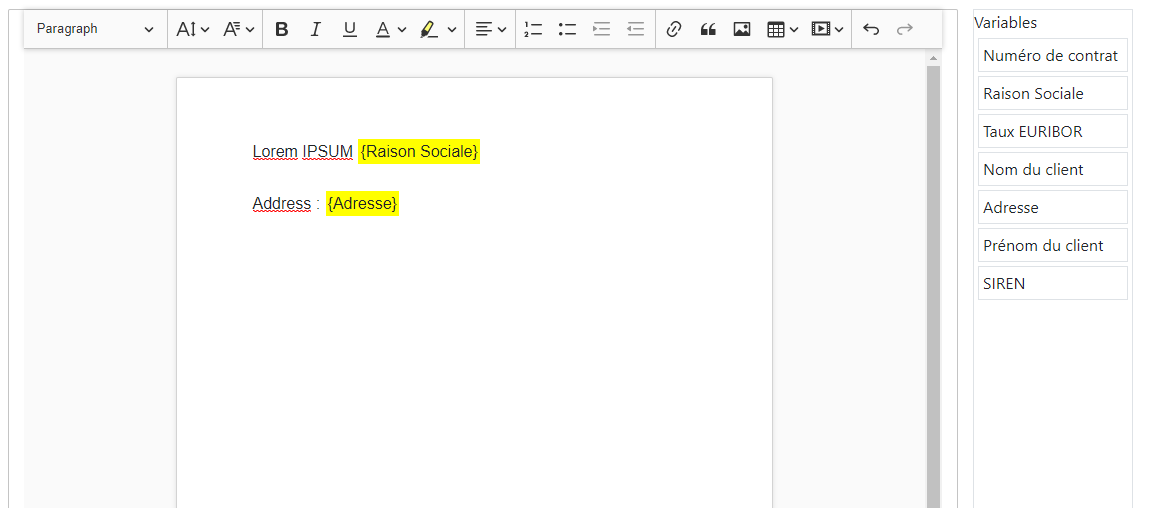
I'd like to have different data when I call getData()
In this example, instead of having :
<span class="placeholder">Variable Value<span>
I'd like to have
<span class="placeholder">{variableName}<span>
How could I modify my widget in order to extract the variable name instead of the variable label, only when I extract my editor data ?
Thanks in advance !
 Jch71
on 20 Aug 2019
Jch71
on 20 Aug 2019
Related issues
 MCMicS
·
3Comments
MCMicS
·
3Comments
 pjasiun
·
3Comments
pjasiun
·
3Comments
 oleq
·
3Comments
Reinmar
·
3Comments
oleq
·
3Comments
Reinmar
·
3Comments
 metalelf0
·
3Comments
metalelf0
·
3Comments
Most helpful comment
I use it for an invoice template designer for placeholders like "Client Name", "Invoice Number", etc. which are then replaced at print time with their real values.
What we need it to have an inline element which the user can select, move around (preferably with cut/paste), delete like text, and edit (via a dialog box like hyperlinks) would be ideal. An element similar to images, but "more inline" like text