Ckeditor5: Pressing enter moves the last character to a new line when typing Hangul (Korean)
🐞 Is this a bug report or feature request? (choose one)
- Bug report
💻 Version of CKEditor
https://ckeditor5.github.io/ <- here editor
📋 Steps to reproduce
- Korean typing, (Window Korea Keyboard) if you want typing "한글입니다-> gksrmfdlqslek"
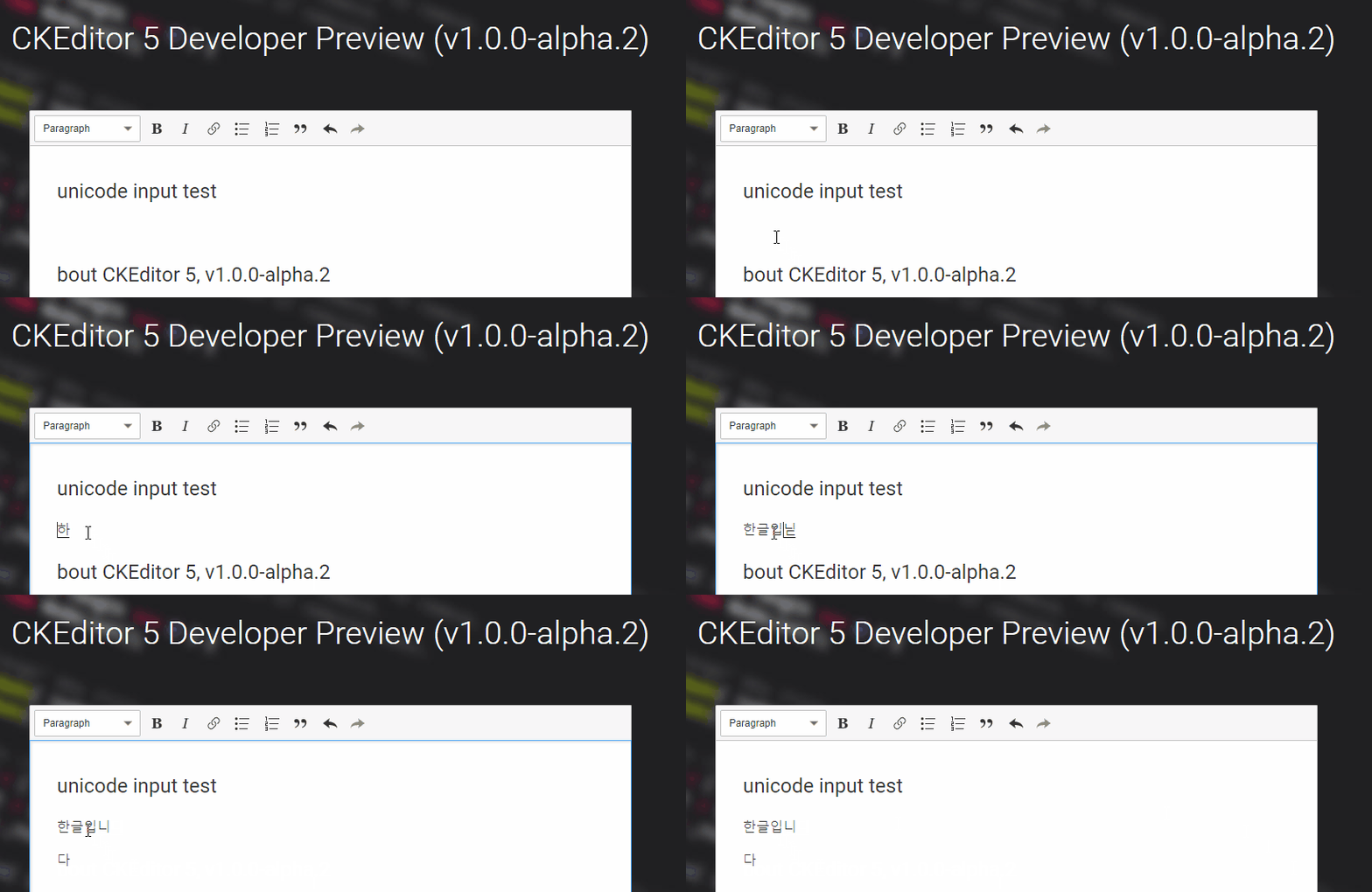
- Type "한글입니다" and press Enter key immediately.
You can check the symptoms in the image below.
✅ Expected result
❎ Actual result
📃 Other details that might be useful
 bjrambo
All 21 comments
I use a chrome.
bjrambo
on 22 Jan 2018
Possibly related to https://github.com/ckeditor/ckeditor5/issues/777. @Reinmar?
 oleq
on 22 Jan 2018
oleq
on 22 Jan 2018
777 is definitely related to #777 :D But, it may also be related to #748.
@bjrambo, could you check whether #748 describes the bug that you encounter as well? Because you didn't state what happens and what's the expected result and I can see on your screenshot that #748 occurs there as well, but perhaps you meant also some other issues,
 Reinmar
on 22 Jan 2018
Reinmar
on 22 Jan 2018
@Reinmar Seems to be related but different. Japanese has problem at the beginning of line. Korean has problem at the end of line.
bjrambo
on 23 Jan 2018
@Mgsy, could you take a look on this?
Reinmar
on 30 Jan 2018
I can confirm this issue. As you can see on the screencast, the selection is always behind inserted character (except character at the beginning of the block) and probably that's why one character moves downwards after pressing Enter.
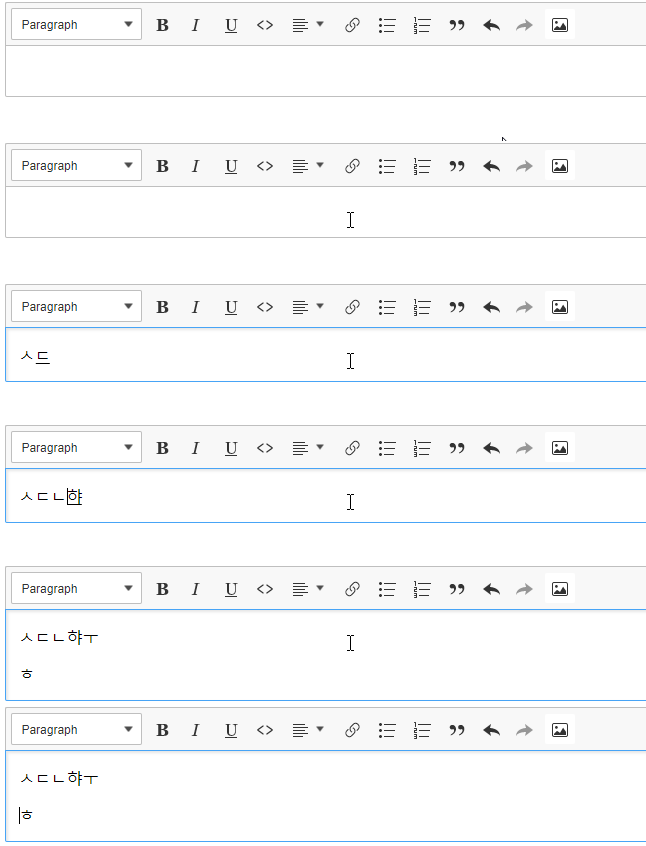
Update: This is editor's bug. In a plain contenteditable selection is also behind the character, but after pressing Enter it moves properly to the new line without any content.
 Mgsy
on 30 Jan 2018
Mgsy
on 30 Jan 2018
I assume that in a plain contenteditable or in CKEditor 4 the selection stays after the underlined part of the content?
Also, does a similar issue occur if you start typing at the end of a non-empty line?
Reinmar
on 30 Jan 2018
I assume that in a plain contenteditable or in CKEditor 4 the selection stays after the underlined part of the content?
I've made an update to my previous comment. In a plain contenteditable the selection stays behind inserted character, but after pressing Enter it behaves properly.
Also, does a similar issue occur if you start typing at the end of a non-empty line?
Yes, behaviour is the same.
This bug isn't reproducible in Firefox and Edge, I guess because of different typing method:

Mgsy
on 30 Jan 2018
I have analysed this issue in a little more detail. I suspected it might be caused by the renderer and the fact that it rerenders selection during composition which may break it.
However, it seems the cause is totally different. First of all, the fact that caret is before the last character when composing in Hangul (Korean) is already reported as a bug in a Chrome bugtracker. However as it works correctly in plain _contenteditable_ (even though selection is before the last character - enter does not move it to the new line) it means that CKEditor behaves different in some way and breaks it.
The different behaviour is caused by our custom enter handling (Enter feature) which relays on the current selection when inserting new lines (in short). Now, when typing regular text like:
<p>Foo Ba{}r</p>
and when composing Hangul:
<p>Foo ㅎㅇ{}ㄷ</p>
the native selection (and its ranges) is exactly the same showing that selection is before the last character. So relying on the native selection we are unable to tell that for Hangul the enter behaviour should be different.
This means that enter behaviour is inconsistent and I have already reported it to a Chrome team. TBH, I didn't find any other way to distinguish the Hangul case from other cases so I'm not sure if there is any reasonable way to fix it for now🤔
 f1ames
on 5 Jun 2018
f1ames
on 5 Jun 2018
@f1ames
It does not seem to be a problem with Chrome. There is no problem in ckeditor4.
Please check the image on #1117
 Clouds101
on 28 Jun 2018
Clouds101
on 28 Jun 2018
There is no problem in ckeditor4.
CKEditor 4 works completely differently than CKEditor 5 so this Chrome's bug isn't triggered there.
Reinmar
on 28 Jun 2018
Is there any idea?
The Chrome team seems not to fix this problem and it takes long time already.
We can't write sentences without "Enter key" globally (especially Korean) and I want to use CKEditor5 in developing Korean sites.
 startong21
on 10 Dec 2018
startong21
on 10 Dec 2018
@startong21
When entering characters in the editor, if the character you want to input is "enter", if the previous character is Korean, you have moved to the right and tried to "enter". However, unlike ckeditor version 4, we stopped the fix.
Please note that below is not a complete source code.
var ck5LastHan = false;
editor.editing.view.document.on( 'keydown', ( evt, data ) => {
    var ck5pass = getKeyStatus(data.keyCode);
    if(!ck5pass){
        ck5LastHan = true;
    }else{
        ck5LastHan = false;
    }
} );

ClassicEditor
.create( document.querySelector( '#editor' ) )
.then( editor => {
 editor.keystrokes.set( 'Enter', (data, stop ) => {
    if(ck5LastHan)
    {
      //give up
    }
}, { priority: 'high' }  );

// korean char detect
function getKeyStatus(char_ASCII){
     if (char_ASCII >= 48 && char_ASCII <= 57 )
    return true;
    else if ((char_ASCII>=65 && char_ASCII<=90) || (char_ASCII>=97 && char_ASCII<=122))
        return true;
    else if ((char_ASCII>=33 && char_ASCII<=47) || (char_ASCII>=58 && char_ASCII<=64)
       || (char_ASCII>=91 && char_ASCII<=96) || (char_ASCII>=123 && char_ASCII<=126))
    return true;
    else if (char_ASCII>=188 && char_ASCII<=190)
    return true;
    else if (char_ASCII>=8 && char_ASCII<=1)
    return true;

 return false;
}
// You will also need to add the source code above that works only with the Chrome browser.
Clouds101
on 10 Dec 2018
Most helpful comment
This issue has been fixed.