Ckeditor5: Link creation window moves to the top-left side of a browser while nesting list item
Steps to reproduce
- Create an ordered list with two items.
- Select some text in second item and transform it into a link.
- Unselect.
- Click on this link to open link creation window.
- Press "TAB".
Current result
Link creation window moves to the top-left side of a browser.
Other informations
OS: Windows 10, Ubuntu 16.04
Release: 0.10.0
Screenshot

 Mgsy
Mgsy
All 10 comments
I can't reproduce it any more. I think it was fixed in the current milestone. But I can't reproduce it on https://ckeditor5.github.io either, so please check it on the latest master version, @Mgsy.
 Reinmar
on 21 Jun 2017
Reinmar
on 21 Jun 2017
@Reinmar, I checked this one again and it's still reproducable. I was able to reproduce this issue on https://ckeditor5.github.io, local build and article preset /ckeditor5-presets/tests/manual/article.html.
I recorded a screencast, I hope it would be helpful.
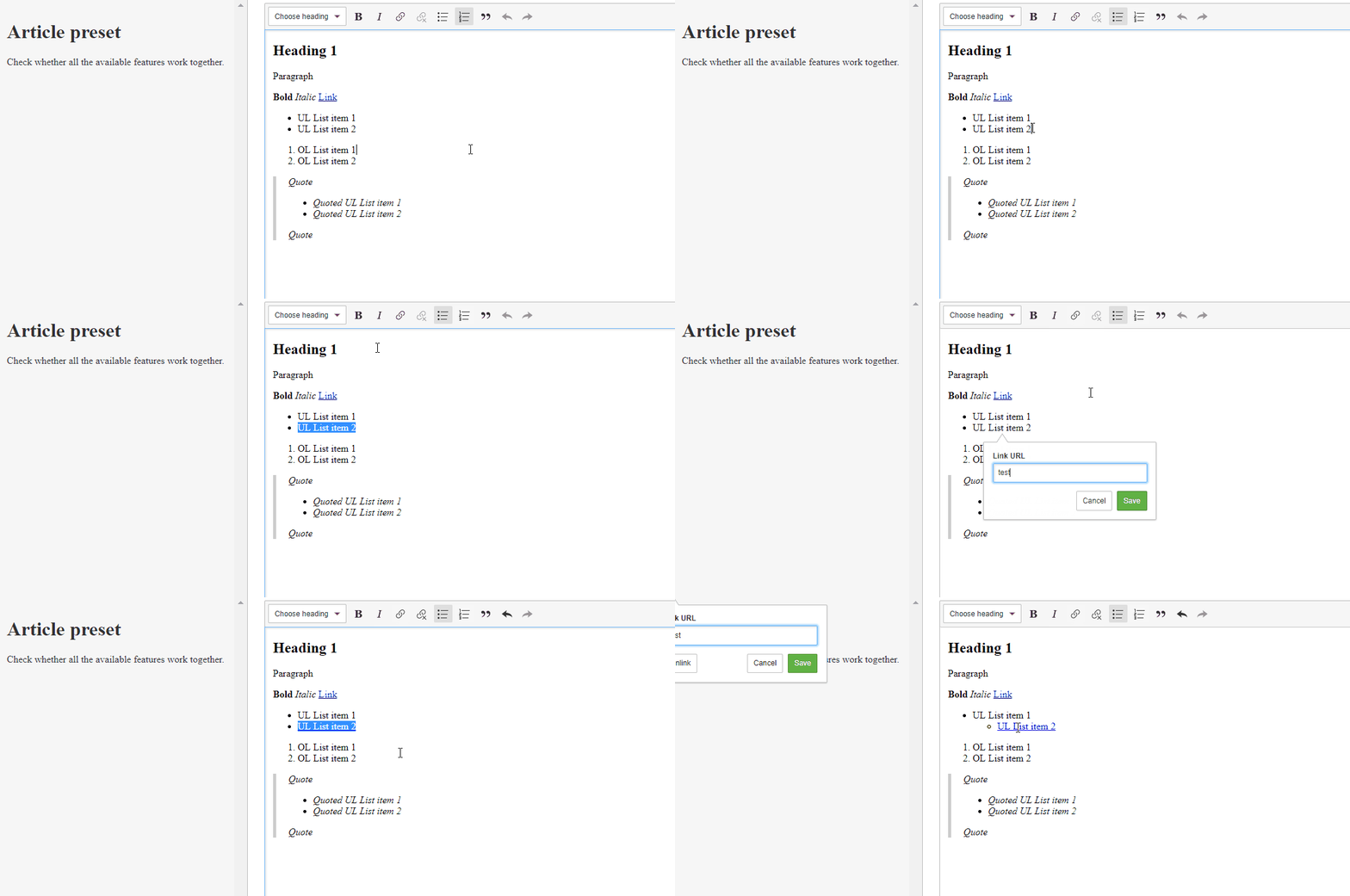
Mgsy
on 22 Jun 2017
Confirmed.
Reinmar
on 22 Jun 2017
I was analyzing this some time ago. My idea was to stop keystroke propagation after focusing link balloon and prevent List feature from making an indent, but this is rather not possible because both are listening on the same element and stopPropagation() can't help.
The simplest working fix I found (requires https://github.com/ckeditor/ckeditor5-ui/pull/286):
diff --git a/src/link.js b/src/link.js
index 1e08493..1a15be4 100644
--- a/src/link.js
+++ b/src/link.js
@@ -275,15 +275,7 @@ export default class Link extends Plugin {
                        //  * the selection remains in the original link element,
                        //  * there was no link element in the first place, i.e. creating a new link
                        else {
-                               // If still in a link element, simply update the position of the balloon.
-                               if ( renderSelectedLink ) {
-                                       this._balloon.updatePosition();
-                               }
-                               // If there was no link, upon #render, the balloon must be moved
-                               // to the new position in the editing view (a new native DOM range).
-                               else {
-                                       this._balloon.updatePosition( this._getBalloonPositionData() );
-                               }
+                               this._balloon.updatePosition( this._getBalloonPositionData() );
                        }
                } );
 oskarwrobel
on 7 Aug 2017
oskarwrobel
on 7 Aug 2017
The story is quite complex. There are multiple issues involved and each one must be addressed separately.
The actual positioning issue
To start off, there's a bug in the Link feature that causes the link balloon to float off screen under certain conditions.
And the particular condition we're talking about is that as the List feature indents/outdents the list item, it re-renders the editing view (document), and by doing that it obsoletes the references in the ContextualBalloon#_stack. The remaining targets in the stack point to the old DOM elements, which have been replaced by the new ones upon render.
As @oskarwrobel correctly noticed, if ContextualBalloon#updatePosition is called without a specific new position after the indentation, the balloon uses the last position from the _stack and thus attaches the BalloonPanelView to an element which is no longer in DOM. That's why the balloon lands in the (0,0) of the screen.
Keystroke collision
But that's not the end of the story.
Link uses Tab to focus the form. List uses Tab to indent the lists. They can't do that at the same time because it would be super-weird.
I decided that focusing the UI has greater priority because it's a key accessibility feature. Without it, it's impossible to move the focus to the link form using just the keyboard. And besides, the user can hit Esc first to hide the link form and then hit Tab to indent the list item with a link (BTW, we must figure out some way to announce to the screen readers tag e.g. a panel is open but not focused).
Both features will remain accessible if the Link is more important. The other way around, we're losing an important piece of the Link feature. We can revisit the priorities when (if?) we implement an editor-wide keystroke to focus the floating panels (other than Tab).
And to make sure just one feature handles the keystroke some changes in the code are necessary:
- Both features should use the same API. ATM
Linkuses the(Editing)KeystrokeHandlerbutListuses directkeydownlistener to handle keystrokes. It shouldn't – it's a job for the(E)KH. - ATM, if a listener in the
(E)KHcancels like
js
hk.set( 'Tab', ( data, cancel ) => {
cancel();
} );
it only causespreventDefaultandstopPropagationin DOM. It does not prevent otherTabcallbacks from executing and that needs to be fixed if theLinkcallback is to be executed but theListone ignored. (E)KHcallbacks must have priorities just likeEmitterevents to make sure that no matter the order plugins are loaded,Linkcallback will always prevail over theList.
Changes
- The https://github.com/ckeditor/ckeditor5-utils/tree/t/ckeditor5/447 branch in
ckeditor5-utilsintroduces priorities to theKeystrokeHandlerand proper keystroke cancellation (solves 2. and 3.). - The https://github.com/ckeditor/ckeditor5-core/tree/t/ckeditor5/447 branch in
ckeditor5-corealignsEditingKeystrokeHandlerto the above. - The https://github.com/ckeditor/ckeditor5-list/tree/t/ckeditor5/447 branch in
ckeditor5-listintroducesEditingKeystrokeHandlerintegration in theListfeature (solves 1.). - The https://github.com/ckeditor/ckeditor5-link/tree/t/ckeditor5/447 branch in
ckeditor5-linksolves:
- The weird positioning of the balloon because of outdated references. I know that the fix is not super–important since the
Listno longer engages on Tab but we're gonna git this issue again when developing other features that use Tab key anyway. - The
Linkkeyboard integration should always have greater priority than the one of theList(solves 3.).
- The weird positioning of the balloon because of outdated references. I know that the fix is not super–important since the
The branch constellation in https://github.com/ckeditor/ckeditor5/tree/t/447. Have a nice review!
 oleq
on 7 Aug 2017
oleq
on 7 Aug 2017
Fix in Link feature (except setting priority) is not necessary in this case because list item won't be transformed into a nested list item on Tab press while link balloon is displayed. However, it's safer to pass new position data to each updatePosition() call because this probably will save us from the future issues related to collaboration or undo.
Big ❤️ for priorities in keystroke handler, this is something that is really necessary for us.
oskarwrobel
on 7 Aug 2017
I saw most of the changes. They look good. I hoped that the keydown:<keystroke> event will be public (and this will definitely become a followup for 1.0.0) but there are some issues with publishing it on the KH now, so we can skip it.
Reinmar
on 8 Aug 2017
@oleq, could you make proper tickets and PRs for changes described in https://github.com/ckeditor/ckeditor5/issues/447#issuecomment-320698055?
Those are not that straightforward changes so it won't be good to close them like that. I don't even know now which changes were merged already.
Reinmar
on 18 Aug 2017
@Reinmar I just split the entire issue into sub-issues. Have fun reviewing it ;-)
oleq
on 21 Aug 2017
🎉 , all done!
Reinmar
on 22 Aug 2017
Related issues
 pomek
·
3Comments
pomek
·
3Comments
 hybridpicker
·
3Comments
hybridpicker
·
3Comments
 pandora-iuz
·
3Comments
pandora-iuz
·
3Comments
 hamenon
·
3Comments
Reinmar
·
3Comments
hamenon
·
3Comments
Reinmar
·
3Comments
Most helpful comment
🎉 , all done!