Ckeditor5-angular: How to define a Base64 file upload?
Hello,
I'm using the ckeditor5 with Angular 7 for the first time. I have seen this topic about how to upload the images in Base64 format (https://github.com/ckeditor/ckeditor5/issues/1378 - specifically this gist: https://gist.github.com/f1ames/f0d154e2a1fbeefcac5bb4dff20920ec) but i don't follow where to use this code in my environment.
I tried to add it as a separated .ts and import it in the project, but it didn't work (at best i got that i duplicated modules).
Can someone point me to the right direction?
 diedona
All 14 comments
i was able to make it work (https://github.com/diedona/angular-ckeditor-test) but i had to tweek somethings. Is this the intended way?
diedona
on 12 Apr 2019
Hi @diedona!
This gist imports source files from CKEditor so to make it work you should create a custom build first outside of the Angular project. Then add to this build the Custom upload adapter and after bundling the custom editor outside of the Angular app you can copy the generated ckeditor.js file to the Angular project and use it. It's because we don't officially support building from source in the Angular ecosystem yet.
Hope it will help you :)
 ma2ciek
on 12 Apr 2019
ma2ciek
on 12 Apr 2019
thanks for the promp reply @ma2ciek. I was able to make it work by making some changes in the gist, like so: https://gist.github.com/diedona/16444e367c069b8b7639b85899b957f7
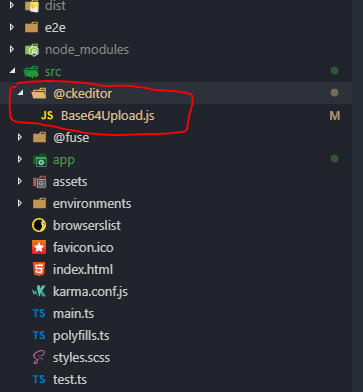
Then i placed the file in my solution:
Called it in as a extraplugin:
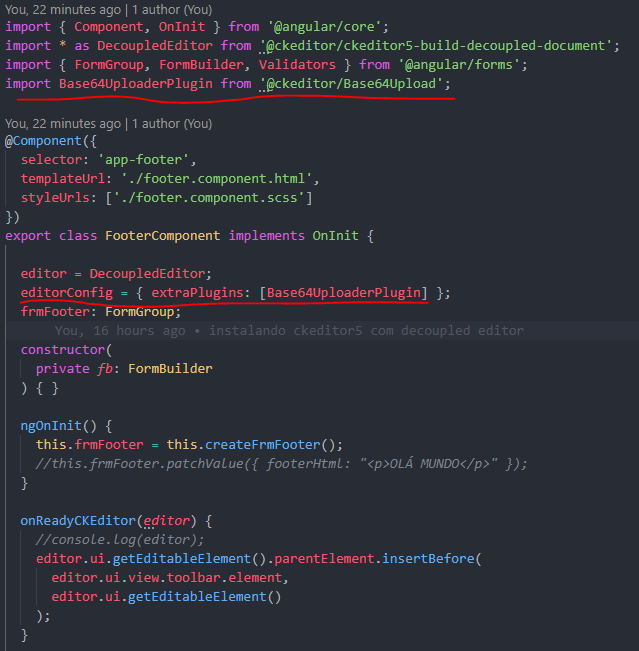

And it works like a charm! All using the decoupled editor build. Seems like a workaround, but suits me very nice right now and might help others.
diedona
on 12 Apr 2019
Oh, now your gist is perfectly fine and that approach should be the easiest solution to that problem. I overlooked that these imports can be omitted. Good job 👍
ma2ciek
on 12 Apr 2019
@diedona, I also want to integrate CKEditor as you used but getting error my end, can not find module...


and html code:

Could you please suggest me steps to integrate it properly.
Thanks
 puru101
on 17 Apr 2019
puru101
on 17 Apr 2019
@puru101 your path in the import should be relative from your component calling it. In my example i created a custom path (tsconfig.json, key "paths"), but you don't need it.
If your component is inside the folder "/app", you should import it as:
import Base64Upload from ../ckeditor/Base64Upload
For a functional example, check my github (https://github.com/diedona/angular-ckeditor-test/tree/master/src/app) it does not use custom name paths
diedona
on 17 Apr 2019
@puru101 your path in the import should be relative from your component calling it. In my example i created a custom path (tsconfig.json, key "paths"), but you don't need it.
If your component is inside the folder "/app", you should import it as:
import Base64Upload from ../ckeditor/Base64UploadFor a functional example, check my github (https://github.com/diedona/angular-ckeditor-test/tree/master/src/app) it does not use custom name paths
Thanks, @diedona , Yes it's working for me.
puru101
on 18 Apr 2019
@diedona, as per your suggestion I am able to integrate base64 plugins in angular. But when insert image and try to get data it's through
Error: my-editor.component.ts:37 Log error TypeError: Cannot read property 'getData' of undefined

Here is a code which is used to get an editor data:

Could you please suggest me to fetch data from the editor.
Thanks,
Purushottam
puru101
on 19 Apr 2019
Hi @diedona!
This gist imports source files from CKEditor so to make it work you should create a custom build first outside of the Angular project. Then add to this build the Custom upload adapter and after bundling the custom editor outside of the Angular app you can copy the generated
ckeditor.jsfile to the Angular project and use it. It's because we don't officially support building from source in the Angular ecosystem yet.Hope it will help you :)
Hi, When can we expect an official support for Angular2+ to build from source? Is it in the pipeline?
 venkateshwarans
on 4 May 2019
venkateshwarans
on 4 May 2019
Hi @venkateshwarans.
Hi, When can we expect an official support for Angular2+ to build from source? Is it in the pipeline?
Unfortunately, there is no ETA for this feature yet.
ma2ciek
on 6 May 2019
thanks for the promp reply @ma2ciek. I was able to make it work by making some changes in the gist, like so: https://gist.github.com/diedona/16444e367c069b8b7639b85899b957f7
Then i placed the file in my solution:
Called it in as a extraplugin:
And it works like a charm! All using the decoupled editor build. Seems like a workaround, but suits me very nice right now and might help others.
awesome work man .... ......just works like charm
 bharathnallamothu
on 19 Aug 2020
bharathnallamothu
on 19 Aug 2020
Thank you thank you Thank you thank you Thank you thank you! I spent a whole day on this trying to do the custom builds and none of it worked! This worked first time! Thank you thank you!
 fromage9747
on 10 Nov 2020
fromage9747
on 10 Nov 2020
@diedona, as per your suggestion I am able to integrate base64 plugins in angular. But when insert image and try to get data it's through
Error: my-editor.component.ts:37 Log error TypeError: Cannot read property 'getData' of undefined
Here is a code which is used to get an editor data:
Could you please suggest me to fetch data from the editor.
Thanks,
Purushottam
You can use ngModelChange.
HTML
<ckeditor [editor]="Editor"
              [(ngModel)]="TextValue"
              (ngModelChange)="TextValueChange($event)"></ckeditor>
Component
public TextValue: string;
public TextValueChange(value: any): void {
        console.log(value);
    }
 nevraydin
on 19 Mar 2021
nevraydin
on 19 Mar 2021
This is better
_Allow uploading base64 images and resize_
https://stackblitz.com/edit/ngx-summernote
 id1945
on 3 Jul 2021
id1945
on 3 Jul 2021
Related issues
 rivernews
·
5Comments
rivernews
·
5Comments
 Ruud-cb
·
10Comments
Ruud-cb
·
10Comments
 Dev199x
·
5Comments
Dev199x
·
5Comments
 ninadh26
·
6Comments
ninadh26
·
6Comments
 FERNman
·
7Comments
FERNman
·
7Comments
Most helpful comment
thanks for the promp reply @ma2ciek. I was able to make it work by making some changes in the gist, like so: https://gist.github.com/diedona/16444e367c069b8b7639b85899b957f7
Then i placed the file in my solution:

Called it in as a extraplugin:

And it works like a charm! All using the decoupled editor build. Seems like a workaround, but suits me very nice right now and might help others.