Ckb-next: 0.3.2 shows no devices connected after Mojave Update
ckb-next-dev-detect-report.gz
Hi all, i have been using CKB for a long time.
Was on the older version <0.2.9 and my RGB Strafe works perfectly with key binding and lighting animation.
Recently I have updated my Mac Pro Retina Early 2015 to Mojave.
I tried installing the latest 0.3.2 but the CKB doesn't recognise my keyboard and shows no devices connected.
I can't bind my keys, however i can use it normally.
I attached my report and hope you guys can help me figure it out.
Thank you!
 gaoxing840
All 8 comments
You need to re-enable the Karabiner kext; you can do this in System Preferences > Security.
 Ravenslofty
on 7 Dec 2018
Ravenslofty
on 7 Dec 2018
Hello,
You need to re-enable the Karabiner kext; you can do this in System Preferences > Security.
Do you mean to drag and drop the ckb-next app under Accessibility?
Thank you!
PS My first time installation…
 florianorama
on 9 Dec 2018
florianorama
on 9 Dec 2018
I'm having the same issue (no devices connected). I'm installing CKB for the first time (version 0.3.2) on Mojave 10.14.2.
 beatlevic
on 11 Dec 2018
beatlevic
on 11 Dec 2018
You need to go to System Preferences > Security & Privacy and allow the extension by Fumihiko Takayama, by clicking the allow button on the bottom right.
If it doesn't appear, try unplugging and replugging your corsair devices.
You also need to either reboot or unplug and replug your devices after you've allowed it.
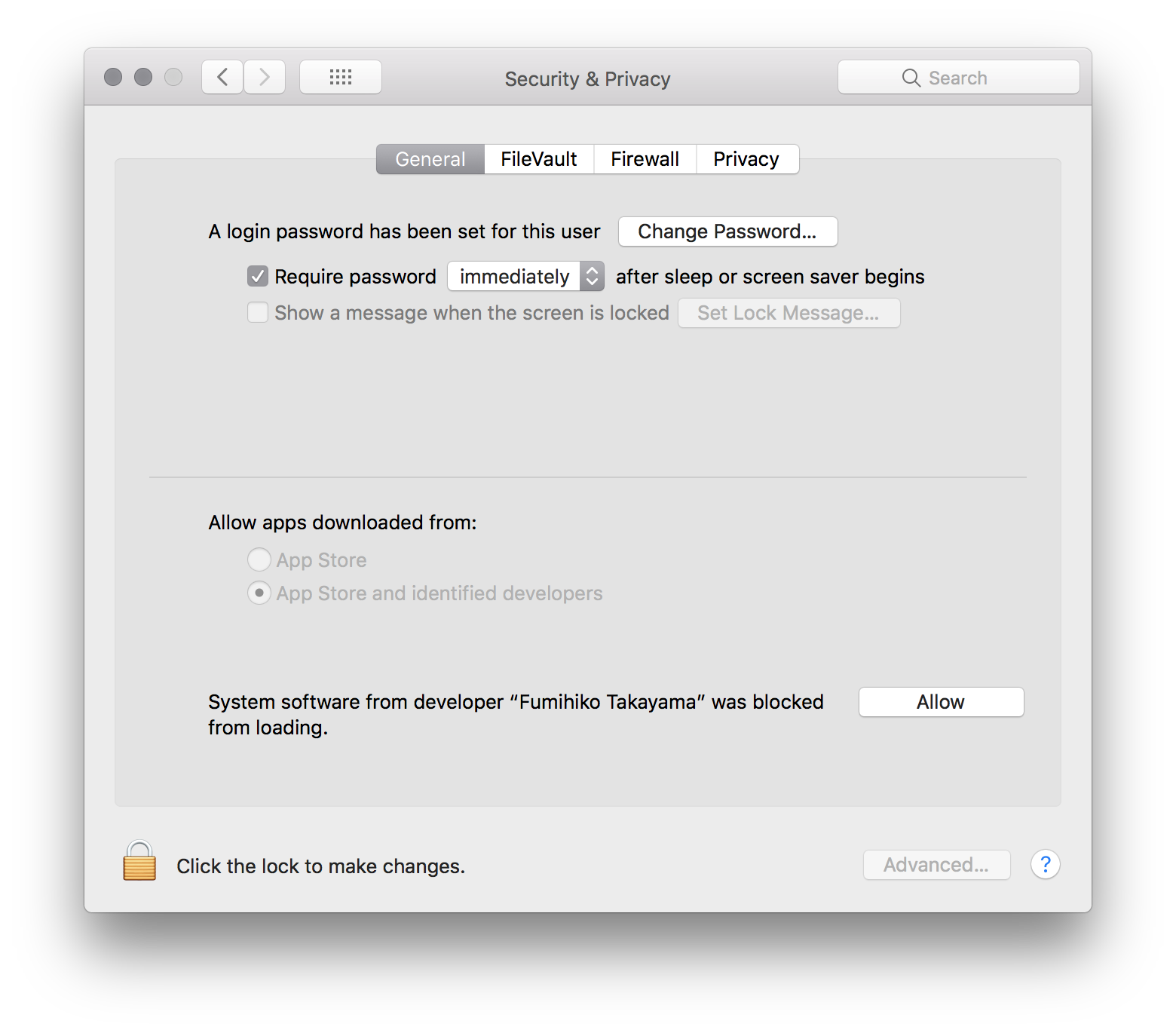
 tatokis
on 11 Dec 2018
tatokis
on 11 Dec 2018
Thank you for your quick response. In my case, I "Allowed" the developer already, but without success. I also tried rebooting, reinstalling and plugging my mouse (k65) in and out.
I'm on a macbook pro 13 inch 2018, with a usb-c to usb-a adapter for my k65 mouse.
I included my report here:
ckb-next-report-1544540641.gz
beatlevic
on 11 Dec 2018
@beatlevic Looking at the report, you have an M65 mouse. Only the M65 RGB and M65 RGB Pro are currently supported.
If I recall correctly, the M65 uses a different protocol, however we could try adding support for it if you want to spend time on it and help.
What features of it are you looking to configure?
tatokis
on 11 Dec 2018
@tatokis I actually now also have the M65 RGB Pro, which I just hooked up and which is working fine with CKB-next.
I was hoping I could change the mouse's polling rate, which is 1ms by default, because I was running into an annoying issue where my macbook pro would make high-pitch sounds whenever I would move the mouse :( Similar as described here: https://apple.stackexchange.com/questions/262400/high-pitch-sound-coming-from-my-macbook-pro-when-i-move-a-wired-mouse where they offer a solution by dialing back the polling rate.
For now I just work with an external monitor and the macbook pro in clamshell mode, so I no longer hear the high pitch noise :)
If you have a suggestion how I could change the polling rate (from 1ms to 2ms), I'm all ears.
beatlevic
on 16 Dec 2018
You can run echo "pollrate 2" > /var/run/ckb1/cmd in the terminal with ckb-next running, and it will switch your mouse to 2ms pollrate. See #272
tatokis
on 17 Dec 2018
Related issues
 EvanVujcec
·
9Comments
EvanVujcec
·
9Comments
 Aimela
·
4Comments
Aimela
·
4Comments
 derbrachialist
·
10Comments
derbrachialist
·
10Comments
 pakro
·
5Comments
pakro
·
5Comments
 mrnoisytiger
·
5Comments
mrnoisytiger
·
5Comments