Ckb-next: Windows / super key doesn't work K95 on Ubuntu 18.04
Bug report
General information
Hi, love ckb-next. Brilliant work. However spotted an issue after recent upgrade from Ubuntu 16.04 to 18.04 and upgrade of ckb-next to v0.3.0
Source
- ckb-next-git package in releases and local build as per instructions in wiki.
Logs & crash reports
Upload:
ckb-next-dev-detect-report.gzattached
What is the program's current behaviour?
With the daemon running the super key does nothing e.g. window switching, dash start etc. With daemon stopped, normal function returns.
I checked the key binding 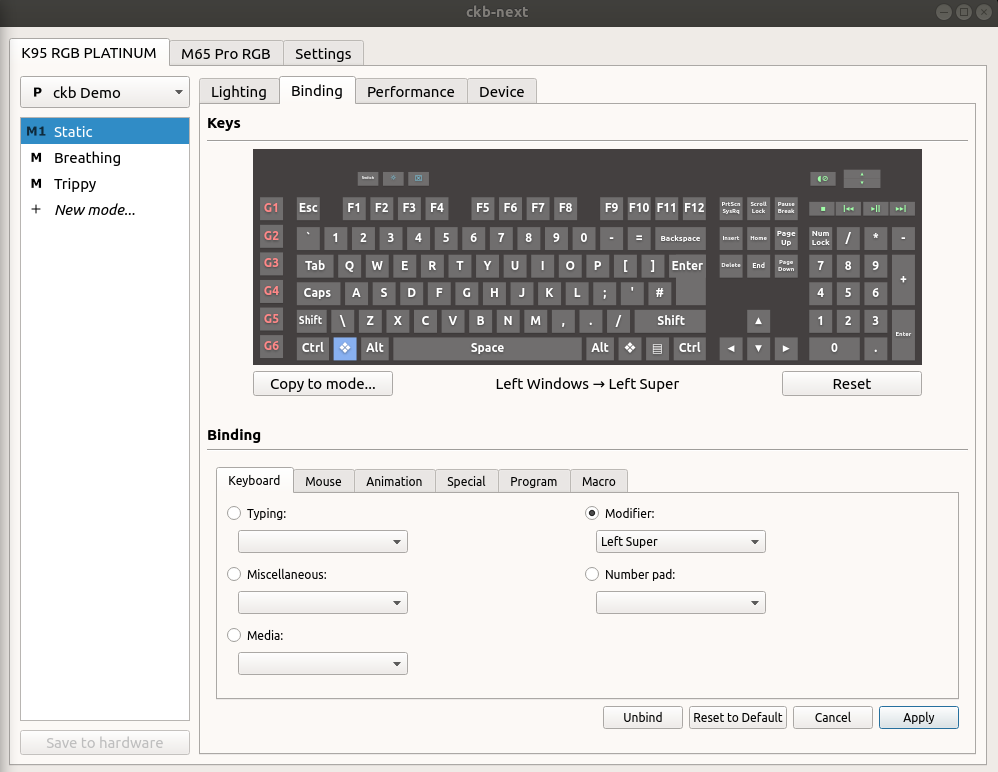 seems fine, and re-assigning dosn't fix.
If I assign a different key to 'super' (e.g. alt) then it behaves as the super key should.
Any other notes & comments?
Bit of a cli noob, happy to supply other info if you tell me what you need.
 petecog
All 6 comments
Make sure winlock isn't enabled
 tatokis
on 1 May 2018
tatokis
on 1 May 2018
sorry, drawn a blank. How?
Do you mean screen lock? or like mode-lock like caps lock. If former, yes, it's disabled.
petecog
on 1 May 2018
There's a button with a windows logo inside a lock on the top left of your keyboard. Pressing that disables and enables the super key.
tatokis
on 1 May 2018
ah ha! Nailed it! thanks. Never spotted that key before! Thanks for answering my (silly) question.
petecog
on 1 May 2018
Awesome. I had my Windows key locked, and I didn't even know that was an option.
Thank you!
 raziel5746
on 25 Dec 2019
raziel5746
on 25 Dec 2019
Thanks so much. I had the windows key lock logo on the windows key itself, so just pressing Fn + Win fixed it for me. :)
 zee-bit
on 20 Nov 2020
zee-bit
on 20 Nov 2020
Related issues
 ckb-next-bot
·
8Comments
ckb-next-bot
·
8Comments
 nameispanduh
·
15Comments
nameispanduh
·
15Comments
 5and3r
·
4Comments
5and3r
·
4Comments
 Aimela
·
4Comments
Aimela
·
4Comments
 rporter220
·
17Comments
rporter220
·
17Comments
Most helpful comment
There's a button with a windows logo inside a lock on the top left of your keyboard. Pressing that disables and enables the super key.