
_Sunday Mar 01, 2015 at 22:03 GMT # Sample: Friday Sep 13, 2013 at 22:58 GMT_
_Originally opened as https://github.com/KSP-CKAN/CKAN-support/issues/98_
The very first dialog I get when running ckan.exe is the following...

 netkan-bot
All 10 comments
D'oh. I don't suppose you have a CKAN version this applies to?
(Also, hi!)
 pjf
on 22 May 2015
pjf
on 22 May 2015
Can you still reproduce it on Windows 7?
 Postremus
on 28 Jun 2015
Postremus
on 28 Jun 2015
Can reproduce on Windows 8.1 on newest version (v1.25.3)
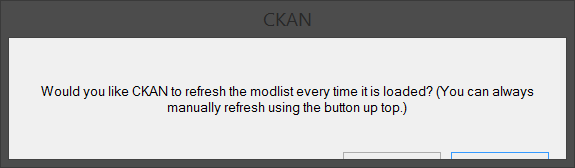
Probably caused by high DPI setting
 ghost
on 2 Oct 2018
ghost
on 2 Oct 2018
For comparison, here it is on Linux:
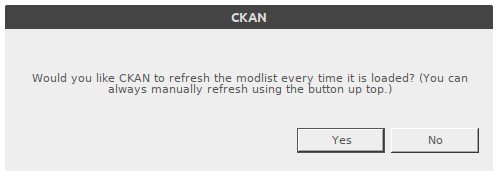
Presumably that's the environment in which this popup was initially developed and tested. Windows does some misleading stuff with window dimensions to make room for its title bar (seen on unrelated projects and platforms).
 HebaruSan
on 2 Oct 2018
HebaruSan
on 2 Oct 2018
Relevant code references:
https://github.com/KSP-CKAN/CKAN/blob/e825bdef9d52a4117e37acf6b6b74da216ee4567/GUI/MainRepo.cs#L113-L118
- https://github.com/KSP-CKAN/CKAN/blob/master/GUI/YesNoDialog.cs
- https://github.com/KSP-CKAN/CKAN/blob/master/GUI/YesNoDialog.Designer.cs
This looks suspicious:
Scaling by Font is useful if you want to have a control or form stretch or shrink according to the size of the fonts in the operating system, and should be used when the absolute size of the control or form does not matter.
The absolute size does matter in this case because the buttons are absolutely positioned controls.
HebaruSan
on 2 Oct 2018
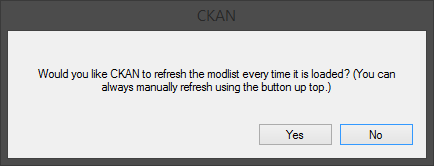
Same dialog on Windws 8.1 but with default (96) DPI setting:
ghost
on 2 Oct 2018
I just noticed there's already a hack in place related to form heights on Windows:
So whatever we do here would have to account for that and avoid conflicting with it.
EDIT: Commenting out ApplyFormCompatibilityFixes has no effect! So this hack does nothing.
HebaruSan
on 2 Oct 2018
Thanks for those screenshots! Putting them side by side, they're exactly the same height, but the "high DPI" one has a bigger font, greater width, slightly bigger title bar, and its controls are shifted downward.
HebaruSan
on 2 Oct 2018
@antipin00, exactly where is the high DPI setting that controls this? I want to make sure I change the right thing when I reboot into Windows later to check this out.
HebaruSan
on 2 Oct 2018
@HebaruSan, Control Panel -> All Control Panel Items -> Display. And I'd recommend to reboot after changing it, not just log off. That 'high DPI' screenshot is with 'Medium - 125%', by the way
ghost
on 2 Oct 2018
Related issues
 jupiterbjy
·
3Comments
jupiterbjy
·
3Comments
 Rohaq
·
5Comments
Rohaq
·
5Comments
 DasSkelett
·
6Comments
DasSkelett
·
6Comments
 mactijn
·
4Comments
mactijn
·
4Comments
 davidgiven
·
6Comments
davidgiven
·
6Comments