Ckan: [Bug] All mods installed via CKAN immediately listed as AD
Background
- Operating System: Windows 10 Home build 18363.592
- CKAN Version: 1.26.6
- KSP Version: 1.8.1.2694 (with both expansions installed)
No manual changes to GameData.
Problem
Upon installing any mod via CKAN, it immediately gets marked as "AD" in the interface, as if it were an autodetected, manually-installed mod.
Steps to reproduce
- Install CKAN.exe in the KSP game install folder.
- Start CKAN, open File > Manage KSP Instances; this will list no instances.
- Add the KSP instance where the CKAN.exe file resides as a new instance and set it as default.
- Use CKAN to install any mod.
- Mod will install without error, but will immediately be marked "AD".
Expected behavior
CKAN-installed mods should be marked appropriately.
 qeveren
All 8 comments
Problem reproduced on Win7!!
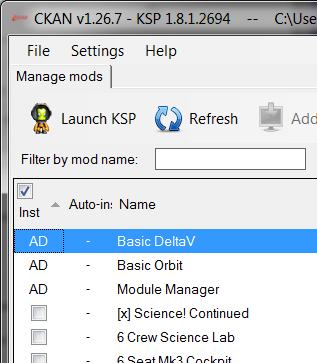
Thank you for the report!!
 HebaruSan
on 22 Jan 2020
HebaruSan
on 22 Jan 2020
I think we've got two different copies of the registry in memory at once. When installing, we register the installed files with one copy and save it, then the other copy finds the DLLs as unregistered files and we save that:
2020-01-22 04:49:09 DEBUG CKAN.ModuleInstaller - Copying GameData/BetterBurnTime/
2020-01-22 04:49:09 DEBUG CKAN.ModuleInstaller - Making directory C:/Users/User/Documents/KSP-Testing/ksp-1.8.1/GameData/BetterBurnTime
2020-01-22 04:49:09 DEBUG CKAN.ModuleInstaller - Copying GameData/BetterBurnTime/BetterBurnTime.dll
2020-01-22 04:49:09 DEBUG CKAN.ModuleInstaller - Writing file C:/Users/User/Documents/KSP-Testing/ksp-1.8.1/GameData/BetterBurnTime/BetterBurnTime.dll
2020-01-22 04:49:09 DEBUG CKAN.ModuleInstaller - Copying GameData/BetterBurnTime/changelog.txt
2020-01-22 04:49:09 DEBUG CKAN.ModuleInstaller - Writing file C:/Users/User/Documents/KSP-Testing/ksp-1.8.1/GameData/BetterBurnTime/changelog.txt
2020-01-22 04:49:09 DEBUG CKAN.ModuleInstaller - Copying GameData/BetterBurnTime/LICENSE
2020-01-22 04:49:09 DEBUG CKAN.ModuleInstaller - Writing file C:/Users/User/Documents/KSP-Testing/ksp-1.8.1/GameData/BetterBurnTime/LICENSE
2020-01-22 04:49:09 DEBUG CKAN.ModuleInstaller - Copying GameData/BetterBurnTime/README.md
2020-01-22 04:49:09 DEBUG CKAN.ModuleInstaller - Writing file C:/Users/User/Documents/KSP-Testing/ksp-1.8.1/GameData/BetterBurnTime/README.md
2020-01-22 04:49:09 DEBUG CKAN.ModuleInstaller - Copying GameData/BetterBurnTime/SRBurnTime.cfg
2020-01-22 04:49:09 DEBUG CKAN.ModuleInstaller - Writing file C:/Users/User/Documents/KSP-Testing/ksp-1.8.1/GameData/BetterBurnTime/SRBurnTime.cfg
2020-01-22 04:49:09 INFO CKAN.ModuleInstaller - Installed BetterBurnTime 1.10
2020-01-22 04:49:09 DEBUG CKAN.Registry - Pardon me, but I couldn't help overhear you're in a transaction...
2020-01-22 04:49:10 DEBUG CKAN.Registry - State saved
2020-01-22 04:49:10 INFO CKAN.RegistryManager - Saving CKAN registry at C:/Users/User/Documents/KSP-Testing/ksp-1.8.1/CKAN\registry.json
2020-01-22 04:49:11 DEBUG CKAN.Registry - Registry prepared to commit transaction
2020-01-22 04:49:11 DEBUG CKAN.Registry - Registry transaction committed
2020-01-22 04:49:11 DEBUG CKAN.Registry - Pardon me, but I couldn't help overhear you're in a transaction...
2020-01-22 04:49:11 DEBUG CKAN.Registry - State saved
2020-01-22 04:49:11 INFO CKAN.Registry - Registering ModuleManager from GameData/ModuleManager.4.1.3.dll
2020-01-22 04:49:11 INFO CKAN.Registry - Registering Astrogator from GameData/Astrogator/Astrogator.dll
2020-01-22 04:49:11 INFO CKAN.Registry - Registering BasicDeltaV from GameData/BasicDeltaV/BasicDeltaV.dll
2020-01-22 04:49:11 INFO CKAN.Registry - Registering BasicOrbit from GameData/BasicOrbit/BasicOrbit.dll
2020-01-22 04:49:11 INFO CKAN.Registry - Registering BasicOrbit from GameData/BasicOrbit/BasicOrbit.Unity.dll
2020-01-22 04:49:11 INFO CKAN.Registry - Registering BetterBurnTime from GameData/BetterBurnTime/BetterBurnTime.dll
2020-01-22 04:49:11 INFO CKAN.Registry - Registering MiniAVC from GameData/LoadingTipsPlus/MiniAVC.dll
2020-01-22 04:49:11 INFO CKAN.Registry - Registering LoadingTipsPlus from GameData/LoadingTipsPlus/Plugins/LoadingTipsPlus.dll
2020-01-22 04:49:12 INFO CKAN.RegistryManager - Saving CKAN registry at C:/Users/User/Documents/KSP-Testing/ksp-1.8.1/CKAN\registry.json
2020-01-22 04:49:12 DEBUG CKAN.Registry - Registry prepared to commit transaction
2020-01-22 04:49:12 DEBUG CKAN.Registry - Registry transaction committed
Here's the moment we switch over from the "portable" install to the registered install:
2020-01-22 04:48:58 DEBUG CKAN.RegistryManager - Disposing of lock file writer at C:/Users/User/Documents/KSP-Testing/ksp-1.8.1/CKAN\registry.locked
2020-01-22 04:48:58 DEBUG CKAN.RegistryManager - Disposing of lock file stream at C:/Users/User/Documents/KSP-Testing/ksp-1.8.1/CKAN\registry.locked
2020-01-22 04:48:58 DEBUG CKAN.RegistryManager - Dispose of registry at C:/Users/User/Documents/KSP-Testing/ksp-1.8.1/CKAN
2020-01-22 04:49:00 DEBUG CKAN.RegistryManager - Preparing to load registry at C:/Users/User/Documents/KSP-Testing/ksp-1.8.1/CKAN
2020-01-22 04:49:00 DEBUG CKAN.RegistryManager - Checking for stale lock file at C:/Users/User/Documents/KSP-Testing/ksp-1.8.1/CKAN\registry.locked
2020-01-22 04:49:00 DEBUG CKAN.RegistryManager - Trying to create lock file: C:/Users/User/Documents/KSP-Testing/ksp-1.8.1/CKAN\registry.locked
2020-01-22 04:49:00 DEBUG CKAN.RegistryManager - Lock file created: C:/Users/User/Documents/KSP-Testing/ksp-1.8.1/CKAN\registry.locked
2020-01-22 04:49:00 DEBUG CKAN.RegistryManager - Trying to load registry from C:/Users/User/Documents/KSP-Testing/ksp-1.8.1/CKAN\registry.json
2020-01-22 04:49:00 DEBUG CKAN.RegistryManager - Registry JSON loaded; parsing...
2020-01-22 04:49:03 DEBUG CKAN.RegistryManager - Registry loaded and parsed
2020-01-22 04:49:03 INFO CKAN.RegistryManager - Loaded CKAN registry at C:/Users/User/Documents/KSP-Testing/ksp-1.8.1/CKAN\registry.json
When you click Select to switch instances, GUI doesn't reset/refresh anything initially because we think the instances are the same because they have the same gamedir:
https://github.com/KSP-CKAN/CKAN/blob/2a7ae1da980738bf59a53d5a35266b836ff3e001/GUI/Main.cs#L1145
https://github.com/KSP-CKAN/CKAN/blob/2a7ae1da980738bf59a53d5a35266b836ff3e001/Core/KSP.cs#L493-L497
Meanwhile, Core has switched over to a new instance because KspManager.SetCurrentInstance was called:
HebaruSan
on 22 Jan 2020
The Dispose of registry at message corresponds to removing the registry manager from the cache, so a new instance is accessed the next time RegistryManager.Instance is called.
ModuleInstaller.GetInstance's cache is based on gamedir:
And we access that when you check a checkbox or when the mod list is refreshed:
https://github.com/KSP-CKAN/CKAN/blob/2a7ae1da980738bf59a53d5a35266b836ff3e001/GUI/Main.cs#L781
And ModuleInstaller retains a reference to a RegistryManager!
So the problematic sequence would be:
- Load the "portable" instance
- A
ModuleInstallersingleton is added to the cache with a reference to aRegistryManagerthat loads the registry for the portable instance - Switch to the registered instance
- The old
Registryobject is disposed and a new one is created - Install modules
- The old
ModuleInstalleris used, and its oldRegistryManagerobject holds a reference to theRegistryobject that we disposed previously! - When installation is complete, the old disposed
Registryreceives the file registration calls, and the new one has no clue
Possibilities to consider for a fix:
- Make
ModuleInstallerget a newRegistryManageras needed instead of holding references long term - Release and destroy the
ModuleInstallerwhen we switch instances - Detect that a newly registered instance is the same as the currently in-use portable instance and just keep using it without disposing anything
- Stop caching references to
RegistryManagerandModuleInstaller - Make the caching smarter than just based on gamedir, since gamedir can be the same between a portable and registered instance
- Have
KSPManager.SetCurrentInstanceraise an event to notify everyone else that the instance has changed rather than making everyone compare the gamedirs ad hoc
HebaruSan
on 22 Jan 2020
Alternate, arguably more common steps to trigger the same root cause based on investigation findings:
- Have two or more installs
- Launch CKAN with default install A
- Switch to install B
- Switch back to install A
- Install some modules; they'll be shown as AD or missing
Also works for any combination of switching to/from any instances A-B-A and then installing, regardless of whether they're the default instances, or the first instances, etc.
A persistent ModuleInstaller is created for install A in step 2. It retains a persistent reference to a RegistryManager for install A.
In step 3, the RegistryManager for install A is disposed and removed from RegistryManager.Instances, but remains in the ModuleManager instance, and later is used to register the installed modules!
Meanwhile all other users of RegistryManager, including GUI's mod list, will be using a new instance that locks and loads a new Registry instance that never hears about the registration of those installed modules.
It's simply not viable to retain persistent references to RegistryManager when they might be disposed out from under you and replaced.
HebaruSan
on 22 Jan 2020
2262 and #2864 were probably both this same issue, but lacked clues of how to make it happen. I suspect folks did this:
- Launch CKAN
- Add and switch to new install A
- Switch to existing install B
- Export mod list
- Switch back to install A
- Import the mod list from step 4
- Everything is AD
I think this started when #1828 added the dispose call to release locks when switching to a new instance, in July-August 2016.
@qeveren, this issue is almost 4 years old, and we've been receiving sporadic reports of it for at least two years now that no one could figure out. Thank you for paying careful attention and providing this major break in the case!
HebaruSan
on 22 Jan 2020
@HebaruSan Happy to be of help! :)
qeveren
on 22 Jan 2020
Related issues
 mario-ragucci-sp
·
4Comments
mario-ragucci-sp
·
4Comments
 Jacke4913
·
7Comments
Jacke4913
·
7Comments
 mynameis1234
·
7Comments
mynameis1234
·
7Comments
 w1wwwwww
·
6Comments
w1wwwwww
·
6Comments
 JesusTheBird
·
5Comments
JesusTheBird
·
5Comments
Most helpful comment
The
Dispose of registry atmessage corresponds to removing the registry manager from the cache, so a new instance is accessed the next timeRegistryManager.Instanceis called.https://github.com/KSP-CKAN/CKAN/blob/3969dda30b5620bea968e0ffac434d1a1e3f97ed/Core/Registry/RegistryManager.cs#L108-L112
ModuleInstaller.GetInstance's cache is based on gamedir:https://github.com/KSP-CKAN/CKAN/blob/2a7ae1da980738bf59a53d5a35266b836ff3e001/Core/ModuleInstaller.cs#L64
And we access that when you check a checkbox or when the mod list is refreshed:
https://github.com/KSP-CKAN/CKAN/blob/2a7ae1da980738bf59a53d5a35266b836ff3e001/GUI/Main.cs#L781
And
ModuleInstallerretains a reference to aRegistryManager!https://github.com/KSP-CKAN/CKAN/blob/2a7ae1da980738bf59a53d5a35266b836ff3e001/Core/ModuleInstaller.cs#L49
So the problematic sequence would be:
ModuleInstallersingleton is added to the cache with a reference to aRegistryManagerthat loads the registry for the portable instanceRegistryobject is disposed and a new one is createdModuleInstalleris used, and its oldRegistryManagerobject holds a reference to theRegistryobject that we disposed previously!Registryreceives the file registration calls, and the new one has no cluePossibilities to consider for a fix:
ModuleInstallerget a newRegistryManageras needed instead of holding references long termModuleInstallerwhen we switch instancesRegistryManagerandModuleInstallerKSPManager.SetCurrentInstanceraise an event to notify everyone else that the instance has changed rather than making everyone compare the gamedirs ad hoc