Circuitpython: STM32F405 runs out of memory prematurely compared to SAMD51 (5.0.0-beta)
The attached file illustrates an interesting memory issue that's significantly different between Feather STM32F405 (192k RAM) and Adafruit SAMD51 M4 devices with 192k RAM. The code is simple, and mainly has hundreds of lines just incrementing a dummy variable. The file has just over 1700 lines of code, one line makes the difference between having enough memory or not.
Found this trying my main application (much more complex, with many more imported modules and libraries), with ~1900 lines of code (~79k code.py), which runs on 192k M4, but I had to cut roughly in half (lines of code / file size) to run on STM32F405.
The attached file is only 19k, so seems to be more related to lines (or memory usage of interpretation) rather than code complexity or size of code file.
If it isn't repeatable, just add or subtract a few more dummy lines. I tested this across power cycles. (testing this with beta.1 because beta.2 has some other issue with STM32F405 (on macOS) where I can't test this... separate issue has been filed)
For comparison, Feather M4 doesn't get a memory error with this code until something over 3000 dummy += 1 lines.
Seems to be trying to allocate a lot of memory for a simple addition statement.
Is it possible to show the line number / trace in memory allocation errors?
Github truncates the large file if I try to include it here, so the code is in the comment below, sorry for the length.
Output, first running properly, then re-saving after uncommenting the last dummy += 1 line:
Auto-reload is on. Simply save files over USB to run them or enter REPL to disable.
code.py output:
-------------------------------------------------
Checking CPU...
Feather STM32F405 Express with STM32F405RG
CircuitPython 5.0.0-beta.1 on 2019-12-10
-------------------------------------------------
Loop...
656.619
..............................................soft reboot

Auto-reload is on. Simply save files over USB to run them or enter REPL to disable.
code.py output:
MemoryError: memory allocation failed, allocating 15477 bytes


Press any key to enter the REPL. Use CTRL-D to reload.
 anecdata
All 23 comments
import sys
import os
import time
import gc


print('-'*49)
print("Checking CPU...")
print(os.uname().machine)
print("CircuitPython", os.uname().version)

dummy = 0
dummy += 1
# insert 1691 more lines of `dummy += 1` here
# dummy += 1  # uncommenting this line results in memory error

print('-'*49)
print("Loop...")
print(time.monotonic())
loop = 1
while True:
    print('.', sep='', end='')
    if (loop % 49 == 0):
        print()
        print(time.monotonic())
    loop += 1
    time.sleep(1)
It appears to be fragmentation-related, and it's sudden (not gradual degradation of free mem). If I instead do max runnable repetitions of this code before the loop:
dummy += 1
print(dummy, gc.mem_free())
followed by:
gc.collect()
print(dummy, gc.mem_free())
Output is:
444 79040
445 79040
445 79120
-------------------------------------------------
Loop...
202.695 79040
Not much gets freed up with the .collect(). Adding one more repetition yields (now less than 1000 lines of code total):
MemoryError: memory allocation failed, allocating 12345 bytes
The RAM size on the STM32F405 build is set to 128kB, even though the chip has 192kB. That would certainly explain the difference. @hierophect is there some reason the RAM LENGTH in STM32F405.ld is 128kB instead of 192kB?
 dhalbert
on 21 Dec 2019
dhalbert
on 21 Dec 2019
That would explain hitting the upper limit sooner (lines of code) relative to SAMD51. But this is simple code, and the apparent fragmentation seems odd too.
anecdata
on 21 Dec 2019
It may have to do with the compiler: you could try it precompiled using mpy-cross and see what the gc numbers look like.
dhalbert
on 21 Dec 2019
Interesting. If code.py has just one line to import an .mpy of the same code above, it's fine. In fact it's fine with a couple thousand of the repetitive lines added (the CP code is up to 2700 lines), free mem is at around 50k+, and no memory error.
(btw, used mpy-cross from here for now due to make issues in Catalina)
anecdata
on 21 Dec 2019
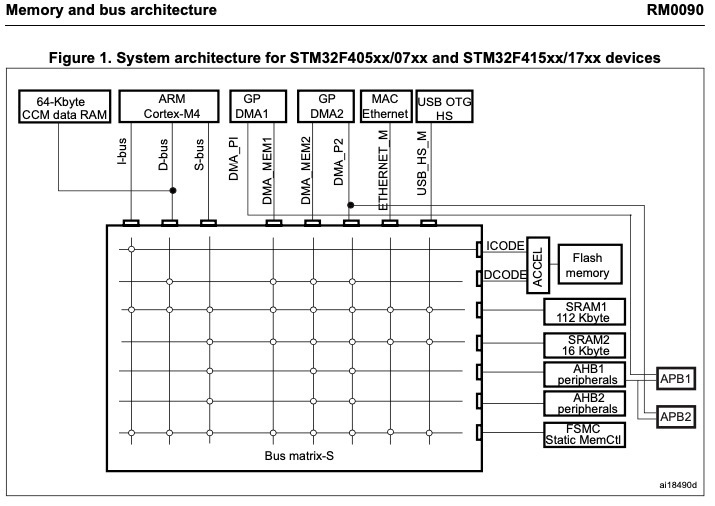
@anecdata I'm sorry I didn't get on here sooner, I could have saved you some time on this. The memory of the F405 is not contiguous - 128KB exist at address 0x2000_0000 - 0x2001_FFFF, but the remaining 64KB is Core Coupled Memory (CCMRAM) at address 0x1000_0000. Currently we do not use this extra RAM at all, pending flash improvements where it will be used to buffer the internal filesystem to increase it by 64KB and improve read/write speeds (Micropython uses it for the same purpose). You can see a diagram of this memory in the attached image from page 71 of the F405 datasheet:

So for the foreseeable future, you should treat the F405 as having only 128KB of accessible memory, same as micropython. However, it might be worth discussing an option to compile without an internal filesystem for boards that don't need it, so we can explore direct access to the CCRAM for user code.
@dhalbert Would you like me to keep this issue open for the fragmentation issue? I'm not sure what that could be.
 hierophect
on 23 Dec 2019
hierophect
on 23 Dec 2019
@hierophect We could open a new issue about using the CCRAM, since this issue is "solved".
Could the 64kB be used for the stack, and maybe the static RAM (bss?), leaving the 128kB for heap?
dhalbert
on 23 Dec 2019
@dhalbert I don't think stack use is a feasible use case for CCMRAM, since it is tied to the Data bus and is inaccessible to any form of DMA (which we don't use much now but will probably want to soon with audio stuff). The primary reason it exists is to execute code while concurrent memory operations are occurring in the main SRAM, to increase performance in parallel. We'd have to find a use case for it that excludes any possibility that something outside the data bus would attempt to use it. I don't know if Circuitpython has such an application, aside from the aforementioned filesystem buffering. If you can think of anything, let's start a new issue for it.
You can read more about CCMRAM here.
https://www.st.com/content/ccc/resource/technical/document/application_note/bb/09/ca/83/14/e9/44/c5/DM00083249.pdf/files/DM00083249.pdf/jcr:content/translations/en.DM00083249.pdf
Closing as this seems wrapped up.
hierophect
on 23 Dec 2019
@hierophect Thank you for the explanation about RAM structure. 128k makes perfect sense now.
I still have two questions:
Does
gc.mem_free()report total free RAM (192k-based), or just contiguous RAM available to CP (128k-based)? If it's 128k-based, then it does seem to me that there is something like fragmentation going on.Doesn't it seem odd that the (relatively simple) code will fail suddenly and request a large chunk of memory... but only when it's _not_ pre-compiled? Or is this expected due to much lower RAM usage of precompiled code + not needing interpretation?
I would suggest we call out 128k RAM on the product page / learn guide. 192k is printed on the board, so we should set expectations somewhere.
anecdata
on 23 Dec 2019
I agree that the 128K of RAM should be put on the product page, since this isn't at all obvious. @ladyada you ok with me going in there and adding a note?
I'll have to defer to @dhalbert on the gc.mem_free without doing more research - I don't implement any of the garbage collector functionality on the port level. Dan, does gc extract heap information out of the linker file? I notice that the F405 linker lacks the two lines
_heap_start = _ebss; /* heap starts just after statically allocated memory */
_heap_end = 0x2001c000; /* tunable */
Which I think I removed early on by request. This stuff is a bit outside my ballpark, so I'm not even quite sure where to find the gc implementation to double check this myself...
hierophect
on 23 Dec 2019
@hierophect hi dont edit product pages - let me know what you want me to add
 ladyada
on 23 Dec 2019
ladyada
on 23 Dec 2019
@ladyada Maybe adding a note somewhere saying that only 128KB of RAM is accessible for micropython or circuitpython despite 196KB being listed for the MCU, since anyone just skimming the datasheet or looking at the STM32 product page would totally miss all this CCRAM stuff.
That said, I see we don't actually have any mention of the device RAM on the product or learn pages; are they already omitted for this or another similar reason?
hierophect
on 23 Dec 2019
hi, let me know what you want added and where
ladyada
on 23 Dec 2019
@ladyada
I think a note in the Circuitpython Setup/Circuitpython Notes of the learn guide would be good:
Note for advanced users: if you are intending to start a project that is very RAM intensive, note you cannot access the full 196KB of RAM that listed on the F405 datasheet and website - only 128KB is available to Circuitpython programs for system reasons. You'll find the same limitation on Micropython and most other F405 devices.
Might also be a good time to update the implemented feature list to include UART, Neopixel and DisplayIO too now that they're all in there :)
hierophect
on 23 Dec 2019
On the product page, I'm not sure exactly how to word it. Maybe
- 1MB flash, 196 KB RAM (128K for python on hardware)
or the more blunt
- 1MB flash, 128 KB RAM + 64 KB CCMRAM
- 1MB flash, 128 KB RAM + 64 KB program-only RAM
?
hierophect
on 23 Dec 2019
Just reading along, wanted to mention: reason why not all of the RAM on the F405 is the same, is that it has a DSP-like Harvard architecture instead of a traditional Von Neumann.
 ednl
on 24 Dec 2019
ednl
on 24 Dec 2019
ok updated guide/product plz check
ladyada
on 25 Dec 2019
@ladyada looks great thank you!
hierophect
on 25 Dec 2019
Do we have a new issue for using the CCRAM? We could definitely use it and free up the normal ram for the circuitpython heap.
I want to start adding more information about memory locations to CircuitPython. The iMX RT line runs code off of flash so we'll want to start designating some code to sit in RAM. We may also be able to speed up execution by moving the stack and other common state to core coupled memory. (mp_state struct is one candidate.)
 tannewt
on 2 Jan 2020
tannewt
on 2 Jan 2020
Note, the CCM memory is actually data-only (not on the instruction bus):
tannewt
on 2 Jan 2020
@tannewt I haven't gotten to making a new issue yet as I wasn't sure exactly what I would be making it for. Check out my posts earlier in the thread for some more CCRAM info - it's restricted enough that right now I can't think of a much better use for it than what Micropython uses it for, which is simply a large buffer for internal filesystem tasks (which is something I do want to implement this month). I'll link the appnote I attached earlier again:
https://www.st.com/content/ccc/resource/technical/document/application_note/bb/09/ca/83/14/e9/44/c5/DM00083249.pdf/files/DM00083249.pdf/jcr:content/translations/en.DM00083249.pdf
The primary tasks it lists for CCMRAM are:
_• digital power conversion control loops (switch-mode power supplies, lighting)
• field-oriented 3-phase motor control
• real-time DSP (digital signal processing) tasks_
Frustratingly, this is for the F3, and there is no equivalent for the F4 that I've been able to find. I missed the implication in the datasheet map you linked that it actually isn't attached to the instruction bus in the F4 compared to the F3, so that's an irritating additional limitation. If you can think of something other than buffering that falls within these guidelines, let me know and I'll create an issue for it outside of my existing internal flash plans.
hierophect
on 3 Jan 2020
There should be plenty of data that we use in RAM that is only accessed by the CPU. The stack is almost that but we may need to move some DMA memory.
Buffering the internal flash filesystem isn't something I'd do in that space because DMA could be used to flush the cache out of RAM. With external flash it will be used for that.
Please open a placeholder issue and we can discuss related work there. Thanks!
tannewt
on 3 Jan 2020
Related issues
 No1089
·
31Comments
tannewt
·
41Comments
tannewt
·
29Comments
No1089
·
31Comments
tannewt
·
41Comments
tannewt
·
29Comments
 sommersoft
·
38Comments
sommersoft
·
38Comments
 robertgallup
·
42Comments
robertgallup
·
42Comments
Most helpful comment
ok updated guide/product plz check