Circuitpython: nrf: implement BLE HID
 dhalbert
All 25 comments
why is USB in the title?
 tannewt
on 17 Jul 2018
tannewt
on 17 Jul 2018
why indeed?
dhalbert
on 17 Jul 2018
Is there any intention to implement this? I'd love to be able to implement a keyboard/mouse composite device in CircuitPython!
 RoganDawes
on 20 May 2019
RoganDawes
on 20 May 2019
Yes, it is high on the list of features to implement next.
dhalbert
on 20 May 2019
Do you have any sort of ideas as to a timeline on this, or where it fits in on the roadmap. This would be super helpful for a project we're currently working on. If we were to write a Python extension in C, would we have access to the Arduino BLE libraries to implement BLE HID from that route? Or would it need to be done from scratch.
 jscholes
on 31 Jul 2019
jscholes
on 31 Jul 2019
Good timing: I have been working on this today. The code is really all in Python: the C BLE modules provide the infrastructure. The HID-specific part of the code is relatively complex because of the complexity of HID. It needs pairing and bonding: I have pairing working, but have not yet implemented bonding (remembering the pairing info so you don't need to re-pair).
No promises on when it will get done, but it's my current task!
dhalbert
on 1 Aug 2019
Seriously fantastic news. Are you developing this on a public branch or repo? Would love to check it out and maybe help if you're looking for outside contributions. Thanks!
jscholes
on 1 Aug 2019
Consider me onboard to help as needed with this effort - BLE has been on KMK Firmware's goal list for about as long as the project has existed and we're finally stable enough in the core firmware to dedicate cycles to QoL/creature comfort features. If there's a way I/we can help, holler at us here/Discord/etc. Cheers!
 klardotsh
on 1 Aug 2019
klardotsh
on 1 Aug 2019
FYI CircuitPython works as a BLE peripheral with the latest CircuitPython master and the BLE library master. Here is the demo code: https://github.com/adafruit/Adafruit_CircuitPython_BLE/blob/master/examples/ble_hid_periph.py
I'll leave this open because I intend on supporting other BLE HID devices from CircuitPython as well.
tannewt
on 9 Dec 2019
Any idea if this works with Windows / OSX hosts?
 urish
on 5 Jan 2020
urish
on 5 Jan 2020
Any idea if this works with Windows / OSX hosts?
It should work fine assuming they have BLE support (you may need Windows 10). In our experience, iOS is the pickiest, and hardest to get working. Windows, MacOS, Linux, and Android are all easier, and we got them all to work.
dhalbert
on 5 Jan 2020
Thanks Dan! I'll give it a go with Windows 10!
urish
on 9 Jan 2020
Windows 10 does see the device (even though not always - I had to remove the scan_response part from the advertising so that it show it on the list of pairable devices), but disconnects about one second after pairing with a "Driver error" message:
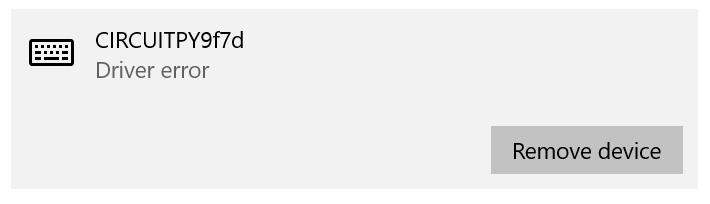
Android works well
urish
on 9 Jan 2020
@urish I'm seeing the same thing as you. At first I thought this was related to changes I have made in an attempt to implement a different HID device incorrectly / missing something (Microsoft Radial Controller / Surface Dial) , But after seeing your report I loaded up this BLE HID Keyboard example verbatim and am seeing the same behavior on Windows 10. Same thing, where it takes a second or two for it to settle with "Driver error".
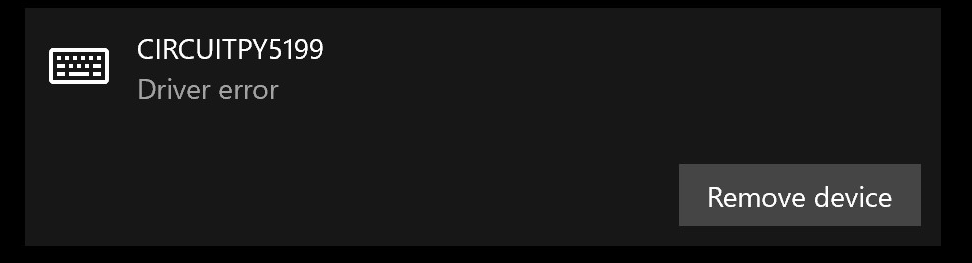
Android Recognizes the keyboard and am able to type on it as expected
 mscosti
on 14 Jan 2020
mscosti
on 14 Jan 2020
I have been working on BLE bonding over the past couple of weeks (see #2510), and just tested on Windows 10 with a BLE-capable dongle, and did not have this problem. But it also worked before without bonding. So it may be particular to the Bluetooth hardware on your Windows machine(s).@mscosti and @urish, what is your hardware?
dhalbert
on 14 Jan 2020
@dhalbert I'm using a MS Surfacebook 2, which has Bluetooth built in (no dongle)
mscosti
on 14 Jan 2020
@mscosti hmm, some kind of pairing issue mentioned here: https://social.technet.microsoft.com/Forums/en-US/31e39461-0b8b-4daa-86d0-010f0bd2feed/microsoft-surface-and-ble-issue?forum=win10itprohardware. The OP said it works with a dongle, but not with the builtin Bluetooth hardware. I assume you're up to date on drivers and the latest version of Windows 10, but if not, that might be worth trying.
I did not find many similar reports, but very few people are trying to use BLE HID with Windows. It was only fairly recently it started to be better supported.
dhalbert
on 14 Jan 2020
The issue mentioned here sounds very similiar to the one I'm experiencing. https://answers.microsoft.com/en-us/windows/forum/all/problem-with-bluetooth-low-energy-gatt-compliant/ec845657-d885-47e8-a796-cd3ff83a7698
Unfortunately, the suggested solution that others confirmed working for them (uninstalling Microsoft Bluetooth LE Enumerator and restarting) did not seem to work for me. @urish , I am curious if this works for you, though.
I'm not sure if its relevant/true/meaningful, but when I look at the device in device manager / HID -> Bluetooth Low Energy Gatt compliant HID device, it says error code 10 in status like in the reported issue above, and the first response says
According to the error code, the cause of the issue: the device's hardware key contains a "FailReasonString" value, and the value string is displays an error message defined by the hardware manufacturer. If the hardware key does not contain a “FailReasonString” value the message above is displayed.
As far as I can tell i'm up to date on my drivers. I have 2 other Bluetooth HID devices (Pen digitizer, granted its a MS device), and a PS4 game pad, both of which are able to pair and function just fine.
mscosti
on 14 Jan 2020
According to the error code, the cause of the issue: the device's hardware key contains a "FailReasonString" value, and the value string is displays an error message defined by the hardware manufacturer. If the hardware key does not contain a “FailReasonString” value the message above is displayed.
I think that is just saying that it's failing and we didn't supply a reason string ??
As far as I can tell i'm up to date on my drivers. I have 2 other Bluetooth HID devices (Pen digitizer, granted its a MS device), and a PS4 game pad, both of which are able to pair and function just fine.
Are those other devices BLE or classic Bluetooth (it might be hard to tell from the specs)?
dhalbert
on 14 Jan 2020
hmm. Not sure about the PS4 game pad, I think that's older, but the Surface Pen is listed as using Bluetooth 4.0, and in device manager shows up in HID section as Bluetooth Low Energy GATT compliant HID. So, still not 100% sure, but most likely?
Is there perhaps some arduino BLE HID code I could try on the CPB instead to see if I get the same issue?
mscosti
on 14 Jan 2020
How about https://github.com/adafruit/Adafruit_nRF52_Arduino/blob/master/libraries/Bluefruit52Lib/examples/Peripheral/hid_keyboard/hid_keyboard.ino ? You'll need to install the Adafruit nRF52 BSP if you haven't already.

dhalbert
on 14 Jan 2020
Someone summoned me, lol
 mcosti
on 14 Jan 2020
mcosti
on 14 Jan 2020
@mcosti: Sorry, typo for "mscosti" :)
dhalbert
on 14 Jan 2020
@dhalbert Thanks, I'll give that a shot when I next have time, likely sometime tomorrow evening. Is it appropriate/relevant to keep this discussion on this issue, or would you prefer a new github issue?
mscosti
on 14 Jan 2020
I've opened a new issue for the Windows problems.: #2517. Closing this because we do now have BLE HID.
dhalbert
on 14 Jan 2020
Related issues
 tdicola
·
4Comments
tdicola
·
4Comments
 kevinjwalters
·
7Comments
jscholes
·
3Comments
kevinjwalters
·
7Comments
jscholes
·
3Comments
 jepler
·
7Comments
jepler
·
7Comments
 osterwood
·
4Comments
osterwood
·
4Comments
Most helpful comment
FYI CircuitPython works as a BLE peripheral with the latest CircuitPython master and the BLE library master. Here is the demo code: https://github.com/adafruit/Adafruit_CircuitPython_BLE/blob/master/examples/ble_hid_periph.py
I'll leave this open because I intend on supporting other BLE HID devices from CircuitPython as well.