Cinnamon: Alt+Tab switcher takes too long to show up (~2 seconds)
I just migrated from Ubuntu 12.04 with Cinnamon to Linux Mint with Cinnamon. When I was in Ubuntu-Cinnamon, holding Alt+Tab would display the Alt+Tab switcher immediately. In Mint-Cinnamon, there is a noticeable delay (~2 seconds) between initially pressing Alt+Tab, and the Alt+Tab switcher showing up. A quick Alt+Tab to the most recently viewed application works fine, but does not immediately show the Alt+Tab switcher as I would expect.
This is more of a personal preference than an issue. Is there any way to configure the delay time in Cinnamon's settings?
 nucleartide
All 32 comments
This may be intentional to prevent the switcher from flickering for a quick ALt-tab to change to recently viewed application
 gauravjuvekar
on 24 Dec 2012
gauravjuvekar
on 24 Dec 2012
Oh no, quick Alt+Tabs _do_ work. It's just that I don't get to see the switcher until after two seconds have passed, provided that I'm still holding the Alt key.
nucleartide
on 24 Dec 2012
takes about half a second here - not a universal bug at least
 bimsebasse
on 24 Dec 2012
bimsebasse
on 24 Dec 2012
That's good behavior to me. I don't like having it show up every single time.
 seaweedchan
on 30 Dec 2012
seaweedchan
on 30 Dec 2012
For me it takes about half a second. But then I'm using RAID 10 f2, so maybe my system is snappier.
 MiY4Gi
on 15 Jan 2013
MiY4Gi
on 15 Jan 2013
@MiY4Gi I switched to another theme and the delay went down to around half a second, so maybe it has something to do with themes that take awhile to load?
Anyway it seems like ~0.5s is the standard. I wish there was some way to make it instantaneous like on Windows.
nucleartide
on 15 Jan 2013
Making it instantaneous is not really appealing - at least IMHO - since, as mentioned above, sometimes you just want to make a quick swap of applications to the previous one.
0.5s seems quite adequate...
 areynaldos
on 15 Jan 2013
areynaldos
on 15 Jan 2013
Actually, the timeouts involved are in the order of 0.2 seconds, which is a compromise between (1) having the icon bar appear almost immediately on activation and (2) being able to quickly switch between the two last-used windows without the icon bar needlessly appearing. During some time we used to have a shorter delay in the nightly builds, and that was deemed to be too short.
 autarkper
on 15 Jan 2013
autarkper
on 15 Jan 2013
@autarkper , thanks for the clarification... Those 0.2 seconds seem like the best tuning in terms of user experience (at least from my experience with Cinnamon)
areynaldos
on 15 Jan 2013
I know this bug is closed but I'd just like to share my $0.02 on the issue that seems to have been left out of the discussion above and bugs me about the current implementation.
What about the case where you would like to quickly switch to two, three, four windows backward or forward in the ring buffer? With the current delay I feel like I end up waiting for the Alt-Tab switcher to display on the screen. Once it finally displays on the screen my brain needs another 100 ms or so to process it to decide if I blindly cycled through the correct number of times to get to the window I want. When I know for sure that my target window is, say, 3 steps backward and I can blindly Alt-Tab to it without seeing the switcher I often get the flicker that proponents of the current behavior dread so much.
With the instantaneous display of Alt-Tab switcher (a la Windows, OS X, GNOME 2, and every other desktop environment I can think of) I am able to switch windows via Alt-Tab window switching _faster_. Yes, sometimes the Alt-Tab switch paints/unpaints to the screen very quickly. Some might call it flicker, but I would say it's just a UI responding very quickly to very quick user input -- a responsive user interface. I was actually surprised when I discovered the current behavior is by design because to an end user it just feels like a UI that is not responsive.
If the "flicker" is a deal breaker, how about dealing with it this way: throw the Alt-Tab switcher up on the screen as fast as possible, but set a minimum time limit that it will remain on the screen - maybe 100 - 200 ms.
 nocnokneo
on 4 Mar 2013
nocnokneo
on 4 Mar 2013
@ nocnokneo
My thoughts exactly! The current behaviour really slows me down, at least it feels that way, constantly waiting for those thumbnails to appear. I wonder if there is a way to get an alternative "window switcher" for cinnamon running.
 RoscoeReeseHiggings
on 31 Mar 2013
RoscoeReeseHiggings
on 31 Mar 2013
I have discovered one flaw with the timeout logic in Alt-Tab, namely that the timeout starts counting from the end of the initialization and not from the start. That may cause longer delays than anticipated, especially if you have a slow computer.
autarkper
on 31 Mar 2013
@RoscoeReeseHiggings : have you tried any of the Alt-Tab extensions over at Cinnamon Spices (http://cinnamon-spices.linuxmint.com/extensions)? There's even an Alt-Tab applet for those running a recent developer version (disclaimer: that is my applet).
autarkper
on 1 Apr 2013
I'm on Cinnamon 1.6 and tried the following extensions:
- Coverflow Alt-Tab
- Gnome2 AltTab LookALike
- Win7 Alt-Tab
But none of them solved the latency issue. Is there another one I should
try?
On Mon, Apr 1, 2013 at 2:31 AM, Per Ångström [email protected]:
@RoscoeReeseHiggings https://github.com/RoscoeReeseHiggings : have you
tried any of the Alt-Tab extensions over at Cinnamon Spices (
http://cinnamon-spices.linuxmint.com/extensions)? There's even an Alt-Tab
applet for those running a recent developer version (disclaimer: that is my
applet).—
Reply to this email directly or view it on GitHubhttps://github.com/linuxmint/Cinnamon/issues/1536#issuecomment-15705727
.
nocnokneo
on 1 Apr 2013
I use Mint 14 and Cinnamon 1.6.7
gksu gedit /usr/share/cinnamon/js/ui/altTab.js
const POPUP_DELAY_TIMEOUT = 0; // change from 150 to 0 milliseconds
restart Cinnamon and your done, I would love to have a parameter in settings for this!
 linuxbastler
on 4 Apr 2013
linuxbastler
on 4 Apr 2013
Thanks, linuxbastler. That helps but I it still has some annoying latency.
This is sounding like the devs took the "if you can fix it, call it a
feature" approach...
On Thu, Apr 4, 2013 at 9:17 AM, linuxbastler [email protected]:
I use Mint 14 and Cinnamon 1.6.7
gksu gedit /usr/share/cinnamon/js/ui/altTab.js
const POPUP_DELAY_TIMEOUT = 0; // change from 150 to 0 millisecondsrestart Cinnamon and your done, I would love to have a parameter in
settings for this!—
Reply to this email directly or view it on GitHubhttps://github.com/linuxmint/Cinnamon/issues/1536#issuecomment-15896310
.
nocnokneo
on 5 Apr 2013
@nocnokneo : Firing cheap shots at the devs that have spent countless hours of their valuable free time trying to improve Cinnamon does not in the least help your situation.
autarkper
on 5 Apr 2013
there was a discussion on GitHub 7 month ago about this "feature":
https://github.com/linuxmint/Cinnamon/pull/1115
clem changed the value of PREVIEW_DELAY_TIMEOUT from 100 to 200 ms.
Setting PREVIEW_DELAY_TIMEOUT to 0 ms was my first approach, but that didnt work for me so I tried to set POPUP_DELAY_TIMEOUT = 0.
Maybe additional values have to be changed to make it fast again.
For me POPUP_DELAY_TIMEOUT = 0 makes react it as fast as Windows.
I do not like any delay for Alt-Tab. My Windows XP / 7 / 8 all have no delay.
Ubuntu 12.10 also had delay and in 13.04 the delay was removed again.
linuxbastler
on 5 Apr 2013
@autarkper Sorry, didn't mean to be so cynical. The only reason I'm here pushing for changes like this is because I think Cinnamon on the whole is well done and has lots of potential.
nocnokneo
on 5 Apr 2013
@nocnokneo Others, including the developers, clearly disagree with your taste and think that YOUR suggestion would be bad design. Besides that, this issue is closed. Why would anyone aside from those who have responded to this issue already look here for future debate when there are million new issues made?
If you want it to be an option, request an option instead of getting all worked up here.
seaweedchan
on 6 Apr 2013
@seaweedchan We get email notifications for any comments on any issues. So most of us are actually following this issue.
Regarding taste, we tend to give options to accommodate for different tastes. So Yes. This will probably become an option.
 dalcde
on 6 Apr 2013
dalcde
on 6 Apr 2013
Solution provided by linuxbasler worked for me (modify altTab.js file).
Configuration: Linux Mint 14, Nadia. Cinnamon 1.6.7+nadia
@seaweedchan Actually this delay sucks, I don't like it too...
 G-S2h
on 9 Apr 2013
G-S2h
on 9 Apr 2013
@ lInuxbastler
Thanks for your help, this solution works fine for me!
RoscoeReeseHiggings
on 13 Apr 2013
FWIW, I am using the version of Cinnamon in LMDE (1.8.8). Ever since I installed LMDE a few months ago, I have had issues with short delays when I press alt-tab, the windows key or right click on a window in the task bar. The delay is definitely less than half a second, but I find it very noticeable (and it disturbs my flow). I wasn't sure whether the issue was a graphics driver issue or something in Cinnamon until I read this issue.
Unfortunately I don't have a file called /usr/share/cinnamon/js/ui/altTab.js as suggested by a previous commenter - however there is a file called /usr/share/cinnamon/js/ui/appSwitcher/classicSwitcher.js which contains the same variables so I suspect things might have moved.
I suppose the point of me commenting here is just to make register a view that excessive delays are noticeable and make it seem like bad performance.
 wtfrank
on 14 Aug 2013
wtfrank
on 14 Aug 2013
Yeah they were moved.
dalcde
on 14 Aug 2013
Cinnamon 1.8.6
Delay constant is INITIAL_DELAY_TIMEOUT in /usr/share/cinnamon/js/ui/appSwitcher/appSwitcher.js
 monitorius
on 30 Aug 2013
monitorius
on 30 Aug 2013
thanks monitorius, this works on my cinnamon 1.8.8+olivia.
I would like to see the delay as default value to 0 ms, not 150 ms or at least configurable.
It gives me a faster user experience.
My other systems also do not have a delay in Alt-Tab switching (Ubuntu 13.03 / 13.10, Win XP / 7)
linuxbastler
on 30 Aug 2013
Yeah, I agree. Right now I'm trying to switch from Windows to Linux Mint with Cinnamon, and that alt+tab delay was really annoying
monitorius
on 30 Aug 2013
I absolutely support the no-delay.
I applied the trick by monitorius, which works.
There is a still a tiny little delay, probably caused by my system being a little bit slow.
But the shorter the delay, the better. Those other OSes (Windows, OSX) probably have their research teams studying this usability stuff...
 donquixote
on 19 Sep 2013
donquixote
on 19 Sep 2013
Is there a way to place these customizations into some per-user configuration file, instead of editing the DPKG-managed files?
 mikaelhg
on 13 Oct 2013
mikaelhg
on 13 Oct 2013
Just my two cents. This delay is the worst idea ever. At least make it optional. My thumb is paining me because of this. Other than that I LOVE Linux Mint. Don't want to sound negative but this is really something you use so much and if it is a pain, the overall experience will be bad.
 mlp1802
on 20 Nov 2013
mlp1802
on 20 Nov 2013
In case someone was wondering the same, I achieved it by tweaking alttab-switcher-delay to 0 in dconf (/org/cinnamon/alttab-switcher-delay)
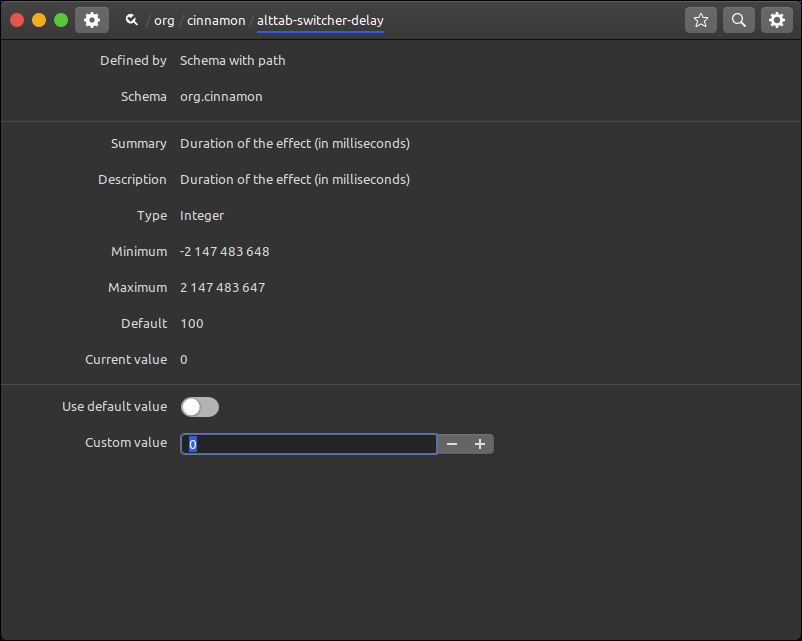
 awsms
on 15 May 2020
awsms
on 15 May 2020
Related issues
 ghost
·
3Comments
ghost
·
3Comments
 FreedomFighterSparrow
·
3Comments
FreedomFighterSparrow
·
3Comments
 Cloudwalk9
·
4Comments
Cloudwalk9
·
4Comments
 stefan-niedermann
·
4Comments
stefan-niedermann
·
4Comments
 orschiro
·
3Comments
orschiro
·
3Comments
Most helpful comment
I use Mint 14 and Cinnamon 1.6.7
gksu gedit /usr/share/cinnamon/js/ui/altTab.js
const POPUP_DELAY_TIMEOUT = 0; // change from 150 to 0 milliseconds
restart Cinnamon and your done, I would love to have a parameter in settings for this!