cinnamon --replace service with unknown memory leak
 * Cinnamon version 4.6.6
 * Distribution - (LinuxMint 20.0)
 * Intel(R) UHD Graphics 620 (3072MB VRAM) on Intel(R) Core(TM) i5-8250U
    - Driver: i915
    - Module: i915
 * 64 bit
lshw.long.txt
lshw.short.txt
_xsessions-errors.log
Issue
Hi,
yesterday i discovered a memory leakage on the cinnamon process (computer was slow cinnamon process eating 30 percent of my total amount of available RAM and lingering increasing), today investigated a little further (did a fresh start without any programs, just opened a console with top in it).
It seems the cinnamon --replace or one of it's threads produces a memory leak, my system was fine before i did a distribution upgrade to LinuxMint 20.
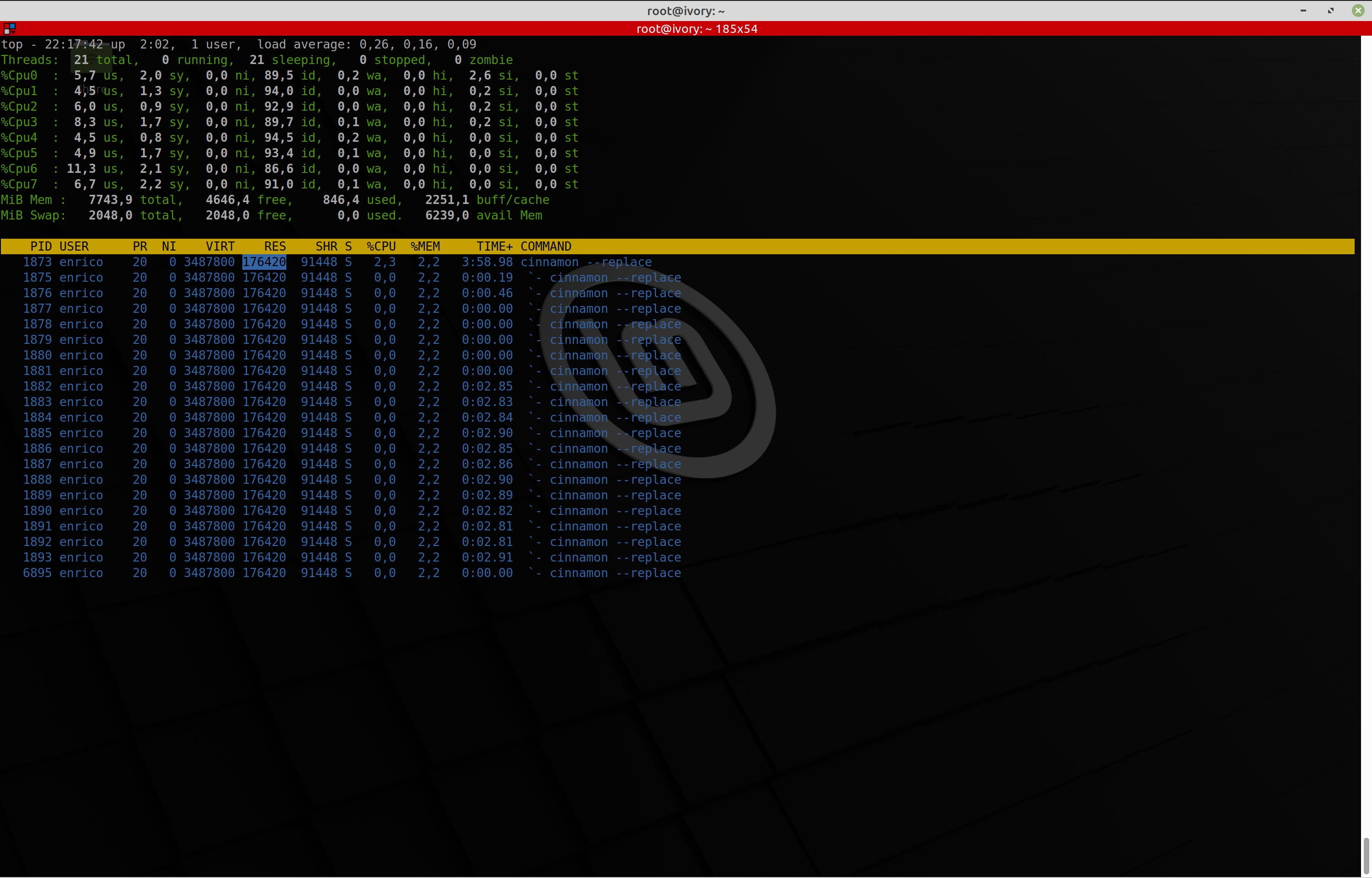
look at the time... (nobody is working on the computer, in the meanwhile)
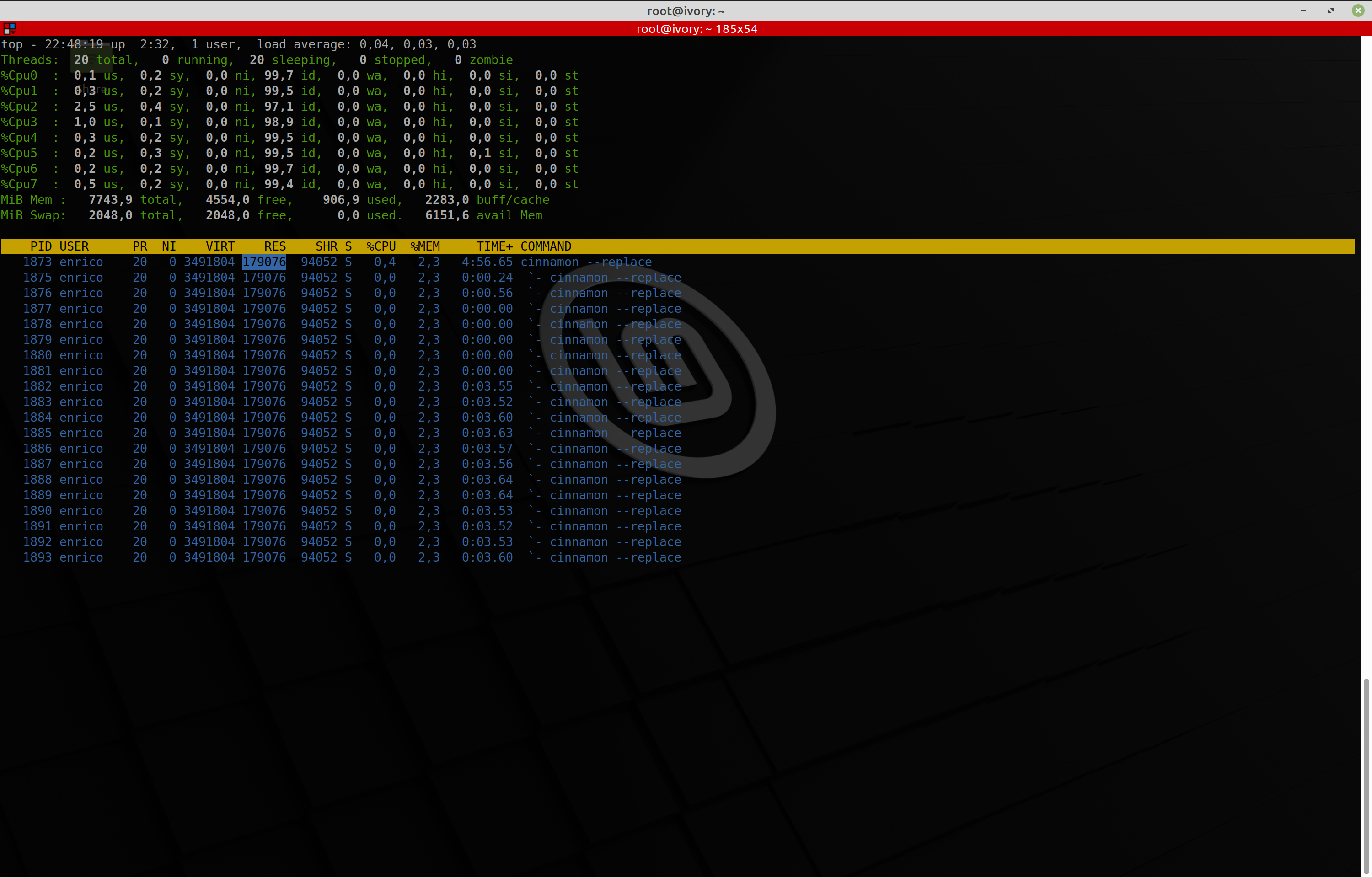
just a few hours more and the computer is unuseable.
I hope this will help u.
Steps to reproduce
- Buy a "Matebook X Pro" 8GB model with a Intel(R) Core(TM) i5-8250U CPU with integrated graphics.
https://www.amazon.de/gp/product/B07DVGST72/ref=ppx_yo_dt_b_asin_title_o04_s00?ie=UTF8&psc=1 - Install LinuxMint 19.3 make a upgrade of all packages
- Make a system upgrade to Mint 20.0
https://linuxmint-user-guide.readthedocs.io/en/latest/upgrade-to-mint-20.html
Expected behaviour
No leak :-)
Other information
https://github.com/linuxmint/cinnamon/issues/6850
If you have questions, please ask.
Configuration info
* stock installation, no modifications, no plugins, just a vanilla mint 19.3 and then 20.0
* extra software `RubyMine`, `VisualStudioCode`, `git` and `KiCad`  that's basically it.
 lirtistan
All 21 comments
Came here to open a thread like this one about "cinnamon --replace".
I installed LM20 from scratch but have the same issue.
After startup everything's fine, but after a few hours, exactly one "cinnamon --replace" process uses the CPU every 3-4 seconds as seen here:

Edit: Please let me know if you need any logs.
 msegmx
on 28 Jul 2020
msegmx
on 28 Jul 2020
@msegmx that`s exactly what i have seen a few days ago on my machine, thx for live capturing of that issue.
Now it should be clear that there is something wrong with that service.
lirtistan
on 28 Jul 2020
@msegmx the only thing is, i can't reproduce this issue. Currently it's not really clear what's going on behind the scene, or better what processes are involved with.
Can u remember what processes are running at the time this happens to u?
lirtistan
on 28 Jul 2020
My PC was running all night. Running processes were Opera (many tabs), Firefox (1 tab), Visual Studio Code, node (Angular in-memory server), and a "temperature applet" in the taskbar (but the issue remained after removing it).
Even after a restart and before opening any programs, one "cinnamon --replace" process goes steadily up and down, but it stays below 10%.
There must be a "debug" flag to switch to find what exactly makes this process go up and down every few seconds.
msegmx
on 28 Jul 2020

seems all debug levels for the libraries are hard coded in void main() function inside the main.c of the cinnamon process...
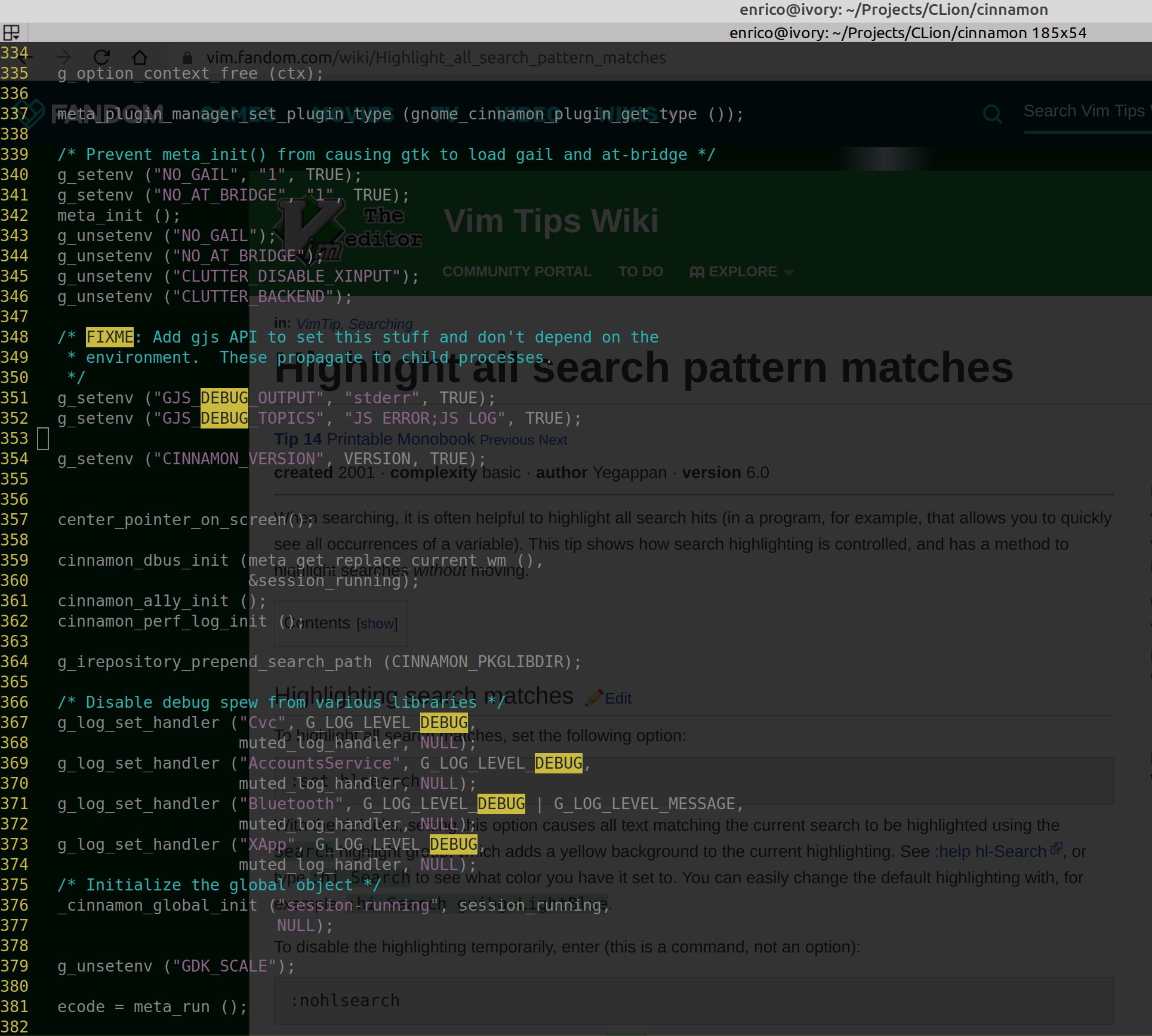
maybe with an attached gdb instance or strace/ptrace we can take a look inside
lirtistan
on 28 Jul 2020
Are you sure there's not something else using all your memory? This is top for me, perfectly normal operation, a little under 200mb. The JS layer is a bit of a black box, but also the most likely to cause memory problems.
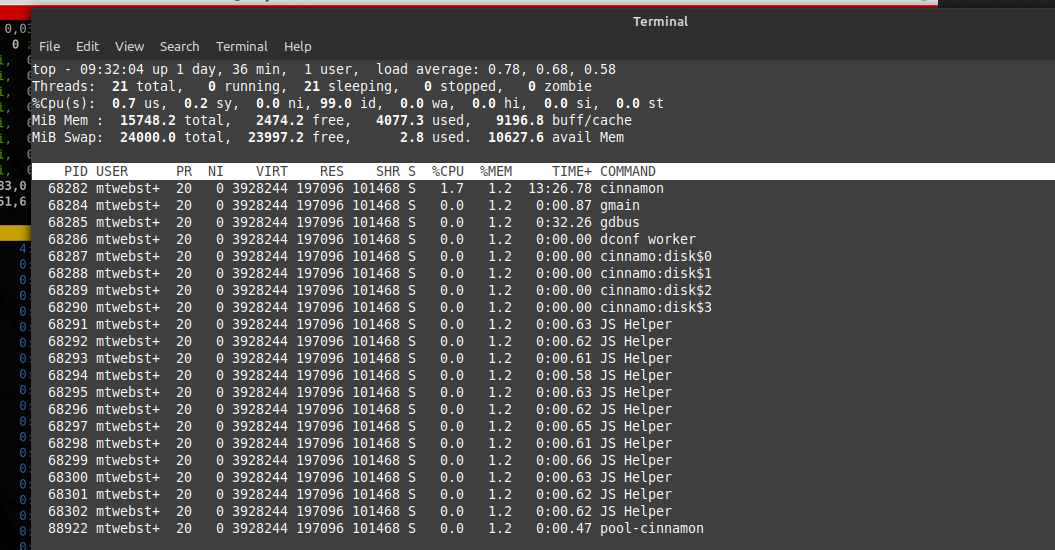
@msegmx yours is out of the ordinary. Can you provide ~/.xsession-errors? Does your issue occur if you disable any 3rd-party applets/extensions (anything you've downloaded and installed since installing mint/cinnamon). It is normal for the cinnamon process cpu to spike when doing things like dragging windows. Even moving the mouse around will cause a small bump.
I'm not trying to start arguments. This is not a new subject. It's pretty typical for cinnamon's memory to grow a bit after startup. It will eventually plateau unless you're using some applet that itself leaks memory. Multiple monitors usually means a bit higher memory use, using hidpi also causes it to be higher. The more applets in your panels, the more memory also. But 179mb isn't excessive at all.
I wrote an applet for myself so I could monitor the cinnamon process - https://github.com/mtwebster/Cinnamonitor - you can put those files/folders into the folder ~/.local/share/cinnamon/applets/[email protected] and then add to your panel in the usual way. By default it displays the memory and cpu of the cinnamon process. The tooltip shows more info, including growth. If you click on the applet it resets the 'history'. You can add multiple instances and have it monitor other processes as well (I use it extensively for monitoring long-running programs to check for leaks over time (days). I'm not trying to plug the applet itself, just providing a tool if you want to monitor things more closely.
 mtwebster
on 28 Jul 2020
mtwebster
on 28 Jul 2020
@mtwebster
I'm not trying to start arguments. This is not a new subject. It's pretty typical for cinnamon's memory to grow a bit after startup. It will eventually plateau unless you're using some applet that itself leaks memory. Multiple monitors usually means a bit higher memory use, using hidpi also causes it to be higher. The more applets in your panels, the more memory also. But 179mb isn't excessive at all.
I agree with u, it's not a surprise if a process allocates memory over time (or on start), but for a running process which is alive for a couple of hours and driving crazy whilst producing load is a problem.
At the time i discovered the problem, i worked on a Rails App, so just RubyMine with Google Chrome and a Terminal was involved, the CPU load goes u for no reason after a while and with that the memory allocation goes up to 33 percent of my available 8GB RAM.
I will try ur applet, hope we can see more what's going on inside the process.
lirtistan
on 28 Jul 2020
Sure, here's ~/.xsession-errors :
I installed the applet, but couldn't add it. It says '... encountered an error'.
This package does not show up in Synaptic PM:
Requires:
gir1.2-gtop-2.0
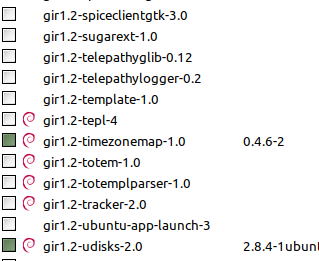
Edit: The latest version is already installed:
gir1.2-gtop-2.0 is already the newest version (2.40.0-2).
msegmx
on 28 Jul 2020
@mtwebster for me the applet work fine, thank you.
lirtistan
on 28 Jul 2020
Could you please look at this old xsession-errors file? It has many of these lines:
Cinnamon warning: Log level 128: posix_spawn avoided (automatic reaping requested) (fd close requested)
msegmx
on 28 Jul 2020
@msegmx You have a number of 3rd-party applets and extensions installed (Meaning, you downloaded them from spices) - could I get you to try disabling a couple of them one at a time (followed by a cinnamon restart each time - alt-f2, r, enter):
extension desktop-scroller@wolf359 in 4 ms
extension transparent-panels@germanfr in 8 ms
extension DesktopCube@yare in 4 ms
This one could explain some of the memory growth (if cinnamon is left running for hours or days), but not cpu spikes:
applet [email protected] in 22 ms
These are the remaining I saw from your log:
applet Mint-Unsplash-Background@wolf359 in 150 ms
applet ScreenShot+RecordDesktop@tech71 in 54 ms
applet color-picker@fmete in 20 ms
applet SpicesUpdate@claudiux in 144 ms
At a glance they should be fine, but if the first ones I listed done have an effect, you may as well try these as well.
As for this error:
Cinnamon warning: Log level 128: posix_spawn avoided (automatic reaping requested) (fd close requested)
This is harmless, and happens when starting new processes from cinnamon (for instance every time you click the Mint-Unsplash-Background applet, it spawns a process to download a new wallpaper). It's supposed to be a debug-only message, but the library it comes from mistakenly marked it to print always.
mtwebster
on 28 Jul 2020
I did disable them, one by one. 'transparent-panels' didn't respond to a disable-button click, so I uninstalled it. I did restart Cinnamon each time (with alt-f2-r-enter).
Here's the current errors log:
xsession-errors.tar.gz
msegmx
on 28 Jul 2020
When installing the applet I omitted to rename the folder to its proper name. Sorry, my fault. It's fixed now and it works great.
Great applet btw, thanks a lot!
msegmx
on 28 Jul 2020
@mtwebster Great applet! Why do you not offer a Spice?
Is there a way to monitor an applet?
 claudiux
on 28 Jul 2020
claudiux
on 28 Jul 2020
When I originally made it (2012) memory leaks in cinnamon were fairly prevalent compared to now. I was a bit worried about spotlighting cinnamon's memory use (How bad is a program if you need to monitor how much memory it's using?).
I may reconsider now - it's useful for more than just cinnamon. I usually have a few instances monitoring different programs I'm working on.
Unfortunately applets are all part of the cinnamon process so there's no way to monitor them individually.
mtwebster
on 28 Jul 2020
It's only been 6 hours since last reboot and that one process is using CPU excessively again:
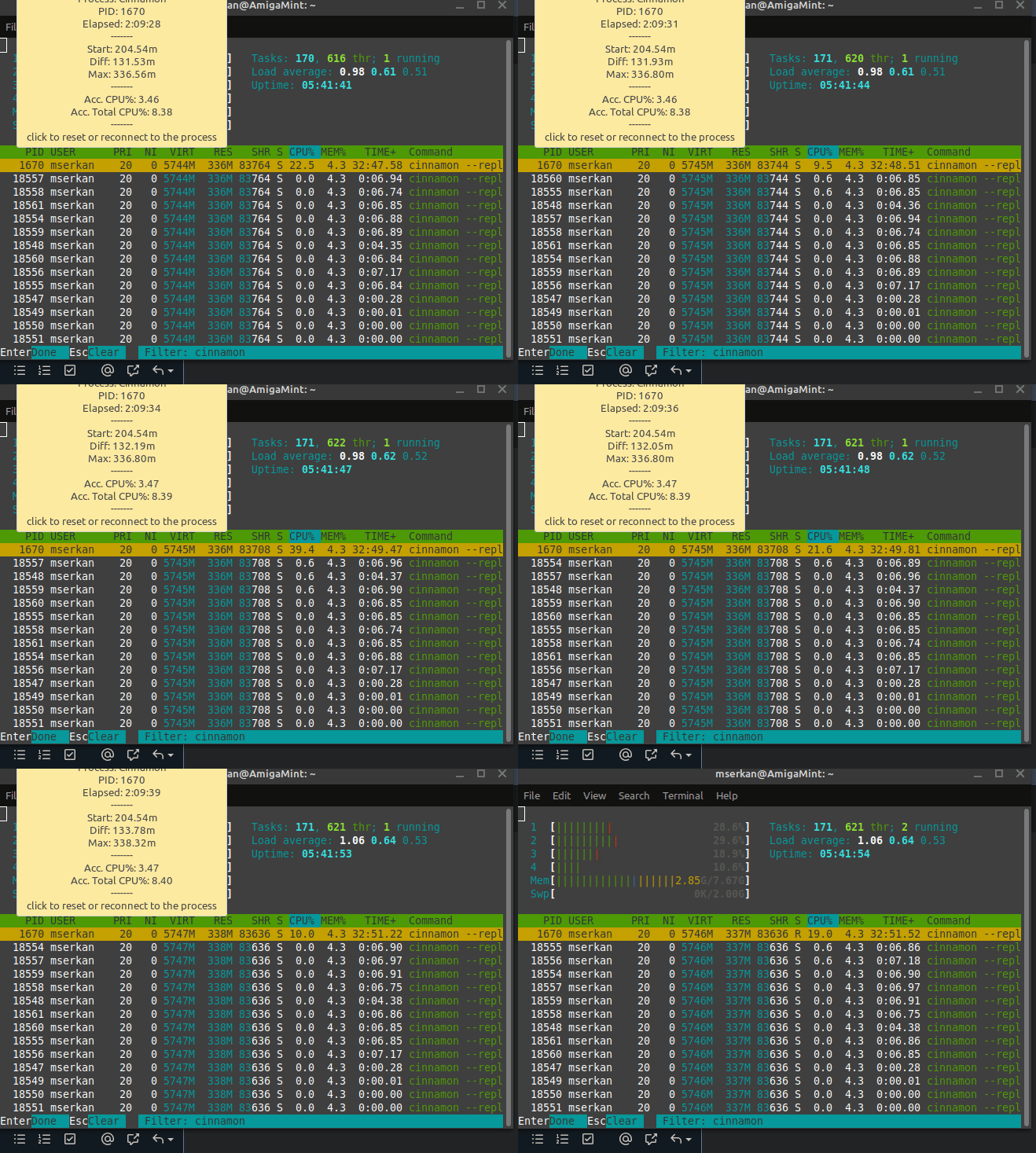
The only difference is I opened VLC for a while during dinner. Could VLC (or ffmpeg, video card driver etc.) trigger something that makes that one Cinnamon process go crazy every few seconds?
At the moment, VLC and Youtube (in Firefox) 'stutter' every second, like freezes for a moment and plays 2 seconds, freezes and plays a.s.o. I'm not sure if that's the reason or the result of those CPU spikes.
Any suggestions?
msegmx
on 28 Jul 2020
@msegmx did u have any browser windows open at them moment (maybe in background)?
if so can u pls have a look in there task manager to verify that no web app consumes ur cpu time!?
sometimes the devs let run some stupid polling in the background of there sites, instead of using websockets for some tasks.
lirtistan
on 28 Jul 2020
Browser (Opera) was open but no excessive use of CPU. But I will observe all open apps more often from now on.
msegmx
on 28 Jul 2020
I've installed latest stable version of Mint Cinnamon on Friday (runs natively, not in a VM) and although it initially looked very snappy compared to Windows 10, it suddenly started to become very slow around ~20 minutes after a reboot. Each time the symptoms are the same:
cinnamon --replacetakes between 17% and 50% CPU for a long period of time;- the entire user interface becomes unresponsive (e.g. Start menu opens 1-2s after clicking it) everywhere, even when I close all the applications;
- killing
cinnamon --replaceprocess makes the interactions with the applications snappy again;
(Cinnamon 4.6.6)
(I personally likes Cinnamon but unfortunately the chronic unresponsiveness was a blocker for my friend and I'll have to uninstall Mint on his laptop as I didn't see any solution around.)
 l0k9j
on 2 Aug 2020
l0k9j
on 2 Aug 2020
After days/weeks of observing my PC, I'm almost 100% sure it's Redshift.
First I disabled all unnecessary startup programs and all extensions + applets.
CPU never went up.
Then gradually added all extensions + applets.
CPU never went up.
Only Update Manager and Redshift left.
I'm sure it's not Update Manager, so it must be Redshift.
Whenever I start the app and leave my PC open for a while, the CPU goes up (cinnamon --replace process).
Closing Redshift (and making sure it does not startup after reboot), rebooting PC, and leaving it running overnight/for hours does not show any of those high CPU usages shown in previous posts.
1) Could anyone with this problem confirm: do you have Redshift running as well?
2) How can I be 100% sure it's Redshift?
3) If it is Redshift (since it's a must-have app, esp. at night) what's the proper way to solve this?
Update:
Adding location info to the redshift shortcut (in this format: redshift-gtk -l xx.xxxxx:xx.xxxxxx) solved it, my LM installation doesn't show high CPU usage anymore. HTH someone.
msegmx
on 18 Aug 2020
- Could anyone with this problem confirm: do you have Redshift running as well?
no, not me- How can I be 100% sure it's Redshift?
no clue, maybe stop everything and just open redshift and look whats doing??- If it is Redshift (since it's a must-have app, esp. at night) what's the proper way to solve this?
i have no answer for you
At the moment i have Cinnamon 4.6.7 installed, the problem didn't occur anymore.
I want to close this issue, if none of you guys/girls have a problem with this!?
lirtistan
on 8 Sep 2020
Related issues
 ghost
·
3Comments
ghost
·
3Comments
 orschiro
·
3Comments
orschiro
·
3Comments
 damian101
·
3Comments
damian101
·
3Comments
 NikoKrause
·
3Comments
NikoKrause
·
3Comments
 trymeouteh
·
3Comments
trymeouteh
·
3Comments
Most helpful comment
When I originally made it (2012) memory leaks in cinnamon were fairly prevalent compared to now. I was a bit worried about spotlighting cinnamon's memory use (How bad is a program if you need to monitor how much memory it's using?).
I may reconsider now - it's useful for more than just cinnamon. I usually have a few instances monitoring different programs I'm working on.
Unfortunately applets are all part of the cinnamon process so there's no way to monitor them individually.