Cinnamon: [USABILITY ISSUE] Terminal cannot be removed from the favorite apps bar
```
- Cinnamon version : Cinnamon 4.4.8
- Please specify if you are using the daily builds PPA
No I'm not using any PPA
- Please specify if you are using the daily builds PPA
- Distribution - (Mint 19.3)
- Graphics hardware and driver used : Intel Corporation HD Graphics 5500
- 64 bit
```
Issue
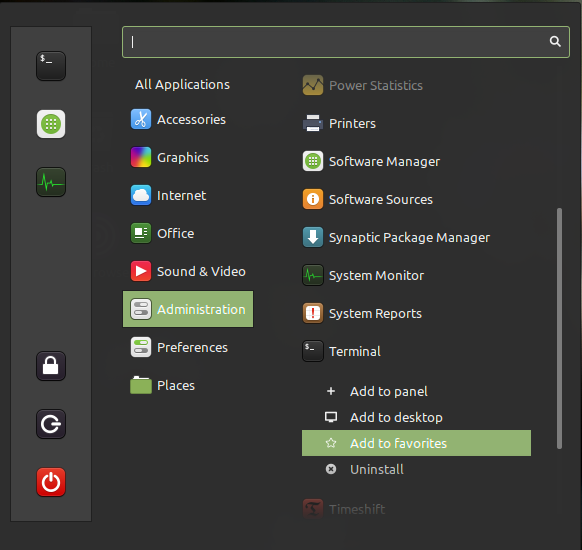
The terminal app (bash frontend) cannot be removed from the favorite apps bar. The option to remove it is not active in the context menu but it still is there.
Steps to reproduce
- Click on Mint Menu
- Find Terminal from Administration sub-menu
- Right-click on it
- You will see 'Add to favorites' instead of 'Remove from favorites while the Terminal is still on favorites
Expected behaviour
Terminal should not remain in favorites bar when the option 'Add to favorites' shows
Other information
This issue does not appear in Fedora 32 Cinnamon. I have not tested other distros.
 grande-mephistopheles
All 5 comments
I have the same issue here on Linux Mint 19.3 Cinnamon 4.4.8.
 mshmm
on 14 Jun 2020
mshmm
on 14 Jun 2020
Interesting bug. It's caused by gnome-terminal shipping two desktop files - /usr/share/applications/org.gnome.Terminal.desktop and /usr/share/applications/gnome-terminal.desktop
The former is set in dconf as a default favorite, but it's the latter that populates the menu entry.
Workaround - just click and drag the default icon out of favourites
 smurphos
on 15 Jun 2020
smurphos
on 15 Jun 2020
Interesting bug. It's caused by gnome-terminal shipping two desktop files - /usr/share/applications/org.gnome.Terminal.desktop and /usr/share/applications/gnome-terminal.desktop
The former is set in dconf as a default favorite, but it's the latter that populates the menu entry.
Workaround - just click and drag the default icon out of favourites
thanks, that worked. will it be fixed in the next update?
grande-mephistopheles
on 15 Jun 2020
I'll check if the issue still exists in Mint 20 and if so will put in PR to make ensure the default favourite matches the correct .desktop file.
smurphos
on 15 Jun 2020
It's not a problem in Mint 20 - gnome-terminal only has one .desktop file
smurphos
on 15 Jun 2020
Related issues
 Cloudwalk9
·
4Comments
Cloudwalk9
·
4Comments
 stefan-niedermann
·
4Comments
stefan-niedermann
·
4Comments
 elboulangero
·
3Comments
elboulangero
·
3Comments
 NikoKrause
·
3Comments
NikoKrause
·
3Comments
 kauffy
·
4Comments
kauffy
·
4Comments
Most helpful comment
Interesting bug. It's caused by gnome-terminal shipping two desktop files - /usr/share/applications/org.gnome.Terminal.desktop and /usr/share/applications/gnome-terminal.desktop
The former is set in dconf as a default favorite, but it's the latter that populates the menu entry.
Workaround - just click and drag the default icon out of favourites