Cinnamon: 4.6.0 - Base interface scale not applied
 * Cinnamon version 4.6.0
 * Distribution Arch
 * 440.82 nvidia, gtx 1070
* Dual 4K display setup
 * 64 bit
 ```

**Issue**
Since the update to 4.6.0 the base interface scale doesn't get applied, it always stays at Normal.

**Steps to reproduce**
Go to System Settings, Display, change Base interface level to something besides Normal and press Apply.

**Expected behaviour**
Base interface level should be honored after changing it and pressing Apply.
 LevCohan
All 23 comments
Can you describe what actually happens? Pictures? Anything in ~/.xsession-errors?? Ditto your other report.
Already applied 9306, but it didn't help.
Screens are going blank and coming up again, but no change.
With 4.4.8 a Base interface scale change was instantaneous without a reinitialization of the displays.
Nothing in .xsession-errors or the system logs. Are there any other logs in the home directory I can check?
LevCohan
on 16 May 2020
@mtwebster
I did try to take two screen recordings to show the problem.
Cinnamon 4.4.8 did work flawlessly in this regard and showed the expected behavior.
cinnamon_4.4.8_simplescreenrecorder-2020-05-16_22.26.35.mkv.zip
Cinnamon 4.6.0 was giving me some problems in that regard and I even had to disconnect one screen to be able to take a recording and then I did observe something.
If I go from "Normal" Base interface scale to "Double" the screen resolution is doubled!
xrandr shows
Screen 0: minimum 8 x 8, current 3840 x 2160, maximum 32767 x 32767
and then
Screen 0: minimum 8 x 8, current 7680 x 4320, maximum 32767 x 32767
Take a look:
cinnamon_4.6.0_simplescreenrecorder-2020-05-17_00.15.31.mkv.zip
LevCohan
on 17 May 2020
So, I'd like to start fresh here -
- Delete ~/.config/cinnamon-monitors.xml
- Run
gsettings set org.cinnamon.desktop.interface scaling-factor 1 - Logout
- Log back in - your 4k monitors should be at their native resolution, but scaling should be at 1 so everything is half the size (I assume) you want things to be.
Open display settings. Zoom should be 100% and the interface scale should be Normal.
Se the zoom for both monitors to 200% and press apply (do not touch the interface scale selector).
Take a look at the tooltips on these controls as well. We've made a lot of changes to this to allow more flexibility, and we're not 100% certain the user controls will make sense, or how they might be improved.
The idea is that you only adjust the 'zoom' factor to set how you want your 'apparent' resolution to be on each monitor. The scale factor is adjusted automatically depending on the zoom level.
For instance, if you want simple 2x scaling (like in 4.4) you would set zoom to 200% and apply. Since it's a whole number, the simple solution is to switch the global scale to 2x (which is identical to 4.4.
On the other hand, let's say only one monitor is 4k, the other is just 1920x1080. You set the 4k monitor to 200% and leave the other at 100%. You hit apply, and the global scale is set to 2x. The 4k monitor is now displaying in hidpi. The normal monitor is the same size, but is now being scaled via xrandr to appear 1920x1080 (where in 4.4, this monitor would be displaying at 960x540 instead). Maybe you don't like it that way. If you switch the scale to Normal and apply, No sizes change, but now the normal monitor is displaying unscaled, and the 4k monitor is being scaled up by xrandr.
We're definitely open to suggestions on presentation and function here. It's tricky to understand (I still have think about it when I'm working on this).
Btw, the global scale is now stored in cinnamon-monitors.xml when you apply a configuration from cinnamon-settings. The gsettings key is set at startup (or whenever something is changed in display settings) based on that file. The upside is people dealing with multiple configurations (like with laptops and external monitors) won't have to keep toggling the setting like they've always had to.
Sorry to be wordy here, this is also for the next person reporting this as well, to hopefully explain a few things.
Please let me know if these steps work.
 mtwebster
on 17 May 2020
mtwebster
on 17 May 2020
@mtwebster
I tried the steps you detailed and the result is not desirable compared to the previous method of changing 'base interface scale'.
Three problems are present after changing zoom level to 150% on a single 4K monitor:
- text rendering is blurry.
- while the mouse pointer moves correctly, an additional mouse pointer is stuck in the middle of my screen after reboot.
- mouse sensitivity is too high.
 lethargy-navigator
on 17 May 2020
lethargy-navigator
on 17 May 2020
@mtwebster
I'm also experiencing the same issue as the original poster (and probably @lethargy-navigator).
After following your instructions (clearing old settings and setting zoom 200%) DPI scaling does not occur, instead the display is upscaled to 4K from 1080p (noted by blurry text/interface, high mouse sensitivity, and screenshot resolution of 1920x1080 instead of 4K).
I only have a single laptop display (connected via eDP) thus your described behaviour of:
For instance, if you want simple 2x scaling (like in 4.4) you would set zoom to 200% and apply. Since it's a whole number, the simple solution is to switch the global scale to 2x (which is identical to 4.4.
does not occur.
Edit: Also on Arch
 initramfs
on 17 May 2020
initramfs
on 17 May 2020
@mtwebster
I can only join in with saying that your steps don't achieve the desired result.
What does, is running
gsettings set org.cinnamon.desktop.interface scaling-factor 2
and then pressing Alt+Ctrl+Esc to alleviate some wrong drawings.
This then works wonderfully!
The only problem is, that this setting doesn't stick to the next session.
So please bring back the global "base interface scale"-setting like in Cinnamon 4.4, as this can't be a per display setting.
Don't be like the gnome team in this regard ;-)
_As for the rationale for it:_
I think there is a misconception here.
Upscaling through xrandr can't never be as good as the "base interface scale".
xrandr offers two filters for scaling, bilinear and nearest. At the moment bilinear is clearly used for every zoom level. If you do integer scaling you should use "nearest" to increase the sharpness, in my case
xrandr --output DP-0 --scale 0.5x0.5 --filter nearest
and it is still no match for "base interface scale".
The best approach here would be a combination of xrandr scale in combination with "base interface scale" integer scaling to achieve the best results.
Example:
Zoom Level 125%, xrandr --scale 1.6x1.6, base interface scale 2
Zoom Level 150%, xrandr --scale 2x2, base interface scale 3
Zoom Level 175%, xrandr --scale 1.14x1.14, base interface scale 2
Zoom Level 200%, xrandr --scale 1x1, base interface scale 2
and so on
or you could work with size instead of scale for the xrandr part..
A quick search, did reveal a project which does that, see HiDPI-Fixer .
LevCohan
on 18 May 2020
Having just upgraded to 4.6, I ran into the same issues. The gsettings scaling commands don't do much: they change the scaling a bit, but everything is still far too tiny. Desktop zooming isn't a solution either as has already been highlighted.
 YorickPeterse
on 18 May 2020
YorickPeterse
on 18 May 2020
I think I got the base interface scale working again, but it's horrendously unintuitive.
Indeed, first the zoom level has to be set by itself, ie to 200%, and applied. The rendering will be blurry when applied due to being solely xrandr-based scale. But only after applying this can base interface scale be selected over to Hi-DPI or 3x, which will return the old behaviour. gsettings was not invoked at all. In my case, both my external monitor and laptop screen are Hi-DPI types so the same zoom level and base interface scale were set for both. Can't dogfood having one screen at 200% and the other at 100% since I don't have that monitor configuration.
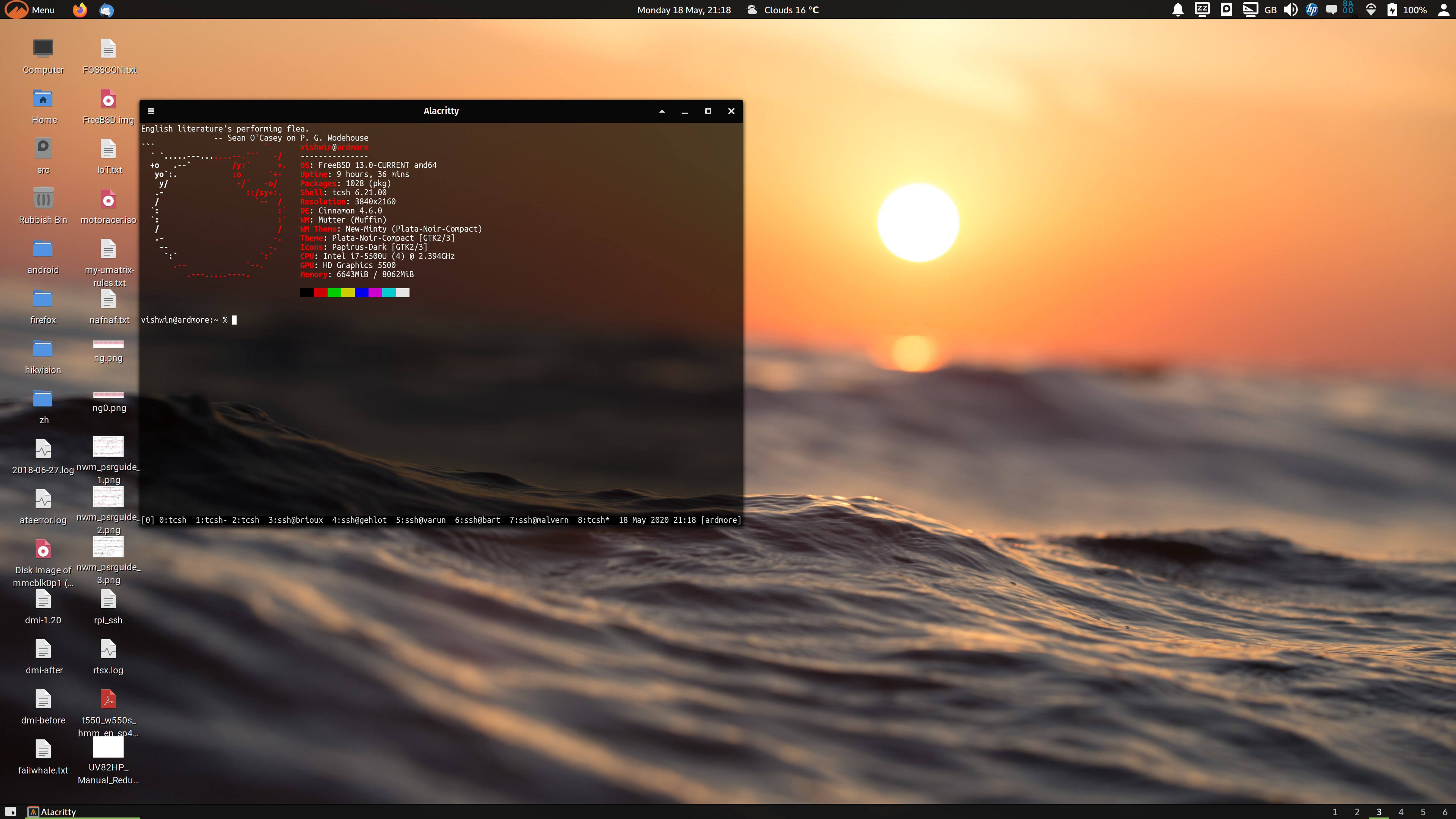
I understand the motivations behind the setting and rendering change, wanting to allow for more flexibility between monitors with regard to display densities, but I think this runs into fundamental limitations in xrandr or GTK.
 vishwin
on 19 May 2020
vishwin
on 19 May 2020
I can confirm that the approach mentioned by @vishwin works, though it's very counter intuitive (especially compared to how every other distribution/OS handles this).
YorickPeterse
on 19 May 2020
An issue I ran into with this setup: on my laptop the Display settings GUI only allows me to set a zoom level up to 175%, which leads to a somewhat fuzzy UI _even_ with scaling set to HiDPI. I managed to work around this by manually setting the scale to 2,0 in ~/.config/cinnamon-monitors.xml.
YorickPeterse
on 19 May 2020
I am also stuck at 1.0 scaling after updating to 4.6.0 on Manjaro with Cinnamon (4k screen on a laptop).
I have these errors when trying to apply different scaling factor:
Cinnamon warning: Log level 128: posix_spawn avoided (fd close requested)
(csd-xrandr:1627): CinnamonDesktop-CRITICAL **: 20:19:31.084: gnome_rr_mode_get_width: assertion 'mode != NULL' failed
After I change Base Interface scaling to hiDPI or change Zoom Level and press Apply the monitor goes to like 0.5 FPS refresh rate and everything becomes more fuzzy. After 30 seconds it thankfully automatically reverts back to sharp at 60 FPS and 1.0 scaling.
I am currently staying at 1920x1080 and waiting for a fix.
 goaud27
on 1 Jun 2020
goaud27
on 1 Jun 2020
My explanation being wrong above didn't help matters.
I'll see how we can fix this, or at least make things significantly more clear.
mtwebster
on 1 Jun 2020
I can confirm that Base interface scaling works as intended at Double (HiDPI) if Zoom is set to 200%. It just doesn't work if Zoom is 100%.
Setting Zoom to 200% but keeping Base interface scaling Normal would result in an effective resolution of 1920x1080 (that everything behaves, renders as if the screen is 1920x1080).
 lss4
on 2 Jun 2020
lss4
on 2 Jun 2020
After several reboots and changing resolution from 1920x1080 to 4k the Base interface scaling went to Double by itself. Choosing the Zoom of 200% now fixed all the scaling. Before, it was hanging when I tried to change Zoom level or Base scaling.
After another reboot everything still looks fine, although if I try, as a test, to change Zoom level or Base scaling I receive a very "long" system dialog window with an error saying that it was not possible to set any of the following screen resolution+refresh rate combinations (more than 50 of them).
So it looks a bit non-systematic to me. It randomly works or doesn't with a different erratic behavior each time. Must be some weird bug in the code.
goaud27
on 4 Jun 2020
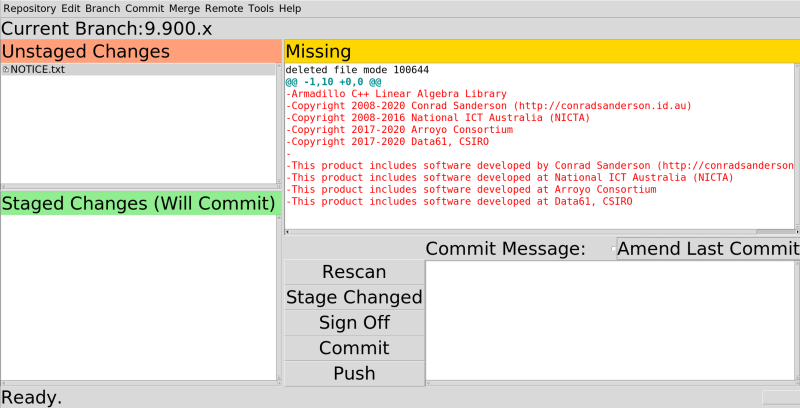
I want to point out one more weird thing that started happening after 4.6.0. The fonts in git-gui (which is a tcl/tk app) are all wrong, see attached screenshot. The gui elements (except menu) display with huge font. I have not found a work around for this yet.
 jmarino
on 4 Jun 2020
jmarino
on 4 Jun 2020
@YorickPeterse what is the native resolution of your monitor (the one you're unable to set above 175%)?
Just a little update on some changes I'm working on here:
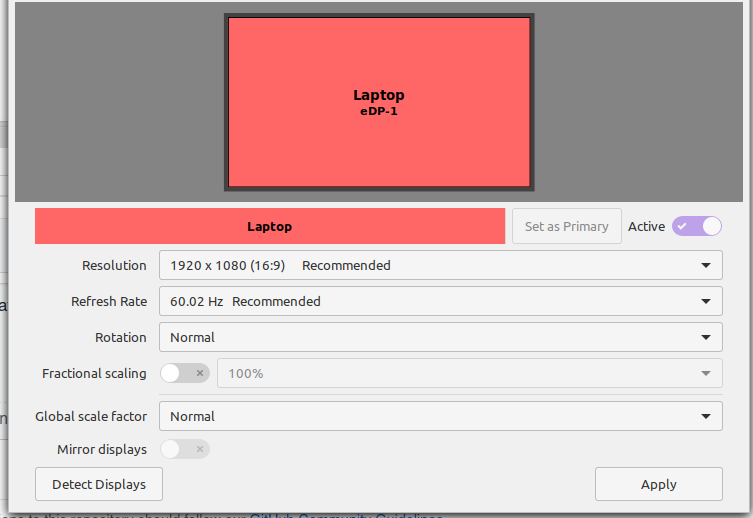
I'm going to restore the original behavior of the ~base~ global scale factor to its pre-4.6 state - changing it here will behave exactly as changing it in cinnamon-settings->General did in 4.4.
The fractional scaling will be disabled by default. Any who don't want to deal with fractional scaling can just leave it disabled (the switch off) and forget about it. Changing the global scale will update the fractional to the same scale. For example, setting 1x global scale -> 100% fractional, and 2x -> 200%. Enabling the fractional adjustment will allow xrandr scaling as before.
This is still a wip, but this is the direction it's heading at the moment.
mtwebster
on 5 Jun 2020
@mtwebster seems reasonable to me. Will the settings be the same as 4.4? i.e. will upgrading from that version preserve the display scaling?
Thanks
 ohell
on 5 Jun 2020
ohell
on 5 Jun 2020
@mtwebster
what is the native resolution of your monitor (the one you're unable to set above 175%)?
2560x1440. I managed to set it to 200% by just editing the config file like so:
<monitors version="1">
  <configuration>
      <clone>no</clone>
      <base_scale>2</base_scale>
      <output name="eDP-1">
          <vendor>AUO</vendor>
          <product>0x2336</product>
          <serial>0x00000000</serial>
          <width>2560</width>
          <height>1440</height>
          <rate>60,011000</rate>
          <x>0</x>
          <y>0</y>
          <scale>2,0</scale>
          <rotation>normal</rotation>
          <reflect_x>no</reflect_x>
          <reflect_y>no</reflect_y>
          <primary>yes</primary>
      </output>
      <output name="DP-1">
      </output>
      <output name="HDMI-1">
      </output>
      <output name="DP-2">
      </output>
  </configuration>
</monitors>
This is what the GUI now looks like:

YorickPeterse
on 5 Jun 2020
So, one problem is (1) getting the settings to do what they are designed to do, and another problem is (2) allowing users to understand the design.
What follows is a word on problem 2.
Even with helpful tooltips, having all of 'zoom level', 'base interface scale' and (yes? though hidden by default?) 'fractional scaling' seems confusing. Or is 'zoom level' another name for 'fractional scaling'?
At any rate, if one setting is a global one that applies to all monitors, why not call it that, i.e. use the phrase Global scaling (applies to all monitors)? And if another setting is a scaling adjustment that is per monitor (the adjustment being to the global setting) then why not call it Scaling adjustment (a per-monitor setting)? Or, better perhaps, use the following:
Scaling, globalScaling, per monitor
Perhaps though I misunderstand.
 LinuxOnTheDesktop
on 16 Jun 2020
LinuxOnTheDesktop
on 16 Jun 2020
Hi, please check out this comment:
https://github.com/linuxmint/cinnamon-control-center/pull/238#issuecomment-646734935
I'd appreciate any feedback.
Thanks
mtwebster
on 19 Jun 2020
@mtwebster
I tried and failed to install those packages in a newly-updated Mint 20 VM - dependency problems. Output here.
Perhaps you could just post some screenshots.
LinuxOnTheDesktop
on 19 Jun 2020
Sorry I should have left out the -dev packages.
Try:
sudo apt-get remove libcinnamon-control-center-dev libcinnamon-desktop-dev
which should fix the dependencies.
I posted a screenshot on the PR that comment is on as well, but functionality is very important in this case also.
I've deleted the problematic packages from the download location.
mtwebster
on 19 Jun 2020
OK, I got that to work, thanks.[1]
We still have: 'Fractional scaling' and 'User interface scale'. Those labels do not make it clear that - as I believe is the case -_one is a global setting and one a per-monitor setting_. Also, why have 'scaling' in one label and 'scale' in the other?
While I am at it: Refresh Rate // 60.00 Hhz Recommended Vsync (_sic_) is unclear. Is the idea that that is the recommended Vsync setting? Or is the idea this: that is the refresh rate that is recommended, whereas Vsync is neither recommended nor discomended but is enabled? I think the latter is meant. To make that clearer, put more of a space before 'Vsync' and change 'Vsync' to 'Vsync on' and ideally have this: 60.00 Hhz - recommended.
You yourself have said that the settings at issue are confusing. So it would be good to minimize the confusion.
I do not actually have a HiDPI monitor on my Mint 20 installation. Indeed that installation is in VirtualBox and VirtualBox tends to play havoc with resolution. So I was testing the packages just to test the intelligibility of the UI. Hopefully someone else can test the UI's actual functionality.
[1] sudo apt-get remove libcinnamon-control-center-dev libcinnamon-desktop-dev failed. The output of that command recommended apt --fix-broken install but for some reason running that command just produced some help text. Nor could Synaptic fix the problem (well, it offered a solution, but in involved removing and upgrading a dozen or so packages). So I used Timeshift.
LinuxOnTheDesktop
on 19 Jun 2020
Related issues
 bittner
·
3Comments
bittner
·
3Comments
 ghost
·
3Comments
ghost
·
3Comments
 NikoKrause
·
3Comments
NikoKrause
·
3Comments
 Odyseus
·
4Comments
Odyseus
·
4Comments
 elboulangero
·
3Comments
elboulangero
·
3Comments
Most helpful comment
@YorickPeterse what is the native resolution of your monitor (the one you're unable to set above 175%)?
Just a little update on some changes I'm working on here:

I'm going to restore the original behavior of the ~base~ global scale factor to its pre-4.6 state - changing it here will behave exactly as changing it in cinnamon-settings->General did in 4.4.
The fractional scaling will be disabled by default. Any who don't want to deal with fractional scaling can just leave it disabled (the switch off) and forget about it. Changing the global scale will update the fractional to the same scale. For example, setting 1x global scale -> 100% fractional, and 2x -> 200%. Enabling the fractional adjustment will allow xrandr scaling as before.
This is still a wip, but this is the direction it's heading at the moment.