Cinnamon: Desktop background resets to default every now and then
System: Linux Mint 17.0: Qiana
Roughly every 7th time I log in, the desktop background has been reset to the default Linux Mint wallpaper. This occurs after regular shutdowns, there are no crashes or errors I am aware of.
EDIT: This is probably related to #3913
 ghost
ghost
All 93 comments
Can confirm for Cinnamon version 2.4.6 on Antergos. Unlike above the desktop background resets to a random but default wallpaper (Antergos switches default wallpaper on every boot, this is on purpose).
 xamino
on 15 Mar 2015
xamino
on 15 Mar 2015
Almost the same problem with "Rosa". Wallpaper resets sometimes (maybe because of cinnamon crashing) during the system work. Last time it happened when i ran xarchiver.
ghost
on 10 May 2016
It also happens on Linux Mint 17.3. Cinnamon edition, everything updated....
As the title says, now and then I also lose my wallpaper....
 rodrigograca31
on 10 Jun 2016
rodrigograca31
on 10 Jun 2016
Happens on up-to-date Arch x64 multilib with Cinnamon installed too
 sumanguru
on 21 Jul 2016
sumanguru
on 21 Jul 2016
Please try to note what you were doing/did when this happens. Also maybe check your logs and see if anything stands out when it does. This has been around for awhile but there doesn't seem to be any rhyme or reason for it. Without that it's extremely hard to pin down any type of fix.
 JosephMcc
on 21 Jul 2016
JosephMcc
on 21 Jul 2016
I have had one reset after processing an update, but also had it reset a few times when typing in Qt Creator. (as in I'm in the middle of typing and notice the background changes on my second monitor) It happens for me about once every 1-3 weeks.
One thing to note is I have three computers at home running Arch with Cinnamon installed for well over a year (January 2015 was the latest), and I have never seen this happen on those computers. I also haven't changed the wallpapers for those computers in a very long time. However, I have seen the bug occur on recent installs both with Ubuntu 16.04 and with Arch. Perhaps an older version was setting the wallpaper settings to some configuration file before that is no longer being set?
 akb825
on 5 Aug 2016
akb825
on 5 Aug 2016
Happens also on 17.3 with Cinnamon 2.8.8. It even crashes and sets no wallpaper at all.
 mdumrauf
on 14 Aug 2016
mdumrauf
on 14 Aug 2016
Also happens on 18.0 with Cinnamon Stable (and Unstable) and can confirm it resets the Dconf setting too when it happens...
 dominichayesferen
on 5 Sep 2016
dominichayesferen
on 5 Sep 2016
I've just had it happen on an machine with an old install (but fully up to date) after resuming from suspend, so my previous thought of it only occurring on new installs wasn't correct.
akb825
on 5 Sep 2016
Hello, everybody.
This happens to me constantly on Linux Mint 18 Cinnamon 3.0.7 stable. I always set the options Picture aspect to No picture, Background gradient to None and Gradient start color to Black. But it changes itself to Picture aspect > Zoom. It happened hundred of times, and still don't know what triggers it. I'm always doing something different when I realize that the desktop background changed. At first, I thought that the culprit was conky (that's why I don't use a background image), so I disabled all my conky scripts from starting on system start up for a couple of days. It didn't made any difference (the background kept changing randomly to the default). Sometimes, it happens like 5 times in less than an hour. Some other times, it doesn't happen for days. My system never goes into suspend/hibernation mode (but I shut it down every day).
 Odyseus
on 7 Sep 2016
Odyseus
on 7 Sep 2016
I have this problem too, in that (1) every so often the picture aspect resets, and (though this hasn't happened for a month or so) (2) sometimes my system reverts to a default background.
EDIT: I am sorry I can't be more specific about just when it happens. Problem 1 is fairly subtle, so I don't always notice it.
Linux Mint Cinnamon 18.
ghost
on 24 Sep 2016
On Arch, I just had the background reset when upgrading the following packages:
assimp-3.3.1-1  bluez-libs-5.42-1  chromaprint-1.3.2-1
curl-7.50.3-1  doxygen-1.8.12-1  ffmpeg-1:3.1.3-2
firefox-49.0.1-1  git-2.10.0-1  gnome-online-accounts-3.20.4-1
gtkspell3-3.0.9-1  gvim-8.0.0005-1  hwids-20160801-1
iana-etc-20160921-1  jansson-2.8-1  libass-0.13.3-1
libcups-2.2.0-4  libinput-1.5.0-1  libjpeg-turbo-1.5.1-1
libkeybinder3-0.3.1-1  libmm-glib-1.6.2-1  libphonenumber-7.7.0-1
libtool-2.4.6-6  libva-1.7.2-1  linux-4.7.5-1
linux-firmware-20160915.c4c07a8-1  logrotate-3.10.0-1
mesa-12.0.3-1  mpfr-3.1.4.p5-1  openssl-1.0.2.j-1  pango-1.40.3-1
perl-5.24.0-2  pinentry-0.9.7-3  qt5-3d-5.7.0-2  qt5ct-0.27-1
qtcreator-4.1.0-3  shared-mime-info-1.7-1  sqlite-3.14.2-1
sudo-1.8.18-1  vim-runtime-8.0.0005-1  wayland-1.12.0-1
xf86-input-libinput-0.19.1-1  xproto-7.0.31-1
I had two computers with recent updates (see my post above for a list of packages) have the background reset, and both of those have 2 monitors. I just updated my laptop and the background didn't reset, so it could also be related to having multiple monitors.
akb825
on 30 Sep 2016
I have the same problem on my laptop Lenovo z510. I haven't connected any additional monitor. And the background did reset after the last update and it also occurs randomly from time to time.
System:
Linux Mint 18 Cinamon 64-bit
Cinnamon Version 3.0.7
Linux Kernel 4.4.0-21-generic
Last update:
I show if somebody will tell me how to retrieve them from an upgrade manager in a plain text. But the list looks kinda similar to akb825
 Devnull85
on 30 Sep 2016
Devnull85
on 30 Sep 2016
Same problem in LMDE 2, Cinnamon 3.0.6. Background image resets to default after playing video in fullscreen (sometimes) and working in terminal.
 Sunderland93
on 30 Sep 2016
Sunderland93
on 30 Sep 2016
+1, I also have had this happen to me.
As a wild guess, I feel like it might be related to the graphics driver crashing and rebooting, as my computer slowed dramatically when it happened...?
Using Linux Mint 18, Cinnamon 3.0.7, and NVIDIA Closed-source Drivers 361.42, with an NVIDIA GTX 660 Graphics Card.
 SolarLune
on 6 Oct 2016
SolarLune
on 6 Oct 2016
Update, it just happened - my computer slowed down again, but I notice that it happened when I plugged my phone in. Perhaps that has something to do with it? Or the fact that the file manager always starts up to open the phone's folder when it plugs in?
EDIT: Re-plugging my phone didn't do anything, so some time or other condition might need to pass first for it to happen...
SolarLune
on 8 Oct 2016
When it happens here, it's mostly the lag out where the system tray icons have a black background behind them...
dominichayesferen
on 8 Oct 2016
On my system (cf. @SolarLune) the problem seems unconnected to plugging in any external device. Moreover, on my system the problem does not seems associated with any lag (though I do not quite know what @feren means when s/he writes about lag).
ghost
on 9 Oct 2016
@ACinnamonUserInUK Sometimes when changing the Cinnamon theme, applet set, etc, the system tray icons get a black background behind them whilst Cinnamon is unresponsive...
dominichayesferen
on 9 Oct 2016
After loosing the wallpaper the only way to set it again is using the Monitor-configuration and set the main-Display again. After that i can setup the wallpaper again. So i think the problem is about multiple monitors. Sometimes my applications switches from monitor 1 to monitor 2 after standby.
 ikarus13
on 10 Nov 2016
ikarus13
on 10 Nov 2016
On my Arch with Cinnamon sometimes Cinnamon does not even start and .xsession-errors is full of "method SetDesktopBackground unavailable" or smth along those lines
sumanguru
on 17 Nov 2016
Occurs to me randomly with Linux Mint 18 Cinnamon
 dic1911
on 17 Nov 2016
dic1911
on 17 Nov 2016
I just watched the background change:
I have a shortcut to my home folder in the panel. When I clicked the shortcut it changed the background.
Then I tested:
- rebooted the computer
- opened the browser (as I had it open before)
- clicked the 'files' shortcut'
----> background changed again
My background always goes back to the very first one I set up.
I am running Ubuntu 16.04 and Cinnamon 3.0.7
I use only an external monitor as display
 FlaviaBastos
on 18 Nov 2016
FlaviaBastos
on 18 Nov 2016
/@all It will be helpful if you can provide a paste2 link for the contents of ~/.xsession-errors immediately following an occurrence of the issue.
 lots0logs
on 18 Nov 2016
lots0logs
on 18 Nov 2016
Here's the link to my ~/.xsession-errors : http://paste2.org/a6e9pgPa, taken right after background change
FlaviaBastos
on 18 Nov 2016
@FlaviaBastos How long has it been since you last rebooted your system? Could you reboot and then when it happens again post the log so we can compare them? Thanks!
lots0logs
on 18 Nov 2016
@lots0logs that was taken right after reboot: reboot, open browser, click shortcut (background changes), grab log file.
My background doesn't even reset back if I don't reboot...
Do you want a new log anyway?
FlaviaBastos
on 18 Nov 2016
@lots0logs and this is a right click, edit on the shortcut that changes the background (not sure if it helps):

FlaviaBastos
on 18 Nov 2016
@FlaviaBastos Why are you using GNOME Files? If you use Nemo instead does the issue still occur?
lots0logs
on 18 Nov 2016
@lots0logs I'm not really sure why GNOME files.... I have both available from menu but I liked the icon for this one better.... :flushed:
But it doesn't happen with Nemo. I just tested.
FlaviaBastos
on 18 Nov 2016
Okay great. That confirms that the issue you were experiencing is not actually the one reported on this github issue. Cinnamon requires Nemo, you can use Nautilus at the same time but you must edit all its shortcuts so that it gets launched with the --no-desktop option. That way it doesnt try to take your desktop from Nemo (which manages it for Cinnamon) :wink:
lots0logs
on 18 Nov 2016
@lots0logs Thanks for the info! I ended up changing the icons so I can use Nemo ¯_(ツ)_/¯
FlaviaBastos
on 18 Nov 2016
Nautilus still draws the desktop background. So when you start it, it's background gets drawn over the top of the background that Cinnamon is drawing. You can see this by killing the nautilus process. Your original background will show again.
JosephMcc
on 19 Nov 2016
Well, I don't have Nautilus here but it's still causing a problem...
dominichayesferen
on 19 Nov 2016
Why was my comment deleted?
 sustained
on 19 Nov 2016
sustained
on 19 Nov 2016
@sustained I don't see where your comment was deleted. If it was, it wasn't done so intentionally that I know of.
JosephMcc
on 19 Nov 2016
I was sure that I left a comment on this issue mentioning how I have the same problem on Fedora 24/Cinnamon. Maybe I'm mistaken and it was a different related issue.
Anyway, I have the same issue and it happens seemingly at random. I too, along with @feren, don't even have Nautilus installed (although maybe Nemo does the same thing?).
There doesn't seem to be any pattern to it. Sometimes it happens when I'm not even using the computer.
I can't find anything that seems relevant in my ~/.xsession-errors.
EDIT: Also, someone mentioned that they have multiple monitors and that maybe it's relevant to the issue. Confirming that I have two monitors also.
sustained
on 19 Nov 2016
@sustained
I can't find anything that seems relevant in my ~/.xsession-errors.
It'd be helpful if you could provide the logs anyway. Perhaps someone will notice something that you did not. Grabbing the logs immediately following an occurrence of the issue would be the most helpful. Also including the last 100 lines or so from your systemd journal can't hurt.
lots0logs
on 19 Nov 2016
I have one monitor... :'( (something terrible has happened)
dominichayesferen
on 20 Nov 2016
I have just had it happen again recently.
Here is my .xsession-errors and here is the output of journalctl | tail -n 100.
Let me know if you need anything else, @lots0logs.
sustained
on 22 Nov 2016
I've had the same problem with no nautilus installed and just one monitor (I posted here about it a while ago) and after looking through the logs some I think I've tracked it down for my machine. I'm running my root and home filesystems on btrfs and sometimes on boot btrfs would encounter a known bug when the filesystem reports that it's full when it's not really and neither is metadata. In that case, system authentication goes through, but Cinnamon fails to load the desktop, failing in particular on the method "SetDesktopBackground". That in itself does not reset the background but I believe it's relevant to this issue
sumanguru
on 22 Nov 2016
Similar problem here: I had started Nautilus file manager and it changed my background image to default.
Trying to change it back in the "Backgrounds" settings was impossible; I tried selecting various other images but the system just stuck with the default one. This was even after I had closed Nautilus.
Checked the background processes using "ps auxw" and there was a nautilus process running. After "killall nautilus", the background process was gone and I was able to change the background image again.
This is on LinuxMint 18 with all installed packages current.
 marksarnold
on 27 Nov 2016
marksarnold
on 27 Nov 2016
@JosephMcc Should there be a Bug Reproduced label on this issue given so many people have the same bug?
Also, this affects LM 17.3 too (knew that from my time of using 17.3, but didn't know where to report it back then)
Has anyone found this to also happen on GNOME with Nautilus handling the Desktop Icons?
dominichayesferen
on 28 Nov 2016
Similar problem here: I had started Nautilus file manager and it changed my background image to default.
Nautilus and Nemo (which is a fork of Nautilus) handle both manage the desktop in addition to the file browser. Since you started Nautilus while Nemo was still running, it drew its own background (using the Gnome settings, as opposed to the Cinnamon settings) over the one you usually see from Nemo. This is expected and unrelated to the bug described here, which is the background randomly changing when Nautilus isn't running or even installed.
akb825
on 28 Nov 2016
Nautilus and Nemo (which is a fork of Nautilus) handle both manage the desktop in addition to the file browser. Since you started Nautilus while Nemo was still running, it drew its own background (using the Gnome settings, as opposed to the Cinnamon settings) over the one you usually see from Nemo. This is expected and unrelated to the bug described here, which is the background randomly changing when Nautilus isn't running or even installed.
This isn't quite true. Nemo does NOT draw a background. When you allow Nautilus to handle the desktop it draws its background over the background being drawn by Muffin.
@feren Sure, soon as someone actually comes up with steps to reproduce. "It happens sometimes" doesn't cut it. It has nothing to do with how many people it affects.
JosephMcc
on 28 Nov 2016
@JosephMcc Over here, it seems completely random.
Sometimes it's closing a window, other times it's changing the Cinnamon portion of the theme choice, the most common thing about it, is that most of the time, you know the glitch is about to happen because the system tray icons go black background-ed and then when Cinnamon regains responsiveness, it has a black desktop background...
@JosephMcc Have you got System Tray in your panel? I think that may be related to the glitch, given that's what goes black when Cinnamon randomly freezes for a second or two before changing the background...
@JosephMcc Also, if it matters, I have Variety installed, but usually that would just set the background to the last background chosen through the program itself and that's very rare, not the Default Desktop Background...
dominichayesferen
on 28 Nov 2016
@/all Do you guys have Variety by Peter Levi by any chance??
dominichayesferen
on 28 Nov 2016
No Variety by Peter Levi here and only using Nemo. And I think this bug has not manifested itself for a while on my system.... Maybe it has been fixed or I need to "wait more" ....
rodrigograca31
on 28 Nov 2016
I got it yesterday when changing the theme parts for Cinnamon, as I said, if it was Variety, it'd change the wallpaper to something other than the default wallpaper...
dominichayesferen
on 28 Nov 2016
Hello, everybody.
I managed to find a way to consistently trigger a background reset, but only on Cinnamon 3.0.7, not on 3.2.x.
I was in the middle of removing a favorite from my menu (by dragging it), when all of the sudden the menu and the entire Cinnamon UI froze (It lasted for just a couple of seconds). I happened to have the glass.log file opened and focused at the moment and I immediately saw this:
info t=2016-12-05T10:32:57.849Z loading user theme: /usr/share/themes/Mint-XY-Greybird-Blue/cinnamon/cinnamon.css
info t=2016-12-05T10:32:57.930Z added icon directory: /usr/share/themes/Mint-XY-Greybird-Blue/cinnamon
info t=2016-12-05T10:32:57.956Z BackgroundManager: org.gnome.desktop.background changed!
info t=2016-12-05T10:32:57.968Z BackgroundManager: org.gnome.desktop.background changed!
info t=2016-12-05T10:32:57.970Z BackgroundManager: org.gnome.desktop.background changed!
info t=2016-12-05T10:32:57.970Z BackgroundManager: org.gnome.desktop.background changed!
info t=2016-12-05T10:32:57.970Z BackgroundManager: org.gnome.desktop.background changed!
info t=2016-12-05T10:32:57.971Z BackgroundManager: org.gnome.desktop.background changed!
info t=2016-12-05T10:32:57.971Z BackgroundManager: org.gnome.desktop.background changed!
info t=2016-12-05T10:32:57.971Z BackgroundManager: org.gnome.desktop.background changed!
When I minimized all windows, the desktop background was reseted to its default. It seems like the currently used theme was reloaded and then the background changed.
It isn't the drag and drop operation that triggers it, because I managed to trigger it even when adding favorites from the context menu. Sometimes happens immediately after the first favorite addition/removal. Sometimes happens when adding/removing several favorites in a row and very fast.
Like I said, I can reproduce this only on Cinnamon 3.0.7, not on Cinnamon 3.2.x. But I must clarify that my 3.2.x systems are installed in VirtualBox machines, not on real hardware. So, maybe the virtual systems aren't responsive enough to force a trigger of the issue.
P.S.: Only those lines on the glass.log file are logged. The .xsession-errors file doesn't log anything at the moment of the error.
Odyseus
on 5 Dec 2016
I haven't read all of this thread, but I do think I have found something relevant. To wit: a new version of the Neofetch program sometimes fetched the wrong wallpaper in Cinnamon. The developer of Neofetch fixed the problem (though I still get crash-to-wrong-wallpaper in Mint); so perhaps he can help? Perhaps the wallpaper is getting looked up, sometimes, in the wrong way?
Here's the Neofetch bug report. It would be really good were this to be fixed before Mint 18.1.
ghost
on 7 Dec 2016
Linux Mint Cinnamon 18 and I have the same problem.
I can't see any useful error messages, is there anything devs would like to have/see?
 liltinkerer
on 9 Dec 2016
liltinkerer
on 9 Dec 2016
I have the same problem on Linux Mint 18 Sarah (Cinnamon 3.0.7+sarah) and on Debian unstable (Cinnamon 3.0.7 from it's repos).
Thought, maybe it was because I mounted some folders to home directory.
Linux Mint's fstab: http://pasteall.org/151603
Debian's fstab: http://pasteall.org/151629
Wallpaper is resets without any crashes\error windows\lags.
I have 1 monitor, Nvidia proprietary driver for GT 630, i3 540, 8gb RAM.
Logs:
Case 1 (near 16:20 (14.12.16)):
~/xsession-errors: http://pastebin.com/dGfLac2A
journalctl | tail -n 100: http://pastebin.com/LvPKLWQd
Case 2 (near 18:20 (15.12.16)):
~/xsession-errors: http://pastebin.com/ZSufZrmH
journalctl | tail -n 100: http://pastebin.com/TY8HJRnb
Case 3 (near 15:42 (20.12.16)):
Was after updating with mintupdate, just after I pressed close button.
(updated only 1 package - "mintupdate" itself)
~/xsession-errors: http://pastebin.com/X1CXrdkE
journalctl | tail -n 100: http://pastebin.com/TZGzviUH
Case 4 (near 02:48 (24.12.16)):
After opening Xed window. Cinnamon stacked on 4 seconds, applets were on white backgound.
~/xsession-errors: http://pastebin.com/fG7zbZt8
journalctl | tail -n 100: http://pastebin.com/E4rgc3Fy
Case 5 (near 12.38 (27.12.16)):
~/xsession-errors: http://pastebin.com/svJgBLeA
journalctl | tail -n 100: http://pastebin.com/KhbFy8uL
~/cinnamon/glass.log: http://pastebin.com/ZuCng8A9
12.01.17. Debian x64 Sid Cinnamon 3.2.7. I had not seen this problem for a long time.
 vlad0337187
on 13 Dec 2016
vlad0337187
on 13 Dec 2016
@/all Are YOU ALL using Intel Graphics? If you all are, we may be able to get further towards a criteria of the situation needed for the bug to be triggered...
dominichayesferen
on 28 Dec 2016
I'm running amd with the same problem.
liltinkerer
on 28 Dec 2016
Using NVidia graphics cards on the machines I've seen the issue on. These are on desktops, so it's not with a dual GPU where it usually runs off of the Intel graphics that you see on laptops.
akb825
on 28 Dec 2016
Do you guys happen to have encrypted home dir?
liltinkerer
on 28 Dec 2016
Do you guys happen to have encrypted home dir?
I don't - though I did try it once, but it broke something, so I removed
the encryption (and I'm unsure I've ever done a clean install since then).
ghost
on 29 Dec 2016
@liltinkerer Nope
dominichayesferen
on 29 Dec 2016
@liltinkerer No encripted home dir...
@akb825 NVIDIA drivers here.... and Intel ....
rodrigograca31
on 31 Dec 2016
Same issue here. I want it to be no picture and black. Every now and then, I notice the background has been reset, but when I look in the settings, the settings are correct (no picture, black). I have to set them to picture, and back to no picture for the background to be correct again.
Running Cinnamon 3.0.7, Ubuntu 16.10 x86_64.
 chris13524
on 18 Mar 2017
chris13524
on 18 Mar 2017
My desktop resets to its default Mint Logo every week or so...
Running Linux Mint Sarah
 dnacombo
on 20 Mar 2017
dnacombo
on 20 Mar 2017
Hi, i'm running fedora 24 and i can reproduce it every time by switching workspace two times and background goes back to default. I have 4 workspaces and have given up changing background as it always gets reset after 2 workspace switchs.
 tiggerfan
on 11 Apr 2017
tiggerfan
on 11 Apr 2017
I am currently using Arch linux for some decent amount of time and had no problems at all. Today I installed the nvidia drivers to test some things and i noticed the same problem as above. Losing the wallpaper (getting all white) after returning from sleep mode. My problem was solved by simply uninstalling the nvidia drivers and installing the mesa drivers instead. Hope that helps!
 TFotakis
on 3 May 2017
TFotakis
on 3 May 2017
Today I installed the nvidia drivers to test some things and i noticed the same problem as above. Losing the wallpaper (getting all white) after returning from sleep mode.
I've seen this problem as well, and this is a separate issue where the image for the background gets corrupted. You can either reboot or restart your login manager (which restarts X) to fix it. The issue here is where the settings get reset and reverts to using the default background image. This will happen seemingly randomly while using your computer. (i.e. you're doing stuff on your computer, then it will suddenly pop to another image)
For what it's worth, I'm running Arch and haven't seen this problem for several months. I don't know if that means it's been fixed or if it just hasn't triggered for a while.
akb825
on 3 May 2017
Since upgrading to Cinnamon 3.2.7 (from upgrading Ubuntu to 17.04), I don't think this issue has ever happened to me.
chris13524
on 3 May 2017
I didn't seen it for a while too.
(my earlier comment)
vlad0337187
on 11 May 2017
Happened to me today on Ubuntu 17.04 with Cinnamon 3.4.0
 tsdtsdtsd
on 16 May 2017
tsdtsdtsd
on 16 May 2017
Ubuntu 17.04, Cinnamon 3.4.0 from official unstable ppa:
If I select show desktop icons I can't see desktop backgound, I see white bg instead.
If I disable desktop icons show in cinnamon settings I see my deskto background.
If I press CTRL+ALT+UP_ARROW I can see my bg below the workspace panoramic view with cinnamon desktop icons showing enabled and even disabled
 andreabellitto
on 22 May 2017
andreabellitto
on 22 May 2017
@belandsoft What GTK theme do you use?
dominichayesferen
on 22 May 2017
My theme is Mint-XY, Controls are macOS-sierra-master, Icons are
MacBuntu-OS, Windows borders are macOS-sierra-master.
Just tried to change one by one and the problem seems to be in Controls, if
I change macOS-sierra-master to some other I have my desktop background
back, but selecting macOS-sierra-master again it disappears immediately,
but until some days ago I have never had this problem before, even with the
same theme configuration. So it's a theme bug or a cinnamon/nemo bug?
2017-05-22 20:37 GMT+02:00 feren CEO notifications@github.com:
@belandsoft https://github.com/belandsoft What GTK theme do you use?
—
You are receiving this because you were mentioned.
Reply to this email directly, view it on GitHub
https://github.com/linuxmint/Cinnamon/issues/3953#issuecomment-303184524,
or mute the thread
https://github.com/notifications/unsubscribe-auth/AC_EMUWPOm8l0gmY3XQRzTyy12_kz1fHks5r8dYDgaJpZM4Ds0eq
.
andreabellitto
on 22 May 2017
@belandsoft That's a GTK Theme Issue for macOS Sierra, report it here:
https://github.com/B00merang-Project/macOS-Sierra/issues/new
dominichayesferen
on 22 May 2017
@belandsoft
This was an issue in Nemo that I believe should be fixed now by: https://github.com/linuxmint/nemo/commit/77ff741db809455251cb2a3fce6716e6dffb5f2f
Hopefully you will see it fixed at the next update.
JosephMcc
on 22 May 2017
Hello, everybody.
First, sorry for the off-topic.
@belandsoft: Just an FYI. I'm the author of the Mint-XY theme. The Cinnamon part of the Mint-XY theme isn't compatible with Cinnamon 3.4. I will not be adding support for 3.4 directly into the theme because the changes needed for Cinnamon 3.4 will break the theme for all other versions of Cinnamon supported by the theme (3.0 and 3.2).
If you need the 3.4 compatible version of the theme, I already uploaded it to my repository. When Cinnamon 3.4 is officially released, I will publish it in the Spices website.
Odyseus
on 22 May 2017
A while since this thread was updated...I installed Mint 18.x Cinnamon on both my laptop and my wifes. Interestingly, everything on my machine (Lenovo T570) is fine, whereas on my wifes pc (Lenovo Yoga), we seem to experience the same problem as described above (e.g. every now and then the cutom theme switches back to a different one [the default?])...
Installation exactly the same, same personalized theme settings etc.
Only difference is that on the "faulty" one, we first had Ubuntu 16.04 installed, and un-installed it prior to installing Mint...
 logozz
on 29 Aug 2017
logozz
on 29 Aug 2017
Kernel: 4.4.0-21-generic , on Linux Mint "Sarah" with cinnamon desktop same bug of "default" mint background on startup.. problem didnt occured first 3 months of using OS with wine installed. After that 3 months I installed PlayOnLinux, FuriusISO mount and configured Warcraft3 through PlayOnLinux GUI app (and made shortcuts to Frozen Throne). Game runs perfectly , but after few days those "default" backgrounds ( with some icons that were deleted long time ago) started showing up. Also day or two before bugs started occuring i downloaded c++ man pages with [ sudo apt-get install manpages-dev glibc-doc ] and [ sudo apt-get install cppman ]. Here is pic of bugged desktop https://ibb.co/cOk1UF
 tomek320
on 12 Sep 2017
tomek320
on 12 Sep 2017
@tomek320 I also have PlayOnLinux....
Maybe that's the common thing between all of us? (probably not)
rodrigograca31
on 12 Sep 2017
@rodrigograca31 no idea , I'm kinda new to this Linux community. I love it but im still a newbie. I heard if you install wine you also let Linux OS sort of "waygate" for windows viruses to infect the system.. Also if you delete wine after you've installed it on Linux there is no way you can destroy (clean) package dependancies (not even with [ sudo apt-get purge --auto-remove ] command) it's like it stays there pernament..
tomek320
on 12 Sep 2017
I installed Linux Mint Cinnamon 18 in a new install and set some images for the background slideshow in my Pictures folder. I am not using dual screens or Wine or Play on Linux. Things seem to be OK most of the time. But occasionally, the image will reset itself to an image that is not even in my file manager and turn off the slideshow in Cinnamon background settings. I understand you may think this is not possible. But I have seen it happen a few times and it is pretty upsetting when it does. I really like Cinnamon and I hope this problem can be fixed. As one possible clue, I keep my file manager in a left side panel and open it quite a bit. I think there may be a problem with the Nemo file manager and how it displays background images. I have also checked the Properties and metadata sections of all of my images - thinking that perhaps there was some Javascript virus in some of my images. But everything was clean. So I have no clue as to how this happened. Thanks for looking into this problem. It needs to be fixed.
 davidspring
on 3 Nov 2017
davidspring
on 3 Nov 2017
I figured out what my problem was. I had somehow downloaded Variety and it loaded itself to my side panel and then took over my background and added the images that were displaying on my desktop. I have now deleted Variety and hopefully everything will be OK. I realize this is not a solution for those who do not have Variety installed. But if you do have Variety, it seems to have a mind of its own and is fully capable of disabling the Mint background without you doing anything.
davidspring
on 3 Nov 2017
Same here, and after EVERY reboot!
Using Cinnamon 3.6.7 on Mint 18.3 with two Monitors
 silelmot
on 21 Feb 2018
silelmot
on 21 Feb 2018
Humm just noted I commented 2 years ago here....
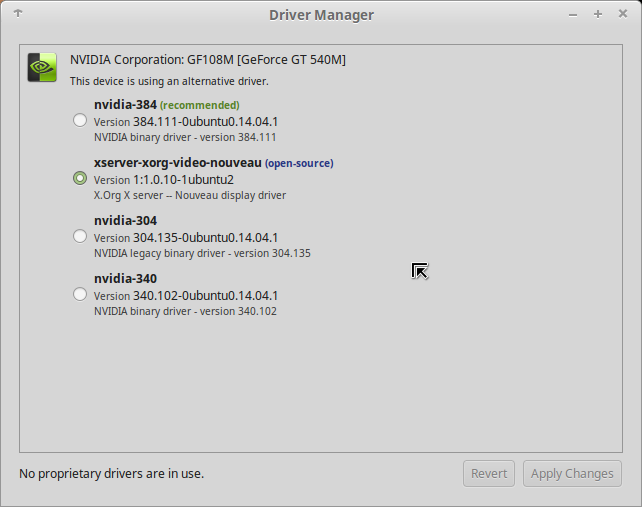
Still same system but this bug hasn't happened in a while....... I've been doing updates..... but still Linux Mint 17.3 'Rosa' ........
I also havent messed up with drivers in a while..... (probably related) and using the xserver-xorg-video-nouveau.......
rodrigograca31
on 21 Feb 2018
So.........
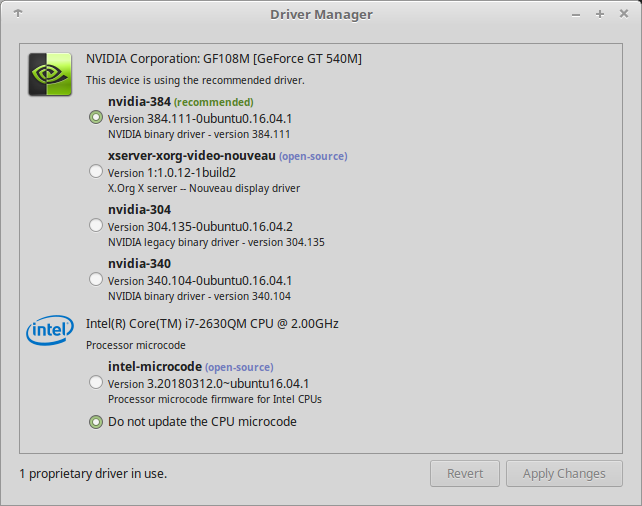
I've upgraded to Linux Mint 18.3 (what a nightmare...)
and also changed the driver....
then after installing a bunch of stuff I installed nautilus and as soon as I launched it the desktop background changed back to a default image.....
When launch nautilus from the command line I also loose conky..... and this error is given:
(nautilus:24794): Gtk-WARNING **: Failed to register client: GDBus.Error:org.gnome.SessionManager.AlreadyRegistered: Unable to register client
If I try to change my background it takes no effect until I CTRL + C the command line... (closing nautilus doesn't really close the process)
rodrigograca31
on 12 Apr 2018
In 18.3/ubuntu 16.04, nautilus will draw the background when launched, and use its own setting for the image to use.
gsettings set org.gnome.desktop.background show-desktop-icons false
This will keep the desktop portion of nautilus from running.
To add to this, if nautilus is installed, it is the default file manager launched (regardless of your currently set 'preferred' file manager) when doing some things like "open containing folder" in Firefox, which, as a result, may also have the effect of changing your background. That key will keep nautilus behaving only as a windowed file manager, and prevent this.
I'm not guaranteeing this is everyone's issue here (I don't even know if nautilus is a common variable) I'm just bringing up this as a possible solution to the most recent poster's issue.
 mtwebster
on 12 Apr 2018
mtwebster
on 12 Apr 2018
@mtwebster yep that worked.
I also don't know if nautilus was a common variable but thought I'd share my experience...
I don't get why nautilus (supposedly a file manager) can change a desktop background.... Why? Why? Who implemented this? LMAO
rodrigograca31
on 13 Apr 2018
Desktop is a folder which in linux is just another type of file - what better to manage a file than a file manager.
Nemo does the job normally for Cinnamon. Nautilus does the job in Gnome. Like drunken cousins at a wedding they fight when in the same installation unless the user knows the tricks to keep them both well behaved.
 smurphos
on 13 Apr 2018
smurphos
on 13 Apr 2018
I cannot correlate why it happens or when, but on my Kernel: 4.4.0-116-generic x86_64 (64 bit) Desktop: Cinnamon 3.0.7 my desktop backgrounds revert to the original linux background from the original install.
I have tried to understand the comments, posts, etc. here, but have not found anything useful except that this is an ongoing problem that has not been resolved in years.
Is there something I am missing?
PS: I have Mint 17.3 on my other computer. It has never reset the background.
 keithterrill
on 28 Apr 2018
keithterrill
on 28 Apr 2018
Running Mint 18 w/4.4.0-119 kernel currently. Through a couple of different kernels over time, noticed that the desktop background would revert to the default Mint Logo. As for repeatability, and although it seemed to happen at random times, when it did happen, it was when I double-clicked a file (such as a conf or text file) to open it for viewing. This was with the default text editor (xed). I’ve since changed my default editor to gedit and have not had the issue.
Inxi.txt
 powerwagon75
on 25 Sep 2018
powerwagon75
on 25 Sep 2018
I noticed that if my background is set to a picture using a right click in a browser on a picture and then I set the background in the settings to a different picture, I can run the cmd "nautilus $(pwd)" and the bug will happen every time, reverting the picture to the one I set from the browser.
 e-Euler
on 13 May 2019
e-Euler
on 13 May 2019
Checking to see if anyone associated on this thread is still experiencing the issue since some of the last comments are almost a year or two years old now.
 icarter09
on 18 Apr 2020
icarter09
on 18 Apr 2020
I've been using a new instalation Linux Mint 19.3 and havent had this issue again. I guess it got fixed at some point.... or the starts havent aligned the correct way again... :joy:
rodrigograca31
on 19 Apr 2020
No, I didn't experience it for a while.
vlad0337187
on 23 Jun 2020
Related issues
Odyseus
·
4Comments
 FreedomFighterSparrow
·
3Comments
FreedomFighterSparrow
·
3Comments
 garymm
·
3Comments
garymm
·
3Comments
 Cloudwalk9
·
4Comments
Cloudwalk9
·
4Comments
 bittner
·
3Comments
bittner
·
3Comments
Most helpful comment
Also happens on 18.0 with Cinnamon Stable (and Unstable) and can confirm it resets the Dconf setting too when it happens...