Cinnamon: Mousewheel events are ignored in the system tray for the Variety app where previously this worked
```
- Cinnamon version 4.4.8
- Distribution - Mint 19.3 Tricia
- Graphics hardware and driver used: Nvidia 430.50
- 64 bit
```
Issue
A non-system application (Variety) icon in the tray is not responding to mousewheel events.
Steps to reproduce
- Install Variety
apt install varietyand run it. An icon will display in the system tray. - Hover over the Variety icon and spin the mousewheel. The desktop wallpaper should rotate (previous versions of Mint this works. In 19.3 mousewheel events seem to be ignored).
Related: https://github.com/varietywalls/variety/issues/260
Expected behaviour
When the mouse is over the Variety icon in the system tray and the mousewheel is rotated the wallpaper image changes. It appears that mousewheel events are being ignored.
Note: Built in system icons such as volume control and battery brightness do respond to the mousewheel events.
Other information
See: https://github.com/varietywalls/variety/issues/260
Variety uses this Gnome extension for system tray support: https://github.com/ubuntu/gnome-shell-extension-appindicator
 RyanNerd
All 16 comments
Was able to reproduce this issue.
 icarter09
on 8 Feb 2020
icarter09
on 8 Feb 2020
It's probably the xapp status applet, it doesn't support mouse-wheel events yet. If you remove the 'Xapp Status applet', the icon should move to the old tray applet. It's likely scroll events will work again.
 mtwebster
on 8 Feb 2020
mtwebster
on 8 Feb 2020
@mtwebster does the 'Xapp Statues applet' need to be completely uninstalled? It wasn't added to the panel for me when I looked into this issue. When I did enable it, then the Variety tray icon was being brought into focus when the mouse icon hovered over it. When I disabled/removed the Xapp Status applet, the icon was no longer being brought into focus on hover.
icarter09
on 9 Feb 2020
Not sure what you mean by the app being "brought into focus". I'm fairly certain this issue began before the XApp Status Applet was even availble. Just to be sure: I removed XApp Status from the taskbar, quit Variety and restarted Cinnamon, but the mouse scroll wheel still does not change the wallpaper image.
 dannn-o
on 9 Feb 2020
dannn-o
on 9 Feb 2020
Meant that when the background of the Variety icon changed color, acknowledging the mouse icon was being hovered over it.
icarter09
on 9 Feb 2020
For Variety in particular, I believe that means you had the XApp Status app installed, as without XApp the variety icon does not change (at least, for me) when the mouse is hovered over it (but does change color with XApp installed).
dannn-o
on 9 Feb 2020
@dannn-o This is true about the icon changing on a hover event and not responding when XApp is disabled.
However, disabling or uninstalling XApp, Variety still does not respond to mousewheel events. Therefore uninstalling or disabling XApp is not a valid work-around. Something else is going on that is preventing Variety from responding to mousewheel events.
RyanNerd
on 9 Feb 2020
@RyanNerd: I think we are in agreement. See my earlier post...I had tried removing XApp from the panel but the mouse scroll wheel was still not causing the Variety wallpaper to change. I can't recall when the scroll wheel stopped working, and I no longer have any Linux Mint 19.2 (or earlier) machines to test with, but I believe it may have been before XApp was even introduced.
If I had some extra time, I'd download some different live CDs of Mint 19.x and try to narrow down the time framework a bit.
dannn-o
on 10 Feb 2020
It's almost certainly the xapp status icon. In Mint 19.3, we've patched another package that variety uses for its status icon (libappindicator) so that it uses XApps instead. If there's no xapp status applet running, then a GtkStatusIcon is used. But without mousewheel support.
I was incorrect when telling you to remove the XApp applet to workaround the issue - it wouldn't matter. If you require this functionality, one way to do this could be to install an upstream version of libappindicator:
https://launchpad.net/~ci-train-ppa-service/+archive/ubuntu/3208-deletedppa/+build/14482231
Probably just these packages:
https://launchpad.net/~ci-train-ppa-service/+archive/ubuntu/3208-deletedppa/+build/14482231/+files/gir1.2-appindicator3-0.1_12.10.1+18.04.20180322.1-0ubuntu1_amd64.deb
https://launchpad.net/~ci-train-ppa-service/+archive/ubuntu/3208-deletedppa/+build/14482231/+files/libappindicator3-1_12.10.1+18.04.20180322.1-0ubuntu1_amd64.deb
https://launchpad.net/~ci-train-ppa-service/+archive/ubuntu/3208-deletedppa/+build/14482231/+files/gir1.2-appindicator-0.1_12.10.1+18.04.20180322.1-0ubuntu1_amd64.deb
https://launchpad.net/~ci-train-ppa-service/+archive/ubuntu/3208-deletedppa/+build/14482231/+files/libappindicator1_12.10.1+18.04.20180322.1-0ubuntu1_amd64.deb
https://launchpad.net/~ci-train-ppa-service/+archive/ubuntu/3208-deletedppa/+build/14482231/+files/python-appindicator_12.10.1+18.04.20180322.1-0ubuntu1_amd64.deb
If you download them, open a terminal and install with dpkg -i *.deb
Hopefully we'll address the mouse wheel support for the next release.
mtwebster
on 10 Feb 2020
Sounds like you are confident about XApp's involvement, so I won't bother with any further trouble-shooting. Although changing the wallpaper with the scroll wheel was a convenience I had used frequently, I can wait for a proper fix to be available.
dannn-o
on 10 Feb 2020
I tried @mtwebster work-around using just the suggested packages but it fails with some dependencies. So it looks like _all_ the packages may need to be installed.
dpkg: dependency problems prevent configuration of gir1.2-appindicator-0.1:
 gir1.2-appindicator-0.1 depends on gir1.2-gtk-2.0 (>= 2.12.0); however:
  Package gir1.2-gtk-2.0 is not installed.
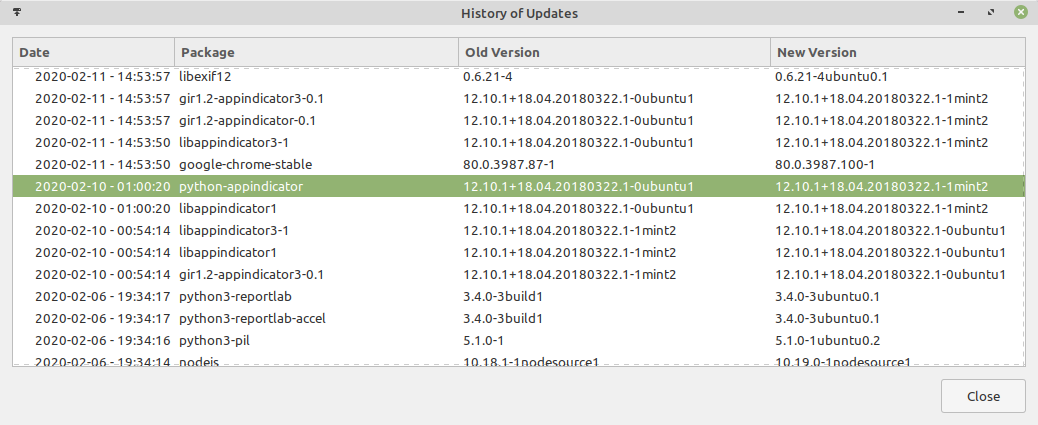
Mint 19.3 just released an update that fixes this issue.
Closing.
RyanNerd
on 11 Feb 2020
Huh - I don't see python-appindicator listed at all in my "History of Updates", and the mouse wheel still doesn't change the wallpaper. Could you have installed it as part of the libappindicator packages suggested as a workaround by @mtwebster above?
dannn-o
on 12 Feb 2020
This worked for me it looks like because I was able to partially apply @mtwebster 's work-around.
Reopening issue because there is only a work-around and not a true solution to the issue.
RyanNerd
on 14 Feb 2020
mtwebster
on 31 Mar 2020
Any easy way to know / predict when the code fix will be integrated through an update cycle?
dannn-o
on 20 Apr 2020
Related issues
 PauloGDPeixoto
·
3Comments
PauloGDPeixoto
·
3Comments
 Cloudwalk9
·
4Comments
Cloudwalk9
·
4Comments
 bittner
·
3Comments
bittner
·
3Comments
 ghost
·
3Comments
ghost
·
3Comments
 Odyseus
·
4Comments
Odyseus
·
4Comments