Cinnamon: Window preview stays after window closed
```
- Cinnamon 4.4.4
- Distribution - Arch
- Graphics hardware and driver used: Intel Corporation HD Graphics 620 (rev 02), intel
- 64 bit
- Attach /home/
/.xsession-errors, or /var/log/syslog (not relevant)
```
Issue
Sometimes the panel shows a tooltip which does not vanish until Cinnamon is restarted.
Steps to reproduce
There are many ways to reproduce. Maybe the easiest one is:
- Open Nemo
- Hover over the Nemo entry in the panel until the tooltip (window preview) is visible.
- Press Ctrl+W to close Nemo.
Expected behaviour
The panel entry and the tooltip vanishes.
Actual behaviour
Only the panel entry is gone. The tooltip stays until I restart Cinnamon.
 buzo-ffm
All 18 comments
I'm not able to reproduce the issue, it seems to work correctly in Cinnamon 4.4.5 (Linux Mint 19.3)
 Vahan86
on 23 Dec 2019
Vahan86
on 23 Dec 2019
Did you try to close the window via keyboard shortcut, too, while the window preview was visible?
Anyway, I'll wait till 4.4.5 lands in Arch then.
buzo-ffm
on 23 Dec 2019
I'm able to replicate what I think to be the same issue on 4.4.5, Mint 19.3:
Distro: Linux Mint 19.3 Tricia base: Ubuntu 18.04 bionic
Desktop: Cinnamon 4.4.5
Graphics:
Device-1: Intel 3rd Gen Core processor Graphics vendor: Lenovo
  driver: i915 v: kernel bus ID: 00:02.0 chip ID: 8086:0166
  Display: x11 server: X.Org 1.19.6 driver: modesetting unloaded: fbdev,vesa
  resolution: 1600x900~60Hz
Steps to replicate
Open any application and hover mouse over panel icon:
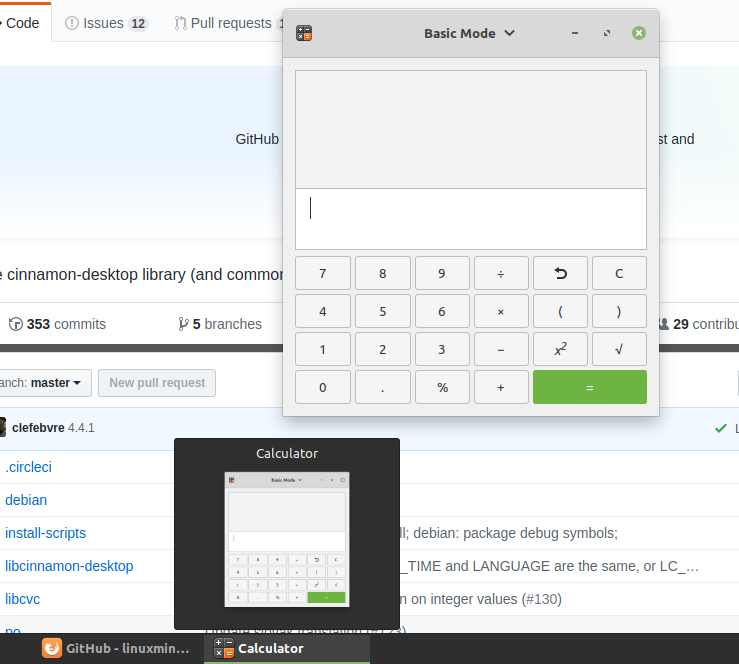
Close application with F4 while hovering
Note tooltip will not disappear until logout:
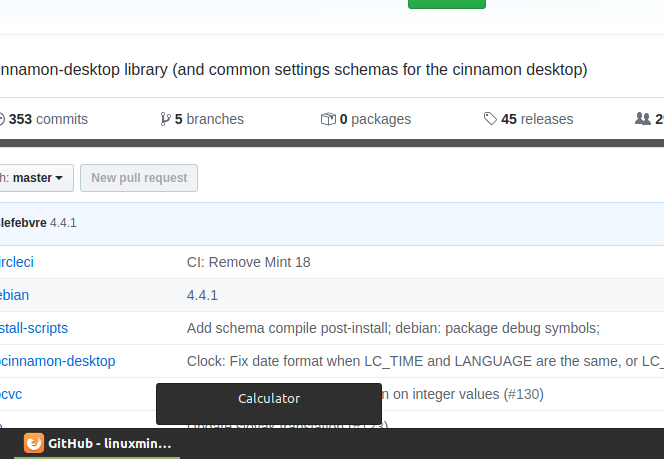
 tommypyatt
on 24 Dec 2019
tommypyatt
on 24 Dec 2019
I am experiencing the same problem with 4.4.4-1 on arch, too
It looks like #9040 is related
 9R
on 24 Dec 2019
9R
on 24 Dec 2019
Updated the title because this isn't actually the tooltip. It's the window preview being left behind.
 JosephMcc
on 26 Dec 2019
JosephMcc
on 26 Dec 2019
I was able to confirm it as well. It's happening for me. It happens when using ctrl-w keyboard shortcuts (nemo), and when the program closes on its own while the mouse is showing the preview (terminal command exit, and dosemu closing/crashing).
Additional: $ cinnamon --replace also can reset this, so you don't have to log out.
 Hordeking
on 26 Dec 2019
Hordeking
on 26 Dec 2019
Can anyone reliably reproduce this? I managed to do so twice, but not again.
If you can reliably reproduce, can you share your grouped window list applet's configuration? (Upper right corner button of configuration page, "Export to a file".
Thanks
 mtwebster
on 27 Dec 2019
mtwebster
on 27 Dec 2019
I would export it if I could figure out what you're talking about. Confuguration page of what? How do I get there? I can consistently reproduce it, so that's taken care of.
Hordeking
on 28 Dec 2019
I can reproduce the same behavior in my window-list applet. I don't use grouped windows.
As a workaround, if you you disable "show title above thumbnail", it becomes just a small black block, which is easier on the eyes.
settings.zip
ps: I have this on a normal linux mint 19.3 updated from 19.2
 janos-r
on 28 Dec 2019
janos-r
on 28 Dec 2019
@Hordeking right-click any item on the window list applet, expand 'Preferences", then click 'Configure..'
In the window that appears, in the upper right corner there's a button with 3 horizontal lines. Click that, select 'Export to a file'
mtwebster
on 28 Dec 2019
@Hordeking right-click any item on the window list applet, expand 'Preferences", then click 'Configure..'
In the window that appears, in the upper right corner there's a button with 3 horizontal lines. Click that, select 'Export to a file'
The resulting file is in my previous message under the "settings.zip" link.
janos-r
on 28 Dec 2019
I'm not using grouped windows, either.
Here's my exported config
window_list.json.gz
Hordeking
on 28 Dec 2019
I can reproduce this reliably. I'm on Linux Mint 19.3. From the system reports:
System:     Kernel: 5.3.0-26-generic x86_64 bits: 64 compiler: gcc v: 7.4.0
           Desktop: Cinnamon 4.4.6 wm: muffin dm: LightDM Distro: Linux Mint 19.3 Tricia
           base: Ubuntu 18.04 bionic
For me to reproduce this, I just made a simple bash script.
#!/bin/bash
sleep 5
Double click the file and select 'Run in terminal'. The terminal window will open, hover over the window so that the window preview is shown. Then after the script ends, the terminal window will automatically close. The preview (just the window title text, no window is shown as a preview after it closes) will remain. Similar to the images provided by @tommypyatt
This only seems to happen with the 'Window List' applet. I cannot reproduce with the 'Grouped Window List'.
 ugly95
on 29 Dec 2019
ugly95
on 29 Dec 2019
Why was this closed? Was the problem fixed? This seems to be a legit issue, and I don't even have to _try_ to reproduce it to wind up with half a dozen window preview names that can't be dismissed without restarting cinnamon...they just happen as I leave the mouse laying around while running the keyboard.
This isn't a nemo problem. I get it with terminal, ghidra, dosbox, firefox, thunderbird, and pretty much every other program I've tried it with.
Hordeking
on 29 Dec 2019
Why was this closed? Was the problem fixed?
Yes - click on the hyperlink in the closed message to see the fixing commit. It won't be rolling out to users yet (jut missed yesterdays maintenance release)
 smurphos
on 29 Dec 2019
smurphos
on 29 Dec 2019
Oh, cool. I didn't see the hyperlink. Good show!
Hordeking
on 2 Jan 2020
Nearly posted a duplicate bug report for this - it's very annoying for me. Hopefully there's a patch release soon!
 parnikkapore
on 4 Jan 2020
parnikkapore
on 4 Jan 2020
The update I got this morning has resolved the issue.
Thanks.
ugly95
on 7 Jan 2020
Related issues
 garymm
·
3Comments
garymm
·
3Comments
 pviotti
·
3Comments
pviotti
·
3Comments
 NikoKrause
·
3Comments
Vahan86
·
3Comments
NikoKrause
·
3Comments
Vahan86
·
3Comments
 orschiro
·
3Comments
orschiro
·
3Comments
Most helpful comment
Updated the title because this isn't actually the tooltip. It's the window preview being left behind.