Cinnamon: Make SUPER+L lock the session, not open the Cinnamon Debugger
I was referred here from the Linux Mint Community »Ideas« page, so I re-post my idea here:
Ex-Windows users might be trained to use WINDOWS+E to invoke the »Windows Explorer«, WINDOWS+R to »Run« something (like Alt+F2), and WINDOWS+L to »Lock« the session.
SUPER+E we now got with 17.1—it invokes Nemo.
Why not use SUPER+L to lock the screen instead of invoking the Cinnamon Debugger? Ex Windows users (and I converted several to Linux Mint) tend to get extremely confused when they are used to quick-lock their screen by WINDOWS+L … and Melange pops up.
I'm not proposing to make Linux Mint emulate Windows at all cost—but this one could just make the transition even easier, for some. If you're working (at a client, or in your workplace), you might get called away and/or have to leave your workplace and it's just SO convenient just to be able to hit SUPER+L to lock your screen quickly.
Think this feasible?
 Moonbase59
All 24 comments
You can customize the shortcut. Menu -> Settings -> Keyboard -> Keyboard shortcuts -> Windows -> Show Desktop.
On another hand I also believe that WinKey + L should be default for session locking.
This one has a +1 form me.
 DrOptix
on 7 Dec 2014
DrOptix
on 7 Dec 2014
-1 Why should Linux users learn Windoze keybindings?
but this one could just make the transition even easier, for some
I never learnt Windoze stuff so this would make it harder for me!
 leigh123linux
on 7 Dec 2014
leigh123linux
on 7 Dec 2014
-1
The current keybinding is a common pattern on Linux, and screwing with default keybindings purely to appease Windows users is hardly ideal. It's much easier for me to remember Ctrl + Alt + L on Linux, because I'll frequently use Ctrl + Alt + T to pull up a terminal.
 Topperfalkon
on 8 Dec 2014
Topperfalkon
on 8 Dec 2014
Even I accidentally hit Super + L often (my work PC is Windows :sob: ) but am neutral on this topic as the keybinding is occupied already.
Not sure if you're aware, but these keybindings are configurable and can be set the way you need.

 anandrkris
on 9 Dec 2014
anandrkris
on 9 Dec 2014
Thanks for all the feedback! Yes I do know (and am happy about it) that we can change almost anything on Linux machines—even made easy on Mint. ;-) I'm also stuck with a few Windows machines at work and—more often than not—accidentally hit things like Ctrl+Alt+Right or Ctrl+Alt+T on a Windows box … before I remember we have no desktops and the »terminal« is WINDOWS+R, enter »cmd«, press RETURN … and I'm aware that I can hit Ctrl+Alt+L, of course, on a Mint box.
Still I thought my suggestion might just help people who are either ex Windows users (like many of my friends and some colleagues even, nowadays), or people that have to use both. Like we now have SUPER+E, and no (Linux) metaphor of an »Explorer« whatsoever. :-)
Moonbase59
on 9 Dec 2014
@Moonbase59 I do see your point. However, like @leigh123linux and @Topperfalkon, I am so used to the linux keybindings that I often find myself trying to use them on Windows. I could just as easily (and probably even more futilely suggest that Microsoft change their keybindings to fit what I'm used to.
Also, those who switch to a new OS should be ready for a learning curve anyway. It takes a little bit of getting used to, but once you do, it's fine.
One solution to the problem (though I don't think the devs will do anything about it for a while since they already have a lot on their plate, and this isn't exactly a high-priority issue) would be keyboard 'themes' - predefined sets of shortcuts that could then be customized to one's liking (eg. 'linux', 'windows', and 'mac').
 collinss
on 9 Dec 2014
collinss
on 9 Dec 2014
I think everyone's missing the point here. _Removing_ super + l as a (default) shortcut to the debugger is more important as 'normal' users don't need a debugger.
Lock screen can be set to anything from the settings as the user likes.
 gauravjuvekar
on 10 Dec 2014
gauravjuvekar
on 10 Dec 2014
@gauravjuvekar - You're right, Cinnamon's looking glass can have a different key binding other than Super + L by default. That is, bother Ctrl + Alt + L and Super + L can be defined as keybindings by default. (_Although, I thought about it and showed it in screenshot, didn't say it explicitly._)
anandrkris
on 10 Dec 2014
+1 The debugger isn't really something I'd normally need.
 devcsrj
on 5 May 2015
devcsrj
on 5 May 2015
Any update on this or is there a way to disable Melange at all?
Quitting it doesn't work as it start next time I press Super + L
 Nandox7
on 27 Jul 2015
Nandox7
on 27 Jul 2015
Just clear out the keybinding for the debugger - Keyboard shortcuts, General->Troubleshooting - then you can reassign it elsewhere if you want.
 mtwebster
on 27 Jul 2015
mtwebster
on 27 Jul 2015
I agree with this issue. Most Windows users are used to press Super + L for locking. The debugger causes confusion.
 rrooij
on 15 Oct 2015
rrooij
on 15 Oct 2015
I think @collinss's idea is a good one, about keyboard "themes" (more properly keybinding themes I think, as keyboard suggests different layouts like Dvorak, etc).
Also agree that the main issue here probably should be to remove the default debugger keybinding from Super + L, optionally setting a different one.
Topperfalkon
on 16 Oct 2015
I'm currently running the Mint desktop inside VMWare on a Windows host. Locking the Windows host with Windows ("super") + L also brings up the debugger in the Mint guest.
As discussed above, super+L to lock would be a good choice for attracting/retaining Windows users. Seeing as most of the look and feel and shortcuts are based on Windows anyway, it wouldn't be an extra big step.
Personally I already know about and don't mind ctrl+alt+L, but for such a common action super+L would be a good (default) addition.
Anyway I'm mostly posting this reply because while my use case (running in VMWare) is probably uncommon, I did find usability issues in trying to remove the unwanted shortcut:
- Super+L brings up a window with no title bar or close button.
- The name is actually on the right "Melange - Cinnamon Debugger" (underlined, but not actually a hyperlink or anything - even outside of a web browser, I wanted to click it to see if it offers anything helpful)
- "Toggle shortcut:
l" is in italics, and at first the llooks like a/. There is no + sign as is common with describing shortcuts (see almost everyone's post above), and it's not clear how it relates to the Actions dropdown (eventually I concluded it's not, but the apparent / made me think there was a relationship). - When trying to remove the shortcut, there is no search option in the shortcuts setting, and I could find no mention of "Melange - Cinnamon Debugger".
Thanks to this GitHub issue, I was able to learn that "Toggle Looking Glass" is the action that's bringing up the debugger, and from there I can easily change it [edit - actually not that easy - there is no right-click remove, the remove custom shortcut is greyed out as it's not a custom one, and I need to read 3 lines of tooltip, which flicks on/off if I move my mouse pointer out of the way].
So, in its current state it is usable only in the sense that you have to Google it. ;)
 fazy
on 4 Nov 2015
fazy
on 4 Nov 2015
The best option would IMHO be to change the default Cinnamon Debugger shortcut to something different (e.g. Super+F12, inspired by the Browser debugger tools) and leave Super+L unassigned.
I came here from google, because after locking Windows my Cinnamon-VM always had this "strange" window at the top...
 xiic
on 12 Jan 2016
xiic
on 12 Jan 2016
Like @fazy and @xiic, I also run Mint 17.3 in a VM on a Windows Host (I require Windows for VS). Unassigning the Super+L keybinding is a nice compromise.
 jpickwell
on 29 Feb 2016
jpickwell
on 29 Feb 2016
@fazy @xiic @jpickwell same here. Had a hard time finding where this popup was coming from.
I think that such a common binding shouldn't invoke a debugger. I think Super+F12 is a nice choice.
 slurdge
on 26 Apr 2016
slurdge
on 26 Apr 2016
+1
Came from Ubuntu where it's been the default for lock for years. Easier to hit with janked up right hand than ctl alt l.
Debugger makes no sense on "L".
 blackomegax
on 17 Jul 2016
blackomegax
on 17 Jul 2016
+1, it confuses me.
 riseremi
on 26 Sep 2016
riseremi
on 26 Sep 2016
I also support moving the debugger hot key off of Super-L. I'm in the same position as others having to use multiple operating systems and a consistent key binding, by default, would be helpful. For me, it's a small security issue since locking my screen is a good security practice and it catches me off-guard when I try to lock the screen and I end up with the Cinnamon debugger.
 mvsoder
on 11 Jan 2017
mvsoder
on 11 Jan 2017
Perhaps a better long term solution would be to present the user with a choice of key bindings on first start that are either the typical Linux solution or closer to those on Windows, that way it helps new users acclimate without alienating existing users.
 metiscus
on 31 May 2017
metiscus
on 31 May 2017
Closed as 'wont fix'.
leigh123linux
on 11 Aug 2017
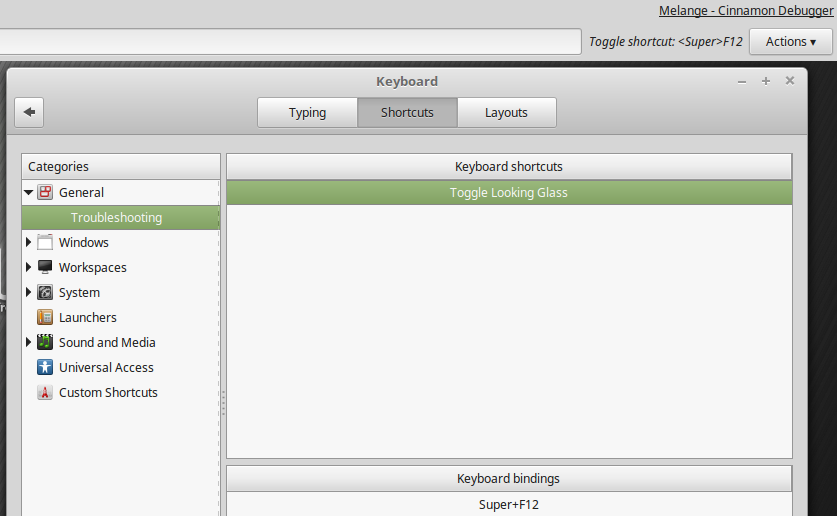
In my system (Mint 18.2) there is settings for Melange shortcut but with mysterious name:
"Toggle Looking Glass" (on screen I've changed "Super+L" to "Super+F12"). Maybe should we change that name to "Melange - Cinnamon Debbuger"?
 slawomirfurtak
on 22 Sep 2017
slawomirfurtak
on 22 Sep 2017
Screen locking can be important. I _need_ the binding to match Unity and Windows, for consistency.
 nigels-com
on 13 Nov 2017
nigels-com
on 13 Nov 2017
Related issues
 Vahan86
·
3Comments
Vahan86
·
3Comments
 ch3pjw
·
4Comments
ch3pjw
·
4Comments
 ghost
·
3Comments
ghost
·
3Comments
 damian101
·
3Comments
damian101
·
3Comments
 piotrekkr
·
3Comments
piotrekkr
·
3Comments
Most helpful comment
+1
Came from Ubuntu where it's been the default for lock for years. Easier to hit with janked up right hand than ctl alt l.
Debugger makes no sense on "L".