Builds
Here are a couple of builds, from newer to older, to help test/bisect without having to recompile everything:
397-8300.zip
410-8300.zip
427-8003.zip
429-8003.zip
4.0-maintenance.zip
4.0.zip
Performance tests:
Dragging windows across the screen.
| Tester | Observation |
| :---: | :---: |
| Clem (intel) | Subtle improvements introduced by 397. Windows feel a bit lighter, as if they carried less weight when dragging them around. Elastic effect with pointer isn't really affected. |
| Clem (nvidia) | Same as with intel. |
Selecting code and scrolling in Visual Studio Code.
| Tester | Observation |
| :---: | :---: |
| Clem (intel) | No difference between 4.0 and 397. |
| Clem (nvidia) | Same, no visible difference. |
Issue 1: Tile zone preview animations
Observed by @clefebvre.
Tile zone preview animations starts from the center of the first monitor.
Drag a window to the right monitor and go near its left edge. The tile zone animation should start from the edge and towards the center of the right monitor. Instead it starts from the center of the left monitor and towards the edge.
| Introduced by | Fixed by |
| :---: | :---: |
| https://github.com/linuxmint/muffin/pull/427 | https://github.com/linuxmint/muffin/pull/447 |
Issue 2: Moving a window moves another one
Observed by @clefebvre.
Have two terminals open, double-click the titlebar of the right terminal to maximize it, double-click the titlebar of the maximized terminal to unmaxmize, drag the titlebar of the left terminal to move it
result: right terminal moves as you try to move the left terminal.
| Introduced by | Fixed by |
| :---: | :---: |
| https://github.com/linuxmint/muffin/pull/397 | https://github.com/linuxmint/muffin/pull/435 |
Issue 3: Alt-tab doesn't bring window
Observed by @clefebvre.
It's not clear how to reproduce this bug 100%. It would happen pretty fast after using the desktop and switching between windows.
| Introduced by | Fixed by |
| :---: | :---: |
| https://github.com/linuxmint/muffin/pull/410 | https://github.com/linuxmint/muffin/pull/435? |
Issue 4: Dialogs look squashed
Observed by @clefebvre.
With effects enabled on windows and dialogs, open a terminal and type "pkexec xed", observe corrupt looking dialog, where content and title look squashed.
Same thing when running ./test from the mintupdate project.
| Introduced by | Fixed by |
| :---: | :---: |
| https://github.com/linuxmint/muffin/pull/410 | https://github.com/linuxmint/muffin/pull/453 (partly) |
Partly fixed by 453. Windows now look correct but their mapping animation happens in two times.
Issue 5: Window opacity change isn't immediate
Observed by @itzexor.
- WinKey + E to open nemo, WinKey + L to open melange
- in melange start inspector and click the nemo window
- evaluate r(#).opacity = 127 where # is the result number of the nemo window inspection
Expected result is the window is set to 50% opacity but nothing happens. window still interacts as usual and redraws fine, but is at full opacity
A simpler way to test this is to change the cinnamon window settings, to use the mouse wheel to change window opacity.
"workaround":
click show desktop twice to turn it on then off again. nemo window is now 50% opaque, and reacts to all opacity changes properly.
| Introduced by | Fixed by |
| :---: | :---: |
| https://github.com/linuxmint/muffin/pull/397 | https://github.com/linuxmint/muffin/pull/448 |
Issue 6: Nemo can't switch monitor
Observed by @Cobinja.
Invoke nemo with WinKey + E, right click GWL to tell Nemo to switch to the other monitor, nothing happens.
| Introduced by | Fixed by |
| :---: | :---: |
| https://github.com/linuxmint/muffin/pull/410 | https://github.com/linuxmint/muffin/pull/444 |
Issue 7: Monitor border preview and snap OSD get stuck
Observed by @JosephMcc. We don't know how to reproduce it.
| Introduced by | Fixed by |
| :---: | :---: |
| | |
Issue 8: Corrupted zones in Slack window
Observed by @itzexor.
Often upon unminimizing slack: (edit: it's hard to see the bottom corruption because it's pure white and there's a white background here. it's not always white, usually just garbage).

| Introduced by | Fixed by |
| :---: | :---: |
| | |
Issue 9: Flicker shadow/border on xed about dialog
Observed by @itzexor.
Every time xed about dialog is opened, bottom and right shadow flicker:

| Introduced by | Fixed by |
| :---: | :---: |
| https://github.com/linuxmint/muffin/pull/410 | https://github.com/linuxmint/muffin/pull/397? |
Issue 10: Skyrim fails to run
Observed by @brownsr.
Using proton 3.16-8 Beta in Steam.
| Introduced by | Fixed by |
| :---: | :---: |
| https://github.com/linuxmint/muffin/pull/410 | https://github.com/linuxmint/muffin/pull/448 |
Possibly the same issue. Launching Ticket to Ride using proton in Steam, the game window appears behind the other windows and the music plays but the window shows no content and the game can't be played. Introduced by 410 as well.
 clefebvre
All 23 comments
There is also an issue with changing MetaWindowActor opacity. It doesn't work until certain conditions are met, which makes Map/Close window effects look wrong. The condition I've found that makes it work is toggling show desktop.
simple test case:
WinKey + Eto open nemo,WinKey + Lto open melange- in melange start inspector and click the nemo window
- evaluate
r(#).opacity = 127where#is the result number of the nemo window inspection
expected result is the window is set to 50% opacity but nothing happens. window still interacts as usual and redraws fine, but is at full opacity
"workaround":
click show desktop twice to turn it on then off again. nemo window is now 50% opaque, and reacts to all opacity changes properly
 itzexor
on 15 Mar 2019
itzexor
on 15 Mar 2019
More info on issue 4:
- Affects CSD dialogs by squashing in both x and y axis, maintaining aspect ratio but way underscaled
- Affects SSD dialogs by squashing them in the y axis, so they look vertically squashed
- Requires window effects to be on for this bug to occur
itzexor
on 16 Mar 2019
Other visual artifacting:
often upon unminimizing slack: (edit: it's hard to see the bottom corruption because it's pure white and there's a white background here. it's not always white, usually just garbage)
every time xed about dialog is opened, bottom and right shadow flicker:
itzexor
on 16 Mar 2019
The window tiling chrome occasionally gets stuck on screen. The small bars indicating a tile zone and the snap dialog. I can't reliably reproduce but when in happens these will stay in place no matter where you move the window until the mouse button is released.
 JosephMcc
on 24 Mar 2019
JosephMcc
on 24 Mar 2019
That's when you drag with the mouse? Is it the tiling preview (i.e. the area which the window will occupy), or just the border preview (i.e. the smaller area which represents the border)?
clefebvre
on 25 Mar 2019
When you drag with the mouse, yes. And it's the small tile zone indicators and snap dialog.
JosephMcc
on 25 Mar 2019
More info on issue 8:
Happened to me a few times, while having maximed Chrome over maximized Spotify. In Chrome, I would see that same right hand area corrupt, and I could see a portion of the underlying Spotify Scroll bar, that should be covered by that portion of the chrome window instead.
 antonvalletas
on 25 Mar 2019
antonvalletas
on 25 Mar 2019
Another issue for you. Skyrim running through Steam, using proton 3.16-8 Beta fails to work. it runs OK in builds up to and including 427-8003, it fails from build 410-8300 onwards
 brownsr
on 25 Mar 2019
brownsr
on 25 Mar 2019
@antonvalletas which build introduces it?
thanks @brownsr I'll add that as issue 10.
clefebvre
on 25 Mar 2019
Issue 5 should be fixed by linuxmint/muffin#437 but it is WIP.
Not reproducing 7 or 8 on 437, but not sure I could on master either.
It looks like the shadow doesn't update as quickly as the texture does when clicking "Install Updates" in mintupdate, after expanding the dialog by clicking "Details". I can't reproduce it in Xed though, and it might not be the same issue - it's just the only hint of shadows misbehaving on my end. I'm testing on Nvidia, AMDGPU, and Intel graphics on three machines.
I suspect the cases where people have different behaviors from the compositor comes down to which applications they are using. Some apps may be making muffin paint more or less. For instance, Chrome seems to cause the propagation of a lot of updates so it speeds up the redraws for all windows. So in the interest of figuring out more ways to reproduce some of these, it might be useful if you guys are able to summarize which applications are currently open when these are happening. Typically, I will have slack, vscode, insync, mintupdate, and chrome running.
Also reproducing the skyrim issue. It looks like the window just isn't painting. Currently in the process of bisecting linuxmint/muffin#410 this week.
@antonvalletas Are you using system title bars in Chrome or the CSD decorated window (default in Google Chrome)?
 jaszhix
on 26 Mar 2019
jaszhix
on 26 Mar 2019
@jaszhix Yes, I am using system title bars in Chrome, with the Arc-Dark theme if that is of any help.
antonvalletas
on 26 Mar 2019
Just to clarify, linuxmint/muffin#397 depends on linuxmint/muffin#410, so the 397 deb includes that. I commented out the part of the code in the 397 branch that causes issues without 410, and built a standalone 397. Do note, to make this work without 410, this will have an issue with the cursor icon being incorrect when entering the title bar area of windows, and does not include the fix for the wrong window being grabbed during dragging.
This should be installed with the version of Cinnamon included in 427-8003.zip.
jaszhix
on 26 Mar 2019
A few observations on master:
The tile/snap preview and osd hangup can be reproduced (not entirely reliably but like 1 out of 3 or 4) by dragging a window to an edge and waiting long enough for the osd to appear. Quickly drag the window away from the edge. Like I said, it's not reliable but should be able to reproduce.
I noticed while testing above, if you tile a window, then drag it ever-so-slightly, as if you're going to break it loose, you'll trigger the tile hinting/osd again.
 mtwebster
on 28 Mar 2019
mtwebster
on 28 Mar 2019
another bug, zoom stops working consistently. Typically the first zoom step tends to do odd things like a random translation of the screen. Tends to be better after the first zoom in step as you zoom in further. Introduced in the 410 build.
UPDATE
I can now see the same random translation happening in earlier builds, this may well be a pre-existing quirk. So it's not an issue with this set of changes. Sorry for the misleading report.
brownsr
on 28 Mar 2019
Can't reproduce 9 (intel - hidpi) - I tried with and without vsync fwiw.
mtwebster
on 29 Mar 2019
I closed all of my remaining PRs because things are getting too personal on the Slack. I'm taking a break for my mental health.
jaszhix
on 21 Apr 2019
Just wanted to say thanks to everyone working on Cinnamon, the performance improvements are impressive on my old laptop running the daily build (in recent builds I had to turn vsync off though - then I got good performance). Looking forward to 19.2 :)
P.S. Don't be discouraged, you guys are awesome!
 pizzadude
on 2 May 2019
pizzadude
on 2 May 2019
I've just noticed another thing. Icon shadow in themes that have used it (there aren't many) does not seem to work any more. Try the divo theme (for example), and check the shadow (or lack of it) on symbolic icons in the panel.
Confirmed due to commit https://github.com/linuxmint/cinnamon/commit/37d75d48e4f0214e498dd559ee257946ad3fed6f#diff-b9152792660693113ebfebfbd89105a2 as the problem goes away when reverting this single commit
brownsr
on 17 May 2019
@brownsr There are a couple shadow related issues. The shadow no longer works on things like the workspace switch OSD either
JosephMcc
on 17 May 2019
Another observation. Launch the on screen keyboard and dismiss it. The space it used to occupy is now blocked from having windows moved into it.
UPDATE
Confirmed this is now fixed in master
brownsr
on 19 May 2019
here's an example of thumbnails missing in Scale. I had just added a new terminal and then hit the scale applet immediately afterwards. I haven't got a repeatable case to offer I am afraid
UPDATE: confirmed fixed by #8594

brownsr
on 28 May 2019
Other visual artifacting:
- every time xed about dialog is opened, bottom and right shadow flicker:
I can't see the flickering shadow in the xed about, however there is a consistent error stack in the log files when this functionality is called:
(cinnamon:2732): Cjs-WARNING **: 19:56:42.483: JS ERROR: Error calling onComplete: TypeError: this.source is null
_end@/usr/share/cinnamon/js/ui/windowEffects.js:34:1
_scaleWindow/<.onComplete@/usr/share/cinnamon/js/ui/windowEffects.js:71:31
_addHandler/params[name]@/usr/share/cinnamon/js/ui/tweener.js:256:13
_callOnFunction@resource:///org/cinnamon/cjs/modules/tweener/tweener.js:204:13
_updateTweenByIndex@resource:///org/cinnamon/cjs/modules/tweener/tweener.js:338:9
_updateTweens@resource:///org/cinnamon/cjs/modules/tweener/tweener.js:351:18
_onEnterFrame@resource:///org/cinnamon/cjs/modules/tweener/tweener.js:366:10
_emit@resource:///org/cinnamon/cjs/modules/signals.js:142:27
ClutterFrameTicker.prototype._onNewFrame@/usr/share/cinnamon/js/ui/tweener.js:413:9
ClutterFrameTicker.prototype._init/<@/usr/share/cinnamon/js/ui/tweener.js:389:17
UPDATE
appears to be fixed by https://github.com/linuxmint/cinnamon/pull/8596
brownsr
on 31 May 2019
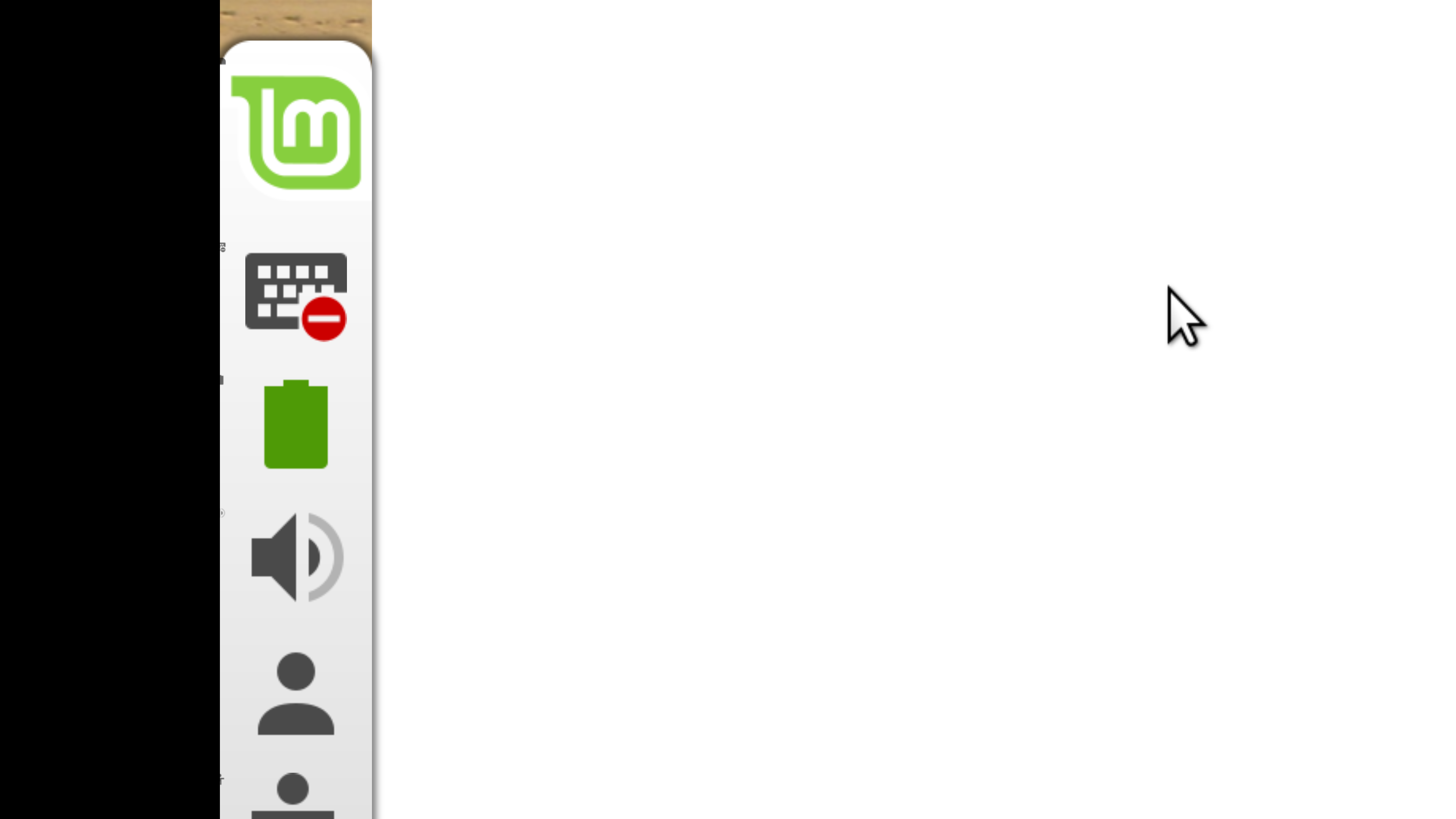
I've got a lead on the occasional artifacting I've seen from time to time. Here is a highly zoomed in panel view. Click on it to display full size and you can see that the artifacts that look like little dots and marks are actually miniature icon versions of the main applet icons
brownsr
on 31 May 2019
Related issues
 Cloudwalk9
·
4Comments
Cloudwalk9
·
4Comments
 pviotti
·
3Comments
pviotti
·
3Comments
 trymeouteh
·
3Comments
trymeouteh
·
3Comments
 stefan-niedermann
·
4Comments
stefan-niedermann
·
4Comments
 PauloGDPeixoto
·
3Comments
PauloGDPeixoto
·
3Comments
Most helpful comment
Just wanted to say thanks to everyone working on Cinnamon, the performance improvements are impressive on my old laptop running the daily build (in recent builds I had to turn vsync off though - then I got good performance). Looking forward to 19.2 :)
P.S. Don't be discouraged, you guys are awesome!