Cinnamon: HiDPi very bad Mint 19 - needs HiDPi scaling solution
```
- Cinnamon version 3.8
- Mint 19
- Graphics hardware - not related
- 64 bit
```
Issue
Mint 19 claims HiDPi improvement. There is no improvement. There is only Auto, normal and Double which is too huge for most hidpi displays but too tiny for Auto or normal. Meaning still required to scale the font in font settings and scale layout in firefox. But no solution for small scrollbars, icons and titlebar buttons. Nemo sidebar icon tiny. and huge on icon view with 100% and 150% scaling. no 120% 140%?
Steps to reproduce
just install Mint 19 or upgrade
Expected behaviour
I know there is limitation on Gtk integer scaling and Xorg limitation as well.
There are solutions easily implemented and made available in this release. Really disappointed we do not have it.
The solution is simple. just make the theme bigger, icons bigger and automatically use it depend on the resolution and screen size. I already used this solution in my Python applications
Other information
 howdev
All 37 comments
The scaling limitation is imposed by gtk3.
 leigh123linux
on 6 Jul 2018
leigh123linux
on 6 Jul 2018
Yes I know is gtk limitation already. didn't you read the details above???
I was merely saying there should be already a solution to overcome that limitation.
It is so easy solution that you don't try to implement it. Why not have the same theme for hidpi like with bigger scrollbars and titlebar buttons, and icons?
howdev
on 6 Jul 2018
Why do I need to read it fully when I know there isn't a solution.
PR welcomed If you think it's so easy to fix.
leigh123linux
on 6 Jul 2018
how do you expect everyone with 4k to use your Min-Y theme with tiny nemo sidebar icons, tiny titlebar buttons, tiny scrollbars.
Why do you say no solution? when you can just make another Mint-Y theme with bigger scrollbars, icons, and titlebars?
howdev
on 6 Jul 2018
It is so difficult for us end users to modify some gtk css files. since we didn't design or developed the themes
howdev
on 6 Jul 2018
If you have a 4k monitor do you want to use that tiny mint-y theme?
howdev
on 6 Jul 2018
It has nothing to do with the mint-y theme or icons, adwaita, adapta and all other themes/icons look the same.
leigh123linux
on 6 Jul 2018
the icons size does not look the same. if you have hidpi the icon are much smaller on hidpi at the same size. you compare 90dpi and 160dpi display on same size icon. which is bigger? of course is 90dpi bigger. Why nothing to do with Mint-Y theme when the title bar is so narrow on the 4k display and was big enough to use on 1366?
There is all to do with the theme. you keep the theme at the same size. is going to be small on hidpi. that is why you have nemo zoom levels for icon view. but there is no zoom level for theme. You look at xed for example, all the toolbar icon are small is because the theme is only good for 1366 or 90, 100dpi displays
howdev
on 6 Jul 2018
The solution I mention is to set right titlebar size, right scrollbar size. nemo icon size, nemo sidebar icon size based on the screen and resolution
Most of these things have settings for it. but why make the end user do it when they don't know it. For example the titlebar is metacity theme is done through the title_scale, the fonts have scaling setting. the scrollbar width is changed through the gtk css. the nemo sidebar icons (don't know where to change that)
And why is the new Mint icons themes makes some preview icons so big in Nemo, bigger than folder icon at the same zoom level. The mint 18 has the archives icons same size as the folder, but now is changed to the new flat icon but is bigger than the folder
howdev
on 6 Jul 2018
I use 4k in hidpi constantly and I am not sure I see the issues you mention. Any chance you can post screenshots so we can understand your concerns clearly?
 brownsr
on 6 Jul 2018
brownsr
on 6 Jul 2018
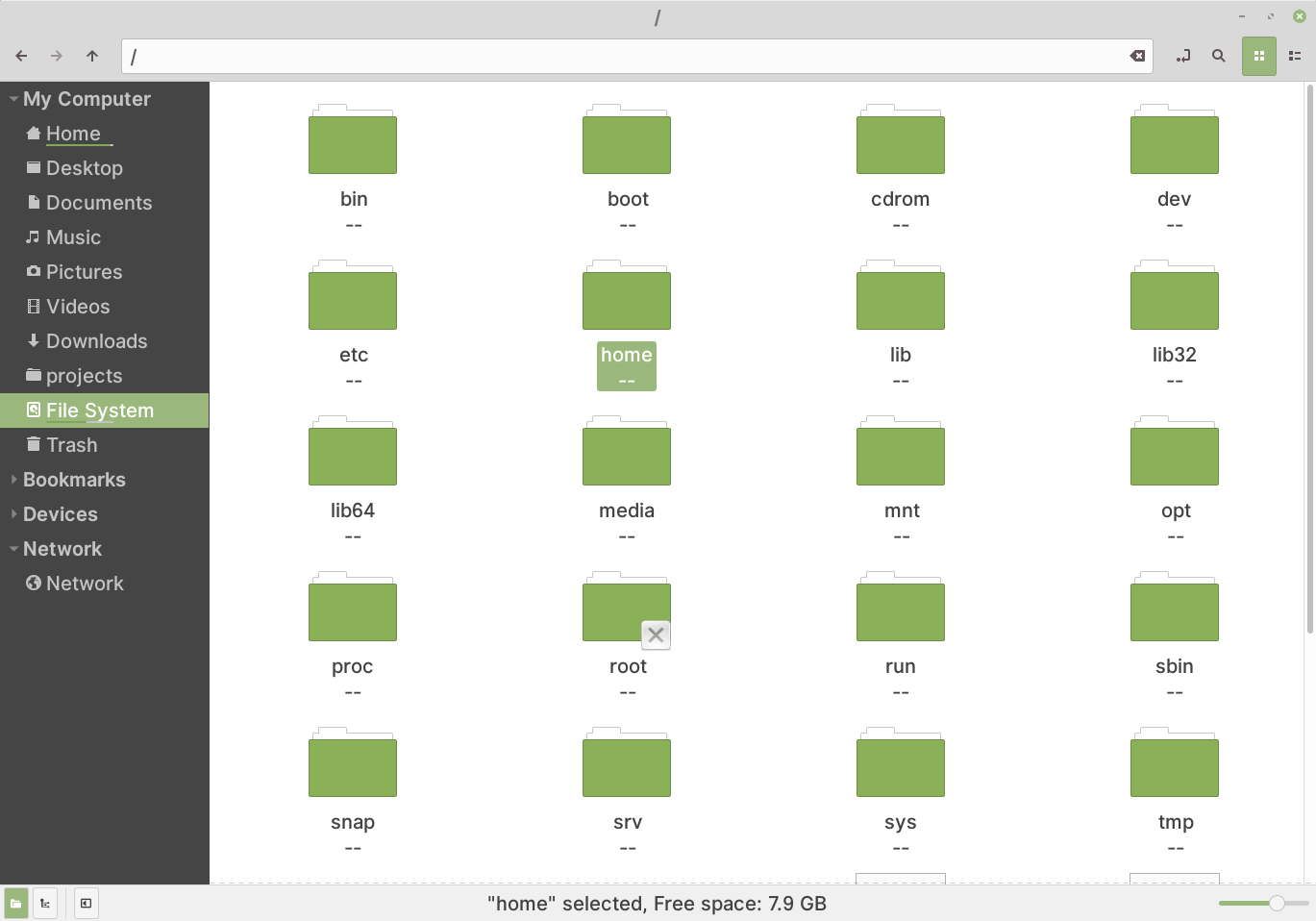
this is nemo window at 4k desktop
good idea can you post yours brownsr?
don't view the screenshot by clicking on it, because it zooms to the browser window size. Instead download then view it with your image viewer
howdev
on 7 Jul 2018
Hello. Same problems as described. There has to be possibility to set size between normal and double size. Double size is nonsense, exactly as described. 4K will be standard in next years and Cinnamon has to be ready for it. KDE is very great with this HiDPI feature. Windows has settings by percentage selection.
 raven2cz
on 20 Dec 2018
raven2cz
on 20 Dec 2018
@raven2cz So it seems they don't understand in low resolutions all the icons and UI elements looks the same as in same readable size. When you have hidpi, all the UI elemnts are tiny including menu icons and toolbar buttons. Temporary solution is for them to provide us hidpi Mint-Y theme until Gtk improve its scaling
howdev
on 29 Dec 2018
Hi,
GTK programmers and Cinnamon programmers have to discuss and cooperate. I
was very surprised with final response from them. The Cinnamon will be
forgotten if the approach of programmers doesn't be changed. I'm old and
there are many UIs which died by this approach. Important is open
communication between cinnamon and gtk. For example I don't find GTK
relevant issues in GTK repo.
You have true, temporary solution is another type of theme. But this is
very very bad. Mainly in case that KDE fully supports HiRes now.
so 29. 12. 2018 v 10:55 odesílatel howdev notifications@github.com napsal:
@raven2cz https://github.com/raven2cz So it seems they don't understand
in low resolutions all the icons and UI elements looks the same as in same
readable size. When you have hidpi, all the UI elemnts are tiny including
menu icons and toolbar buttons. Temporary solution is for them to provide
us hidpi Mint-Y theme until Gtk improve its scaling—
You are receiving this because you were mentioned.
Reply to this email directly, view it on GitHub
https://github.com/linuxmint/Cinnamon/issues/7698#issuecomment-450480638,
or mute the thread
https://github.com/notifications/unsubscribe-auth/ATjeswbAOPalmAshP7f7Yy4qEWbPGnBiks5u9zwTgaJpZM4VEuxi
.
raven2cz
on 29 Dec 2018
Just curious, did we get anywhere with this one? I have a 4K built-in screen with my laptop, and when I connect to an external monitor, the scaling on the external one looks off (content too big).
 sigino
on 16 Feb 2019
sigino
on 16 Feb 2019
Waiting on an update here too, Auto or HiDPI is to big, we need a middle term between 4k and 1080p@4x, in Win10 the 175% scalling works perfectly. Thanks.
 MorenoMdz
on 1 Mar 2019
MorenoMdz
on 1 Mar 2019
Workaround here. https://wiki.archlinux.org/index.php/HiDPI
175% = 200% / 1.15 = 174%
Set scaling to 2x and then xrandr --output DP-0 --scale 1.15x1.15 will achieve what you want, if your screen is connected to DP-0. Verify that by running just xrandr.
 hholst80
on 5 Mar 2019
hholst80
on 5 Mar 2019
So far so good thanks!!
Edit... The touchpad won't move past the old boundary's so I can't access the whole screen. The artcile says to use the '--panning' option but does not explain how.
MorenoMdz
on 6 Mar 2019
Gnome just landed fractional scaling support last week, maybe this could be ported to cinnamon?
 ManIVIctorious
on 6 Mar 2019
ManIVIctorious
on 6 Mar 2019
I am sure it can be ported since Cinnamon is based on mutter
howdev
on 6 Mar 2019
Oh please to do it, the mouse panning is the only thing missing right now.
MorenoMdz
on 6 Mar 2019
@MorenoMdz --panning option is the native resolution of your screen, eg --panning 3840x2160
for those interested, this is the setup I use for mint 19.1 on iMac 27' 5k
set the Desktop scaling to double (Hi-DPI) via System Settings -> General
then open up a terminal and enter the following
xrandr --output eDP --scale 1x1 --panning 5120x2880 to set panning to current scaling
then repeat with preferred scaling eg.
xrandr --output eDP --scale 1.333x1.333 --panning 5120x2880
for me --output = eDP might differ for you, just run xrandr without any params to get a list and see which one is 'connected'
you can add both to System Settings -> Startup Applications, to have this upon login.
 i07
on 11 May 2019
i07
on 11 May 2019
@i07 thanks, any ideas on how to handle multiple monitors this way? My set up has a left display in portrait mode which is a 1080x1920 resolution and a main 4k display in the center. When I set the panning to 4k and scale to 1.33 it will overlap the left monitor.
MorenoMdz
on 25 May 2019
@MorenoMdz, to be honest I didn't try, simply I don't have the need for multiple monitors. However when I was reading up on using xrandr; I did came across this little blog entry: https://blog.summercat.com/configuring-mixed-dpi-monitors-with-xrandr.html you might see if that will help you a bit in the right direction. Good luck!
i07
on 9 Jul 2019
the Xrandr is suggested by many as a workaround solution for HiDPi. However, Xrandr does not produce satisfied results since can be very blurry. It is a bad solution actually. It is better to modified the theme
howdev
on 9 Jul 2019
Change the theme to solve the scaling sounds more complicated to be honest.
MorenoMdz
on 9 Jul 2019
Of course, changing the theme is for the theme developers of the community or we should expect the change to come from the Linux Mint developers. And certainly not expect us users to find and change this type of things. As you see here they closed this without any consideration of my points above.
howdev
on 10 Jul 2019
Exactly, it is more about adding the options to the current interface as the functionality already exists.
MorenoMdz
on 10 Jul 2019
We should all realize that blaming the devs here wont solve a thing, they are doing their best at their free time for us end users and we are in no position to demand 😁 things that seems so easy for us (modifying theme for 4k reso) is not that "actually" so easy for anyone jungling their own life and dedicating their free time for the open source community like linux. The point is, we should all come together, dont demand for a fix, find a way to fix and share it to eveyone 😁
 deasix
on 14 Aug 2019
deasix
on 14 Aug 2019
Don't get me wrong deasix I am not demanding anything, what I do want to give an argument is that this should be a priority somehow.
Just one little curiosity in this topic, I just got a new MacBook and it does also suck at displaying two monitors in different scales. The secondary portrait FHD display keeps the wallpaper all wrong.
MorenoMdz
on 14 Aug 2019
Sorry if i somehow misunderstood. I also do not pertain to a specific person, anyways, is your problem still about the dpi scaling? Maybe you could find answers in other thread or should we start another if theres not? Also what version of mint are you using
deasix
on 14 Aug 2019
In Mint I still about the DPI issue that is shown here, the comment was more about how the scaling of the screen extends to so many other things, from how fonts display, font aliasing, wallpaper quality, etc. It is really important to get it right, and not even macOS that is supposed to have the best scaling of all three major os types is still not perfect.
MorenoMdz
on 14 Aug 2019
@deasix we are no blaming. we are suggesting they provide a temporary solution in modifying the theme which is completely possible for them. They have time for fixes and features that are released 19.2. Github is for bug reporting. Not everyone reporting bugs are developers or know anything about fixing the issues. They are just users
howdev
on 15 Aug 2019
This thread is spot on. I'm surprised that some commenters can't recognize the issue.
I can't use Mint Cinnamon on my laptop because the title-bars are dis-proportionally small when using a higher DPI value. Let's not even talk about the app indicators. I am not a technical person but there must be workaround via the theming as additional options to improve consistency. Until Wayland is properly refined and Cinnamon supports it there will be no fractional scaling in Mind, so an interim way forward would be necessary.
 simonsaysthis
on 4 Sep 2019
simonsaysthis
on 4 Sep 2019
Cinnamon is more of a "Tech Demo". If you don't like it, then use something else.
 mjhorvath
on 8 Sep 2019
mjhorvath
on 8 Sep 2019
@mjhorvath It is a shame you treat your Cinnamon as a "tech demo" and not fit for production use. We all regret to waste our donation. I am planning to use something else. You should abandon Cinnamon as you have no interest to fix it ! Mint should use Gnome instead.
howdev
on 8 Sep 2019
Locked.
leigh123linux
on 8 Sep 2019
Related issues
 bittner
·
3Comments
bittner
·
3Comments
 garymm
·
3Comments
garymm
·
3Comments
 orschiro
·
3Comments
orschiro
·
3Comments
 FreedomFighterSparrow
·
3Comments
FreedomFighterSparrow
·
3Comments
 pviotti
·
3Comments
pviotti
·
3Comments
Most helpful comment
I am sure it can be ported since Cinnamon is based on mutter