Cinnamon: slack cinnamon screen flicker
I have cinnamon 2.8.8+rosa. I connect to our work host and have tmux 1.6 there. Sometimes when I try to create a new window the terminal will start to flicker and the desktop picture will partly show through this flicker. Changing to another program's window will solve this.
Mention that I use dual screen.
 andreiiar
All 44 comments
I think this is the same issue that I am having. Ever since I switched to an Nvidia graphics card with the proprietary driver I get occasional rapid flickering of a single or sometimes multiple windows. It looks like its flashing between completely black and the regular view of the window. Sometimes the windows are behind other ones and only the portion which is exposed will flash. When I click on the offending window it seems to stop it every time, but will keep doing it until I click on it. I also am using dual screens. I have not yet tried other desktop environments such as Gnome, to see if it also has the same issue, but it seems like something worth trying, to isolate whether it is Cinnamon specific or not.
Other info:
Ubuntu 16.04
Cinnamon 3.0.5 from the PPA http://ppa.launchpad.net/embrosyn/cinnamon/ubuntu
Also perhaps noteworthy is that I get this Kernel error on boot, which could very well be the cause:
Your system is not currently configured to drive a VGA console
on the primary VGA device. The NVIDIA Linux graphics driver
requires the use of a text-mode VGA console. Use of other console
drivers including, but not limited to, vesafb, may result in
corruption and stability problems, and is not supported.
 elementgreen
on 5 Jul 2016
elementgreen
on 5 Jul 2016
I get this with every type of window. The desktop background, my IDE, Chrome, Slack, text apps (like Abi), etc...
There doesn't seem to be any specific type of window this happens in.
My setup:
Cinnamon 3 / Ubuntu 16.04
Nvidia Proprietary Drivers (Version 367.44)
Dual monitor setup
The flickering stops when I mouse over the flickering window.
 crash83k
on 13 Oct 2016
crash83k
on 13 Oct 2016
I have the same issue. It can happen in most applications, but it mostly does in an area that is not currently in focus. It is normally a terminal window or the desktop background. Sometimes the entire monitor flashes, and sometimes it is just an area. It is confined to a single window, or part of a window most times. The flickering is rapid and erratic.
Minimizing and restoring, moving the window or mousing over it fixes the issue most of the time.
I have a triple monitor setup and mostly experience the issue on my side monitors (secondary) and not my primary middle monitor. I have experienced the same issue in Linux Mint 17, with a different Nvidia driver, so the problem dates back some time.
Is there any way I can debug this?
$ cat /etc/lsb-release
DISTRIB_ID=LinuxMint
DISTRIB_RELEASE=18
DISTRIB_CODENAME=sarah
DISTRIB_DESCRIPTION="Linux Mint 18 Sarah"
$ cinnamon --version
Cinnamon 3.0.7
$ nvidia-settings --version
nvidia-settings:  version 361.42  (buildd@lgw01-18)  Tue Apr  5 14:33:28 UTC
2016
 runfalk
on 17 Dec 2016
runfalk
on 17 Dec 2016
I have the same experience, happens only on my secondary monitor. Either a window or the desktop flickers. It just happens randomly without any particular action, which makes it hard to reproduce.
Cinnamon 3.2.7
Linux Mint 18.1
Nvidia GTX970 with driver version 375.26 (happens with older drivers too)
 NoXPhasma
on 25 Dec 2016
NoXPhasma
on 25 Dec 2016
Same issue...
Dual Monitors
Nvidia GTX970 with proprietary drivers
Linux Mint 18
 dbishai
on 3 Jan 2017
dbishai
on 3 Jan 2017
I'm gonna be that guy going "me, too". It seems to happen whenever a part of the screen hasn't had any interactive activity for a while - could be related to resource swapping or damage tracking?
Cinnamon 3.4.0 / Fedora 25 64bit / Nvidia Quadro K2000M / binary driver 375.66 / Thinkpad W530 with internal LCD + two displays connected via dock over DVI
 thinwire
on 22 May 2017
thinwire
on 22 May 2017
I'm going to mark this as "Bug reproduced". I've seen it myself though I have no idea what the actual cause is. Just like everyone else it sorts itself out by simply changing the focus to another window.
 JosephMcc
on 22 May 2017
JosephMcc
on 22 May 2017
This has happened for me too ever since upgrading from 17.X to 18.
been happening over multiple driver iterations from nvidia. looks to be related to the window manager.
 m00ster
on 30 May 2017
m00ster
on 30 May 2017
Also getting this behaviour on Arch Linux using the proprietary nVidia drivers.
I have two monitors, and I only notice it on the background.
 videogame-hacker
on 4 Jun 2017
videogame-hacker
on 4 Jun 2017
Use to have a Lenovo + Nvidia 840m setup but since the motherboard went bad I ended up picking a Dell with an "intel 520 HD" card. Only today I have noticed this flickering and its happening alot now .. .in all app types ... I do admit I upgraded the kernel on that 2016 Lenovo (that I no longer have) + added the PPA to get a newer Nvidia driver version and I DONT REMEMBER it happening there.
I am on my new DELL (under a week since I got this) and on Mint Cinnamon 18.2 beta .... This is the same sort of effect I notice sometimes in kwin with Plasma 5 (distro not important) where if its on for awhile I get random compositing issues ... usually for a time anyway, that is fixed by playing with the compositer settings in Plasma 5 when that happens
 Xmetalfanx
on 9 Jun 2017
Xmetalfanx
on 9 Jun 2017
Not certain it's related to a specific type of video card. I had this issue with Nvidia 860m SLI.
This may have something to do with multiple monitor setups.
crash83k
on 9 Jun 2017
i do remember this sort of issue sometimes after a fresh install on that Lenovo BEFORE I installed any Nvidia driver ... but I do not REMEMBER it after that .... like I said I am on a DELL with an Intel 520 HD (something like that) card and it was fine for two days ... watched videos ... did regular stuff i do ... no issue ... today its getting bad ... switching windows does it ... videos (YT or via a media player) makes the entire screen flicker (aka not just the video IN THE player's window) ....
I agree this may not be Nvidia specific as its happening to me too .... again Mint Cinnamon 18.2 beta here
xmetal@xmetal-Inspiron-5759 ~ $ inxi -Gx
Graphics:  Card: Intel Sky Lake Integrated Graphics bus-ID: 00:02.0
           Display Server: X.Org 1.18.4 drivers: intel (unloaded: fbdev,vesa)
           Resolution: [email protected]
           GLX Renderer: Mesa DRI Intel HD Graphics 520 (Skylake GT2)
           GLX Version: 3.0 Mesa 12.0.6 Direct Rendering: Yes
Xmetalfanx
on 9 Jun 2017
Update ... just because GitHub gave me a notification about this ... I was reading on the arch wiki after a number of people were reporting this on different brand computers but all had said they had "intel HD" graphics of some sort ... I added one of the two options it lists at the end of my kernel line in grub (manually typed it in) " _i915.enable_rc6=0_" (the other one it said to try was "_i915.enable_psr=0_") and it cant say 100% no flickering or flashing happens but it's MUCH LESS or at least confined to a specific program (say a web browser that is not maximized) now and ONLY in that window .... before when i saw this happen it was the entire screen ... even if the windows were not maximized
Reference: https://wiki.archlinux.org/index.php/Intel_graphics#Troubleshooting
I do admit this doesn't happen on my 2009 Toshiba .. .only my new Dell (?) 5759 with IntelHD graphics AND a skylake (IIRC ...name wise) i7 processor
Xmetalfanx
on 21 Jul 2017
Everyone is focused on the graphics card ... I wonder if its caused by something related to certain cards/ certain gens of processors, or sometthing
Xmetalfanx
on 21 Jul 2017
This could be related, in that we could be seeing another effect of the same bug that's started manifesting on 4k DP connections: https://devtalk.nvidia.com/default/topic/1016162/occasional-solid-color-flashing-flickering-with-gtx970-on-384-47/
It seems NVidia driver 384.59 and above have fixed the bug; it might be a good idea to upgrade to that and see if the problem re-manifests.
thinwire
on 7 Aug 2017
@thinwire
375.xx series didn't have the flicker issue, as for 384.59 it breaks DP audio.
It seems NVidia driver 384.59 and above have fixed the bug; it might be a good idea to upgrade to that and see if the problem re-manifests.
 leigh123linux
on 7 Aug 2017
leigh123linux
on 7 Aug 2017
@leigh123linux, the flicker issue has been a constant pain for me on 375.66. Or are we now talking about something else?
DP audio being broken is unfortunate, of course, but I'm now running my own tests on 384.59 to see if the flicker still manifests.
EDIT: been riding my computers hard for two days now with 384.59 and I've yet to see the flicker - this may have fixed it.
thinwire
on 7 Aug 2017
Hate to post this here again ... will try to not do a really long post like my prior posts were ... same Dell with IntelHD 520 graphics card that has flicker issues with Cinnamon (3.4.x... exact number is whatever Mint is updated to now) ... I have different OSs installed just for fun and one now is Antergos/Arch Cinnamon (version 3.4.6) ...
I have run this for two days and I SEE no flickering. I know this may no be appropriate here since it's another distro but my idea is perhaps the programmers of Mint can see what they are doing differently and say its the same version of Cinnamon on both distros (that I am running) ... maybe its related to the graphics stack (this is the sort of thing that goes over my head, I admit) or something that Mint is on ... and not related to the code in Cinnamon itself ...
I would be curious if a net install of 16.04 + Cinnamon would produce the same errors ... perhaps even if stuff like this doesn't narrow down WHAT the problem is ... it can narrow down WHERE the problem is.
Xmetalfanx
on 11 Aug 2017
I am also seeing the flicker here and there and I am on 384.59 nvidia drivers, but even when the nvidia card is off. I see it with just about any programs.
The worst thing is that before my system partition got corrupted and I had to reinstall Linux Mint, I had the same issue and actually managed to get rid of it thanks to some settings, but I don't remember how.
Bumblebee 3.2.1
Intel HD 4000
Nvidia GT 740M with 384.59 drivers.
Cinnamon 3.4.6
Linux Mint 18.2, fresh install.
Happens more with dual monitors, but happens with a single one as well.
 Sejsel
on 22 Aug 2017
Sejsel
on 22 Aug 2017
short comment here saying what i said before ... sure this is the WRONG place for this but for the record I have on the same machine run Cinnamon on Antergos (different partition) and no flickering happens what so ever ... it may be something from the Ubuntu LTS side or something that Mint is doing that is causing this
Mentioning this to possibly help the devs know where they may want to look to pinpoint the issue
Xmetalfanx
on 22 Aug 2017
Does this flicker happen if nemo-desktop is not running? (run nemo-desktop --quit twice - it restarts itself once)
 mtwebster
on 9 Sep 2017
mtwebster
on 9 Sep 2017
exiting nemo-desktop looks to have stopped the flickering for me that has been present ever since the upgrade from mint 17 to 18.
m00ster
on 11 Sep 2017
Recently discovered this thread after experiencing random flickering.
@mtwebster The command you supplied makes a considerable difference, not only for flickering!
- Overview
Randomly experienced part of the desktop background flickering above other windows, especially noticeable while using Kodi (currently 17.5) also higher CPU usage.
nemo-desktop --quit not only stops the flickering but also prevents high CPU usage in Kodi.
- Background
Without the command (discounting random flickering), after a few minutes of watching a SD resolution video with Kodi the CPU fan runs faster and slower every few minutes, fan sound is quite audible, and while watching a HD resolution video CPU fan runs continually at high speed.
With the command (apart from fixing the flickering), CPU fan remains at an almost constant speed (barely audible), whether watching a SD or HD video with Kodi. Interestingly, this is how Kodi works while using Windows, and when tested Kubuntu.
Prior to knowing about this command, tried testing Kodi’s various hardware acceleration settings thinking something was amiss with hardware and/or drivers.
Until a more permanent solution, I’ve added the command to launch script which stops the desktop, starts Kodi, then restarts the desktop after Kodi closes.
 DaveBlack
on 8 Nov 2017
DaveBlack
on 8 Nov 2017
I started experiencing this bug only after upgrading to 19 Tara and switching from mdm to gdm3. Again, I have a dual-monitor setup, Intel i5 graphics + Nvidia 760 GTX. Happens only when I drag a window.
The flickering (black bars around windows) goes away when I unplug the second monitor.
 albogdano
on 6 Jul 2018
albogdano
on 6 Jul 2018
Hello guys,
I experience the same issue after installing cinnamon 3.8.8. I recorded my screen to capture the behaviour: https://youtu.be/4DcFPf6mwoM
I use 2 external monitors, it doesn't happen without external monitors.
 rhrazdil
on 6 Sep 2018
rhrazdil
on 6 Sep 2018
@rhrazdil does your problem solve after restarting Cinnamon? (Ctrl+Alt+Esc)
Your video looks like #7665.
 germanfr
on 6 Sep 2018
germanfr
on 6 Sep 2018
Hello @germanfr, thanks a lot for reaching out to me. Yes, I believe it is exactly the same behaviour and Yes! Restarting cinnamon does help.
Unfortunately, restarting machine didn't help, so I guess I need to do it every time I boot up (which doesn't happen too often so this is a viable workaround for some, me included).
rhrazdil
on 6 Sep 2018
I am seeing this also on an intel card. That is, the on-cpu card of intel (i7-5500U), and an nvidia GM108M/840M sharing the same port.
I have blacklisted the nouveau driver, Xorg sais it uses the i915 driver. I am not using the nvidia proprietary driver.
I only see flickering of the desktop background (perhaps the root window) on the rightmost part of the three monitor setup. Monitor order does not appear to be related, its almost the rightmost screen. Not tested: This screen is also the 'primary' screen.
doing 'Alt-F2 --> cinnamon --replace ' "fixes" the issue.
 Heidistein
on 9 Nov 2018
Heidistein
on 9 Nov 2018
I see this behavior on Linux Mint 19 on VMware (Fusion on Mac and Workstation on Windows). For Fusion, it's running on an iMac Pro (no Intel or NVIDIA graphics present, only AMD Vega 64 in my case). For Workstation, I've reproduced it on 2 machines (the only 2 I've tried it on). One is a Threadripper 1950X with a GTX1080 (no Intel graphics) and the other is an 8750H with a GTX1070 Max-Q (hybrid Intel/NVIDIA graphics). None of these configurations reproduce this issue on Linux Mint 18.3, at least for me.
One thing I've noticed is that the black borders largely appear on "resized" parts of the desktop. Since these are VMs, they start with a given window size (typically 1920x1080) and then, when I switch the VM to full screen, they jump to 3840x1600. In the upper-left ~1920x1080 portion of the window, I generally do _not_ get black borders. But dragging a window out into the expanded part of the desktop triggers borders/"painting".
Quick update: After scanning more comments/threads, I've found that if I go to full screen and then use Ctrl+Alt+Esc to restart Cinnamon, the borders go away (and don't seem to recur, though I suspect a restart of the VM, and going through the same windowed-to-full-screen transition would bring them back)
 bturner
on 26 Nov 2018
bturner
on 26 Nov 2018
Bug is over 2 years old guys and still present in latest Linux Mint. All windows/applications flicker/tear to show the background wallpaper behind, makes capturing any kind of screen cast for live stream or recording impractical. the flicker is only present in the capture, not on the screen itself.
 ronlaws86
on 29 Nov 2018
ronlaws86
on 29 Nov 2018
Restarting Cinnamon does still seem to fix it at least for me.
 FeralBytes
on 5 Oct 2019
FeralBytes
on 5 Oct 2019
Feb. 2020 and same happening. It is a laptop. I'm wondering if it has to do with TLP and it's power saving after having it unplugged. I also have dual screens (when plugged in).
 pflugercar
on 27 Feb 2020
pflugercar
on 27 Feb 2020
I too have seen the flashing come back after upgrading to 19.3. I didn't
see it on 19.2.
On 2/27/20 12:27 AM, pflugercar wrote:
Feb. 2020 and same happening. It is a laptop. I'm wondering if it has to
do with TLP and it's power saving after having it unplugged. I also have
dual screens (when plugged in).—
You are receiving this because you commented.
Reply to this email directly, view it on GitHub
https://github.com/linuxmint/cinnamon/issues/5359?email_source=notifications&email_token=ADAOIMU5DKSKO6NBQJVMUJDRE5MMTA5CNFSM4CF2KYFKYY3PNVWWK3TUL52HS4DFVREXG43VMVBW63LNMVXHJKTDN5WW2ZLOORPWSZGOENDDXLQ#issuecomment-591805358,
or unsubscribe
https://github.com/notifications/unsubscribe-auth/ADAOIMX5J3TD5CEV5YPB6SDRE5MMTANCNFSM4CF2KYFA.
--
Regards,
Jon Christopherson
[email protected]
m00ster
on 27 Feb 2020
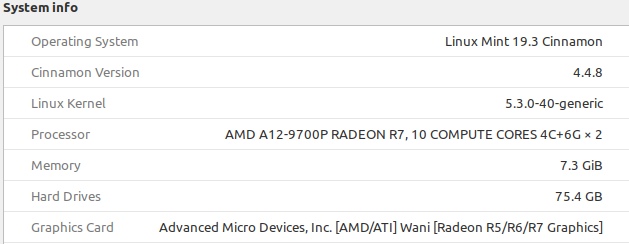
pflugercar
on 27 Feb 2020
Ditto x35 here. Is anyone going to look into this or is Cinnamon no longer being maintained? As above, Ctrl-Alt-Esc does fix it until you reboot. This happens on the second monitor only (for me). Stopping Nemo did not fix it for me.
 PMMRanger
on 4 Mar 2020
PMMRanger
on 4 Mar 2020
I longsince got rid of the machine I use to see this on, so it hasn't effected me in years ... I'd suggest to the people posting ... post your specs, and say graphics card.
Devs... any other info you need to help pinpoint this?
Try to help the devs, help you by providing as much info as possible or whatever they ask for.
Xmetalfanx
on 4 Mar 2020
I am also having this issue however where as most people have mentioned having the problem with Nvidia GPU's and/or multi-monitor setups, mine is with an AMD GPU (5700xt) and a single monitor.
Happens most frequently to me when I close a full screen video (i.e Youtube) and have two applications in split view. The one that is out of focus always flickers between desktop and the application.
Please let me know what information would help identify this issue, but I will post the relevant parts of the output of inxi -Fxxxz below:
System:    Host: sff Kernel: 5.6.0-1-MANJARO x86_64 bits: 64 compiler: gcc v: 9.3.0 Desktop: Cinnamon 4.4.8 dm: LightDM 1.30.0
           Distro: Manjaro Linux
Machine:   Type: Desktop System: Micro-Star product: MS-7A40 v: 2.0 serial: <filter>
           Mobo: Micro-Star model: B450I GAMING PLUS AC (MS-7A40) v: 2.0 serial: <filter> UEFI: American Megatrends v: A.70
           date: 07/10/2019
Graphics:  Device-1: Advanced Micro Devices [AMD/ATI] Navi 10 [Radeon RX 5600 OEM/5600 XT / 5700/5700 XT] driver: amdgpu
           v: kernel bus ID: 2b:00.0 chip ID: 1002:731f
           Display: x11 server: X.Org 1.20.7 driver: amdgpu tty: N/A
           OpenGL: renderer: AMD NAVI10 (DRM 3.36.0 5.6.0-1-MANJARO LLVM 9.0.1) v: 4.5 Mesa 19.3.5 direct render: Yes
Shell:     Bash v: 5.0.16 running in: gnome-terminal inxi: 3.0.37
 richardtatum
on 25 Mar 2020
richardtatum
on 25 Mar 2020
@rhrazdil does your problem solve after restarting Cinnamon? (Ctrl+Alt+Esc)
Your video looks like #7665.
works fine!
 deyvisonrocha
on 27 Mar 2020
deyvisonrocha
on 27 Mar 2020
Same problem. ctrl+alt+esc fixes problem. My specs:
System:
  Kernel: 5.6.15-300.fc32.x86_64 x86_64 bits: 64 compiler: gcc v: 10.1.1
  Desktop: Cinnamon 4.4.8 wm: muffin 4.4.2 dm: GDM 3.36.2, LXDM, SDDM
  Distro: Fedora release 32 (Thirty Two)
Machine:
  Type: Laptop System: Dell product: Latitude 5591 v: N/A serial: <filter>
  Chassis: type: 10 serial: <filter>
  Mobo: Dell model: 0DVVG1 v: A00 serial: <filter> UEFI: Dell v: 1.11.1
  date: 11/11/2019
Graphics:
  Device-1: Intel UHD Graphics 630 vendor: Dell driver: i915 v: kernel
  bus ID: 00:02.0 chip ID: 8086:3e9b
  Device-2: NVIDIA GM108M [GeForce MX130] driver: nvidia v: 440.82
  bus ID: 01:00.0 chip ID: 10de:174d
  Device-3: Microdia Integrated_Webcam_HD type: USB driver: uvcvideo
  bus ID: 1-11:2 chip ID: 0c45:6717
  Display: x11 server: Fedora Project X.org 1.20.8 driver: nvidia
  resolution: 1: 1920x1080~60Hz 2: 1920x1080~60Hz s-dpi: 96
  OpenGL: renderer: Mesa Intel UHD Graphics 630 (CFL GT2) v: 4.6 Mesa 20.0.7
  direct render: Yes
 kkmaslowski
on 3 Jun 2020
kkmaslowski
on 3 Jun 2020
Same problem. restarting cinnamon (ctrl+alt+esc) fixes problem. My specs:
 MMMMMMMMMMMMMMMMMMMMMMMMMmds+.        OS: Linuxmint 20 ulyana
 MMm----::-://////////////oymNMd+`     Kernel: x86_64 Linux 5.4.0-54-generic
 MMd      /++                -sNMd:    Uptime: 1h 43m
 MMNso/`  dMM    `.::-. .-::.` .hMN:   Packages: 3180
 ddddMMh  dMM   :hNMNMNhNMNMNh: `NMm   Shell: zsh 5.7.1
     NMm  dMM  .NMN/-+MMM+-/NMN` dMM   Resolution: 3840x2160
     NMm  dMM  -MMm  `MMM   dMM. dMM   DE: Cinnamon 4.6.7
     NMm  dMM  -MMm  `MMM   dMM. dMM   WM: Muffin
     NMm  dMM  .mmd  `mmm   yMM. dMM   WM Theme: Mint-Y-Dark (Windows-10-Dark-3.2-dark)
     NMm  dMM`  ..`   ...   ydm. dMM   GTK Theme: Mint-Y-Dark [GTK2/3]
     hMM- +MMd/-------...-:sdds  dMM   Icon Theme: Mint-Y
     -NMm- :hNMNNNmdddddddddy/`  dMM   Font: Ubuntu 10
      -dMNs-``-::::-------.``    dMM   Disk: 461G / 900G (54%)
       `/dMNmy+/:-------------:/yMMM   CPU: Intel Core i5-8250U @ 8x 3.4GHz [40.0°C]
          ./ydNMMMMMMMMMMMMMMMMMMMMM   GPU: Mesa Intel(R) UHD Graphics 620 (KBL GT2)
             \.MMMMMMMMMMMMMMMMMMM     RAM: 2163MiB / 15723MiB
 zachliu
on 23 Nov 2020
zachliu
on 23 Nov 2020
I can repro this issue very reliably, still seeing it today, everything updated to the latest. Almost identical to https://github.com/linuxmint/cinnamon/issues/5359#issuecomment-418999740 from 2 years ago.
 ioquatix
on 6 Dec 2020
ioquatix
on 6 Dec 2020
The only source of the problem i can find is OpenGL Flipping. I can turn this off in the nVidia settings application, however this comes at a slight performance penalty so isn't really a fix imo. but it could be related to that.
ronlaws86
on 6 Dec 2020
I've also had this issue on and off for years. I always resolve it by doing ctrl+alt+esc which makes cinnamon reload itself.
I've experienced this on laptops when you shut the lid for standby, then wake it back up (Integrated Intel Graphics) which was an easy way to make this happen on purpose.
It also happens frequently this year on my Archlinux desktop with a Nvidia GTX 2080Ti and two monitors. Just 20 minutes into being booted for the day and you've only just snapped your windows into their corners and got started, the box shaped flickering will start in an unfocused window until you move it around or reload cinnamon. Sometimes the effect happens to half a monitor or when changing a wallpaper. I'm actually here because it just happened 5 minutes ago, uptime of 37 minutes this morning and I wanted to check for a solution.
It's a tad frustrating I had this problem 2-3 years ago, and it still exists in the current release with no definite answer on why. I'll try @ronlaws86 idea of disabling OpenGL flipping as it's also enabled for me in nvidia-settings. Will report back if I encounter it again with that disabled.
e: Machine info
Install: Archlinux with LightDM & Cinnamon for a desktop.
Driver: Nvidia proprietary driver.
Video: GeForce RTX 2080 Ti [dual monitors]
CPU: Ryzen 9 3900X
Memory: 32g (2x16) DDR4 G.Skill 3600 [F4-3600C16-16GTZNC]
 ipaqmaster
on 8 Dec 2020
ipaqmaster
on 8 Dec 2020
The only source of the problem i can find is OpenGL Flipping. I can turn this off in the nVidia settings application, however this comes at a slight performance penalty so isn't really a fix imo. but it could be related to that.
This does not fix the issue for me.
ioquatix
on 8 Dec 2020
Related issues
 dirent1
·
4Comments
dirent1
·
4Comments
 elboulangero
·
3Comments
elboulangero
·
3Comments
 PauloGDPeixoto
·
3Comments
PauloGDPeixoto
·
3Comments
 ghost
·
3Comments
ghost
·
3Comments
 bittner
·
3Comments
bittner
·
3Comments
Most helpful comment
@rhrazdil does your problem solve after restarting Cinnamon? (Ctrl+Alt+Esc)
Your video looks like #7665.