Cinnamon: Cinnamon Panel Too Wide / Icons Disappear/Overflow
The panel gets wider and applets overlap when there's not enough space. Having a couple of windows open, the window list area will overlap the workspace list area, so it's not possible to switch to those windows that overlap workspace buttons (window button is in the foreground but when clicked, the workspace button behind it is activated). Furthermore, the whole panel grows instead of always staying at full width of the first screen. The first few workspace buttons disappear behind window buttons and the clock at the right is outside of the screen:

It overflows into the second screen:

It looks normal when only few windows are open (same system, other workspace):

This also happens in single-monitor setups. Some themes (Metro, Droit) use a bit more space so fewer icons can be displayed before things start overlapping but it happens with the default Cinnamon theme too.
Idea 1: Show a pager in the window list when there is not enough space for all window icons. And even when there's just enough space, I'd rather switch back and forth and see window titles than have all icons there at once without any space left for the title texts.
Idea 2: Allow the panel to have 2 rows.
 basic6
All 19 comments
Although I think idea 2 would be a feature that I would use, in my case I'm not seeing that behaviour with 15 applications open (with icon and titles).
Could be that the applet with the numbers (virtual desktops!?) could be the reason? Did you tried to remove and test?
I tested on a laptop with single monitor, with cinnamon and other themes.
What is your setup?
 keitalbame
on 28 Jan 2016
keitalbame
on 28 Jan 2016
The applet with the numbers is the standard "Workspace switcher" applet. In the screenshot, you can also see the "System Monitor" applet.
But it doesn't matter if you're using these specific applets or not. It's simply a matter of how much space is left for the window list. If you don't use those additional applets, then you simply have to open more windows before the panel starts growing.
Try this:
Open leafpad or gedit (or really any program that allows you to open new windows). Use Ctrl + N to open new windows - not just one, hold Ctrl + N to keep opening more and more new windows. At some point, the window list will be full and the panel will grow (instead of showing a pager). Watch the bottom right corner of your screen, the Calendar applet (if you use that as a clock) is probably the first to disappear.
The whole point is that the panel and/or its window list does not seem to have any paging mechanism, so as soon as there's not enough space to show all window buttons, the whole panel grows, parts of it move outside the viewport and some applets even overlap.
Since there really isn't that much space available for the window list in my setup (because of the other two applets), this happens a _lot_. And because it is so frustrating when applets overlap so that they can't be used anymore and tray icons disappear, it makes me want to switch to another desktop environment.
basic6
on 19 Feb 2016
You are right.
Just tested again and after open 16 windows (same behavior with nemo and gedit), I start to see the panel content being pushed outside. If I connect to an external monitor and placing it on the right side of the laptop monitor, I can see the missing part of the panel.
It will also start showing below the system tray.
Same behavior as your screenshots.
I'm on Arch.
keitalbame
on 20 Feb 2016
4964 also reporting same issue.
keitalbame
on 6 Mar 2016
I can confirm this on Linux Mint 17.3. I have the default taskbar, no desktop switcher or else.
 Ocelot92
on 6 Mar 2016
Ocelot92
on 6 Mar 2016
It's simply an issue that when there are too many windows open in the window list we don't do anything to handle the overflow. Simple issue, simple to reproduce but likely not so simple to fix.
 JosephMcc
on 6 Mar 2016
JosephMcc
on 6 Mar 2016
Yep, i know. What did old gnome 2 does in that situations? I didn't recall, but it could provide a good starting point.
Ocelot92
on 6 Mar 2016
This is still an issue in Linux Mint 18 and 18.1.
 toohuman
on 27 Jan 2017
toohuman
on 27 Jan 2017
although not a complete fix arent themes a factor?
crunchy-green is slimmer, therefore a bit more breathing-space when space is cramped
and more headroom-space-distance to full



to deal with this overlap-overflow
if it happens maybe switch z-order when hover and press shift|alt ?? and the maybe switch focus on click|hover-delay?
(similar to how inkscape handles overlapping objects)
 cmrdt
on 20 Jun 2017
cmrdt
on 20 Jun 2017
Any news on this? Tripped on this bug with wide padding and small resolutions.
I tried looking at the JS of the applet to see if there's any way the applet can detect its end coordinate, and detect the start coordinate of the adjacent applet, to perhaps draw scroll buttons on either side when the two overlap, but I haven't had luck.
 Cloudwalk9
on 29 Aug 2019
Cloudwalk9
on 29 Aug 2019
Just came here to say I see the same issue on my laptop with Mint 19. The workspace switching icons overlap the window icons, making them impossible to click (have to use Alt+tab to access).
 crobarcro
on 14 Oct 2019
crobarcro
on 14 Oct 2019
CORRECTION: This bug happens to all themes. The different thing is that the pannel of these three themes can tolerate less windows than the others .
It happens on my Debian bullseye (testing) when the "System Settings > Themes > Themes > Desktop" option is set to Minty, New-Minty and BlackMATE, but not "Blue-Submarine", "Green-Submarine", "Menta", "BlueMenta" or the default "cinnamon".
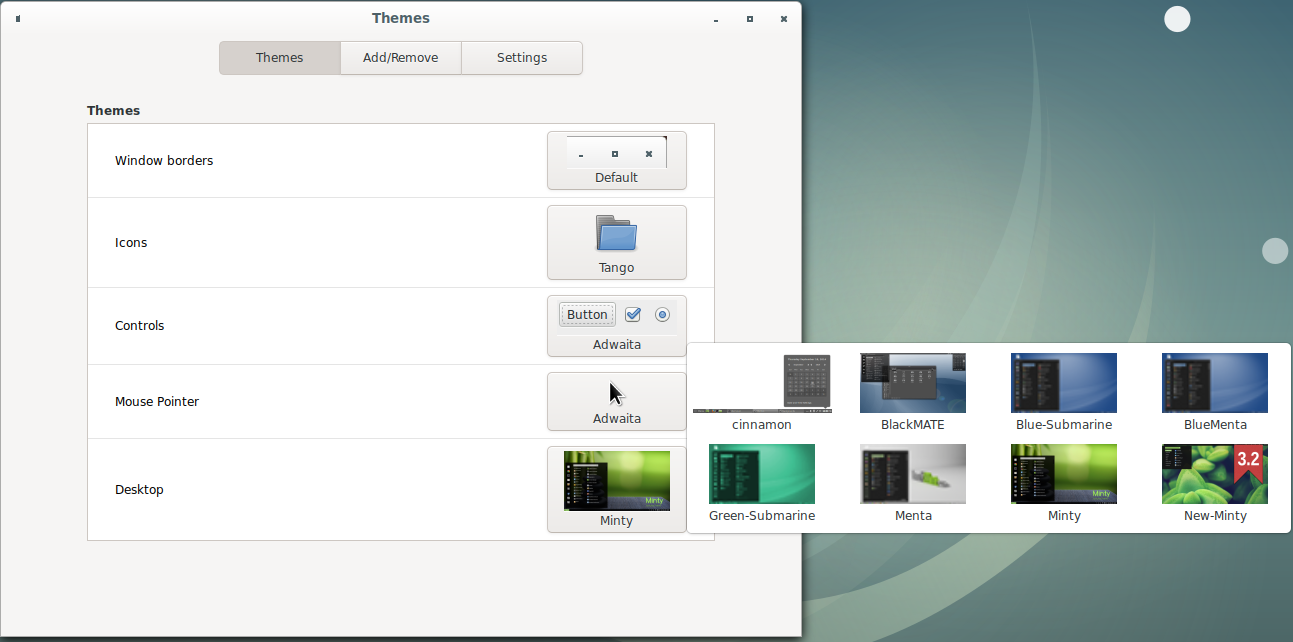
I filed issue 597 of cinnamon-spices-themes, and @germanfr, the author of New-Minty replied that he/she cannot reproduce it and that it could be a Cinnamon bug.
Issues that might be related: #4458, #686
 ShamrockLee
on 10 Nov 2019
ShamrockLee
on 10 Nov 2019
This is a consistently reproducible bug happening with multiple themes.
It would seem some applets are pushovers but others aren't. Either way, the border between the center and right regions of the panel is being pushed too far to the right when the window list expands, and instead of drawing scroll bars, it pushes applets off screen and draws over other applets that stood in its way.
Cloudwalk9
on 10 Nov 2019
Reproduced with Minty and New-Minty


Cloudwalk9
on 10 Nov 2019
@ShamrockLee Default theme too

Cloudwalk9
on 10 Nov 2019
@germanfr Reproduced with regular window list and it's quite a sight to behold.

Cloudwalk9
on 10 Nov 2019
I didn't reproduce it with the regular window list applet @Cpt-Derp. Each window list applet has different issues and they are not related. That issue I was mentioned in was GWL only and with all themes. It's not related to New-Minty.
 germanfr
on 10 Nov 2019
germanfr
on 10 Nov 2019
I didn't reproduce it with the regular window list applet @Cpt-Derp. GWL only and with all themes. It's not related to New-Minty.
Guess I wasn't clear. I wasn't showing it has anything to do with New-Minty, just that the same bug affects the regular window list, and I could at least reproduce it. My apologies.
Cloudwalk9
on 10 Nov 2019
@ShamrockLee Default theme too
You're right. They all have this bug. The only thing different is the tolerable number of windows. That is, 8 windows are enough to push the applets right in Minty and New-Minty, but I need 23 windows to make it happen to Menta, 27 to cinnamon.
ShamrockLee
on 11 Nov 2019
Related issues
 ghost
·
3Comments
ghost
·
3Comments
 elboulangero
·
3Comments
elboulangero
·
3Comments
 kauffy
·
4Comments
kauffy
·
4Comments
 Odyseus
·
4Comments
Cloudwalk9
·
4Comments
Odyseus
·
4Comments
Cloudwalk9
·
4Comments