Cidram: Trigger captcha on every request excluding whitelists
Is there any way to trigger captcha (invisible) for every visitor (session) except for those IPs and signatures which are whitelisted?
 Dibbyo456
All 51 comments
I'm thinking something like this could be achieved via the auxiliary rules and the signature reference option, but I'm not exactly sure what the signature reference option refers since I've never used it and I don't see that in the documentation. I bet if that were used your rules would be a mile long though.
How are the signatures and IPs whitelisted?
@Maikuolan Perhaps some kind of marker in each signature file could be used to reference that whole file in the auxiliary rules? Like a unique marker in ipv4.dat, ipv4_bogons.dat, ipv4_isps.dat, the modules, etc.
 737simpilot
on 13 Apr 2021
737simpilot
on 13 Apr 2021
Since a CAPTCHA is only displayed when a request is blocked anyway, a whitelisted IP address shouldn't ever see a CAPTCHA being offered by CIDRAM. So, simply enabling the CAPTCHA for "everything", should actually produce the desired effects (since "everything" would just be blocked requests, and since whitelisted requests are, by virtue of being whitelisted, not supposed to be blocked). :-)
 Maikuolan
on 13 Apr 2021
Maikuolan
on 13 Apr 2021
@Maikuolan Perhaps some kind of marker in each signature file could be used to reference that whole file in the auxiliary rules? Like a unique marker in ipv4.dat, ipv4_bogons.dat, ipv4_isps.dat, the modules, etc.
That could be done easily enough. I'll work on that tomorrow night (busy day working today, and most likely won't be home until quite late tomorrow, but should have some time tomorrow night to get some coding done).
Maikuolan
on 13 Apr 2021
I'm thinking something like this could be achieved via the auxiliary rules and the signature reference option, but I'm not exactly sure what the signature reference option refers since I've never used it and I don't see that in the documentation. I bet if that were used your rules would be a mile long though.
If there were some specific IPs in mind that we were looking at disabling reCAPTCHA for (so, not "whitelisting" by the definition in the documentation, but "whitelisting" in the sense of them being exempt from being offered a CAPTCHA), that could always be achieved by creating an auxiliary rule to match against the IPs in question, set the action to profiling (since it doesn't have any effect on whether the request is blocked nor on anything else other than creating the internal reference for the request to be able to be "profiled"), and set the flag to forcibly disable reCAPTCHA.
But, by the documentation definition of whitelisting, we shouldn't need to do anything for it anyway.
Maikuolan
on 13 Apr 2021
..Or, do you mean "every session" more broadly (i.e., no matter whether they'd normally be blocked or not, so even offering a CAPTCHA to IPs which aren't normally blocked, minus those which are whitelisted)?
(Also, sorry for the multiple consecutive replies. Busy day working today and a little tired).
Maikuolan
on 13 Apr 2021
..Or, do you mean "every session" more broadly (i.e., no matter whether they'd normally be blocked or not, so even offering a CAPTCHA to IPs which aren't normally blocked, minus those which are whitelisting)?
Yes, this is it.
Allowing search engines, good bots, whitelisted signatures and IP addresses; but offer captcha to all other IPs.
Kind of like Cloudflare _I’m Under Attack Mode_, but under attack mode blocks search engines as well thus seeking CIDRAM to the rescue.
Dibbyo456
on 13 Apr 2021
Currently, there isn't a reliable way to do this in CIDRAM, but I reckon it could be a good idea to try implementing something like this. :-)
I'll see what I can come up with. :+1:
Maikuolan
on 14 Apr 2021
Not trying to be rude but any update on this?
Website contents getting scrapped no matter what I do, this is the only viable solution for me.
Dibbyo456
on 22 Apr 2021
Haven't had time to build an distinct feature for this yet (work occupying all my time this week). I'll have free time on the weekend though, so I expect to be able to work on this properly then.
Until then, if you don't mind users seeing the Access Denied page, you could probably emulate it reasonably sufficiently through auxiliary rules: Creating a new rule to block everything unconditionally (e.g., something like match CIDRs 0.0.0.0/1 and 128.0.0.0/1, or match UA with a wildcard like *, etc), marking it for use with reCAPTCHA, then creating a secondary rule after that to disable logging and IP tracking if signatures count is only one (which would presumably by the prior rule).
This feature is actually pretty high on the priority list, since, aside from as already discussed here, there are also some other peripheral issues I'm thinking I might be able to resolve by implementing this (e.g., #86, the current oldest open issue at the repository here; since most CAPTCHA systems rely on JavaScript, and reCAPTCHA is no exception there, and since we're looking at something slightly different than the usual blocking mechanisms, something like this would effectively be also implementing a way to "block based on JavaScript").
Maikuolan
on 22 Apr 2021
Website contents getting scrapped no matter what I do, this is the only viable solution for me.
This doesn't make any sense at all. CIDRAM will block a good majority of the crap on many levels. Lets see some logs that prove you're being scraped. Then I can suggest a module or something you don't have installed.
If you want to blanket captcha every single request, then I suggest using CloudFlare as well as CIDRAM. This is what I have going, but I don't captcha challenge all requests because it would be a burden to the user. I try to balance the security with usability. If you use CloudFlare you have to do it right to keep your origin hidden, and you'll want to create a page rule in CloudFlare to omit the CIDRAM directory from being cached. I don't even use the caching in CloudFlare, just the security. It didn't seem like much of a speed improvement. Though, I probably have to setup page rules for static content caching and you only get three page rules for free. More than that is like $5/month and that's per website.
Again, let me see some logs here on this "scrapping." There's something not right here.
737simpilot
on 22 Apr 2021
because it would be a burden to the user
Shouldn't be too bad if it's using the "invisible" API, since it should be all automated anyhow, and for the most part, users shouldn't need to do anything at their end. (Though, if the process is triggered on a POST request, the risk still exists that it'll probably interfere with said particular POST requests, which could definitely inconvenience any users affected by that).
Would reply further but already late for work today.. Eep. I'd better run. Anyway, I'll get started on this soon, maybe later today if I can finish work early enough.
Maikuolan
on 23 Apr 2021
This doesn't make any sense at all. CIDRAM will block a good majority of the crap on many levels. Lets see some logs that prove you're being scraped. Then I can suggest a module or something you don't have installed.
CIDRAM do block a good majority of bad traffic but still some scrappers are getting through. How? Because it's impossible to distinguish human traffic and bot traffic with a accuracy of 100%.
I know my contents getting scrapped because I can see other people have scraped my content with zero changes. If this was few case, I wouldn't mind. But it's happening on large scale and only possible by creating scrapper disguising as human, sending requests from good, reputed home IPs. (You can buy proxies on the internet with home IPs.)
The ONLY way you can make sure the requests are 100% legitimate is by throwing captcha at them. If its hard to believe for you think about it for minute, it will start to make sense.
then I suggest using CloudFlare as well as CIDRAM
I have using Cloudflare with CIDRAM from Day 1 with _Security Level_ set to _High_ but does not do any major good. The only thing worked is the Under Attack Mode but it blocks search engines, so no no for me.
I don't captcha challenge all requests because it would be a burden to the user
Scrapping causes the highest damage for me. So I am happy to throw not one but five captchas if I have to..!!!!
And like Caleb said, I will be using _Invisible reCaptcha_ so legitimate and good reputed IPs will never see captcha anyway, but it will put an end to scrapping permanently (not counting manual copy pasting).
BTW, I use the following modules:
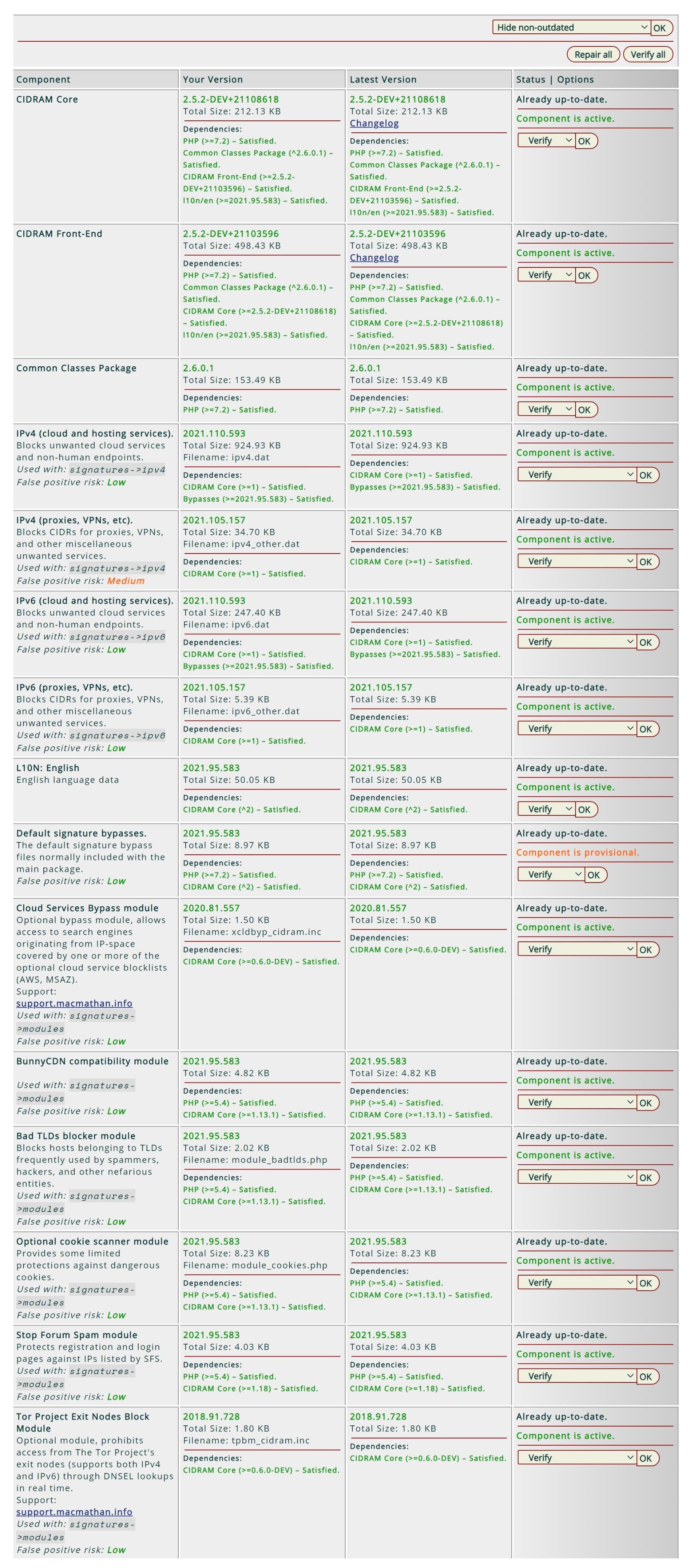
Dibbyo456
on 23 Apr 2021
if the process is triggered on a POST request, the risk still exists that it'll probably interfere with said particular POST requests, which could definitely inconvenience any users affected by that
In which case a normal person will send POST request from browser without sending a GET first? - None.
What I am trying to say, we only POST when submitting form or other data but to submit form we have to first retrieve the page; thus GET.
GET will always come first before any POST requests by normal users. CIDRAM will validate the session on the first GET, so the process will never trigger on a POST unless the user change IP after GET and try to POST with new IP. (and changing IP not a normal behavior).
Dibbyo456
on 23 Apr 2021
Install the BOBUAM module and the AbuseIPDB module. Look under Configuration to adjust those. Without seeing your logs I don't know what I can offer that could really clamp down on it. However, in CloudFlare go to Firewall | Firewall Rules and set three rules: Block HTTP versions 1.0 and 1.1. You may want to JS or captcha HTTP version 1.2. I personally block it and have no ill consequence from legit users thus far. All of these HTTP versions are _usually_ up to no good. I see it every single day.
While you're in the Firewall Rules, create a rule or rules for full URI that looks like the image. Replace mywebsite with yours of course. Make sure you use OR statements to include more than one rule. You only use AND if the conditions merit it.

737simpilot
on 23 Apr 2021
and the Optional User Agents and HTTP version modules. For the latter I just block 1.0.
 mikeruss1
on 23 Apr 2021
mikeruss1
on 23 Apr 2021
It was concluded that the HTTP Version Checker module won't work if you use CloudFlare or a shared hosting account. You need a VPS or bare metal for it to be fully functional. Reason being is because under CloudFlare the website requests from the CloudFlare edge servers all use HTTP 1.2 or 1.1 I think it is. And in a shared account all traffic looks like HTTP 1.1 or 1.2. The other HTTP versions should work though in the module. So it would be wise to use the HTTP Version Checker module in that regard.
PS: I do block all HTTP requests that aren't GET, and POST in the htaccess file. So that may help as well. All HEAD requests are immediately blocked at the CloudFlare level. And Ninjafirewall fills this in as well with an extra layer. For some reason I have seen requests get past htaccess and I have yet to see how that's done. But this is why I use layers.
737simpilot
on 23 Apr 2021
I get lots of 1.0 in shared hosting
mikeruss1
on 23 Apr 2021
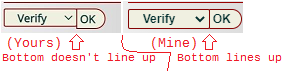
BTW, not a big deal (and also somewhat off-topic), but out of curiosity, if I may ask.. Which browser are you currently using?
Just asking, because I noticed that some of the CSS styling I wrote for buttons and dropdown menus which sit immediately next to each other doesn't seem to be rendering quite how I'd planned it, so I'm wondering whether I might need to adjust something there at some point. I attempted briefly to use some browser screenshot websites to figure it out myself, but wasn't successful.
Image attached to show what I mean:
Maikuolan
on 24 Apr 2021
@Maikuolan This website might be helpful. https://www.browserling.com/
Absent of that, there is portable Chrome and portable Firefox at the Portable Apps website. Previous versions can be found at the Portable Apps Sourceforge web page. I use the niche browser Pale Moon and there is a portable version of that, too. My personal Chrome browser install for when I need a plain vanilla browser with no add-ons and what have you is called UnGoogled Chromium which you can find here at Github. The trick to keeping that browser out of the eyes of Google is never install an extension or attach a Google account. This is what I do since it's just for testing and plain vanilla browser usage.
I also run all my browsers, Thunderbird email client, and Keepass password manager in highly configured Sandbox using Sandboxie. Sandboxie is now free and open source here at Github. I did take it up a notch and place Sandboxie's Sandbox directory in a 2 GB RAM drive that auto mounts on PC boot up. The contents is wiped on PC shut down, but the drive is recreated on PC boot. I used IMDisk for this and I believe that software is at Sourceforge.
Just some food for thought. LOL
737simpilot
on 24 Apr 2021
@Maikuolan This website might be helpful. https://www.browserling.com/
I already gave that a try, actually. And.. AFAICT.. Everything looks A-OK at their end. '^.^
Oh well. It's just a barely noticeable aesthetic issue, anyway.
Absent of that, there is portable Chrome and portable Firefox at the Portable Apps website. Previous versions can be found at the Portable Apps Sourceforge web page.
That could work. A bit more work than a screenshot site would be, though. I may give that a try, if/when I start feeling more urgent about it. Cheers.
(PS, to the main issue at hand: I'm working on this currently, and I'm making some progress, though nothing ready to be committed and pushed quite yet).
Maikuolan
on 24 Apr 2021
The main bulk of the work has now been finished. :-)
CIDRAM is now functionally capable of triggering a captcha instance for every request, excluding whitelisted requests, and requests from verified search engines and social media. If you update to the latest available version, after updating, at the front-end configuration page, you'll notice that the usemode directive has changed from a numeric input field to a dropdown menu, and with some new options added which weren't supported before. From that new dropdown menu, if you select one of the newly supported options (e.g., for offering a CAPTCHA for non-blocked requests), a CAPTCHA instance will then be offered according to the chosen option.
What isn't yet finished:
- I haven't had enough time yet to update all the various installable themes for CIDRAM, so if you're using something other than the default theme, for the moment, at least, you'll still be seeing the default theme when a CAPTCHA instance is offered to a non-blocked request (when I get enough time to get around to updating all the themes, that'll be resolved, and you'll be able to see your chosen theme used for those CAPTCHAs as expected).
- I've also added support for HCaptcha to CIDRAM, as an optional alternative to reCAPTCHA (I'd originally been planning on postponing that until v3 due to backwards-compatibility concerns, but I figured out a way to do it, to structure CIDRAM in such a way, as to avoid any backwards-compatibility problems, so.. yay.. we'll be getting it a little earlier than I'd been planning). However, I haven't had enough time to test it thoroughly yet, and the very minimal amount of testing that I've actually done for it thus far has demonstrated a few major problems (e.g., although it produces the CAPTCHA correctly, without any errors, it doesn't seem to actually register anything when completing the CAPTCHA, and the page just constantly reloads, showing the CAPTCHA again and again, without being able to progress past it). In other words: Don't migrate to it just yet; It's very much almost ready now, but not quite. '^.^
- Since I've updated a huge mount of L10N data, plus added a whole bunch of new configuration directives, and slightly modified a bunch of old ones.. That means I'm now going to need to update all the documentation accordingly (ugh.. tedious, boring, but needs to be done, regardless). I haven't had time for even a passing glance at that yet, but I'll get it sorted out in due time.
Maikuolan
on 26 Apr 2021
Installable themes changes done.
Maikuolan
on 27 Apr 2021
When recaptcha->usemode set to Only When Not Blocked then default theme is being used instead of the custom theme that I have specified. 🙁
Dibbyo456
on 27 Apr 2021
I might've missed something somewhere, I guess. Which custom theme did you specify? I'll take a look.
Maikuolan
on 28 Apr 2021
I have a customised theme which I have been using for the last 2 years.
Dibbyo456
on 28 Apr 2021
I have a customised theme which I have been using for the last 2 years.
Ah, okay. An actual, proper customised theme, and not just one of the installable ones. That makes sense then, since the new CAPTCHA feature adds a new file to the vault (an HTML template file for the CAPTCHA page), to handle the actual HTML form, CSS and etc shown to the end-user (distinct and separate from the Access Denied template file, front-end template files, etc). Sorry for the confusion! I should've mentioned that earlier. '^.^
So.. You should now notice (the newly added file, so since after that latest update) a file in the vault, named as captcha_default.html. Copy that file, and name it so as to replace the default part with the name of your customised theme, and modify that copy per however you see fit, according to your customised theme (the same process as how you would've already copied, renamed, and modified template_default.html way back when you were first creating your customised theme).
The CSS used for your Access Denied template should be fully compatible with the CSS for your CAPTCHA template, since both templates utilise mostly the same structure, the same class names, IDs, etc. So, if you were to directly copy from one to the other, it should work properly in most cases. The two distinct template files were needed, however, since the CAPTCHA template is a little lighter, the structures slightly different (since it isn't used in response to something being blocked, all the HTML blocks, fields, CSS, etc relating to block information isn't needed for the CAPTCHA template, the Access Denied message is stripped off, etc). Splitting them also gives, I suppose, the opportunity for users to set things up differently between the two, if they so choose (though consistency is probably going to be preferable for most, I'd imagine).
Let me know if you happen to utilise the css_url directive at all. If so, I may need to make a few adjustments, since I hadn't considered that directive at all when first implementing the CAPTCHA template (I had been thinking about deprecating css_url for v3, since it's easy enough to set up customised themes without it anyhow, and having multiple ways to go about creating customised themes just adds too much confusion, I think). Of course, if not (i.e., if it's blank), then no need to worry about it.
Maikuolan
on 28 Apr 2021
Everything works now, except captcha page is returning response code 200 where it should return 403 because that what I set on general->forbid_on_block directive unless I am missing something?
Let me know if you happen to utilise the
css_urldirective at all.
Never did and never going to. I can specify external/internal stylesheet within the html, so the css_url directive is pretty much feels like a bloatware.
Dibbyo456
on 29 Apr 2021
HCaptcha stuff all done now. Just need to finish updating the docs now.
Everything works now, except captcha page is returning response code
200where it should return403because that what I set ongeneral->forbid_on_blockdirective unless I am missing something?
I didn't include the headers specified by forbid_on_block for non-blocked CAPTCHAs, since showing a CAPTCHA for "non-blocked requests" would be implying that the request isn't, strictly speaking, "blocked" (despite the requirement to complete the CAPTCHA challenge arguably blocking normal access to the page until the challenge has been completed, but at least, not blocked by signatures, modules, auxiliary rules, etc).
Maybe I should include a separate option for that (i.e., specifying the headers to send with non-blocked CAPTCHA challenges)? Thoughts?
Never did and never going to. I can specify external/internal stylesheet within the html, so the
css_urldirective is pretty much feels like a bloatware.
Lol. Pretty much my feelings, too. And good to know. ^^
Maikuolan
on 1 May 2021
Maybe I should include a separate option for that (i.e., specifying the headers to send with non-blocked CAPTCHA challenges)? Thoughts?
Sounds like a good idea. If a search engine crawler was accidently blocked, having 200 is a bad idea, but sending anything other than 200 would let the crawler know that it was blocked.
Also, is there anyway to disable "IP Tracking"? I left everything at default value but I can see CIDRAM still tracking IPs.
Dibbyo456
on 1 May 2021
Sounds like a good idea. If a search engine crawler was accidently blocked, having
200is a bad idea, but sending anything other than200would let the crawler know that it was blocked.
Agreed. I'll get started on something for that soon. :+1:
Also, is there anyway to disable "IP Tracking"? I left everything at default value but I can see CIDRAM still tracking IPs.
Technically, yes. There's an internal flag for it, and also an option in auxiliary rules to forcibly disable all IP tracking, so it could be done either through a custom module or through an auxiliary rule (e.g., by making an auxiliary rule to "profile" the request, have it match everything, and for that rule, opting to "forcibly disable IP tracking"). But, there isn't currently a dedicated configuration option to completely disable IP tracking (which, I think, would be a preferable solution in the long run).
There's track_mode, but currently, track_mode just allows to specify whether to track IPs blocked by modules and auxiliary rules (i.e., not tracking those IPs blocked solely by signature files), or whether to track IPs blocked for any reason. That kind of made sense back in the early days of CIDRAM, back when it was mostly just signature files and a few modules, back before there was search engine verification, auxiliary rules and every else which CIDRAM now has, but probably not so much now. I'm thinking that maybe I should modify track_mode, so that it can properly account for the various features CIDRAM now has, to allow users to completely disable IP tracking, or to disable/enable it for specific stages of execution (similar idea as to how error_log_stages works).
I'll look into this a little further tomorrow, to try to determine how "backwards-compatible" such a change would be, whether I could work on it immediately or whether it should be flagged as a v3 change.
Maikuolan
on 3 May 2021
Been a bit preoccupied the past few days, but attempting to sit down and get the next part of this (having an appropriate status code be reported with the response) done by tonight, if possible.
Quick question though, if I may get your opinions about something.. I've been doing (or rather, attempting to do, at least) some research into how we would be able to more accurately, succinctly convey with the response that the requested resource is sitting behind a CAPTCHA (i.e., temporarily unavailable pending the completion of a CAPTCHA), for the benefit of any search engines that might potentially be blocked due to the CAPTCHA (as unlikely as such an event may be.. though not entirely impossible, due to us simply not being able to know about the existence of every search engine out there, new search engines being developed at a later date, after having already implemented this feature to CIDRAM, etc), and.. there are a few different possible solutions here, a number of which should be "good enough" for our purpose here, but none of which are exactly what I'm looking for.
Some related discussion here:
- https://www.facebook.com/groups/2204685680/permalink/10160730350360681/
- https://stackoverflow.com/questions/26547466/http-status-code-for-captcha
In short.. The existing status codes supported by CIDRAM should be "good enough", but as far as I've been able to ascertain, the exact thing I was hoping to find (i.e., a way to succinctly declare that the resource is behind a CAPTCHA, which is a little different than simply responding to requests that they've been rate limited, or that the request is forbidden, or has failed authorisation, etc and etc), just doesn't exist.
However.. quoting from here:
http://greenbytes.de/tech/webdav/draft-ietf-httpbis-p2-semantics-25.html#rfc.section.6.p.2:
HTTP status codes are extensible. HTTP clients are not required to understand the meaning of all registered status codes, though such understanding is obviously desirable. However, a client MUST understand the class of any status code, as indicated by the first digit, and treat an unrecognized status code as being equivalent to the x00 status code of that class, with the exception that a recipient MUST NOT cache a response with an unrecognized status code.
For example, if an unrecognized status code of 471 is received by a client, the client can assume that there was something wrong with its request and treat the response as if it had received a 400 status code. The response message will usually contain a representation that explains the status.
..It seems that, if we want to, it should be "okay" for us to simply come up with our own, custom HTTP status codes, as long as we're careful to instead always use the standard, already existent status codes whenever one or more of them suffices, and as long as we're careful to not use a status code for a custom message where said status code is already assigned to one of the standard, already existent status codes. So, I could add some custom status codes to the list, when I add the new configuration directive for the status code to return with CAPTCHA responses. But, the idea of doing so also kind of feels a little obnoxious and dirty to me in a way, too.
So, my question: Should I bother adding some custom status codes? (Which would maybe more succinctly convey the right message, as far as we're concerned.. although would most likely be indistinguishable from the standard ones anyway, as far as said hypothetical search engines are concerned, since, by virtue of being custom, said hypothetical search engines most likely wouldn't be aware of the intended meaning behind said custom codes anyway). Or.. Just stick with the standard status codes (i.e., the same as we're already using elsewhere)? Or.. Something else (got some other interesting ideas that maybe I haven't thought of yet, or that maybe nobody else has suggested at any of the connected discussions yet)? '^.^
Obnoxious and dirty or not, one possible benefit I can think of for us doing our own custom status codes: It might be a little easier for us to pick out the CAPTCHA requests from our server access logs (i.e., if a specific status code is always used for CAPTCHAs, and only for CAPTCHAs, then spotting it in our access logs, it would be reasonably obvious to us what happened for the particular requests in question). Possibly a negligible benefit though (not sure how much weight that would have on the question).
Maikuolan
on 7 May 2021
I am not the prime mover here, but I would like to suggest it leaves me feeling uncomfortable. It feels non-standard and at some point in the future might cause unforeseen problems. I think there should be significant benefit to make it worth the risk.
mikeruss1
on 7 May 2021
not sure if the following issue is related to the subject heading, but I came across a situation where I offered recaptcha which was accepted, to a very dodgy UA. I have the limit set to 1 block cause, Is it possible to only offer recaptcha to particular causes, like Cloud Service, where I would assume they are VPNs?
mikeruss1
on 7 May 2021
I am not the prime mover here, but I would like to suggest it leaves me feeling uncomfortable. It feels non-standard and at some point in the future might cause unforeseen problems. I think there should be significant benefit to make it worth the risk.
Same here, TBH. I put the idea forward since I haven't found an exactly perfect solution anyway, and it's one of a few solutions which could work for us favourably, but yeah.. I've been feeling a little the same. So, hoping to get feedback from others, before I do anything, one way or the other. Also, prime mover or not, I appreciate the feedback. Cheers. :-)
Is it possible to only offer recaptcha to particular causes, like Cloud Service, where I would assume they are VPNs?
It should be.
Slightly somewhat moving away from the main issue at hand, but.. I had also been contemplating removing all the default "marked for use with recaptcha" stuff from the default signatures file at some point (had been planning to post an RFC at the issues page here at some point to get some opinions from others, but there's enough other things on the to-do list already, I figured I'd wait for a bit, get a few more things implemented/fixed/etc and crossed off from the issues page first, then post the RFC after that), so that by default, nothing would be "marked" anymore. My thinking was to encourage users to start taking advantage of the new "profiles" feature I'd recently added, since I've been recently adding some default "profiles" to the default signature files, so most signatures should now have a few "profiles" marked down for them, and it could be taken further, once there's a better idea of what sorts of things users would want to be leveraging for anyhow. What I mean by leveraging the "profiles": Users could go to the front-end auxiliary rules page, create a new rule to match against particular "profiles" (whatever kinds of requests/addresses they want to be offering CAPTCHAs for), mark it for use with reCAPTCHA or hCAPTCHA (whichever they prefer), save the rule as another profile type of rule, and voila: We've got a way for users to more finely-tune which signatures get "marked for use", from even within the default signature files. I'll post more about it later, since it's a little early still anyway, but that might be a good way to go.
Even that aside, it should be possible to do something through auxiliary rules, I think.
Maikuolan
on 7 May 2021
Anyway.. I pushed an update just now, which provides the new configuration directive, using just the standard status codes for now.
Main differences from those available to forbid_on_block and ban_override: 410 and 503 weren't included, the former because nothing is "gone" in the context of non-blocked CAPTCHAs, and the latter because it prevents the page from displaying properly sometimes for some browsers (and also, since it implies a server fault, which isn't really what we want to be implying, unless we're outright blocking something). 429 has been included, since based on the discussions linked earlier and elsewhere, it seems that "too many requests", or rate limiting, seems to be an agreed upon code of choice in similar contexts elsewhere with CAPTCHAs. Aside from that, the same choices have been provided.
I can just add custom status codes later, if anyone reckons it might be a useful idea to include them. Otherwise though, since the standards are there, I guess we can call that part of it done now.
Maikuolan
on 7 May 2021
(And.. I still can't really close this yet, because there's still stuff in the documentation which needs updating. DDD:)
I'll go ahead and address the track_mode changes here too, when I get that done. (That'll probably be tomorrow afternoon, I think).
Maikuolan
on 7 May 2021
re profiles - have given it a try, the rule says if the reason for block is not "Cloud Service" profile it, and block recaptcha - nice one!
note that some network blocks give the reason as "Generic" - how does that differ from "Cloud Service" - could it be a VPN?
mikeruss1
on 7 May 2021
maybe profile not working ? I tested it with the same UA and it offered captcha.
Captcha should be disabled?
If the following conditions are met, profile the request.
Why Blocked ≠ Cloud service
Other options and special flags:
Forcibly disable reCAPTCHA
Use Windows-style wildcards to test the conditions.
In order to trigger the rule, all conditions must be met.
Cloud service has an asterisk before and after (not shown)
D: 1620410269-824001-4726950407 »
Date/Time: Fri, 07 May 2021 18:57:49 +0100 »
IP Address: 14.192.49.5 »
IP Address (Resolved): - »
Hostname: 14.192.49.5 »
Query: - »
Referrer: https://search.yahoo.com »
Signatures Count: 1 »
Signatures Reference: mcm_bobuam.php:L121 »
Why Blocked: Your browser is old and not secure. (F)! »
User Agent: Mozilla/5.0 (X11; Linux ppc; rv:5.0) Gecko/20100101 Firefox/5.0 »
Reconstructed URI: https://xxx.php »
CAPTCHA State: Enabled. »
mikeruss1
on 7 May 2021
First, that IP isn't even in CIDRAM right now (might need to be according to AbuseIPDB) to check against. So there would be in theory two hits if it was. The Cloud service and the UA. Your hit there is just based on the UA, so that auxiliary rule won't invoke against it since there is no Cloud service 'why reason' generated to check against.
The other thing here is that you used wild cards which you should, but there is no wild card even used. It would be: Cloud service* Anything after the asterisk would be the wild card verbiage. The hard rule it's checking against is everything before the * which would be 'Cloud service.' If CIDRAM's code sees that, then it'll invoke what ever action you set in the auxiliary rules.
Last, I don't think the rule works like that as far as I know. You're using the profile option, but that's only for an addition to another rule as far as I know. So you could say profile all of these CIDRs, and then create another rule that says if this profile name matches this UA then invoke this action. Be it a straight up block, reCAPTCHA, etc. I have exactly this set up. If this dude in Arizona uses his cell phone from Verizon uses his smartphone which I know the UA to, he'll get a 403. I managed to Geo locate the CIDRs for his area which are all set as a profile. Then I created another rule that states if this profile name and this UA, block.
The way 'why blocked' is used with the auxiliary rules may need to be explained in the documentation. Until then, read what I asked here: https://gitter.im/CIDRAM/Lobby?at=6062ee2c1049fe429b8ba1f8
737simpilot
on 8 May 2021
Now if you wanted to add this cloud provider yourself you can do so in the auxiliary rules. Here's the ASN and CIDR. https://bgp.he.net/ip/14.192.49.5
I haven't had luck with ASN blocking which I assume is using the BGPView.io API. There is another promising IP source that's actually not an API call I'll mention on Gitter momentarily.
Note, that ASN is largely a residential ISP out of Hong Kong, so you have to use a scalpel in your blocking attempts. Never out right block ASNs without looking at both the IPv4 and IPv6 addresses and who uses them.
737simpilot
on 8 May 2021
@Maikuolan This might be worth reading: https://searchengineland.com/the-ultimate-guide-to-http-status-codes-and-headers-for-seo-302786
Here's something else interesting. https://www.searchenginejournal.com/googlebot-can-crawl-with-http-2/387440/#close
737simpilot
on 8 May 2021
thanks Aaron - what I am trying to do is refuse captcha in all situations where the block reason is NOT "Cloud Service". ie it might be a VPN access. So I was hoping the profile would attach to all CIDRAM rules.
I tried adding a rule ...
If the following conditions are met, profile the request.
Why Blocked ≠ Cloud service
Infractions = 1
Other options and special flags:
Forcibly disable reCAPTCHA
Use Windows-style wildcards to test the conditions.
In order to trigger the rule, all conditions must be met.
it still allowed recaptcha
mikeruss1
on 8 May 2021
So I was hoping the profile would attach to all CIDRAM rules.
Profiling is intended primarily to provide a way to leverage more complex logic for rules than would otherwise normally be possible, by way of allowing us to link multiple rules up together, so it can do that.. kind of. But it needs to be done explicitly (i.e., the rules to be linked, need to cite the profile rule in question as one of their conditions, in order to be linked to that rule), rather than implicitly (i.e., auxiliary rules doesn't make any assumptions about which rules it should link together, and doesn't link them up automatically).
Let's say, you want to make something like conditions A, B, and/or C must match, and conditions D, E, and F must all NOT match, then just doing a singular rule like normal should suffice. But let's say, you want to make something like conditions A and B must both match, while conditions C and D must both NOT match, OR, condition E must match while condition F must NOT match, or something like any of conditions A, B, C, or D may match, but at least one of them must NOT match, or etc.. then the logic behind it becomes a little too complex to work with just a singular rule like normal. But, by creating "profile" rules, and linking them together, it allows us to split our logic into smaller, more discrete units, which can build up to whatever we're ultimately aiming to do.
The other thing profile rules are useful for though: If we want to enact one or more of the "additional options" provided for auxiliary rules (e.g., forcibly enable/disable IP tracking, reCAPTCHA, hCAPTCHA, etc), without actually performing any of the other actions provided by auxiliary rules (e.g., blocking, whitelisting, etc), then to just "profile" the request should suffice for that (since we can mark whatever options we want for the profile rule, and whether the request is blocked/whitelisted/whatever shouldn't be directly affected by that).
And yeah..
The way 'why blocked' is used with the auxiliary rules may need to be explained in the documentation.
..the documentation is gradually falling more and more behind, as it stands currently, as more new features are added, more complex things become possible in CIDRAM over time and so on. Slowly playing catch up whenever I have the time and energy for it, but it'll probably take a while to properly get there, I think.
Maikuolan
on 8 May 2021
Everything works for me as expected. I have set response code 403 for non blocked captcha requests.
Technically, yes. There's an internal flag for it, and also an option in auxiliary rules to forcibly disable all IP tracking, so it could be done either through a custom module or through an auxiliary rule (e.g., by making an auxiliary rule to "profile" the request, have it match everything, and for that rule, opting to "forcibly disable IP tracking"). But, there isn't currently a dedicated configuration option to completely disable IP tracking (which, I think, would be a preferable solution in the long run).
I will settle for any of those. :)
Dibbyo456
on 8 May 2021
thanks Aaron - what I am trying to do is refuse captcha in all situations where the block reason is NOT "Cloud Service". ie it might be a VPN access. So I was hoping the profile would attach to all CIDRAM rules.
I tried adding a rule ...If the following conditions are met, profile the request.
Why Blocked ≠ _Cloud service_
Infractions = 1
Other options and special flags:
Forcibly disable reCAPTCHA
Use Windows-style wildcards to test the conditions.
In order to trigger the rule, all conditions must be met.it still allowed recaptcha
If I understand what you're trying to do correctly, you're trying to afford someone a reCAPTCHA or hCaptcha if they happen to be using a VPN and get caught in the cross hairs of CIDRAM? Correct? In this case you're wanting to match the cloud service 'why blocked' (an =) with the Cloud service as a wild card to catch all. (Note it's an upper case C for Cloud and a lower case s for service). It's an = and not a ≠ because your are saying anything equal to this, i.e. the Cloud service reason will invoke a captcha. With the ≠ you have there that means if it's not matching Cloud service then do this. Make sense?
Have a look at my screenshots to understand how this is done.
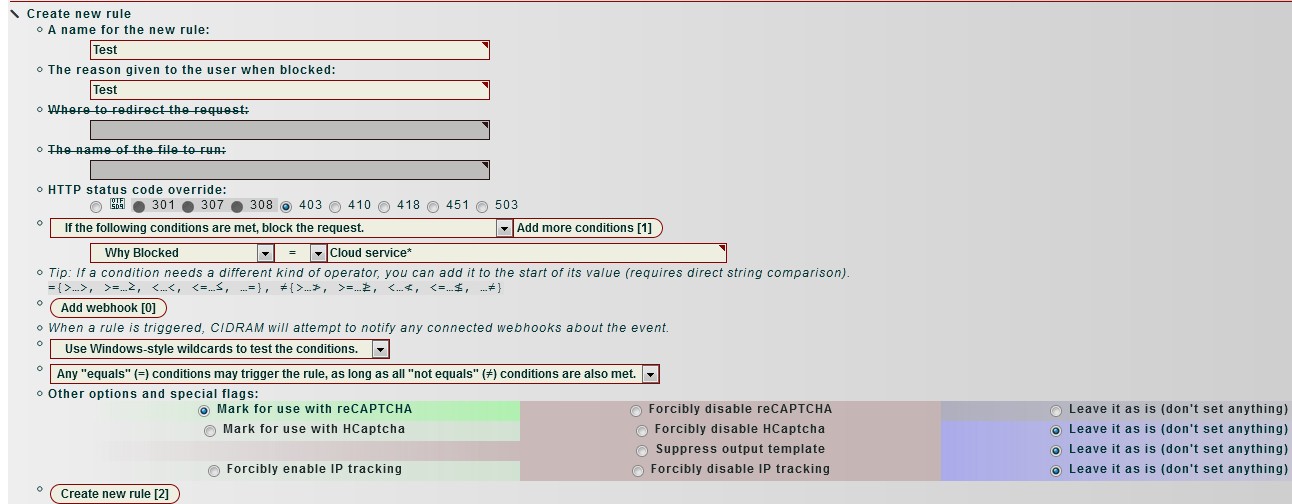
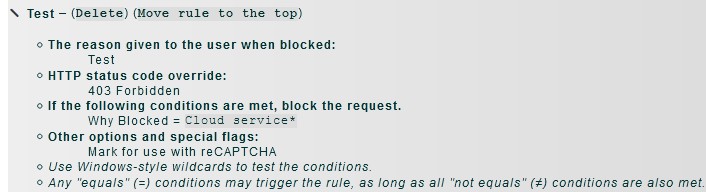
Now you can add this code directly to the auxiliary.yaml file. It'll look like this:
Test:
Method: "WinEx"
Logic: "Any"
Reason: "Test"
Status Code: "403"
Mark for use with reCAPTCHA: true
Block:
If matches:
WhyReason:
- "Cloud service*"
Tailor to your needs and change "Test" to what you want.
I'm thinking this is what you want. The other way I'm interpreting this is that you want to omit the captcha for all Cloud services. I don't think that's what you want. I'm thinking you're wanting to allow a VPN with the use of a captcha. If that's the case, the above auxiliary rules will help with that.
Note that in my case I have to set the infraction limit to 8 I think it is. There's something going on internally creating more than one block and my limit was 3, but that didn't allow a captcha as the connection raked that score up right away for some reason. I found it was at least 7 hits so setting the limit to 8 allowed one to solve a captcha. I also noticed that you'd have to solve a captcha twice, but I don't see that anymore on my end. I think I tried a plain vanilla CIDRAM install to rule out my rules and what you have. I do have some complex auxiliary rules. The great thing about the auxiliary rules though is that you can backup you auxiliary.yaml file and then go into your CIDRAM directory and blank out the contents within the yaml file for testing. Then you can add one back at a time until you find the possible fault. Just food for thought in case you really start getting into the auxiliary rules and find something isn't working right.
737simpilot
on 9 May 2021
Now if you're wanting to omit the ability of a captcha being presented to a cloud service provider that has been marked as such, this is what you need.
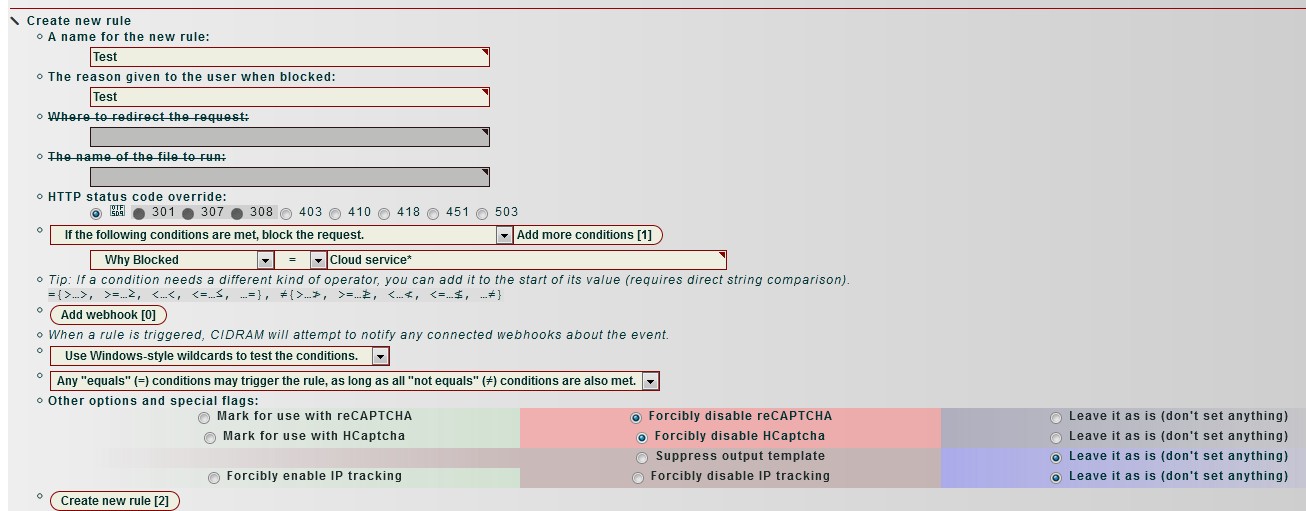
Test:
Method: "WinEx"
Logic: "Any"
Reason: "Test"
Forcibly disable reCAPTCHA: true
Forcibly disable HCaptcha: true
Block:
If matches:
WhyReason:
- "Cloud service*"
Change "Test" to what you want.
I _think_ I have the why reason logic correct for Cloud service*. @Maikuolan Is that correct?
737simpilot
on 9 May 2021
thanks Aaron - nearly, what I want to do is block recaptcha if its not "Cloud service" AND allow recaptcha if it is. I think there is a bug, I have raised a query.
and UPDATE - bug found and fixed.
mikeruss1
on 9 May 2021
I read over your issue #222. You do have both the first rule of profile the request if it isn't the Cloud service to disable captcha and a second rule for block the request if it is the Cloud service and mark for captcha?
This requires two distinct rules.
So after Caleb fixes the code that should do it.
737simpilot
on 9 May 2021
I _think_ I have the why reason logic correct for Cloud service*. @Maikuolan Is that correct?
Yep. :-)
This requires two distinct rules.
And also, yep.
So after Caleb fixes the code that should do it.
And done. :-)
Maikuolan
on 9 May 2021
Note for issue tracker management: #208 partially related, due to planned track_mode changes. Keeping both issues open though, since not identical. Still need to clean more garbage from the docs in relation to this issue (#211).
Maikuolan
on 15 May 2021
Documentation work has now been finished. :-)
Earmarking the track_mode changes for v3, since the changes I have in mind aren't quite compatible with existing configuration for v2. (I'll start working on v3 pretty soon, as soon as the next v1+v2 releases have been tagged).
Maikuolan
on 23 May 2021
Related issues
mikeruss1
·
5Comments
Maikuolan
·
4Comments
 soumsps
·
5Comments
soumsps
·
5Comments
 eurobank
·
3Comments
Dibbyo456
·
3Comments
eurobank
·
3Comments
Dibbyo456
·
3Comments