Cidram: Proper process to manage IPs linked to fake accounts
CIDRAM version used
1.17.3 96fb9931cd4eb1804fa024ad95883817b3df4cb3
PHP version installed
5.6.40
Preamble
In preamble, I must specify that I'm new in using a tool such as CIDRAM. So, the questions below cannot really been considered as true issue but rather as questioning about the right and proper use.
Steps completed
In order to secure an online shop site, I installed the most recent version of CIDRAM compatible with its server configuration: I think I have implemented the system correctly as various log files are effectively created and give a list of blocked connections.
Nevertheless, a significant number of "fake accounts" (which can probably be considered as _registration bots_) continue to be created: I deduced that a various addresses are not blocked and manage to access where is set account creation form.
So, I revised the configuration file to activate all blocking options available (in the _signature_ section of the config.ini file), I also deactivated all the signatures sections which were (strangely) deactivated (in cidram-page=sections on the front-end) and updated all signature lists to the latest version (using cidram-page=updates on the front-end).
However, by testing some IPs used by these "suspicious" connections (via the "front-end"), only one IP out of seven is now mentioned as blocked. I suppose that if certain IPs are not blocked, it is because they are simply absent from the 8 activated signature files.
Expected behavior
Therefore, I'm now looking for the most proper and simplest process to manage these IPs (considering that we can be almost certain that some are "suspicious" since they are linked to "fake accounts" creation process).
- is it possible to add (in files such as
*custom.dat) a kind of range covering potentially several suspect IPs (since manually adding one to one each address seems somewhat tedious) ? - are there lists of additional signatures that can be added to CIDRAM to cover this kind of particular cases ("fake accounts" creation)?
- is there any way to report and/or to submit this kind of IPs linked to "suspicious" activity in order to extend and update native integrated lists?
Thank you in advance for any help.
 gizmecano
All 12 comments
which were (strangely) deactivated (in
cidram-page=sectionson the front-end)
Just to clarify on that: That some signatures sections are deactivated by default, is intentional. The idea behind that, is that there are certain networks, and certain ranges of addresses, which are both a frequent source of unwanted traffic (spammers, hackers, scammers, etc), as well as a frequent source of legitimate human endpoints (or, in some cases, arguable one way or the other, depending on who we ask). There are some CIDRAM users which will say, "Those networks should always be blocked, because they always carry [bad stuff] to my website!", while other CIDRAM users will say (about the exact same networks), "Those are ISPs! Some of my website's users come from those networks! You can't block those!" – So, the question then, is how to satisfy both groups of users? The answer I arrived at, is to maintain signatures to block those networks, so that they can be easily blocked by CIDRAM, but have CIDRAM "ignore" those particular signatures by default. That way, for anyone that agrees (that those they should be blocked), all they need to do is have CIDRAM "unignore" them via the sections list (in the same manner as you've done), and for anyone else (those which don't want them blocked), they don't need to do anything. It may seem strange at first, doing things this way (i.e., why exert effort to maintain signatures, if CIDRAM will be ignoring them by default at the same time?), but it's useful as a way to prevent disputes and arguments between users about what should/shouldn't be blocked (because ultimately, everyone has slightly different opinions about these things, and it's rare to be able to get 100% concensus). :-)
- is it possible to add (in files such as
*custom.dat) a kind of range covering potentially several suspect IPs (since manually adding one to one each address seems somewhat tedious) ?
Yep! :-)
If you're familiar with "CIDR notation", you can use that to block ranges via the custom signature files.
Purely as an example: If we wanted to block every IP address starting from 1.0.0.0, up until 2.0.0.0, we could block 1.0.0.0/8 (which represents that range, in CIDR notation).
You can also use the IP aggregator provided at the front-end to have CIDRAM automatically convert a list of IP addresses (CIDRs and netmasks also recognised and accepted there) into their smallest possible expression using CIDR notation (which will save you some time, because you won't need to calculate the ranges yourself; you can just let the IP aggregator take care of that for you).
- are there lists of additional signatures that can be added to CIDRAM to cover this kind of particular cases ("fake accounts" creation)?
Generally speaking, yes. Optional, supplementary signature files are available (for example; those provided by Macmathan, which can be installed via the front-end updates page). However, I don't maintain any signature files specifically for dealing with fake accounts, and I'm not aware of anyone else doing that (though, it's possible that some users might be doing something like that for themselves).
Possibly, you could try installing some of the optional modules available at the front-end updates page. In particular, the Stop Forum Spam module, the AbuseIPDB module, the Optional security extras module, and the Bot Or Browser User Agent Module (BOBUAM) used in conjunction should, I imagine, block the vast majority of fake account registrations (note that these modules provide some configuration settings of their own – if you install+activate them, after doing so, check back over the configuration page again; you'll notice some new configuration settings appear there, which weren't there before, which relate to the newly installed+activated modules). :-)
- is there any way to report and/or to submit this kind of IPs linked to "suspicious" activity in order to extend and update native integrated lists?
I don't have any automated solutions in place for that yet, but even so, I'm happy to take suggestions for new additions, and encourage it, if anyone has such suggestions. :-)
There are some users (CC: @737simpilot) that post suggestions directly to our Gitter channel; That's one possible avenue to report/submit new IPs/networks/ranges/etc for possible inclusion into CIDRAM's signature files.
Some users have posted new issues to the issues page for such suggestions (posting new issues is another possible avenue, and is worthwhile, if detailed discussion is needed about a particular suggestion, but probably isn't ideal if there's going to be many suggestions made over time, or for very small, off-the-cuff suggestions, because there's a chance that it might end up flooding the issues page with too many issues and might annoy some of the users and repository watchers/subscribers; I would suggest that, if you have a very large list of address/ranges to suggest, all at the same time, it would be best to create a new issue, instead of using the Gitter channel; but, I would suggest that, if it's just one or two address, or some small ranges, and if detailed discussion isn't needed about it, it would be best to use the Gitter channel).
Pull requests are also welcome, but there's some additional complexity involved in doing that, due to the need to sync changes across different branches, and to sync changes with the metadata used by the front-end updates page to determine whether something needs updating, where to get data, etc. If you're confident about being able to do that, you're welcome to send pull requests to add in new suggestions directly, but otherwise, it would probably be easier to just suggest the changes here or at Gitter, and then I can make the necessary changes to the signature files myself when I see the suggestions. :-)
 Maikuolan
on 17 Jul 2020
Maikuolan
on 17 Jul 2020
Maikuolan said exactly what I was already going to say. It sounds like you're not using the front-end GUI configuration ability. Is there a reason for that? It makes configuration, etc a whole lot more easier. Especially with adding several other modules like the aforementioned Stop Forum Spam module or BOBUAM, etc. In the configuration you can also block counties if you so desire using the BGPView module with the country code. As an example, CN would be China. You can find these two digit country codes here: https://www.troon.org/domains/
If you are thinking about submitting an IP address for inclusion into CIDRAM, I'd make sure that it's not already blocked except that it's ignored. To do that go into the front-end and under IP Test you can test the IP there.
A few websites I use for IP research are as follows:
And I use others. I recently just discovered this website: https://scamalytics.com/ip
By in large, the Stop Forum Spam (SFS) module should cut back on the amount of bot crap you're seeing. Are you using a good captcha on your registration page? For reasons I won't mention here to draw this out, I'd check out Hcaptcha. Though, people seem to be tied to everything Google and they may complain.
For me personally. In addition to using CIDRAM I also use the free version of Ninjafirewall and a free CloudFlare account. If you use Ninjafirewall you'll have to use a specially crafted PHP file to hook both CIDRAM and Ninjafirewall in a certain way. I can tell you how to do that if needed. I have CIDRAM execute before Ninjafirewall so it's exceptionally rare for NF to block anything. But just a few days ago it did block someone that got past CloudFlare, CIDRAM and then was met by NF to get blocked. CloudFlare is great in a lot of ways, but if you want to use it to not only protect your website, but hide your origin IP, you need to set it up right. I can show you how to do that as well. In my CloudFlare account I have at least 75 pages of ASNs from a multitude of cloud/hosting companies that are blocked as well as Tor. And of course you can block Tor in CIDRAM. So I in fact block Tor on two levels. My ASN blocks have been the accumulation of at least 5 years. Even so, almost everyday CIDRAM blocks at least two unsavory hits a day. My personal rule is that if I see 10 hits that were blocked in the log I'll either add the whole ASN or CIDR to CloudFlare's firewall for an outright block, JS or captcha challenge. It really depends on what companies are part of that ASN.
Anyway, I could go on and on about spam prevention and what not. In all the years I've had my websites I've only had to report maybe three spammers to the SFS website. And at that their post never saw the light of day since all first time posters are held in moderation queue. Depending on your platform, that may be an option as well to prevent spam, etc.
PS: Do note that a person's router/modem at home can be hacked and turned into a botnet. So you may see legit ISP IPs that hit your website for spam/hacking purposes. So since these IPs are legit ISP IPs and not a cloud/hosting provider, it really can't be blocked in CIDRAM. You could block the IP its self in CIDRAM though if it's a problem. And if it's spam you can report it to the Stop Forum Spam website. This is why you should create a free account there. Often times these legit IPs that are used as a botnet use a very old user agent. So that's where the BOBUAM module will kick in and block it outright in CIDRAM. Though, Google in their infinite wisdom is set to make the UA not change over the course of time which really throws a wrench in the gears. Their idea of doing that is to "not block anyone based on browser version." Yet will gladly block you with their crappy Recaptcha that can NEVER get solved with a niche browser like Pale Moon of which I chose to use. But if you use Firefox or Chrome, that captcha can be solved in an instant. Total browser discrimination.
 737simpilot
on 17 Jul 2020
737simpilot
on 17 Jul 2020
@Maikuolan, @737simpilot,
Thank you very much for your two successive answers, particularly detailed. I will study these quietly, looking at each point with attention: I think that all these elements should allow me to better handle the CIDRAM implementation. I will then answer to your own comments...
🙇
gizmecano
on 18 Jul 2020
Greetings,
I have just completed a full and clean reinstallation based on the various comments you posted above.
I now come back to various other points that you mentioned (with some queries about additional informations).
@Maikuolan
That some signatures sections are deactivated by default, is intentional. (...) That way (...) all they need to do is have CIDRAM "unignore" them via the sections list (...)
Thank you for this very detailed explanation: I understand better how it works now that I know the reasons.
It may seem strange at first, doing things this way (...)
Indeed, it seems strange, and I do not remember having seen anything on this subject in the documentation: it is perhaps for that that I did not understand.
If you're familiar with "CIDR notation" (...)
I am not: I am a great beginner in this field...
You can also use the IP aggregator provided at the front-end to have CIDRAM automatically convert a list of IP addresses (...) into their smallest possible expression using CIDR notation (...).
Ah! Very good: this is the kind of tool that should be very useful for a novice in my genre... I suppose I will need to test this.
Optional, supplementary signature files are available ((...) which can be installed via the front-end updates page).
I did not fully understand the use of modules before, so your answer guides me well.
(...) you could try installing some of the optional modules available at the front-end updates page. In particular, the Stop Forum Spam module, the AbuseIPDB module, the Optional security extras module, and the Bot Or Browser User Agent Module (BOBUAM)
I started to take your advice.
I have no problem installing the _Stop Forum Spam_ module.
For the others, not are file are currently present in the system by default.

So I downloaded the compressed files for _Bot Or Browser User Agent_ module (_aka BOBUAM_ separately, but now I'm wondering which is the procedure to acheive this and where to put these files for being detected by the updates page: I tried putting them in the vault directory as the module_sfs.php signature file, but it doesn't work).
I did not manage to find clear documentation on this subject: I suppose that it must be so simple that it seems implicit. 🤔
used in conjunction should, I imagine, block the vast majority of fake account registrations (...)
I hope so: the increasingly important invasion of these robots is proving particularly painful.
(note that these modules provide some configuration settings of their own (...)
I didn't notice any change in the configuration page for _Stop Forum Spam_ module, I am now warned for others.
I don't have any automated solutions in place for that yet, but even so, I'm happy to take suggestions for new additions, and encourage it, if anyone has such suggestions.
I admit that I do not have one either: I am far too new in this field to risk myself making such any suggestion. But I know from experience that it is better to ask maintainers if something exists before trying to reinvent the wheel... 😉
@737simpilot
(...) It sounds like you're not using the front-end GUI configuration ability. Is there a reason for that?
In fact, to be precise, I didn't use it at the very beginning, and next I didn't discover all of its possibilities. You may consider that the only reason was my ignorance. 😉
(...) Especially with adding several other modules like the aforementioned Stop Forum Spam module or BOBUAM, etc.
This is actually the impression I have now: all I have to do (as I said previously) is to figure out how to install them and then configure them correctly.
(...) To do that go into the front-end and under IP Test you can test the IP there.
It's a very interesting tool: for the time being, with the new settings I made (activation of 1 section and installation of 1 module), out of 32 addresses tested, 6 are now blocked.
I hope to achieve a _more substantial_ results with other modules before I have to submit anything.
Are you using a good captcha on your registration page?
You point to something that seems important in our case. _Yes_, we have a captcha, but _no_, it's not good. It is old and obviously obsolete.
Currently, it is difficult to change it because compatibility constraints (and without forgetting that many users complain about these non-intuitive captcha). But it could be surely a complement to secure the site.
In addition to using CIDRAM I also use the free version of Ninjafirewall and a free CloudFlare account. (...)
Thank you very much for your explanations on the tools that you use on your side: these data enrich the palette of possibilities that I can consider implementing. I note all this to be looked in the future.
So you may see legit ISP IPs that hit your website for spam/hacking purposes.
Alas, I must tell you that I have already seen it.
Often times these legit IPs that are used as a botnet use a very old user agent. So that's where the BOBUAM module will kick in and block it outright in CIDRAM.
I agree. Since a week I have been observing the logs and I have noticed this: it is for this reason that I really want to succeed in installing _BOBUAM_.
Yet will gladly block you with their crappy Recaptcha that can NEVER get solved with a niche browser (...)
Oh, of course, you are probably right on this point: I also think that this state of affairs contributes greatly to the massive invasion that I have seen for some time.
Thanks for your help...
gizmecano
on 20 Jul 2020
The message shown ("Incapable de déterminer", or "Unable to determine") usually indicates some kind of problem at the upstream source (e.g., the server where CIDRAM would normally obtain the component's files is offline at the time, or failing to correctly serve the request for some reason). The files for most of the components are hosted at GitHub (which would only very rarely be subject to such problems), but the files for a small number of the components (which includes BOBUAM) come from elsewhere (due to different authors/maintainers for the specific files in question), and have occasionally encountered problems like these for specific users from specific origins, or when using specific devices. Normally, there should be "install" and "update" options provided at the updates page for all components, but the problem seen here is the reason those options aren't appearing in this case. After I finish writing this response here, I'll send a private message to Macmathan (the author/maintainer for BOBUAM; not present at GitHub anymore, but present and contactable at some other platforms), to let him know about this issue here and to get some advice from him about it (I'll forward his response here when I receive it).
So I downloaded the compressed files for _Bot Or Browser User Agent_ module (_aka BOBUAM_ separately, but now I'm wondering which is the procedure to acheive this and where to put these files for being detected by the updates page: I tried putting them in the
vaultdirectory as themodule_sfs.phpsignature file, but it doesn't work).
CIDRAM uses the "components metadata" files to determine which components have been installed. Normally, the components metadata would be updated automatically by the front-end updates page whenever a component is (un/)installed/updated. But, in the case of (un/)installing/updating manually, aside from the important step of actually installing the files (as you've done so), the next step (in order for the front-end updates page to recognise the change) would be to update the relevant component's metadata, as to replicate the action which would normally occur automatically. Not too difficult if you've done it before, but definitely a lot more work than would normally be necessary, and not something necessary for getting the new modules to work correctly; just necessary for the front-end updates page to recognise it. But, as long as the component's files have been installed (all the same whether manually, automatically or otherwise), it can be "activated" simply by listing it in its corresponding configuration directive at the front-end configuration page (for BOBUAM, that would be the "modules" configuration directive).
For the moment, it may be easier to try that (listing mcm_bobuam.php at the "modules" configuration directive to enable it), saving the configuration, then loading the configuration page again to see the newly available configuration directives for it (after enabling it, they should appear). A little less risky (in terms of unintended changes) than trying to manually update metadata. (The option to "activate" at the front-end updates page acts as "short-cut" for that procedure, automatically listing/unlisting as necessary the components being activated/deactivated at their corresponding configuration directives in a single click, reducing the complexity of the task for users).
If I can get the problem with the upstream fixed and have the normal install/update options reappear, simply installing it again from the front-end updates page will sync everything up to how it should be (and, configuration won't be overwritten when installing/updating specific components, so no problem about that; it's little different when updating configuration after uninstalling something, but that's a story unrelated to our current issues).
It's a very interesting tool: for the time being, with the new settings I made (activation of 1 section and installation of 1 module), out of 32 addresses tested, 6 are now blocked.
Good news. Still a lot of room for further improvement, but definitely a big improvement on what it was before. Hopefully, we'll be able to raise that number to the entire 32, once we've finished getting everything set up and working correctly. :-)
Maikuolan
on 21 Jul 2020
(...) I'll send a private message to (...) the author/maintainer for BOBUAM
I don't know if you have any response since your comment, but I have just tried to set up this module manually.
I directly added mcm_bobuam.* files in the vault folder and I updated various strings of the cidramblocklists.dat file with data set in the downloaded compressed zip.
BOBUAM seems to be activated (but still unable to be autmatically updated). I'm not sure I have followed exactly the right steps. I now get this on the Update page:
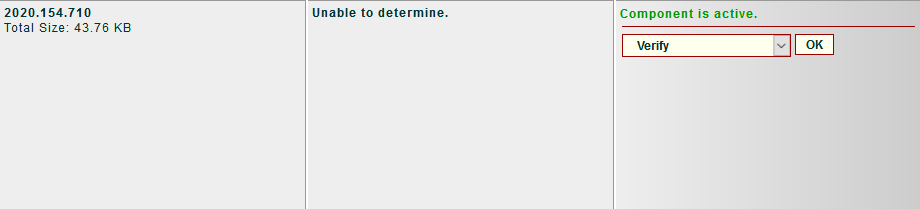
I'm now going to wait to see any effects of these new settings (I also activated a new section and install the _Optional security extras_ module) by watching the logs.
gizmecano
on 22 Jul 2020
the pic above is what I get on my production system for Bobuam, Google Cloud Platform IPv4 blocklist, and Google Cloud Platform IPv6 blocklist. Also Microsoft Azure IPv4 blocklist and Tor Project Exit Nodes Block Module. And a bunch of others like China, Amazon, and Cloud.
 mikeruss1
on 22 Jul 2020
mikeruss1
on 22 Jul 2020
using 1.17.2
mikeruss1
on 22 Jul 2020
I've received a response. :-)
That gizmecano could download the "compressed file" indicates that the access to my site was not blocked.
I do block some countries, but at the same time I have given CIDRAM's updater a charte blanch access to anything "raw".
The only blocks I can see in my logs are a couple of pokes from OVH, and two from India, neither asking for the dat-file or any specific file at all (just the regular repository view).I'm a bit at loss as well, although if the metadata in CIDRAM has been out of sync (i.e. not being updated for a month or so) I think it takes at least two rounds of updates to pick up everything. I recall something similar in a couple of cases last time I moved around.
What we could do is ask gizmecano to pull the backup repository and see if that changes anything, as that has been in the same place for a lot longer (so the URL:s for that should exist even in CIDRAM installations not updated for a few months.)
Let me know how it progresses, and you can mention [url]https://support.macmathan.info[/url] as an alternative contact point for me as needed (although bear in mind I do block a few spammy/hacky countries from accessing it, most noticeable RU, UA, IN.)
However, since then, I managed to replicate the problem at my side too, so it seems that you're not the only person affected by the problem. I suspect, several recent small location changes, and CIDRAM not keeping properly updated with the changes at my side, possibly might've been the cause. But, I also think I've found a way to fix the problem from my side.
I've pushed some changes to CIDRAM's channels file just now (b5da11eb192669a14e071572ce736c402aa437d6 + 8fc8c46ed02b3f1a7e78879ea437285d7852d838), and it seems to fix the problem at my end.
Try updating CIDRAM to the latest version from the front-end updates page (the update will likely be very small, because the only changes I've made just now are to the channels file). After updating, go to the front-end cache page, and click the link to "clear all". After that, return back to the front-end updates page. All the components which previously said "unable to determine", should now be working properly again. Let me know how it goes. :-)
Maikuolan
on 23 Jul 2020
updated, cleared cache, no change to unable to determine
also got
CIDRAM – Component successfully updated. +540.01 KB | -531.50 KB | 2.135
l10n/en – Failed to deactivate!
l10n/en – Component successfully updated. +44.36 KB | -43.87 KB | 0.216
l10n/en – Failed to activate!
Try updating CIDRAM to the latest version from the front-end updates page (...). After updating, go to the front-end cache page, and click the link to "clear all". After that, return back to the front-end updates page. All the components which previously said "unable to determine", should now be working properly again. Let me know how it goes. :-)
So I followed all the steps above and I think I can say that everything seems functional now: the update channel is well indicated and the module is indicated as being up to date.

At this point, I think I will be able to consider this issue as closed: I would open up others on a case-by-case basis if I have further questions.
Many thanks for your efficient help.
gizmecano
on 28 Jul 2020
@gizmecano
At this point, I think I will be able to consider this issue as closed: I would open up others on a case-by-case basis if I have further questions.
Many thanks for your efficient help.
Sounds good. I'm glad to hear that everything seems to be working correctly for you now, and you're most welcome. :-)
@mikeruss1
updated, cleared cache, no change to unable to determine
also got
CIDRAM – Component successfully updated. +540.01 KB | -531.50 KB | 2.135
l10n/en – Failed to deactivate!
l10n/en – Component successfully updated. +44.36 KB | -43.87 KB | 0.216
l10n/en – Failed to activate!
That particular bug (CIDRAM attempting to deactivate+reactivate non-activable components, such as the CIDRAM core, the L10N data, etc), I had thought that I had already successfully fixed a while back.
Relevant changelog excerpt:
- [2020.07.13; Bug-fix; Maikuolan]: Possible problem found with IsActivable
  when updating certain components via the front-end updates page; Fixed.
It's possible, that maybe I made some kind of mistake, or that I missed something.. but my attempt to fix that particular bug, appeared to be successful, based on local testing at my end. Mind quickly clicking the "Verify all" button at the front-end updates page, and letting me know whether any errors/warnings/etc are produced? (That's just to confirm whether your copy has actually updated itself properly, or whether it's just erroneously reporting that it did, or whether something else might've gone wrong somewhere, like files being corrupted, updates being reverted by the host, or other weird potential, unexpected problems. If verifying all reports that something is wrong, that could maybe partially explain why that bug doesn't seem to be fixed yet at your copy. Otherwise, if it doesn't report that anything is wrong, I guess, I will need to do some more thinking on it, about other possible causes). Cheers. :-)
Note: In this context, "activable components" refers to any components which must be "activated", in order to perform their intended function (e.g., "signature files", "modules", etc), and for which activating them via the front-end updates page is possible. In contrast, "non-activable components" refers to any __other__ components (e.g., the CIDRAM core, the L10N data, etc).
Maikuolan
on 30 Jul 2020
Related issues
 eurobank
·
7Comments
eurobank
·
7Comments
 Dibbyo456
·
5Comments
Dibbyo456
·
5Comments
 soumsps
·
5Comments
Dibbyo456
·
6Comments
Dibbyo456
·
7Comments
soumsps
·
5Comments
Dibbyo456
·
6Comments
Dibbyo456
·
7Comments