Cidram: [Critical] [Urgent] Latest update breaks CIDRAM compat_bunnycdn.php
I don't know when it was updated because I use Cronable.
All of my sites were throwing error 500. After digging into it turns out CIDRAM was breaking them.
Here is error logs.
2019/04/07 20:26:50 [error] 26116#26116: *6595648 FastCGI sent in stderr: "PHP message: PHP Notice:  Undefined index: ClearFromCache in /home/cidram/vault/compat_bunnycdn.php on line 20PHP message: PHP Fatal error:  Uncaught Error: Function name must be a string in /home/cidram/vault/compat_bunnycdn.php:20
Stack trace:
#0 /home/cidram/vault/outgen.php(213): require()
#1 [internal function]: {closure}('compat_bunnycdn...', 0)
#2 /home/cidram/vault/outgen.php(216): array_walk(Array, Object(Closure))
#3 /home/cidram/loader.php(93): require('/home/runcloud/...')
#4 {main}
  thrown in /home/cidram/vault/compat_bunnycdn.php on line 20" while reading response header from upstream, client: 81.96.216.205, server: example.com, request: "GET / HTTP/1.1", upstream: "fastcgi://unix:/var/run/example.sock:", host: "www.example.com", referrer: "https://www.foo.com/"
2019/04/07 20:26:53 [error] 26110#26110: *6595834 FastCGI sent in stderr: "PHP message: PHP Notice:  Undefined index: ClearFromCache in /home/cidram/vault/compat_bunnycdn.php on line 20PHP message: PHP Fatal error:  Uncaught Error: Function name must be a string in /home/cidram/vault/compat_bunnycdn.php:20
Every one of my sites were down probably more than 3 hours. :/
I have temporarily disabled compat_bunnycdn.php.
Expecting a reply ASAP.
 Dibbyo456
All 20 comments
Working on this right now. Should have a fix available within the next few minutes.
 Maikuolan
on 7 Apr 2019
Maikuolan
on 7 Apr 2019
Try updating now. If it says "failed to update" for any components, try it again (it may take a few tries to update it all).
The update I committed four ~3 to ~4 hours ago introduces a new caching system to CIDRAM, which also changes the way that CIDRAM's codebase (as well as any modules that make use of the cache) reads from and writes to the cache. The reason for the errors, and the cause of the problem, is that when updating earlier via Cronable, CIDRAM updated itself, but didn't update the affected modules, which meant that these modules, due to still being the old versions, were still trying to use the cache in the old way, instead of the new way, causing these errors to appear.
The reason for the failed update, I think, is that I should've bumped the CIDRAM version reported by the configuration file along with everything else when committing the earlier update, so that the updater would know that the new module versions are compatible with the current CIDRAM version, and not reject them during the update process. Because I didn't bump the CIDRAM version, and the new module versions report the latest CIDRAM version as a requirement, the updater rejected them during the update process (I hadn't intended for this latest CIDRAM change to be breaking at all; an oversight on my part, but should be relatively easy to resolve).
The commit that I pushed just now bumps the CIDRAM version reported by the configuration file, so should (in theory) resolve the problem, and allow the modules to update normally.
Sorry for the trouble. Let me know how it goes, if it doesn't work, or if there are further problems. :-)
Maikuolan
on 7 Apr 2019
Thank you for the prompt fix. You were right I had to click "Update All" then "Verify All" then "Update All" again to actually updates all the components.
The issue seems to be resolved.
Thank you again..
Dibbyo456
on 7 Apr 2019
One more thing should I stop using Cronable and manually update CIDRAM every couple of days to avoid this type of disaster? Or do you have something planned to avoid this type of thing near future?
Dibbyo456
on 7 Apr 2019
After updating, I just had a white page and my site was also down. Had to disable CIDRAM.
 delle54
on 7 Apr 2019
delle54
on 7 Apr 2019
One more thing should I stop using Cronable and manually update CIDRAM every couple of days to avoid this type of disaster? Or do you have something planned to avoid this type of thing near future?
Cronable itself should still be quite reliable and safe to use in its own right.. as long as I'm more careful in the future to avoid repeating this particular oversight and similar. '^.^
I don't want to ask any users to stop using Cronable, because manually updating all the time can become tiresome and inconvenient, and I worry then that many users will update less often as a result, which could pose an increased risk of false positives and other problems if everything eventually becomes too outdated.
I'm going to think about this carefully over the next week or so and try to figure out what else can be done to make the whole process safer. In the meanwhile.. I'll be much more cautious about potential unwanted breaks like this, for any future updates.
On the bright side though, I hope to be able to make a start on v2 relatively soon, so, I don't anticipate any more really major changes coming to CIDRAM, at least until v2. I still plan to port the signature file validator/fixer features from CIDRAM's CLI-mode into the front-end before v2, and plan to add a few more minor safety mechanisms, but aside from that, no more major features or the likes planned for v1, and most other pending to-do items, pending requests, etc are for new modules, rather than core features, so the risk of further breaks during v1 are quite low, I think.
Maikuolan
on 7 Apr 2019
After updating, I just had a white page and my site was also down. Had to disable CIDRAM.
Anything in the error logs? (To confirm whether this is the same problem, or an additionally that we hadn't known about yet).
Maikuolan
on 7 Apr 2019
Where do I find the logs? My update yesterday was fine.
delle54
on 7 Apr 2019
Where do I find the logs? My update yesterday was fine.
Usually (and if errors have occurred that PHP has been able to detect), there'll be a file named error_log, error.log, or similar in the same directory as the top-level calling script (for Cronable, that'll be the same directory as where Cronable.php is located, and for CIDRAM, it'll usually be the same directory as the originally requested script; in the case of when accessing the CIDRAM front-end, loader.php is the "top-level calling script").
If we can find any such named files, they could help us to identify exactly what's going on, whether it's the same problem at hand, something new, or something else. If there aren't any such named files in any of those directories, it means that PHP didn't detect the problem, and we'll need to find some different ways to identify what's going on. :-)
Maikuolan
on 7 Apr 2019
THX. There are no log-files. I uploaded the newest package, but still have a blank page. On Firefox and Chrome. I also emptied the cache.
delle54
on 7 Apr 2019
I'm using both Chrome and Firefox on my local development machine, so I don't think the browsers are causing the problem at all. Could maybe be useful as tools for debugging though.
On Chrome, when you see the blank page, if you right click on the page, and click "Inspect", do any warning messages, or any small, red [x] marks appear in the inspection window? I'm wondering, in particular, whether there are any "500 Server" errors or similar errors detectable via inspection.
Maikuolan
on 7 Apr 2019
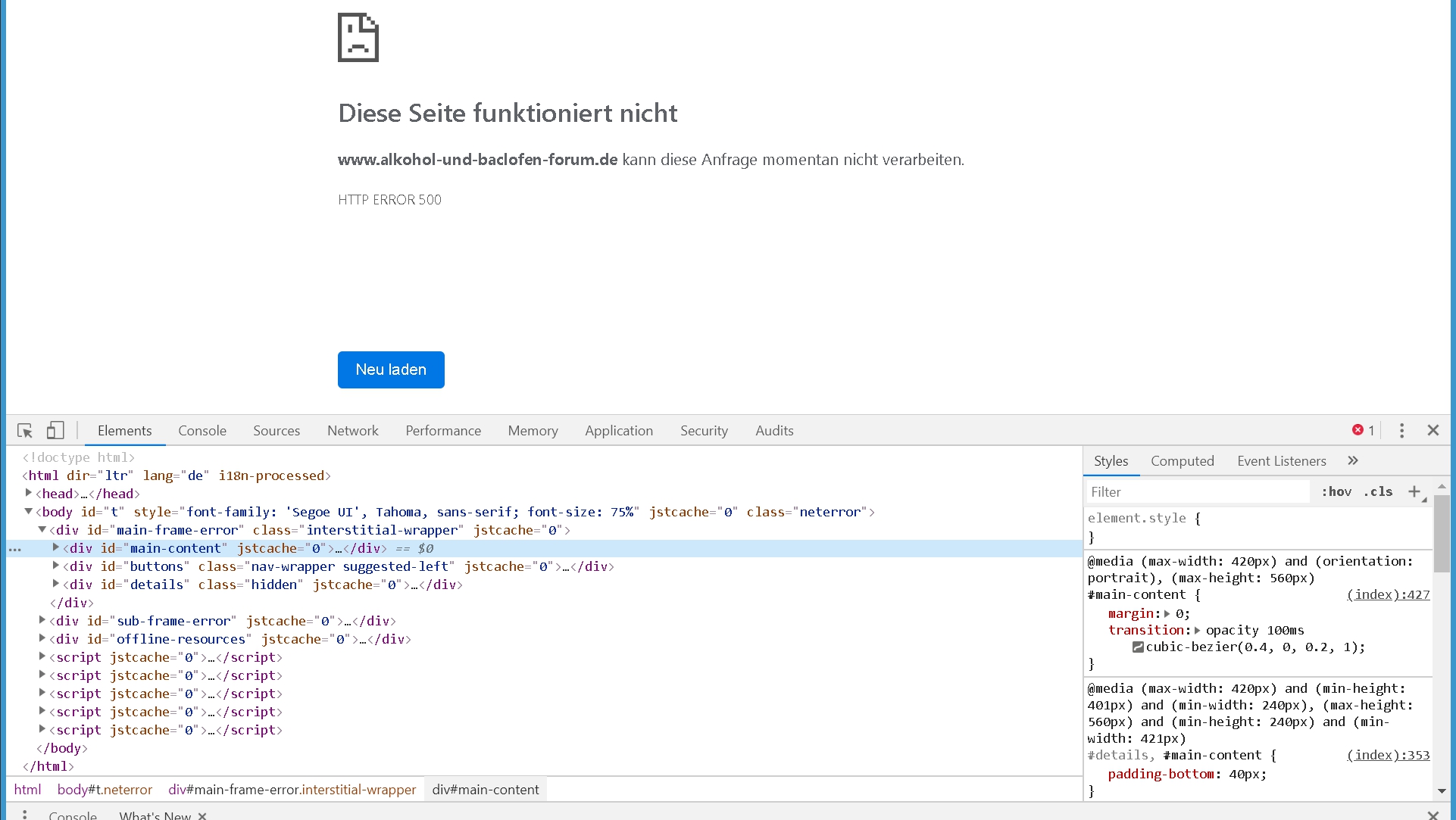
delle54
on 7 Apr 2019
Create a .user.ini in the CIDRAM directory.
Then add this line
display_errors = On
Or
Can you redownload the package from Github again, then try again?
Dibbyo456
on 7 Apr 2019
I uploaded the package again, but that didn't help. The user.ini won't help, because if I enable CIDRAM, my forum goes down. Maybe the php version is incompatible since today. I have 5.6.31. An update is not possible at the moment.
delle54
on 7 Apr 2019
I am now running the previous version of CIDRAM and everything is ok.
delle54
on 7 Apr 2019
in general I prefer to update CIDRAM app every month or so, allows any issues to surface.
 mikeruss1
on 8 Apr 2019
mikeruss1
on 8 Apr 2019
I notice, via the element inspection screenshot above, that at least some parts of your website's normal output are being received by the browser, prior to to the 500 error occurring, which is interesting. That the problem only occurs since the latest CIDRAM update, would suggest that the latest update is at least partly responsible, but seeing at least some parts of your website's normal output via element inspection would at least suggest that execution is not being actually terminated during the chain of execution where CIDRAM sits.
One particular thing that comes to mind offhandedly, which could cause such a thing, is output being generated and sent prior to any necessary headers that might be pending being sent. I'm not aware of CIDRAM doing such a thing in its own right though, and the only time that CIDRAM should generate any output anyway, is when blocking a request, and when accessing the front-end (i.e., normal requests to your website from end-users, which aren't blocked, shouldn't generally see anything from CIDRAM at all), so I'm not sure whether that would be it.
"Fatal errors" caused by bad or broken PHP code (assuming not suppressed, anyway), generally result in any further processing by PHP being prematurely terminated, which, in most cases, would mean that we shouldn't be seeing any of your website's normal output appear anywhere at the browser (e.g., what we're seeing in the inspection window), so whatever the error is, I don't think it's a "fatal error".
AFAICT, the newly introduced cache system should still be compatible from PHP 5.4 and onward, matching the existing minimum PHP requirement for CIDRAM v1.x otherwise. (That'll likely change for v2, but that's a story for another day anyway, and we're still looking at v1 in this case at the moment).
Out of curiousity, if you try running CIDRAM outside the context of your website (e.g., when accessing the front-end, or, without hooking it to your website, instead, just hooking it to a simple PHP test page somewhere on the same server or same hosting package, and then attempting to access that test page), do you still get the blank page, or does the test page (or front-end) display normally?
Maikuolan
on 8 Apr 2019
Technical/Debug notes:
- The new cache system could potentially generate an artificial 503 error if any of the newly added options to use an available caching extension (APCu, Memcached, Redis, etc) are enabled, and if the cache system then fails to connect to the enabled caching extension during instantiation (i.e., doesn't affect flatfile caching nor installations using the default configuration, and doesn't generate any artificial 500 error anywhere in that same particular code).
- The new cache system could end the request prematurely when using the default configuration, when using a flatfile cache, during instantiation, if, after a period of time, and after multiple retries, it fails to acquire an appropriate lock on the flatfile cache being read (a safety precaution against reading in cache data that might be being actively overwritten by another parallel process at the time of being read). This, however, shouldn't result in any reported errors at the server, nor should allow the website's normal output to be received by the browser.
- The newly added class file containing most of the code for the new cache system, itself, doesn't produce any output at all (any output produced as a result of the class is the responsibility of the implementation; i.e., CIDRAM).
Maikuolan
on 8 Apr 2019
Or do you have something planned to avoid this type of thing near future?
We can only prevent this by introducing unit tests which catch this.
The current single unit tests is not enough imo:
https://travis-ci.org/CIDRAM/CIDRAM/jobs/516879547
 DanielRuf
on 8 Apr 2019
DanielRuf
on 8 Apr 2019
I will try the test page. I don't know if it's relevant, but before the script executes CIDRAM, it calls Bot Trap:
"
It's been working this way for a long time.
delle54
on 8 Apr 2019
Related issues
Dibbyo456
·
6Comments
 soumsps
·
5Comments
Dibbyo456
·
6Comments
soumsps
·
5Comments
Dibbyo456
·
6Comments
 eurobank
·
3Comments
eurobank
·
3Comments
 gizmecano
·
6Comments
gizmecano
·
6Comments